Fallout 3 on Windows 7.

I wouldnt try to run Fallout 3 with a single core CPU and a 8500GT card. They are just not ment to paly games of this magnitude.

I'd disagree. I havent had many if any crashes. I get about 34fps on average with my old beaten 8500GT, and my single core. its just ATI cards are junk, that is my (not so) professional opinion. i alway see people having problems with games, and gfx dependent apps (3dmax, e/g), and 8/10 they have an ATI card. i dont thinks it's just coincidence...
 

My Computer My Computer

Computer Manufacturer/Model Number
eMachines W3502
OS
Windows 7 Ultimate x32
CPU
Intel Celeron D 3.2 Ghz 533 fsb (LGA 775)
Motherboard
Intel D101GGC
Memory
1 GB (2x512MB) PC-3200 DDR @ 200Mhz
Graphics Card(s)
Nvidia GeForce 9400GT- 1GB
Sound Card
Sound Blaster X-Fi Xtreame Gamer
Monitor(s) Displays
19" LCD HDtv
Screen Resolution
1360x768 @ 60Htz
Hard Drives
SeaGate Barracuda 750GB
SeaGate Barracuda 100GB
Toshiba CD/DVDW/ TS-H552D [DVD+R, DL]
PSU
stock (idk)
Case
The busted remains of the stock case
Cooling
Dust cooled, waitwut?
Keyboard
Stock. Missing a few keys.
Mouse
Logitech LX8 5-btn mouse (wireless)
Internet Speed
TWC 10Mb
Other Info
Keeps going, and going, and going.......
I'd disagree. I havent had many if any crashes. I get about 34fps on average with my old beaten 8500GT, and my single core. its just ATI cards are junk, that is my (not so) professional opinion. i alway see people having problems with games, and gfx dependent apps (3dmax, e/g), and 8/10 they have an ATI card. i dont thinks it's just coincidence...

ure wrong :))

Card manufacturers dont create their cards on what games are out, its the other way around. Game manufacturers make games depending on what cards are out and some manufacturers create games specially for 1 card manufacturer (Ex. Company of heroes is for nVidia or world in conflict, showing better fps then ATIs) but that dosnt mean they wont work on an ATI.

Anyway if its not a 9600GT/8800GT or 3870ATI the least i wouldnt try gaming with it. And ofcourse 2 cores atleast. And lol why play a game at LOW.

I`m not an ATI fanboy, i used nvidia since Geforce 2 Series. This is my 2nd ATI card ever, first being an x300 lol .Both are exceptional but latelly nvidia been sucking using same 8800GT design in the 200 series. The HD series from ati are completely different then its former 9600PRO etc cards.
 

My Computer My Computer

Computer Manufacturer/Model Number
Custom Built
OS
Windows 7 Ultimate SP1 build 7601
CPU
AMD Athlon II x2 240 3.35Ghz
Motherboard
Gigabyte MA785G-UD3H
Memory
4x1Gb XMS2 Corsair 786Mhz Oc
Graphics Card(s)
HIS Ati Radeon 4850 IceQ4 512 Ddr3
Sound Card
Integrated HD Realtek Audio Device
Monitor(s) Displays
iiYama ProLite E1900S 2ms
Screen Resolution
1280*1024 32bit
Hard Drives
Samsung 500Gb SP F3
WD 240GB 16 mb
PSU
ThermalTake 420W
Case
noname :(
Cooling
Standard
Keyboard
Microsoft 600
Mouse
Razer Imperator
Internet Speed
100+ MB/s
Other Info
N-ai Treaba !!!
Anyway if its not a 9600GT/8800GT or 3870ATI the least i wouldnt try gaming with it. And ofcourse 2 cores atleast. And lol why play a game at LOW.

I can play fine on medium... on high if I'm using XP.

I was just point out that, the ridiculous system specs that companies say you need, are usually false. It's like a scam if you think about it. Being the pessimist that i am, I personally can conclude that someone looking to get my money, is also very capable of lying through their teeth to get it. Which is usually the case.

oh and btw, the graphics are not what make the game 'good', developers who have actual imaginations do.
 

My Computer My Computer

Computer Manufacturer/Model Number
eMachines W3502
OS
Windows 7 Ultimate x32
CPU
Intel Celeron D 3.2 Ghz 533 fsb (LGA 775)
Motherboard
Intel D101GGC
Memory
1 GB (2x512MB) PC-3200 DDR @ 200Mhz
Graphics Card(s)
Nvidia GeForce 9400GT- 1GB
Sound Card
Sound Blaster X-Fi Xtreame Gamer
Monitor(s) Displays
19" LCD HDtv
Screen Resolution
1360x768 @ 60Htz
Hard Drives
SeaGate Barracuda 750GB
SeaGate Barracuda 100GB
Toshiba CD/DVDW/ TS-H552D [DVD+R, DL]
PSU
stock (idk)
Case
The busted remains of the stock case
Cooling
Dust cooled, waitwut?
Keyboard
Stock. Missing a few keys.
Mouse
Logitech LX8 5-btn mouse (wireless)
Internet Speed
TWC 10Mb
Other Info
Keeps going, and going, and going.......
1024x768 on high is same thing as 1280x1024 on Low .
 

My Computer My Computer

Computer Manufacturer/Model Number
Custom Built
OS
Windows 7 Ultimate SP1 build 7601
CPU
AMD Athlon II x2 240 3.35Ghz
Motherboard
Gigabyte MA785G-UD3H
Memory
4x1Gb XMS2 Corsair 786Mhz Oc
Graphics Card(s)
HIS Ati Radeon 4850 IceQ4 512 Ddr3
Sound Card
Integrated HD Realtek Audio Device
Monitor(s) Displays
iiYama ProLite E1900S 2ms
Screen Resolution
1280*1024 32bit
Hard Drives
Samsung 500Gb SP F3
WD 240GB 16 mb
PSU
ThermalTake 420W
Case
noname :(
Cooling
Standard
Keyboard
Microsoft 600
Mouse
Razer Imperator
Internet Speed
100+ MB/s
Other Info
N-ai Treaba !!!
its just ATI cards are junk, ... i alway see people having problems with games,

I've seen (and experienced) nvidia cards have their own fair share of problems ;)

It comes down to driver support. ATI is just a bit more hit and miss than nvidia.
 

My Computer My Computer

Computer type
PC/Desktop
Computer Manufacturer/Model Number
Systems by SmartEyeball
OS
8 Pro x64
CPU
i7 3770K 4.6GHz
Motherboard
ASUS P8Z77 WS
Memory
16GB G.Skill Trident X 2666mhz
Graphics Card(s)
x2 EVGA 780 Ti Superclocked SLI
Sound Card
SB X-FI Surround 5.1 PRO USB / ATH-AD900 Headphones
Monitor(s) Displays
x3 Dell U2410 / 58" Samsung
Screen Resolution
5760*1200/ 1920*1200
Hard Drives
2x Intel 520 240GB (RAID 0) * 2x WD Caviar Blacks 2TB (RAID 0) * 2TB WD Caviar Black * Sony Optirac DVD
PSU
Silverstone Strider Evolution 1200W
Case
Thermaltake Level 10 GT Snow Edition
Cooling
Noctua NH-D14
Keyboard
Topre Realforce // Ducky Shine MX Black // Filco Ninja TKL
Mouse
Thermaltake Theron (Highly Recommended) + Razer Imperator
Antivirus
MSE
Browser
IE, FF, WaterFox
Other Info
GT Extreme V2 Sim Racing Cockpit + 40" LCD and K/B Mouse stand ▼
Fanatec CSR Elite Wheel + Clubsport V1 Pedals + CSR shifter/7G-H ▼Saitek X52 Pro ▼ TrackIR 5 Pro
Buttkicker v2 Seat Rumbler with Dedicated 5.1 and Sub Woofer attached to frame ▼
=
Bloody Big Grin
With the latest 1.6 patch, it seems that random crashes considerably decreased. I run the official expansions and a few other mods no issues so far.
 

My Computer My Computer

OS
Windows 7 7232b x64
CPU
Intel Q8300 @ 2500 Mhz
Motherboard
Gigabyte EP45-DS3R
Memory
OCZ 4x2GB DDR2 1066 Mhz
Graphics Card(s)
Palit 512MB 9800GTX+
Sound Card
Realtek HD
Monitor(s) Displays
Samsung T220
Screen Resolution
1680x1050
Hard Drives
WD 500GB 32MB, Samsung 200GB 8MB
PSU
OCZ 600SXS
Case
CoolerMaster Centurion CAC-T05
Cooling
Arctic Cooling Fans
Other Info
Epson v500

My Computer My Computer

Computer Manufacturer/Model Number
Custom Built
OS
Windows 7 Ultimate SP1 build 7601
CPU
AMD Athlon II x2 240 3.35Ghz
Motherboard
Gigabyte MA785G-UD3H
Memory
4x1Gb XMS2 Corsair 786Mhz Oc
Graphics Card(s)
HIS Ati Radeon 4850 IceQ4 512 Ddr3
Sound Card
Integrated HD Realtek Audio Device
Monitor(s) Displays
iiYama ProLite E1900S 2ms
Screen Resolution
1280*1024 32bit
Hard Drives
Samsung 500Gb SP F3
WD 240GB 16 mb
PSU
ThermalTake 420W
Case
noname :(
Cooling
Standard
Keyboard
Microsoft 600
Mouse
Razer Imperator
Internet Speed
100+ MB/s
Other Info
N-ai Treaba !!!
Sorry to revive an old thread, but I am having some issues getting Fallout 3 to start a new game. Everytime I click on New Game and "Yes" it begins to load as the radar is turning, then the radar stop, my CPU is at 100% and have to use the TM to exit the program. First off my current build.

CPU: E8500
GPU: GTX 260
MoBo: P5N-D
HDD: 1TB WD
RAM: 8GB GSkill
OS: Windows 7 RC1 64 Build 7100

I have read through this thread and this is what I have done thus far.

A. Updated to the latest nVidia driver.
B. Run both the Launcher.exe and the Fallout3.exe as *both* Run as Administrator and Vista(SP1 and 2)/XP (SP2 and 3)
C. Updated game to version 1.6 from Bethesda site
D. Checked my read write permissions for both My Documents and My Games, I have full access on my account but I am still getting the read-only box checked.
E. Tried using TakeOwnership
F. Installed GFWL 2.0
G. Tried altering between windowed and fullscreen, low, med, high, ultra settings.
H. Check my monitor settings which are at 60Mhz, 1280x1024

None of these had any effect on it at all. Same issue. Begins to load and then quits. Anyone have any suggestions?
 

My Computer My Computer

OS
Win7 RC Build 7100
CPU
Intel E8500 Wolfdale
Motherboard
Asus P5N-D
Memory
8 GB GSkill DDR2
Graphics Card(s)
GTX 260
Sound Card
Asus Xonar DX
Monitor(s) Displays
26" Xerox LCD
Hard Drives
1TB WD
PSU
Corsair 750
Case
Xcilo Windtunnel Advanced
Keyboard
G11
Mouse
MX 518
Internet Speed
8MB Down/1 MB Up
Other Info
I call her Black Betty
have you tried adding Fallout3.exe and FalloutLauncher.exe to the process exception in your antivirus. a few games have done that to me, and sometimes doing that helps.
 

My Computer My Computer

Computer Manufacturer/Model Number
eMachines W3502
OS
Windows 7 Ultimate x32
CPU
Intel Celeron D 3.2 Ghz 533 fsb (LGA 775)
Motherboard
Intel D101GGC
Memory
1 GB (2x512MB) PC-3200 DDR @ 200Mhz
Graphics Card(s)
Nvidia GeForce 9400GT- 1GB
Sound Card
Sound Blaster X-Fi Xtreame Gamer
Monitor(s) Displays
19" LCD HDtv
Screen Resolution
1360x768 @ 60Htz
Hard Drives
SeaGate Barracuda 750GB
SeaGate Barracuda 100GB
Toshiba CD/DVDW/ TS-H552D [DVD+R, DL]
PSU
stock (idk)
Case
The busted remains of the stock case
Cooling
Dust cooled, waitwut?
Keyboard
Stock. Missing a few keys.
Mouse
Logitech LX8 5-btn mouse (wireless)
Internet Speed
TWC 10Mb
Other Info
Keeps going, and going, and going.......
Tried while having it in the exceptions list in my AV, even added Launcher and Fallout3.exe to the DEP list, still same issue.
 

My Computer My Computer

OS
Win7 RC Build 7100
CPU
Intel E8500 Wolfdale
Motherboard
Asus P5N-D
Memory
8 GB GSkill DDR2
Graphics Card(s)
GTX 260
Sound Card
Asus Xonar DX
Monitor(s) Displays
26" Xerox LCD
Hard Drives
1TB WD
PSU
Corsair 750
Case
Xcilo Windtunnel Advanced
Keyboard
G11
Mouse
MX 518
Internet Speed
8MB Down/1 MB Up
Other Info
I call her Black Betty
I finally got Fallout3 working tonight (love the game :D)

it was my dual monitor setup that was screwing everything up, unplugging my 2nd monitor from my 8800GTS fixed everything right up.
 
It works!!!!! :D:D

I set compatibility mode to Windows Vista RTM, and "run as administrator" on the launcher and it works like a dream. Thank god, I wanted to play so bad and didn't want to log into XP just for Fallout.

This game is sooo good :p


How did u change the compatibility mode???

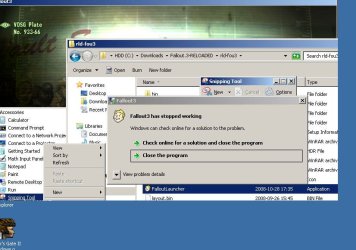
Every time I try to start the game, a window appear and says that Fallout 3 has stopped working, then I can choose to close the program or search for a solution online. VERY DISTURBING:P cuz I love the game
(this happen check the Prt Scr)
Capture.JPG

Please help me with this
 

My Computer My Computer

Computer Manufacturer/Model Number
Packard Bell
OS
windows 7
CPU
Intel 1,46 ghz dual core
Memory
4gb
Graphics Card(s)
sis mirage 3 graphics
Fallout 3 problems

I think I am going crazyyyyyyyy soon, this damn Fallout 3 game. maybe I should install xp or vista instead. Every time I start the game it runs smoothly until I choose new game, then a window appears and says Fallout 3 has stopped working and I can choose between close the program or search for a solution on the internet and close program. very disturbing cuz te ****ing internet doesn't have any solution!!!!!!!!! and I ave tried every damn thing I have red in this forum. Maybe it is me that is the main problem, I am not a superb computer ****ing hacker/ oscar awarded programer.

Anyone save me from my misery haha I am retarded I know shot me now
 

My Computer My Computer

Computer Manufacturer/Model Number
Packard Bell
OS
windows 7
CPU
Intel 1,46 ghz dual core
Memory
4gb
Graphics Card(s)
sis mirage 3 graphics
Graphic card maybe

I just realized thats this stupid laptop just have a sis mirage graphic card and maybe that's is te problem???? what do you say people
 

My Computer My Computer

Computer Manufacturer/Model Number
Packard Bell
OS
windows 7
CPU
Intel 1,46 ghz dual core
Memory
4gb
Graphics Card(s)
sis mirage 3 graphics
Yep it is very possible that your graphic card is not good enough, that's why game crashes.
What's your graphic card anyway?
 

My Computer My Computer

Computer Manufacturer/Model Number
Custom build
OS
Windows Xp 32 bit, Windows 7 next week :P
CPU
Intel i7 920 D0 @ 3,5 ghz
Motherboard
Gigabyte GA-EX58-UD4P
Memory
TeamGroup 6 gig ram 1866 mhz CL=9
Graphics Card(s)
Sapphire Radeon 4890
Sound Card
Integrated
Monitor(s) Displays
Samsung SyncMaster 940N 17''
Screen Resolution
1280 x 1024
Hard Drives
Western Digital Black Caviar 640 gig 7200
PSU
LC Power Metatron Arkangel 850W
Case
Cooler Master RC-690
Cooling
CPU Cooler Scythe Mugen 2
Keyboard
Genius
Mouse
Genius
Internet Speed
no idea max download is 160kb, max upload 32kb, kinda slow
Yep it is very possible that your graphic card is not good enough, that's why game crashes.
What's your graphic card anyway?

I think it is called sis mirage 3 graphicscard
 

My Computer My Computer

Computer Manufacturer/Model Number
Packard Bell
OS
windows 7
CPU
Intel 1,46 ghz dual core
Memory
4gb
Graphics Card(s)
sis mirage 3 graphics
I think it is called sis mirage 3 graphicscard


Here are some specs for your integrated Graphics

The usual DirectX 9 and OpenGL 1.5 3D APIs are supported with the Mirage 3 graphics core. There will only be support for Pixel Shader 2.0 instead of Pixel Shader 3.0 supported by Intel’s upcoming Graphics Media Accelerator X3000, ATI’s Radeon Xpress 1250 and NVIDIA’s GeForce 6100 series. Up to 16 texture units are available though. No vertex shader is present on the Mirage 3 graphics core disappointingly. Nevertheless the Mirage 3 graphics core has an integrated transform and lighting engine which is quite common nowadays. The graphics engine clock is expected around 250 MHz.

While the graphics core won’t exactly keep up with the latest value graphics cards from ATI or NVIDIA it does have plenty of video processing features. Notable video features include pixel scaling capabilities up to 1920x1200 pixels via a 6x4 scaling algorithm and motion adaptive deinterlacing algorithms. The SiS Mirage 3 also features smoothing algorithms that smooth out jagged edges and lines in videos. 3:2 pull down detection is also supported for progressive MPEG2 video playback.

The SiS Mirage 3 graphics core is expected to enter mass production in SiS 671, 671FX and 771 chipsets this month. Expect motherboards feature the chipset to arrive in the upcoming months with prices below $100. SiS Mirage 3 graphics powered chipsets will support Microsoft’s upcoming Windows Vista with aero glass user interface.

2513_large_SiS_Roadmap_2007.png


Either you don't need better graphics, or you will upgrade later. Nobody runs games beyond Solitare on these.

DailyTech - SiS Mirage 3 Graphics Core Details Unveiled

Verdict, not good enough for Fallout. ;)
 

My Computer My Computer

Computer Manufacturer/Model Number
Home Brew
OS
Windows 7 Ultimate Vista Ultimate x64
CPU
Core 2 Duo E8500 3.16Ghz @ 3.8Ghz
Motherboard
eVGA 750i FTW
Memory
2x2Gigs Patriot PC2-6400 LL
Graphics Card(s)
Inno3D GeForce GTX260 216 SP
Monitor(s) Displays
ASUS VW222U 22" 2ms Response time
Screen Resolution
1680x1050
Hard Drives
SATA 150GB
SATA II 250GB
USB IDE 750GB Ext.
PSU
HYTEC 600W & Thermaltake 650W Toughpower Power Exp
Case
Thermaltake Armor LCS (Liquid Cooling System)
Cooling
Liquid Cooling System
Keyboard
Logitech G15 Gaming Keyboard
Mouse
Logitech G9 Gaming Mouse
I'm having a bit of an issue with Fallout 3 on W7 as well. I bought it on Steam so I don't know if that makes any differences. The FalloutPref.ini file has the bug where it reads

sD3DDevice="ATI Radeon HD 4800 Series (Engineering Sample ? WDDM v1.1)"

instead of

sD3DDevice="ATI Radeon HD 4800 Series (Engineering Sample – WDDM v1.1)"

If I change it to the correct coding and save the game automatically chances it back upon opening the launcher. So the only way I can even get into the game is to set the file to read-only. Though now I cannot change any of the display options. Is there any way to get around this or am I just boned?
 

My Computer My Computer

OS
Windows 7
CPU
Q6600 @ 3.0GHz
Motherboard
Abit IP35 Pro
Memory
8gb DDR2 800
Graphics Card(s)
ATI 4870 512mb
I just installed Fallout 3 this morning on Windows 7, have the latest patch from Bethesda, and all I'm getting is a black screen, followed by the usual Fallout 3 has encountered an error, after clicking on Play from the Launcher.

It previously worked fine in Vista. I've tried adding the sD3DDevice="NVIDIA GeForce GTX 260" line to the fallout.ini to no success. Have both the falloutlauncher and fallout exe's to run in compatibility mode with Vista SP2, and as an administrator.

Any thoughts?
 

My Computer My Computer

OS
Windows 7 64 bit
CPU
Intel Core 2 Duo E8400 @ 3.0GHz
Motherboard
ASUS P5Q SE+ LGA 775
Memory
OCZ Platinum 8GB DDR2 1066
Graphics Card(s)
XFX GeForce GTX 260 Black Edition
Sound Card
Onboard VIA VT1708s
Monitor(s) Displays
Acer X243Wbd 24" Widescreen LCD
Screen Resolution
1920x1200
Hard Drives
Seagate 7200.11 320GB 2x
PSU
Raidmax Hybrid 2 630W Modular PSU
Case
Thermaltake Armor +MX VH8000BWS
Cooling
Thermaltake Blue Orb 2
Keyboard
OCZ Alchemy Elixir
Mouse
Logitech G7
Internet Speed
22mbps
I installed Windows 7 just last night, and I'm getting the same problem (black screen). I don't know for sure what to try next, though I AM running two displays, and it sounds like that might be the problem. Tonight I'll try and see if removing my second monitor will fix it.
 

My Computer My Computer

OS
Windows 7
CPU
Intel Core 2 Duo E8400
Motherboard
Asus P5q P45
Memory
4 GB DDR 1066
Graphics Card(s)
ATI Radeon 4870 512MB
Sound Card
Onboard
Monitor(s) Displays
Acer 24" Widescreen; Samsung 19"
Hard Drives
2x Seagate Barracuda 320GB
PSU
Modular 800W
Case
Antec
Cooling
Air
Back
Top