Fallout 3 on Windows 7.

i got fallout 3 to work on my computer bur im still having one minor problem, i can't get games for windows live to launch in game any tips on this? i downloaded games for windows live 2.0 and i have fallout 3 patched all the way
 
Hey all, just adding my two cents. Fallout 3 is working pimpingly in the 64-bit version of windows 7. I do not have all the constant freezing and glitching that vista-64 provided.

Installation time was MUCH faster, as well. This is the non-patched, right out of the box disc.

~happycamper
 

My Computer

OS
windows 7/64
I hope this helps someone.

I ran into problem similar to whats mentioned in this thread, where I would launch the game and would just get stuck in a loop with the launcher. Well it turns it if you start adding, removing, changing the location of your documents, and your library settings, the launcher loses track of where "My Games/Fallout 3/" Directory is, and doesn't seem to recreate it, just gets stuck in a loop.

So double check all those settings, change or move your "My Games/Fallout 3" directory and you should be good to go.


Worked for me! Thanks for sharing the info! :D
 

My Computer

OS
Windows 7
Well, I don't have the 'launcher loop' issue, but I do have sound (SB Audigy) issues with stuttering radio music and a completely cutting out of sound after a few minutes.
I also have a total freeze when trying to exit the game. A reboot is always necessary. (Works perfectly in Vista.)
Any ideas?
 

My Computer

OS
Windows 7 64-bit
CPU
Intel i7 920 @ 4GHz
Motherboard
Asus P6T Deluxe V2
Memory
6Gb
Graphics Card(s)
nVidia GTX 285
Sound Card
X-Fi Extreme Audio PCIe
Screen Resolution
1900x1200
Ok so after reading this thread over and over agian I still haven't fixed the problem.

Here is what happens:

When I try and start up Fallout 3 it says something like "Window is searching for a solution to the problem". It does that for 10 sec and then quits.

I have tried:
- Access Permissions
- reinstall
- install on another hdd
- change compatibility mode

Can someone please help me? I was loving windows 7 up until this point. I may have to uninstall it.. :(
 

My Computer

OS
Windows 7
Problems with Fallout 3 made me go back to Vista. I have a dual boot, so Win 7 is still there if a fix is found for all my sound problems in Fallout 3.
 

My Computer

OS
Windows 7 64-bit
CPU
Intel i7 920 @ 4GHz
Motherboard
Asus P6T Deluxe V2
Memory
6Gb
Graphics Card(s)
nVidia GTX 285
Sound Card
X-Fi Extreme Audio PCIe
Screen Resolution
1900x1200
Problems with Fallout 3 made me go back to Vista. I have a dual boot, so Win 7 is still there if a fix is found for all my sound problems in Fallout 3.

I would but I just don't have the hdd space to dual boot. I really need to get a new hdd.... but I have no money. :P
 

My Computer

OS
Windows 7
Fallout 3 on Windows 7

I just install fallout3 correctly but when i go to launch the game in program files (x86) with the Fallout3Launcher.exe it gives me an error "The Fallout3 Launcher stopped working". I then changed compatiblity to Widows Vista and Windows XP (Service pack 2) but neighter of them worked and the game wont launch.
 

My Computer

OS
Windows 7 beta (64 bit)
CPU
E8400 @ 3.01 Ghz
Motherboard
Asus P5Q3 Deluxe/WiFi-AP @n
Memory
Corsair XMS3 DHX 2048MB Dual Channel PC10600 DDR3 1333MHz
Graphics Card(s)
EVGA 9800 GTX+
Sound Card
On Board
Monitor(s) Displays
Samsung Touch of Color T220 22"
Screen Resolution
1680x1050
Hard Drives
2 Seagate Barracuda 7200.11 750GB running raid 1
PSU
Enermax 650W
Case
ANTEC Twelve Hundred
Cooling
Thermaltake Blue Orb
Keyboard
Logitec G15
Mouse
Logitec G9
Some things to double check:

- Update / try a different video driver version (Catalyst 9.1 and latest ATI / Nvidia beta drivers with the hash fix work)

- Remove or alter any 3rd party codec pack (You need to add Fallout3.exe to ffdshow's exclusion list if it's installed)

- Double check your permissions are set correctly (make sure you have the ticks in the right place ;))

- Try "Run as Admin" on the falloutlauncher.exe and even fallout3.exe (it may make no difference, but it can't hurt)

- Fallout 3 doesn't need to be run in compatibility mode. (the crashing problem lies elsewhere)

Sorry if these seem obvious and don't help, but it never hurts to eliminate some easily overlooked causes.

Also, please take the time to fill out your "My System Specs". Extra info is always helpful ;)
 

My Computer

Computer type
PC/Desktop
Computer Manufacturer/Model Number
Systems by SmartEyeball
OS
8 Pro x64
CPU
i7 3770K 4.6GHz
Motherboard
ASUS P8Z77 WS
Memory
16GB G.Skill Trident X 2666mhz
Graphics Card(s)
x2 EVGA 780 Ti Superclocked SLI
Sound Card
SB X-FI Surround 5.1 PRO USB / ATH-AD900 Headphones
Monitor(s) Displays
x3 Dell U2410 / 58" Samsung
Screen Resolution
5760*1200/ 1920*1200
Hard Drives
2x Intel 520 240GB (RAID 0) * 2x WD Caviar Blacks 2TB (RAID 0) * 2TB WD Caviar Black * Sony Optirac DVD
PSU
Silverstone Strider Evolution 1200W
Case
Thermaltake Level 10 GT Snow Edition
Cooling
Noctua NH-D14
Keyboard
Topre Realforce // Ducky Shine MX Black // Filco Ninja TKL
Mouse
Thermaltake Theron (Highly Recommended) + Razer Imperator
Antivirus
MSE
Browser
IE, FF, WaterFox
Other Info
GT Extreme V2 Sim Racing Cockpit + 40" LCD and K/B Mouse stand ▼
Fanatec CSR Elite Wheel + Clubsport V1 Pedals + CSR shifter/7G-H ▼Saitek X52 Pro ▼ TrackIR 5 Pro
Buttkicker v2 Seat Rumbler with Dedicated 5.1 and Sub Woofer attached to frame ▼
=
Bloody Big Grin
thanx for the feed back ill get back too u after i try thos things
 

My Computer

OS
Windows 7 beta (64 bit)
CPU
E8400 @ 3.01 Ghz
Motherboard
Asus P5Q3 Deluxe/WiFi-AP @n
Memory
Corsair XMS3 DHX 2048MB Dual Channel PC10600 DDR3 1333MHz
Graphics Card(s)
EVGA 9800 GTX+
Sound Card
On Board
Monitor(s) Displays
Samsung Touch of Color T220 22"
Screen Resolution
1680x1050
Hard Drives
2 Seagate Barracuda 7200.11 750GB running raid 1
PSU
Enermax 650W
Case
ANTEC Twelve Hundred
Cooling
Thermaltake Blue Orb
Keyboard
Logitec G15
Mouse
Logitec G9
And i updated my specs aswell
 

My Computer

OS
Windows 7 beta (64 bit)
CPU
E8400 @ 3.01 Ghz
Motherboard
Asus P5Q3 Deluxe/WiFi-AP @n
Memory
Corsair XMS3 DHX 2048MB Dual Channel PC10600 DDR3 1333MHz
Graphics Card(s)
EVGA 9800 GTX+
Sound Card
On Board
Monitor(s) Displays
Samsung Touch of Color T220 22"
Screen Resolution
1680x1050
Hard Drives
2 Seagate Barracuda 7200.11 750GB running raid 1
PSU
Enermax 650W
Case
ANTEC Twelve Hundred
Cooling
Thermaltake Blue Orb
Keyboard
Logitec G15
Mouse
Logitec G9
I tryed all things that u told me to try smarteyeball but nothing worked. I found out that in "My games" under fallout3 folder i only had the "FALLOUT.INI" and from some of the reaserch that i have been doing i should also have a " FALLOUTPREFS.INI" but i dont have this file. I no that this file is supose to have all my preferences in it so i thought if someone gave me their "FALLOUTPREFS.INI" i could edit it to my preferences. If some is going to give me that file it would be nice if you u have a Nvidia card in the 9 series.


Yes it is a vaild version of the game and yes i am running other games like counterstrike source and i do have all the users allowed to all. But i dont do if it is patched or unpatched and if unpatched and that the problem how do i fix that.
 
Last edited:

My Computer

OS
Windows 7 beta (64 bit)
CPU
E8400 @ 3.01 Ghz
Motherboard
Asus P5Q3 Deluxe/WiFi-AP @n
Memory
Corsair XMS3 DHX 2048MB Dual Channel PC10600 DDR3 1333MHz
Graphics Card(s)
EVGA 9800 GTX+
Sound Card
On Board
Monitor(s) Displays
Samsung Touch of Color T220 22"
Screen Resolution
1680x1050
Hard Drives
2 Seagate Barracuda 7200.11 750GB running raid 1
PSU
Enermax 650W
Case
ANTEC Twelve Hundred
Cooling
Thermaltake Blue Orb
Keyboard
Logitec G15
Mouse
Logitec G9
Hi zaffman, if the launcher is failing, then it won't have created the falloutprefs.ini .


Is the game patched or unpatched before attempting to run the launcher?

Are you using a cracked launcher?

-If using a cracked launcher, check it's the right version or use the uncracked/original version.

- If not using a cracked launcher, perhaps try one. (legal if you own the game. Just make sure it's for the correct version)

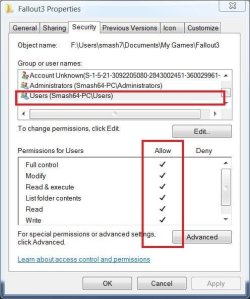
Also triple check that your "C:\Users\yourname\Documents\My Games\Fallout3" folder has the following permissions for "Users"

fo3.JPG


Apart from checking all that, I'm sorry but what other elements could be causing the launcher crash eludes me atm.

Are you able to run any other games?


ps In future, you can just edit your previous post instead of creating a new one. And thanks for filling out your details :)
 

My Computer

Computer type
PC/Desktop
Computer Manufacturer/Model Number
Systems by SmartEyeball
OS
8 Pro x64
CPU
i7 3770K 4.6GHz
Motherboard
ASUS P8Z77 WS
Memory
16GB G.Skill Trident X 2666mhz
Graphics Card(s)
x2 EVGA 780 Ti Superclocked SLI
Sound Card
SB X-FI Surround 5.1 PRO USB / ATH-AD900 Headphones
Monitor(s) Displays
x3 Dell U2410 / 58" Samsung
Screen Resolution
5760*1200/ 1920*1200
Hard Drives
2x Intel 520 240GB (RAID 0) * 2x WD Caviar Blacks 2TB (RAID 0) * 2TB WD Caviar Black * Sony Optirac DVD
PSU
Silverstone Strider Evolution 1200W
Case
Thermaltake Level 10 GT Snow Edition
Cooling
Noctua NH-D14
Keyboard
Topre Realforce // Ducky Shine MX Black // Filco Ninja TKL
Mouse
Thermaltake Theron (Highly Recommended) + Razer Imperator
Antivirus
MSE
Browser
IE, FF, WaterFox
Other Info
GT Extreme V2 Sim Racing Cockpit + 40" LCD and K/B Mouse stand ▼
Fanatec CSR Elite Wheel + Clubsport V1 Pedals + CSR shifter/7G-H ▼Saitek X52 Pro ▼ TrackIR 5 Pro
Buttkicker v2 Seat Rumbler with Dedicated 5.1 and Sub Woofer attached to frame ▼
=
Bloody Big Grin
Hey everone i'm happy to say i finaly got fallout3 working, it happened to be the patch suggestion from you smarteyeball that did ended up doing the trick. For anyone who seems to be having the error of "The FalloutLauncer.exe has stoped working" when trying to launch fallout 3 look for the patch "Fallout3_v1.1.0.35_English_US.exe" Fallouts site. I have to say i almost gave up after trying everything like chageing the compatiblity, moving the path of were it installs ect.. but i have to say this fourm was a huge help in working with me to find find my problems, especially you smarteyeball. Well Thanx alot and now im going to go play my favorite game.
 

My Computer

OS
Windows 7 beta (64 bit)
CPU
E8400 @ 3.01 Ghz
Motherboard
Asus P5Q3 Deluxe/WiFi-AP @n
Memory
Corsair XMS3 DHX 2048MB Dual Channel PC10600 DDR3 1333MHz
Graphics Card(s)
EVGA 9800 GTX+
Sound Card
On Board
Monitor(s) Displays
Samsung Touch of Color T220 22"
Screen Resolution
1680x1050
Hard Drives
2 Seagate Barracuda 7200.11 750GB running raid 1
PSU
Enermax 650W
Case
ANTEC Twelve Hundred
Cooling
Thermaltake Blue Orb
Keyboard
Logitec G15
Mouse
Logitec G9
I thought I'd just say that when I was running fallout 3 on XP i was having considerable problems with freezes and blue screens every 20 minutes. But now that I am running Windows 7 64Bit, it runs like a dream on my XFX 9600 GT. My fps is up considerably and I havent had a single freeze so far so i've been able to get on and finally enjoy playing this great game.

I'm sorry it's not working so well for some of you.
 

My Computer

Computer Manufacturer/Model Number
Me
OS
Windows 7 64Bit
CPU
AMD Athlon x2 4000+
Memory
1GB
Graphics Card(s)
XFX Geforce 9600GT 670M
Monitor(s) Displays
Dell 17"
Screen Resolution
1280x1024
Hard Drives
Maxtor DiamondMAX 250GB
PSU
Trust 750W Pro Dual Fan
Case
Standard Black MIDI
Keyboard
Microsoft Full Keyboard
Mouse
A4 Tech Battery FREE NB-90D
Internet Speed
2 Mb/s
It worked for me flawlessly

Performance was just as good as Vista, which impressed me, since Vista back in its Beta 1 days had inferior gaming performance when compared to XP. However I did not go through the process of installing the game. I just upgraded my Vista SP1 installation with Windows 7 and everything was transferred over. The only program that did not work was Daemon Tools.
 

My Computer

Computer Manufacturer/Model Number
Alienware m15x
OS
Windows Seven 7000 Beta
CPU
Intel Core 2 Duo Extreme X9000 2.8
Motherboard
Alienware m15x
Memory
2.5 DDR2
Graphics Card(s)
nVidia 8600 256MB
Sound Card
Bose Companion 5 USB
Monitor(s) Displays
m15x Built in LCD
Screen Resolution
900p
Hard Drives
120GB 7200RPM
External USB 7200RPM 1TB (for storage)
Case
m15x ripley
Cooling
2 Standard Laptop Fans
Keyboard
Illuminated Alien FX keyboard
Mouse
Touchpad
Internet Speed
6 MBPS

My Computer

Computer type
PC/Desktop
Computer Manufacturer/Model Number
Systems by SmartEyeball
OS
8 Pro x64
CPU
i7 3770K 4.6GHz
Motherboard
ASUS P8Z77 WS
Memory
16GB G.Skill Trident X 2666mhz
Graphics Card(s)
x2 EVGA 780 Ti Superclocked SLI
Sound Card
SB X-FI Surround 5.1 PRO USB / ATH-AD900 Headphones
Monitor(s) Displays
x3 Dell U2410 / 58" Samsung
Screen Resolution
5760*1200/ 1920*1200
Hard Drives
2x Intel 520 240GB (RAID 0) * 2x WD Caviar Blacks 2TB (RAID 0) * 2TB WD Caviar Black * Sony Optirac DVD
PSU
Silverstone Strider Evolution 1200W
Case
Thermaltake Level 10 GT Snow Edition
Cooling
Noctua NH-D14
Keyboard
Topre Realforce // Ducky Shine MX Black // Filco Ninja TKL
Mouse
Thermaltake Theron (Highly Recommended) + Razer Imperator
Antivirus
MSE
Browser
IE, FF, WaterFox
Other Info
GT Extreme V2 Sim Racing Cockpit + 40" LCD and K/B Mouse stand ▼
Fanatec CSR Elite Wheel + Clubsport V1 Pedals + CSR shifter/7G-H ▼Saitek X52 Pro ▼ TrackIR 5 Pro
Buttkicker v2 Seat Rumbler with Dedicated 5.1 and Sub Woofer attached to frame ▼
=
Bloody Big Grin
Hey, found this forum searching through the internet..I can't even download the game, I click "Install" then after I get the message
"Error Code: -5004 : 0x80070002
Error Information:
>SetupDLL\SetupDLL.cpp (3085)
PAPP:Fallout 3
PVENDOR:Bethesda Softworks (Fallout : Welcome to the Official Site)
PGUID:974c4b12-4d02-4879-85e0-61c95cc63e9e
$11.0.0.28844
@Windows XP (7000) BT_OTHER 7403.30560"

I looked through a few pages and didn't see anyone with the same error message and I get nothing on the web by doing that...I have cleaned my registry, just DLd Games for Micro 2.0....nothing works :(.

EDIT: I fixed it, took me an hour but I did it :S. Had to change the name of the InstallShield, guess that the other problems are somewhat similiar to mine :P
 

My Computer

Computer Manufacturer/Model Number
Gateway P-7805u
OS
Windows 7 Beta
CPU
2.26 GHZ
Memory
4GB DDR3
Graphics Card(s)
1GB nVidia 9800 GTS
Screen Resolution
1900x1200
Seems to play alright for me but always crashes when I quit the game, oh this reminds me of the Oblivion issues I had ;)
 

My Computer

Computer type
PC/Desktop
Computer Manufacturer/Model Number
Self Built
OS
Windows 7 Home Premium (64 bit)
CPU
Intel I5 2500K 3.3Ghz Stock
Motherboard
Asus P8H 61-M LE USB 3
Memory
8Gig Kingston DDRIII HyperX Blue 1333 Mhz
Graphics Card(s)
AMD Sapphire 7870 2GB
Sound Card
Creative Fatality Pro
Monitor(s) Displays
27" BENQ LED
Screen Resolution
1920X1080
Hard Drives
1 x OCZ Agility 3 120GB SSD
1 x Seagate 250GB
1 x Western Digital 1000GB
1 x HP 500GB
PSU
700W Coolermaster Stealth Pro etc
Case
Coolermaster Scout
Cooling
Some fans
Keyboard
Some Logitech type.
Mouse
Logitech MX518
Internet Speed
Wireless 8mb
Other Info
Canon Scanner
Epson Printer
Nikon DSLR 3000
Wacom Tablet
Back
Top