Fallout 3 strange blue wavy lines graphics problem

Fungus

New member
Local time
11:59 AM
Messages
4
Hi people I have come here as a last resort.
I just tried to play Fallout 3 and Fallout 3: New Vegas both games are displaying horrible blue distorting wavy lines both in the menu and in the game. There are no other issues but it is quite unplayable, especially in dark areas...most of the game lol.

I have patched, re-installed, run in compatibility modes, lowest graphics, highest graphics, no mods all mods and everything in between.

I love these games and want to play them again.
Please help!
 

My Computer

Computer type
PC/Desktop
Computer Manufacturer/Model Number
Custom Build
OS
Windows 7 Home Premium 64bit
CPU
intel core i7 920 @ 2.67GHz 2.65GHz
Motherboard
LGA 1366
Memory
6 gig
Graphics Card(s)
NVIDIA GeFORCE GTX 275 x2 (SLI)
Sound Card
on board
Monitor(s) Displays
SAMSUNG Syncmaster 24"
Screen Resolution
1920x1080
Are you running latest geforce drivers from nvidia and does it go away if your not running SLI?
 

My Computer

Computer type
PC/Desktop
Computer Manufacturer/Model Number
Custom
OS
10 Pro x64
CPU
Ryzen 9 3900X
Motherboard
Asrock x370 Tachi
Memory
64GB(4x16GB) DDR4
Graphics Card(s)
EVGA 1080ti FTW3
Sound Card
ASUS Xonar Essence STX (V4 Bursons), ODAC rev B, NFB-11, O2
Monitor(s) Displays
3xASUS PB278Q/R, Optoma HD142X
Screen Resolution
3x1440p, 1080p
Hard Drives
512GB 850 EVO(OS, Programs)
4TB (Movies)
3TB (Downloads)
3TB (Programs)
1TB HDD (Games)
2x6TB R1 (videos)
PSU
AX760
Case
Fractal Define R5
Cooling
NH-D15S
Keyboard
Massdrop Ctrl with Box Navy's
Mouse
G903, Alioth XXL Mat
Internet Speed
280/40
Antivirus
MBAM, ESET
Browser
Canary 64 Bit
Other Info
I also own a Thinkpad P50 Xeon 4K, X220T, X1C5
Hi Fungus and welcome to SevenFourms,

Have you tried enabling V-Sync in the Nvidia control panel to see if that fixes the issue, i know most gamer hate using V-Sync, but it'll make the game playable at least, another option is that the cable is loose on your system connecting the monitor, but usually that's only if you're using VGA cables, however, I've had cases where that's happened with DVI and HDMi.

MrNeeds
 

My Computer

Computer type
PC/Desktop
Computer Manufacturer/Model Number
Custom Build
OS
Windows 7 Ultimate x64 SP1
CPU
Intel Q6600 @ 2.6Ghz
Motherboard
Evga NF78-CK-132-A 3-Way SLI
Memory
4Gb DDR2 Corsair Dominator @ 800Mhz 5-5-5-15
Graphics Card(s)
EVGA 560 GTX SC FTW 1GB
Sound Card
Realtek HD 7.1 Audio, Plantronics GameCom780 7.1 Headset
Monitor(s) Displays
Dell S2409W
Screen Resolution
1920 x 1080
Hard Drives
SanDisk SDSSDHII-120G-G25 120GB SSD
Samsung 7200RPM 750Gb SATA
Samsung 850 EVO 120GB SSD
Western Digital Green 1TB 7200RPM
PSU
Xigmatek 750W Quad sli quad core 80% eff
Case
Antec 900 Gaming Case
Cooling
Zalman CNPS9700-NT NVIDIA Tritium
Keyboard
Logitech generic keyboard, MS wireless keyboard
Mouse
Razor Lachesis Banshee V2 Blue, 4000DPI, MS wireless mouse
Internet Speed
152Mb Virgin Media Fibre Optic
Antivirus
Microsoft Security Essentials
Browser
Google Chrome
Other Info
Wireless Gaming Receiver for Windows, Wireless Xbox 360 Pad
yes i am running latest drivers.

Thinking about it. I was using last Decembers drivers and it wasn't there but i was getting random and infrequent crashes from Fallout 3 so I upgraded and now get the blue wavy lines running the current drivers.

I am running SLI. I will try with no SLI and report back.
 

My Computer

Computer type
PC/Desktop
Computer Manufacturer/Model Number
Custom Build
OS
Windows 7 Home Premium 64bit
CPU
intel core i7 920 @ 2.67GHz 2.65GHz
Motherboard
LGA 1366
Memory
6 gig
Graphics Card(s)
NVIDIA GeFORCE GTX 275 x2 (SLI)
Sound Card
on board
Monitor(s) Displays
SAMSUNG Syncmaster 24"
Screen Resolution
1920x1080
GAH!

It is the SLI!

As soon as its turned off the game is fine.

Any Ideas on how to play with SLI enabled? I would much rather play in ultra high than high.

Many thanks to RCVJEW for recommending the SLI.
 

My Computer

Computer type
PC/Desktop
Computer Manufacturer/Model Number
Custom Build
OS
Windows 7 Home Premium 64bit
CPU
intel core i7 920 @ 2.67GHz 2.65GHz
Motherboard
LGA 1366
Memory
6 gig
Graphics Card(s)
NVIDIA GeFORCE GTX 275 x2 (SLI)
Sound Card
on board
Monitor(s) Displays
SAMSUNG Syncmaster 24"
Screen Resolution
1920x1080
GAH!

It is the SLI!

As soon as its turned off the game is fine.

Any Ideas on how to play with SLI enabled? I would much rather play in ultra high than high.

Many thanks to RCVJEW for recommending the SLI.

one fix is to disable HDR lighting, but it takes away the aesthetic of the game, I'm just doing some research on it now.
 

My Computer

Computer type
PC/Desktop
Computer Manufacturer/Model Number
Custom Build
OS
Windows 7 Ultimate x64 SP1
CPU
Intel Q6600 @ 2.6Ghz
Motherboard
Evga NF78-CK-132-A 3-Way SLI
Memory
4Gb DDR2 Corsair Dominator @ 800Mhz 5-5-5-15
Graphics Card(s)
EVGA 560 GTX SC FTW 1GB
Sound Card
Realtek HD 7.1 Audio, Plantronics GameCom780 7.1 Headset
Monitor(s) Displays
Dell S2409W
Screen Resolution
1920 x 1080
Hard Drives
SanDisk SDSSDHII-120G-G25 120GB SSD
Samsung 7200RPM 750Gb SATA
Samsung 850 EVO 120GB SSD
Western Digital Green 1TB 7200RPM
PSU
Xigmatek 750W Quad sli quad core 80% eff
Case
Antec 900 Gaming Case
Cooling
Zalman CNPS9700-NT NVIDIA Tritium
Keyboard
Logitech generic keyboard, MS wireless keyboard
Mouse
Razor Lachesis Banshee V2 Blue, 4000DPI, MS wireless mouse
Internet Speed
152Mb Virgin Media Fibre Optic
Antivirus
Microsoft Security Essentials
Browser
Google Chrome
Other Info
Wireless Gaming Receiver for Windows, Wireless Xbox 360 Pad
Thanks MrNeeds. I will continue to check back here.
 

My Computer

Computer type
PC/Desktop
Computer Manufacturer/Model Number
Custom Build
OS
Windows 7 Home Premium 64bit
CPU
intel core i7 920 @ 2.67GHz 2.65GHz
Motherboard
LGA 1366
Memory
6 gig
Graphics Card(s)
NVIDIA GeFORCE GTX 275 x2 (SLI)
Sound Card
on board
Monitor(s) Displays
SAMSUNG Syncmaster 24"
Screen Resolution
1920x1080
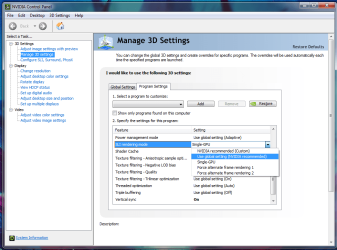
You could try setting its program settings SLI settings to another thing besides recommended for starters.
 

Attachments

  • ss+(2014-10-07+at+12.50.20).png
    ss+(2014-10-07+at+12.50.20).png
    159.5 KB · Views: 0

My Computer

Computer type
PC/Desktop
Computer Manufacturer/Model Number
Custom
OS
10 Pro x64
CPU
Ryzen 9 3900X
Motherboard
Asrock x370 Tachi
Memory
64GB(4x16GB) DDR4
Graphics Card(s)
EVGA 1080ti FTW3
Sound Card
ASUS Xonar Essence STX (V4 Bursons), ODAC rev B, NFB-11, O2
Monitor(s) Displays
3xASUS PB278Q/R, Optoma HD142X
Screen Resolution
3x1440p, 1080p
Hard Drives
512GB 850 EVO(OS, Programs)
4TB (Movies)
3TB (Downloads)
3TB (Programs)
1TB HDD (Games)
2x6TB R1 (videos)
PSU
AX760
Case
Fractal Define R5
Cooling
NH-D15S
Keyboard
Massdrop Ctrl with Box Navy's
Mouse
G903, Alioth XXL Mat
Internet Speed
280/40
Antivirus
MBAM, ESET
Browser
Canary 64 Bit
Other Info
I also own a Thinkpad P50 Xeon 4K, X220T, X1C5
Back
Top