Fallout 3 texture issues

Internet Badass

(null)
Member
VIP
Local time
9:36 PM
Messages
141
Location
Colorado
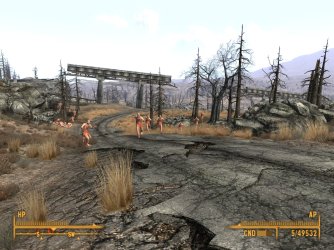
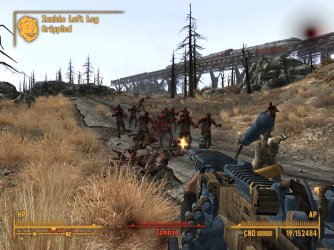
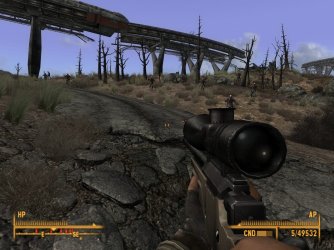
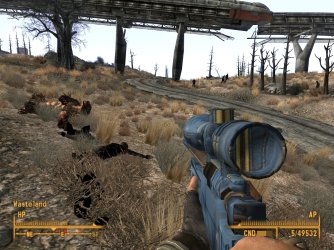
Hi, in fallout 3, all of my textures are messed up for mods. Things like zombies and 21 century weapons have the texture of the nearest thing sometimes, mostly just a random texture. Like my Ak47 and my aa12 all have the vault 87 jumpsuit texture. and when a zombie gets close to an albino radscorpion they get that skin.
I just upgraded to windows 64 bit with a clean install, and too backup my game I just saved my data folder and my saves folder. I just out my data folder in my fallout 3 folder.
I am also hearing the fallout 3 theme in game. the one that plays when your at the main menu. help.
 

Attachments
  • ScreenShot0.jpg
    ScreenShot0.jpg
    347.9 KB · Views: 195
  • ScreenShot1.jpg
    ScreenShot1.jpg
    108.2 KB · Views: 172
  • ScreenShot2.jpg
    ScreenShot2.jpg
    310.8 KB · Views: 139
  • ScreenShot3.jpg
    ScreenShot3.jpg
    334.2 KB · Views: 255

My Computer

Computer type
PC/Desktop
Computer Manufacturer/Model Number
custom
OS
Windows 7 Home Premium 64 bit
CPU
AMD Phenom 9950
Motherboard
ASUS m3a32-mvp deluxe
Memory
12gb ddr2, 2gbx2+4gbx2
Graphics Card(s)
Zotac nvidia gt 730
Sound Card
integrated
Monitor(s) Displays
Samsung syncmaster 213t, dell 13 in
Screen Resolution
1600x1200
Hard Drives
Seagate 750 gb 7200 rpm harddrive, Seagate 7200 rpm120 gb harddrive, samsung 1TB 5400rpm
Case
Alienware Aurora
Cooling
fans yo
Keyboard
Logitech G15
Mouse
microsoft intellimouse explorer 3.0
Internet Speed
10mbps
Antivirus
microsoft security suite
Browser
chrome
You may need to re-install FO3.
May be best just to re-download your mods as well.
But a re-install, and copying over the DATA folder will work to IF you arent using FOMM to install mods and just installed them manually.
If FOMM installed them deactivate them. Re-install FO3, Then reactive the FOMM mods.

99% of the time texture issues are a Archive Invalidated problem.
Redo your Archive Invalidated! (Just deactivate and reactivate it it)

If you do not have it, get it here.
ArchiveInvalidation Invalidated at Fallout 3 Nexus - Fallout 3 mods and community
My guess is this is the issue.


Also, if using FOMM to manage any mods, you may need to reinstall any mod that alters the .ini file.
DARNUI is a good example of this although doesnt look like you're using it.


Not sure how many mods you have going but ... you may also have a few Conflicting mods.
Although conflicting mods usually cause a crash, sometimes other wierd things happen.

Im assuming you're using FOMM to launch the game?
If not .. Please do. it'll save you a lot issues.

I would highly reccomend grabbing BOSS and the updated master list to auto sort your mods.
Also, FO3 edit.
After Boss auto sorts, start FO3 edit. Wait for it to load, and right click anything in the left pane and choose:
"Create Merge patch"
Name it whatever you wish & Save it.
Then Start Fomm, and check/activate your merge patch. (it should be loaded last)

Lastly:
If you just copied everything over, you might want to delete the .ini file and reset graphics settings and preferences once in game.
The one in .. Documents/My games/Fallout/ -->Fallout.ini<---

May want to delete the one in the Windows Live folder as well if you use it.
Documents/My Games/Fallout 3/Saves/ <<Windows Live User name> / Fallout Prefernces

This part may not be needed, I only suggest this because I've seen wierd things happen if just copying it over after new install.

Remember, if you do this step, youll need start the original launcher, re-set all your graphics settings, then reset preferences in game (sound, subtitles etc
 
Last edited:

My Computer

Computer Manufacturer/Model Number
Custom (Self Build)
OS
Windows 7 Home Premium 64bit
CPU
Intel Core i7 2700k
Motherboard
eVGA P67 SLI
Memory
8GB Mushkin Redline Ridgebacks @1866
Graphics Card(s)
EVGA GTX570 SC
Sound Card
XiFi Titanium HD
Monitor(s) Displays
LG W2453V
Screen Resolution
1920x1080
Hard Drives
Intel 320 80GB -- Intel X25-V 40GB --WD Black 1TB x2 -- WD Blue 640GB
PSU
Seasonic x750
Case
Corsair 600T SE White
Cooling
eVGA Superclocked CPU Cooler
Keyboard
Saitek Cyborg
Antivirus
Kaspersky
Browser
IE
Other Info
LG BD/DVD
Oh crap! your probably right about archive invalidation! Ill try that...
 

My Computer

Computer type
PC/Desktop
Computer Manufacturer/Model Number
custom
OS
Windows 7 Home Premium 64 bit
CPU
AMD Phenom 9950
Motherboard
ASUS m3a32-mvp deluxe
Memory
12gb ddr2, 2gbx2+4gbx2
Graphics Card(s)
Zotac nvidia gt 730
Sound Card
integrated
Monitor(s) Displays
Samsung syncmaster 213t, dell 13 in
Screen Resolution
1600x1200
Hard Drives
Seagate 750 gb 7200 rpm harddrive, Seagate 7200 rpm120 gb harddrive, samsung 1TB 5400rpm
Case
Alienware Aurora
Cooling
fans yo
Keyboard
Logitech G15
Mouse
microsoft intellimouse explorer 3.0
Internet Speed
10mbps
Antivirus
microsoft security suite
Browser
chrome
Yea it worked. Im so dumb not to think of that!!!
Thanks!!!
But im still hearing the startup theme in game...I might just move it somewhere else...
 

Attachments

  • archivde invalidated.jpg
    archivde invalidated.jpg
    230.7 KB · Views: 100

My Computer

Computer type
PC/Desktop
Computer Manufacturer/Model Number
custom
OS
Windows 7 Home Premium 64 bit
CPU
AMD Phenom 9950
Motherboard
ASUS m3a32-mvp deluxe
Memory
12gb ddr2, 2gbx2+4gbx2
Graphics Card(s)
Zotac nvidia gt 730
Sound Card
integrated
Monitor(s) Displays
Samsung syncmaster 213t, dell 13 in
Screen Resolution
1600x1200
Hard Drives
Seagate 750 gb 7200 rpm harddrive, Seagate 7200 rpm120 gb harddrive, samsung 1TB 5400rpm
Case
Alienware Aurora
Cooling
fans yo
Keyboard
Logitech G15
Mouse
microsoft intellimouse explorer 3.0
Internet Speed
10mbps
Antivirus
microsoft security suite
Browser
chrome
K im all good now
 

My Computer

Computer type
PC/Desktop
Computer Manufacturer/Model Number
custom
OS
Windows 7 Home Premium 64 bit
CPU
AMD Phenom 9950
Motherboard
ASUS m3a32-mvp deluxe
Memory
12gb ddr2, 2gbx2+4gbx2
Graphics Card(s)
Zotac nvidia gt 730
Sound Card
integrated
Monitor(s) Displays
Samsung syncmaster 213t, dell 13 in
Screen Resolution
1600x1200
Hard Drives
Seagate 750 gb 7200 rpm harddrive, Seagate 7200 rpm120 gb harddrive, samsung 1TB 5400rpm
Case
Alienware Aurora
Cooling
fans yo
Keyboard
Logitech G15
Mouse
microsoft intellimouse explorer 3.0
Internet Speed
10mbps
Antivirus
microsoft security suite
Browser
chrome
Nice sig Badass, glad you got your problem sorted.
 

My Computer

Computer type
PC/Desktop
Computer Manufacturer/Model Number
Self Built
OS
Windows 7 Home Premium (64 bit)
CPU
Intel I5 2500K 3.3Ghz Stock
Motherboard
Asus P8H 61-M LE USB 3
Memory
8Gig Kingston DDRIII HyperX Blue 1333 Mhz
Graphics Card(s)
AMD Sapphire 7870 2GB
Sound Card
Creative Fatality Pro
Monitor(s) Displays
27" BENQ LED
Screen Resolution
1920X1080
Hard Drives
1 x OCZ Agility 3 120GB SSD
1 x Seagate 250GB
1 x Western Digital 1000GB
1 x HP 500GB
PSU
700W Coolermaster Stealth Pro etc
Case
Coolermaster Scout
Cooling
Some fans
Keyboard
Some Logitech type.
Mouse
Logitech MX518
Internet Speed
Wireless 8mb
Other Info
Canon Scanner
Epson Printer
Nikon DSLR 3000
Wacom Tablet
Oh crap! your probably right about archive invalidation! Ill try that...


I've made this same mistake myself a time or 2.

Either forgot it altogether, or for some odd reason a new mod just doesnt want to to work properly untill it is toggled off and back on.

Causes all sorts of texture issues, and on occasions a big Huge exclamation point in place of some textures..


Glad it's all sorted out for you.
:)

But just curious, what was causing the Audio looping?
 

My Computer

Computer Manufacturer/Model Number
Custom (Self Build)
OS
Windows 7 Home Premium 64bit
CPU
Intel Core i7 2700k
Motherboard
eVGA P67 SLI
Memory
8GB Mushkin Redline Ridgebacks @1866
Graphics Card(s)
EVGA GTX570 SC
Sound Card
XiFi Titanium HD
Monitor(s) Displays
LG W2453V
Screen Resolution
1920x1080
Hard Drives
Intel 320 80GB -- Intel X25-V 40GB --WD Black 1TB x2 -- WD Blue 640GB
PSU
Seasonic x750
Case
Corsair 600T SE White
Cooling
eVGA Superclocked CPU Cooler
Keyboard
Saitek Cyborg
Antivirus
Kaspersky
Browser
IE
Other Info
LG BD/DVD
Back
Top