
ssimlai
New member
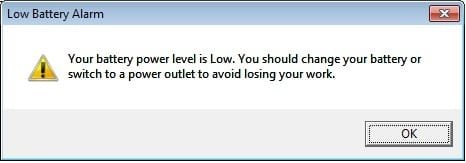
False "Low Battery Alarm" with after-market battery - Dell Studio
Hello,
Sorry for being away from posting on the forum since a long time, though I have been visiting the forum lot many times, without logging in - mainly through Google search. That shows how effective the website really is.
Since some time a very persistent error has been bothering me and I thought it best to come here and post the issue.
After my original battery for my Dell Studio 1555 32-bit computer died, I replaced batteries thrice, one after another (the computer is five years old).
The three replacement batteries were:
1. Dell - exact replacement 56 Wh
2. LB1 - matching specs but 48 Wh
3. Dell - exact replacement 56 Wh
Since the second replacement battery, the Low Battery Alarm has been disturbing me each time that:
1. The computer is restarted with the main power disconnected.
2. The main power jack is removed after a 100% charge.
3. The main power jack is removed anytime.
Since in the first place I never set this alarm manually, I am assuming there could either be a Dell specific registry issue with after-market batteries, though I don't understand why. Either way the irritant must go.
I checked Advanced Power Options under Power Scheme but found nothing that would give me a hint of what's wrong.
The alarm screenshot is attached.
Any help would be welcome.
Hello,
Sorry for being away from posting on the forum since a long time, though I have been visiting the forum lot many times, without logging in - mainly through Google search. That shows how effective the website really is.
Since some time a very persistent error has been bothering me and I thought it best to come here and post the issue.
After my original battery for my Dell Studio 1555 32-bit computer died, I replaced batteries thrice, one after another (the computer is five years old).
The three replacement batteries were:
1. Dell - exact replacement 56 Wh
2. LB1 - matching specs but 48 Wh
3. Dell - exact replacement 56 Wh
Since the second replacement battery, the Low Battery Alarm has been disturbing me each time that:
1. The computer is restarted with the main power disconnected.
2. The main power jack is removed after a 100% charge.
3. The main power jack is removed anytime.
Since in the first place I never set this alarm manually, I am assuming there could either be a Dell specific registry issue with after-market batteries, though I don't understand why. Either way the irritant must go.
I checked Advanced Power Options under Power Scheme but found nothing that would give me a hint of what's wrong.
The alarm screenshot is attached.
Any help would be welcome.
Attachments
My Computer
At a glance
Windows 7 Home Premium 32bit SP14 GBATI Radeon HD4570
- Computer Manufacturer/Model Number
- Dell Studio 1555 Laptop
- OS
- Windows 7 Home Premium 32bit SP1
- Memory
- 4 GB
- Graphics Card(s)
- ATI Radeon HD4570
- Sound Card
- IDT HD Audio
- Hard Drives
- TOSHIBA MK5065GSX ATA