Ok, as promised, here you go:
For the purposes of this, I have created a Standard User account called "Block Me" to illustrate how it's done. I will be restricting a folder I have created called "Naughty Stuff" The same principles apply to all accounts (assuming they are Standard Accounts, Administrators can get around this)
The following should be done from an Administrators account.
1. Right click the folder in question and click Properties
2. Go to the "Security" Tab
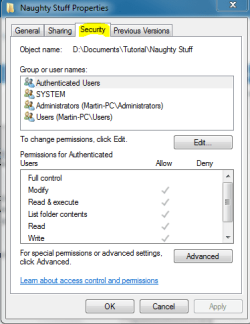
3. Click Advanced you will get a screen that looks like this:
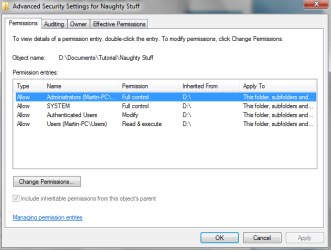
4a) To block by group, Highlight "Users" (or whatever group) and click "Change Permissions" you will get a screen that looks just like the last one, but with one critical difference, it will have "Add" and "Edit" buttons at the bottom. So go ahead and click "Edit" after highlighting Users again.

From here, you can change permissions.
Note
Users cannot be blocked from reading a folder like this. You will need to go to 4b) to set that up per user, however write access can be blocked.
4b) To block per user, go back to the screen in Step 3, and this time click Add. Type the name of the User you wish to block in "Enter the object name to select" and either press Enter, or click "Check Names"
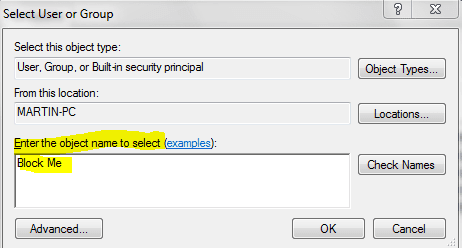
Once you click OK, you can set user permissions for all aspects of read and write to this folder.
Hope it helps



