Fan-like whoosh noise coming from laptop hard drive, NOT from fan

catalogue

New member
Member
VIP
Local time
4:09 PM
Messages
108
Is there anything wrong with my laptop if it is making a constant noise that sounds like a fan but positively 100% definitely ABSOLUTELY is not the fan? Details:

- Thinkpad T520 with a new 1 Tb Western Digital HD installed 6 months ago. However the noise began a year before that with the *original* HD and the new HD has the same noise. Very strange. I thought it must be the fan, due to accumulated dust, but it's not - see below.

- The noise happens the entire time the computer is on and is constant and unchanging. It does not vary, such as louder/quieter or higher/lower. It is 100% perfectly continuous.

- It sounds a little like a laptop fan but definitely louder and 'rougher'. My fan itself has a very very quiet smooth whisper, almost a hum, that barely sounds at all like air moving, whereas this noise is much more of a whoosh, almost like the sound of a fan on a big heavy-duty desktop computer.

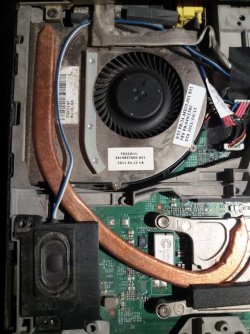
- We know it's not the fan, and that the fan is working fine, because I can lift up the keyboard and see when the fan is or isn't running. Mostly it's not moving at all; then if I make the CPU go to 50 or 100%, for example by playing four HD movies at once (as a test), it will turn on. Then when I close the movies the CPU goes down to its resting rate around 0 to 2% and the fan turns off. Meanwhile the noise I'm talking about remains constant the whole time.

- It is not the normal "stuttering" HD read/write sound. I know what that sounds like and I can hear it from the HD as is normal when reading/writing; meanwhile the whoosh remains continuous. The read/write sound is very faint and hard to hear below the whoosh but it is there.

- It is definitely coming from the area of the HD and processor.

- It only started a year or so ago, with the original HD, but also happens with the brand new HD with a new Windows installation, which is very strange.

- I absolutely can not feel any unusual heat at all on the bottom where the HD is.
 
Last edited:

My Computer My Computer

At a glance

7 Pro 64Intel Core i5-2540M 2.6 GHz6 GB RAM
Computer type
Laptop
Computer Manufacturer/Model Number
Lenovo Thinkpad T520
OS
7 Pro 64
CPU
Intel Core i5-2540M 2.6 GHz
Memory
6 GB RAM
Hard Drives
1 Tb
Same noise on old and new HDD? I would say that it's the CPU fan. Does the laptop has a GPU? If so, does it has a dedicated fan?

Just to check, take out the HDD and boot the laptop, Enter BIOS and see if the noise persists.
 

My Computers My Computers

  • At a glance

    Windows 7 HP 64i5 6600K - 800MHz to 4200MHz4+4G GSkill DDR4 3000IG - Intel 530
    Computer type
    PC/Desktop
    Computer Manufacturer/Model Number
    custom build
    OS
    Windows 7 HP 64
    CPU
    i5 6600K - 800MHz to 4200MHz
    Motherboard
    GA-Z170-HD3P
    Memory
    4+4G GSkill DDR4 3000
    Graphics Card(s)
    IG - Intel 530
    Monitor(s) Displays
    Samsung 226BW
    Screen Resolution
    1680x1050
    Hard Drives
    (1) -1 SM951 – 128GB M.2 AHCI PCIe SSD drive for Windows 7 and Lubuntu
    (2) -1 WD SATA 3 - 1T for Data
    (3) -1 WD SATA 3 - 1T for backup
    PSU
    Thermaltake 450W TR2 gold
    Keyboard
    Old and good Chicony mechanical keyboard
    Mouse
    Logitech mX performance - 9 buttons (had to disable some)
    Internet Speed
    500Mb/s
    Browser
    Firefox 64
    Other Info
    TinyWall firewall
  • At a glance

    Windows 7 Proi7-4500U 800MHz to 3.0GHz(4+4)G DDR3 1600IG intel 4400 + NVIDIA GeForce GT 745M
    Computer type
    Laptop
    System Manufacturer/Model Number
    Asus Q550LF
    OS
    Windows 7 Pro
    CPU
    i7-4500U 800MHz to 3.0GHz
    Motherboard
    Asus Q550LF
    Memory
    (4+4)G DDR3 1600
    Graphics Card(s)
    IG intel 4400 + NVIDIA GeForce GT 745M
    Sound Card
    Realtek
    Monitor(s) Displays
    LG Display LP156WF4-SPH1
    Screen Resolution
    1920 x 1080
    Hard Drives
    BX500 120G SSD for Windows and programs +
    1T HDD for data
    Internet Speed
    500 Mb/s
    Browser
    Firefox
    Other Info
    TinyWall firewall
Same noise on old and new HDD? I would say that it's the CPU fan. Does the laptop has a GPU? If so, does it has a dedicated fan?

You'll have to check the hardware maintenance manual yourself to know if it has any fans besides the main obvious one because I have been unable to find any evidence of them - I checked every appearance of the words "fan" and "thermal" and all the diagrams in the manual, and disassembled the whole laptop except for taking out the motherboard. Is it possible for a computer to have a fan(s) that isn't mentioned in the hardware maintenance manual?

Manual is here: Hardware Maintenance Manual - US

I don't know what a GPU is.


Just to check, take out the HDD and boot the laptop, Enter BIOS and see if the noise persists.

I don't understand how that's possible. How can a computer turn on without an OS? Do I just turn it on, see if the noise is there and then turn it off? The only experience I have with BIOS is, on two or three occasions I needed to boot from a CD or USB by pressing F8 or F12 or something at startup. Possibly I once updated the BIOS if there was a new version at the Lenovo site.
 

My Computer My Computer

At a glance

7 Pro 64Intel Core i5-2540M 2.6 GHz6 GB RAM
Computer type
Laptop
Computer Manufacturer/Model Number
Lenovo Thinkpad T520
OS
7 Pro 64
CPU
Intel Core i5-2540M 2.6 GHz
Memory
6 GB RAM
Hard Drives
1 Tb
- We know it's not the fan, and that the fan is working fine, because I can lift up the keyboard and see when the fan is or isn't running. Mostly it's not moving at all
There are no intel i5 laptops or desktops made that have a cpu fan that is ever not moving (aside from high end exotic cooling, which lenovo does not sell). The fan you are seeing must be a secondary fan that turns on when the cpu is under load because when the cpu is under load the whole machine will get hot
 

My Computer My Computer

At a glance

Win7 pro x64stock i7 7700kCorsair Vengeance LPX 16GB (2x8GB) DDR4 @ 320...integrated Intel HD 630
Computer type
PC/Desktop
Computer Manufacturer/Model Number
diy
OS
Win7 pro x64
CPU
stock i7 7700k
Motherboard
Gigabyte Z270N-WIFI mini-ITX
Memory
Corsair Vengeance LPX 16GB (2x8GB) DDR4 @ 3200MHz
Graphics Card(s)
integrated Intel HD 630
Sound Card
onboard Realtek ALC1220
Monitor(s) Displays
two vertically mounted samsung 55" 4k un55mu8000
Screen Resolution
1920x1280
Hard Drives
256GB Samsung EVO 960 M.2 pci-e NVMe SSD
PSU
SilverStone Nightjar ST45NF 450Watt Fanless
Case
No case. Motherboard is mounted directly onto power supply
Cooling
Evercool low profile 815EP with Panaflow 12L fan at 7v
Keyboard
Ortek MCK-86 mini
Mouse
Belkin 5-button USB
Internet Speed
spectrum 400mbps
Same noise on old and new HDD? I would say that it's the CPU fan.

What do you mean by 'CPU fan'? Is that one I can see when take off the keyboard? It's not making the noise! Like I said you can lift up the keyboard and see right there, when the computer is on the fan is not turning but the noise is going the whole time.
 

My Computer My Computer

At a glance

7 Pro 64Intel Core i5-2540M 2.6 GHz6 GB RAM
Computer type
Laptop
Computer Manufacturer/Model Number
Lenovo Thinkpad T520
OS
7 Pro 64
CPU
Intel Core i5-2540M 2.6 GHz
Memory
6 GB RAM
Hard Drives
1 Tb
There are no intel i5 laptops or desktops made that have a cpu fan that is ever not moving (aside from high end exotic cooling, which lenovo does not sell). The fan you are seeing must be a secondary fan that turns on when the cpu is under load because when the cpu is under load the whole machine will get hot

OK this would mean that there are indeed two (or more) fans:

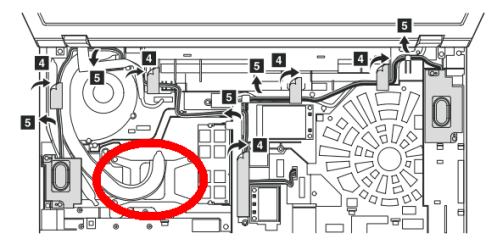
Fan #1: You are calling this the secondary one; the only fan I have been able to find, the one that seems to only run when CPU usage is very high. Visible when you take off the keyboard; shown in photo and labeled "5" in diagram; CPU is circled in red.

Fan #2: You are calling this the CPU fan; I have been unable to find it. Would make the most sense that this is running all the time and you would think the noise is due to dust but that's just my hunch.
 

Attachments

  • fan 1.jpg
    fan 1.jpg
    126.7 KB · Views: 1
  • fan2b.png
    fan2b.png
    21 KB · Views: 27

My Computer My Computer

At a glance

7 Pro 64Intel Core i5-2540M 2.6 GHz6 GB RAM
Computer type
Laptop
Computer Manufacturer/Model Number
Lenovo Thinkpad T520
OS
7 Pro 64
CPU
Intel Core i5-2540M 2.6 GHz
Memory
6 GB RAM
Hard Drives
1 Tb
I once had a wire that when I closed my pc case it would slightly rub against a fan.
It drove me crazy because when I took off the case side the wire would not rub on the fan...

It may not help but may be worth checking anyway..
 

My Computer My Computer

At a glance

Windows 7 64 bit
OS
Windows 7 64 bit
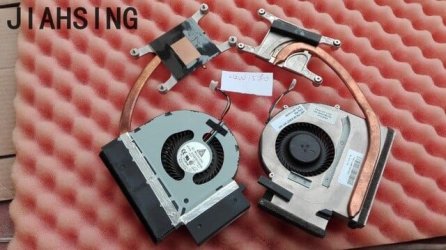
Item #5 in your pic is indeed the cpu fan and its connected to the cpu by the curved copper heatpipe. So now I think your noise must be the hard drive. You can test this by setting a HDD idle time in Power Options Advanced power settings, or this or another utility may be able to spin down the HDD on demand so you can see if the noise stops

Download HDDScan for Windows - MajorGeeks
 

Attachments

  • s-l1600.jpg
    s-l1600.jpg
    43.9 KB · Views: 23

My Computer My Computer

At a glance

Win7 pro x64stock i7 7700kCorsair Vengeance LPX 16GB (2x8GB) DDR4 @ 320...integrated Intel HD 630
Computer type
PC/Desktop
Computer Manufacturer/Model Number
diy
OS
Win7 pro x64
CPU
stock i7 7700k
Motherboard
Gigabyte Z270N-WIFI mini-ITX
Memory
Corsair Vengeance LPX 16GB (2x8GB) DDR4 @ 3200MHz
Graphics Card(s)
integrated Intel HD 630
Sound Card
onboard Realtek ALC1220
Monitor(s) Displays
two vertically mounted samsung 55" 4k un55mu8000
Screen Resolution
1920x1280
Hard Drives
256GB Samsung EVO 960 M.2 pci-e NVMe SSD
PSU
SilverStone Nightjar ST45NF 450Watt Fanless
Case
No case. Motherboard is mounted directly onto power supply
Cooling
Evercool low profile 815EP with Panaflow 12L fan at 7v
Keyboard
Ortek MCK-86 mini
Mouse
Belkin 5-button USB
Internet Speed
spectrum 400mbps
The computer doesn't need a HDD with a OS to boot.
You can take out the HDD and boot into BIOS, or even better, to a Linux from a USB flash disk. Is just to check if the noise comes out from the HDD.

The fan on the image is the CPU fan.

CPU = Central Processing Unit
GPU = Graphics Processing Unit
 

My Computers My Computers

  • At a glance

    Windows 7 HP 64i5 6600K - 800MHz to 4200MHz4+4G GSkill DDR4 3000IG - Intel 530
    Computer type
    PC/Desktop
    Computer Manufacturer/Model Number
    custom build
    OS
    Windows 7 HP 64
    CPU
    i5 6600K - 800MHz to 4200MHz
    Motherboard
    GA-Z170-HD3P
    Memory
    4+4G GSkill DDR4 3000
    Graphics Card(s)
    IG - Intel 530
    Monitor(s) Displays
    Samsung 226BW
    Screen Resolution
    1680x1050
    Hard Drives
    (1) -1 SM951 – 128GB M.2 AHCI PCIe SSD drive for Windows 7 and Lubuntu
    (2) -1 WD SATA 3 - 1T for Data
    (3) -1 WD SATA 3 - 1T for backup
    PSU
    Thermaltake 450W TR2 gold
    Keyboard
    Old and good Chicony mechanical keyboard
    Mouse
    Logitech mX performance - 9 buttons (had to disable some)
    Internet Speed
    500Mb/s
    Browser
    Firefox 64
    Other Info
    TinyWall firewall
  • At a glance

    Windows 7 Proi7-4500U 800MHz to 3.0GHz(4+4)G DDR3 1600IG intel 4400 + NVIDIA GeForce GT 745M
    Computer type
    Laptop
    System Manufacturer/Model Number
    Asus Q550LF
    OS
    Windows 7 Pro
    CPU
    i7-4500U 800MHz to 3.0GHz
    Motherboard
    Asus Q550LF
    Memory
    (4+4)G DDR3 1600
    Graphics Card(s)
    IG intel 4400 + NVIDIA GeForce GT 745M
    Sound Card
    Realtek
    Monitor(s) Displays
    LG Display LP156WF4-SPH1
    Screen Resolution
    1920 x 1080
    Hard Drives
    BX500 120G SSD for Windows and programs +
    1T HDD for data
    Internet Speed
    500 Mb/s
    Browser
    Firefox
    Other Info
    TinyWall firewall
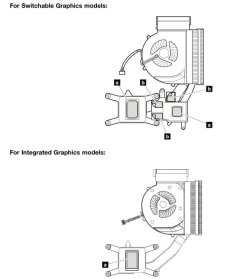
From the manual, some T520 models come with a cpu-integrated gpu and some come with a separate nvidia gpu, but in each case they connect to the heatpipe and use just the one main fan you are seeing. I'm now thinking its the only fan, and my earlier comment that the fan never turns off is incorrect.
 

Attachments

  • Clipboard01.jpg
    Clipboard01.jpg
    30.6 KB · Views: 0

My Computer My Computer

At a glance

Win7 pro x64stock i7 7700kCorsair Vengeance LPX 16GB (2x8GB) DDR4 @ 320...integrated Intel HD 630
Computer type
PC/Desktop
Computer Manufacturer/Model Number
diy
OS
Win7 pro x64
CPU
stock i7 7700k
Motherboard
Gigabyte Z270N-WIFI mini-ITX
Memory
Corsair Vengeance LPX 16GB (2x8GB) DDR4 @ 3200MHz
Graphics Card(s)
integrated Intel HD 630
Sound Card
onboard Realtek ALC1220
Monitor(s) Displays
two vertically mounted samsung 55" 4k un55mu8000
Screen Resolution
1920x1280
Hard Drives
256GB Samsung EVO 960 M.2 pci-e NVMe SSD
PSU
SilverStone Nightjar ST45NF 450Watt Fanless
Case
No case. Motherboard is mounted directly onto power supply
Cooling
Evercool low profile 815EP with Panaflow 12L fan at 7v
Keyboard
Ortek MCK-86 mini
Mouse
Belkin 5-button USB
Internet Speed
spectrum 400mbps
Just to check, take out the HDD and boot the laptop, Enter BIOS and see if the noise persists.

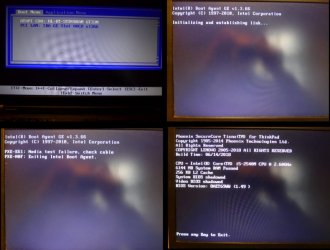
Great, thanks. I took out the HDD and rebooted, resulting in the following screens, I don't know if I was actually in the BIOS but anyway the noise was gone.

Then I rebooted with Linux on a USB stick; the noise was there when the HDD was in and gone when the HDD was removed. It wasn't the complete Linux OS, it was a sort of demo (not sure what the right word is) with desktop and programs that someone gave me but I don't imagine this matters for the current issue.
 

Attachments

  • boot screenshot.jpg
    boot screenshot.jpg
    68.9 KB · Views: 0

My Computer My Computer

At a glance

7 Pro 64Intel Core i5-2540M 2.6 GHz6 GB RAM
Computer type
Laptop
Computer Manufacturer/Model Number
Lenovo Thinkpad T520
OS
7 Pro 64
CPU
Intel Core i5-2540M 2.6 GHz
Memory
6 GB RAM
Hard Drives
1 Tb
You can test this by setting a HDD idle time in Power Options Advanced power settings, or HDDScan or another utility may be able to spin down the HDD on demand so you can see if the noise stops


Thanks. I did both your suggestions, none of them stop the noise:

1) In Windows > Power Options > set hard disk to turn off after 1 minute

2) HDDScan lets you decrease the spindle rotation speed when drive is idling as well as stop it immediately. Neither had any effect on the noise. I wonder if it's really slowing/stopping though because wouldn't you hear a change in the sound if it was?

It seems I would need is a program that shows the actual current rotation speed. Is there such a thing? I tried searching around and can only find the many programs for testing whether a HDD is read/writing accurately which so far I have had no problem with at all.
 

My Computer My Computer

At a glance

7 Pro 64Intel Core i5-2540M 2.6 GHz6 GB RAM
Computer type
Laptop
Computer Manufacturer/Model Number
Lenovo Thinkpad T520
OS
7 Pro 64
CPU
Intel Core i5-2540M 2.6 GHz
Memory
6 GB RAM
Hard Drives
1 Tb
Thanks. I did both your suggestions, none of them stop the noise:

1) In Windows > Power Options > set hard disk to turn off after 1 minute

2) HDDScan lets you decrease the spindle rotation speed when drive is idling as well as stop it immediately. Neither had any effect on the noise. I wonder if it's really slowing/stopping though because wouldn't you hear a change in the sound if it was?

It seems I would need is a program that shows the actual current rotation speed. Is there such a thing? I tried searching around and can only find the many programs for testing whether a HDD is read/writing accurately which so far I have had no problem with at all.
The fact that you are trying to spin down the boot drive is the difficulty here. I am not aware of a reliable way to do it nor am I aware of a utility that does what you ask. Sorry
 

My Computer My Computer

At a glance

Win7 pro x64stock i7 7700kCorsair Vengeance LPX 16GB (2x8GB) DDR4 @ 320...integrated Intel HD 630
Computer type
PC/Desktop
Computer Manufacturer/Model Number
diy
OS
Win7 pro x64
CPU
stock i7 7700k
Motherboard
Gigabyte Z270N-WIFI mini-ITX
Memory
Corsair Vengeance LPX 16GB (2x8GB) DDR4 @ 3200MHz
Graphics Card(s)
integrated Intel HD 630
Sound Card
onboard Realtek ALC1220
Monitor(s) Displays
two vertically mounted samsung 55" 4k un55mu8000
Screen Resolution
1920x1280
Hard Drives
256GB Samsung EVO 960 M.2 pci-e NVMe SSD
PSU
SilverStone Nightjar ST45NF 450Watt Fanless
Case
No case. Motherboard is mounted directly onto power supply
Cooling
Evercool low profile 815EP with Panaflow 12L fan at 7v
Keyboard
Ortek MCK-86 mini
Mouse
Belkin 5-button USB
Internet Speed
spectrum 400mbps

My Computer My Computer

At a glance

7 Pro 64Intel Core i5-2540M 2.6 GHz6 GB RAM
Computer type
Laptop
Computer Manufacturer/Model Number
Lenovo Thinkpad T520
OS
7 Pro 64
CPU
Intel Core i5-2540M 2.6 GHz
Memory
6 GB RAM
Hard Drives
1 Tb
Great, thanks. I took out the HDD and rebooted, resulting in the following screens, I don't know if I was actually in the BIOS but anyway the noise was gone.

Then I rebooted with Linux on a USB stick; the noise was there when the HDD was in and gone when the HDD was removed. It wasn't the complete Linux OS, it was a sort of demo (not sure what the right word is) with desktop and programs that someone gave me but I don't imagine this matters for the current issue.

Despite of everyone thoughts, it isn't a fan. The noise comes from the HDD.

Buy a SSD and clone your HDD to it. You can't imagine the performance improvement a SSD can do on your computer.

I have bought some of these. So far so good.
Crucial BX500 2.5" 480GB SATA III 3D NAND Internal Solid State Drive (SSD) CT480BX500SSD1 - Newegg.com
 

My Computers My Computers

  • At a glance

    Windows 7 HP 64i5 6600K - 800MHz to 4200MHz4+4G GSkill DDR4 3000IG - Intel 530
    Computer type
    PC/Desktop
    Computer Manufacturer/Model Number
    custom build
    OS
    Windows 7 HP 64
    CPU
    i5 6600K - 800MHz to 4200MHz
    Motherboard
    GA-Z170-HD3P
    Memory
    4+4G GSkill DDR4 3000
    Graphics Card(s)
    IG - Intel 530
    Monitor(s) Displays
    Samsung 226BW
    Screen Resolution
    1680x1050
    Hard Drives
    (1) -1 SM951 – 128GB M.2 AHCI PCIe SSD drive for Windows 7 and Lubuntu
    (2) -1 WD SATA 3 - 1T for Data
    (3) -1 WD SATA 3 - 1T for backup
    PSU
    Thermaltake 450W TR2 gold
    Keyboard
    Old and good Chicony mechanical keyboard
    Mouse
    Logitech mX performance - 9 buttons (had to disable some)
    Internet Speed
    500Mb/s
    Browser
    Firefox 64
    Other Info
    TinyWall firewall
  • At a glance

    Windows 7 Proi7-4500U 800MHz to 3.0GHz(4+4)G DDR3 1600IG intel 4400 + NVIDIA GeForce GT 745M
    Computer type
    Laptop
    System Manufacturer/Model Number
    Asus Q550LF
    OS
    Windows 7 Pro
    CPU
    i7-4500U 800MHz to 3.0GHz
    Motherboard
    Asus Q550LF
    Memory
    (4+4)G DDR3 1600
    Graphics Card(s)
    IG intel 4400 + NVIDIA GeForce GT 745M
    Sound Card
    Realtek
    Monitor(s) Displays
    LG Display LP156WF4-SPH1
    Screen Resolution
    1920 x 1080
    Hard Drives
    BX500 120G SSD for Windows and programs +
    1T HDD for data
    Internet Speed
    500 Mb/s
    Browser
    Firefox
    Other Info
    TinyWall firewall
Back
Top