Solved Far Cry

travisbickle

New member
Local time
12:59 AM
Messages
3
Hey all
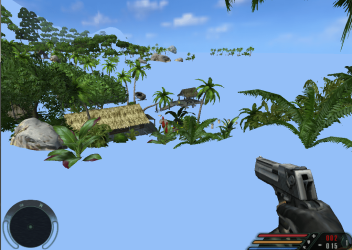
I have the obvious problem with Far Cry, yes it is blue almost everywhere.

I just installed the game and started off in the sewer where everything is fine, until i get outside where the beach is and the ground is blue and the water is blue.

What can i do to fix this problem?
Every other game works fine, expect Scarface which i have to change the msconfig, to get that working, but other than that all of my other games work fine.

I know vista has this problem too.

Is there a patch or something?
 

My Computer

OS
Windows 7
CPU
Intel Core i5 processor
Memory
4GB
Graphics Card(s)
NVIDIA GEFORCE 320M 1GB
Other Info
its a laptop

My Computer

Computer type
PC/Desktop
Computer Manufacturer/Model Number
Custom Build
OS
Windows 10 Pro x64, Arch Linux
CPU
Intel Core 2 Quad Q8200 OC'd 3.08GHz
Motherboard
Asus Rampage formula LGA775
Memory
8GB DDR2 900Mhz
Graphics Card(s)
MSI GT730 2GB GDDR5 (Kepler)
Sound Card
Supreme FX2
Monitor(s) Displays
Samsung LS22F350 LED
Screen Resolution
1080P
Hard Drives
Kingston SSDNow UV400 120GB, 500GB Hitachi, 2TB Samsung, 500GB Seagate FreeAgent, 640GB Samsung, 160GB Toshiba (Arch)
PSU
AeroCool 500W Bronze
Cooling
Cooler Master V6 + 3X fans
Keyboard
Prolink keyboard
Mouse
Logitech M705
Internet Speed
1MiB/s
Browser
Chrome Beta
You should definitely update your GPU drivers just in case, although I am certain that, in my case, drivers had nothing to do with this issue.

Last time I tried to play it I had the same experience as you, I poked around video settings but I can't remember exactly what I had turned off. Try to find any graphics settings for "fog" and/or "water" and turn them off completely, that helped me play.
 

My Computer

Computer type
Laptop
Computer Manufacturer/Model Number
Custom
OS
Windows 7 Home Premium x64
CPU
Intel Core i5 2500K
Motherboard
MSI MS-7750
Memory
8GB DDR3
Graphics Card(s)
nVidia GeForce GTX650 Ti BOOST
Sound Card
Realtek
Monitor(s) Displays
21' Philips
Screen Resolution
Full HD
Hard Drives
1TB
PSU
500W
I've had the same issue until I updated/patched it to version 1.4 and the problem disappeared. I'll try it just now as I have the game so I can report 100% for you :)


OS
 

My Computer

Computer Manufacturer/Model Number
Compaq Desktop
OS
Windows 7 Ultimate x64
CPU
AMD Sempron Dual Core
Memory
3GB
Graphics Card(s)
NVIDIA GeForce 6150SE nForce 430
Screen Resolution
1024x768
Hard Drives
150GB Sata
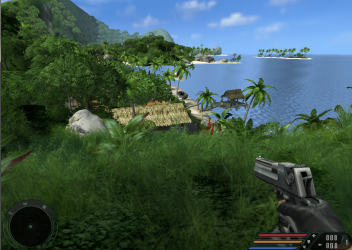
I've just finished installing the game. I have run it before the patch and after patching to version 1.4 and can confirm that it does solve the problem.

Before applying patch
Farcry - Before Patch.PNG

After applying patch
Farcry - After Patch.PNG

I advise the Farcry 1.4 cumulative patch @ 180MB
Ubisoft - Far Cry


OS
 

My Computer

Computer Manufacturer/Model Number
Compaq Desktop
OS
Windows 7 Ultimate x64
CPU
AMD Sempron Dual Core
Memory
3GB
Graphics Card(s)
NVIDIA GeForce 6150SE nForce 430
Screen Resolution
1024x768
Hard Drives
150GB Sata
Good one, mate.
 

My Computer

Computer type
Laptop
Computer Manufacturer/Model Number
Custom
OS
Windows 7 Home Premium x64
CPU
Intel Core i5 2500K
Motherboard
MSI MS-7750
Memory
8GB DDR3
Graphics Card(s)
nVidia GeForce GTX650 Ti BOOST
Sound Card
Realtek
Monitor(s) Displays
21' Philips
Screen Resolution
Full HD
Hard Drives
1TB
PSU
500W
far_cry_v1.4_cumulative installation stuck

Dear friends...
i try to install "far_cry_v1.4_cumulative". During instalation process i stucked one place. when i click next it will return to same screen... i attached image and help me to resolve this...thank you..
 

Attachments

  • Untitled.png
    Untitled.png
    10.7 KB · Views: 38

My Computer

OS
windows 7 home basic 64 bit
Make sure the destination folder of the patch matches the install dir, and by the way, what an awesome game :D
 

My Computer

Computer type
PC/Desktop
OS
Microsoft Windows 10 Professional / Windows 7 Professional
CPU
Intel i5-3570
Motherboard
Lenovo Mahobay
Memory
16GB DDR3
Graphics Card(s)
AMD Radeon HD 7850 2GB
Sound Card
(1) Realtek HD Audio (2) AMD HD Audio
Monitor(s) Displays
LG LS192WS
Screen Resolution
1440 x 900 @ 32bit color
Hard Drives
(1) SUV300S37A/120G (2) ST3500413AS SATA Disk Device AHCI mode enabled.
PSU
Corsair HX620
Case
Thermaltake V4 Black Edition
Cooling
Cooler Master Hyper 212 + Artic Silver 5 on CPU/GPU
Keyboard
Dell SK-8115
Mouse
Razer Copperhead with MAPED mat (awesome!)
Internet Speed
100 Mbps up/down
Browser
Chrome
I had the same problem, patch sorted it all out...
 

My Computer

Computer type
PC/Desktop
Computer Manufacturer/Model Number
Own build
OS
Windows 7 x64 Professional
CPU
Intel Core i7-870 Lynnfield 2.93 GHz
Motherboard
Intel Whitesburg P55 LGA1156
Memory
Kingston Hyper X 1333MHz DDR3 4x4Gb
Graphics Card(s)
Nvidia GTS 250
Monitor(s) Displays
AOC Q3279VWF 31.5"
Screen Resolution
2560x1440
Hard Drives
Western Digital 1000GB Hard Drive (SATA 3.0Gb/s, 7200rpm, 32MB Cache)
Verbatim 500GB (External)
PSU
650W
Case
Coolermaster HAF 912
Cooling
Stock
Keyboard
Logitech
Mouse
Logitech
Antivirus
Avira
Browser
Firefox
Other Info
LG OptDrive 24x SATA DVDRW Lightscribe
"Problem in FAR CRY"

thanks dudes...
my installation directory is "C:\Program Files (x86)\Far Cry"
but when i point that directory,its same thing happen...
i agree..its awsome game...but with this problem it is very boring to play...
:(

plz,,,,help me...
thanks
 

My Computer

OS
windows 7 home basic 64 bit
Run the update installer as administrator /right click, etc
 

My Computer

Computer type
PC/Desktop
OS
Microsoft Windows 10 Professional / Windows 7 Professional
CPU
Intel i5-3570
Motherboard
Lenovo Mahobay
Memory
16GB DDR3
Graphics Card(s)
AMD Radeon HD 7850 2GB
Sound Card
(1) Realtek HD Audio (2) AMD HD Audio
Monitor(s) Displays
LG LS192WS
Screen Resolution
1440 x 900 @ 32bit color
Hard Drives
(1) SUV300S37A/120G (2) ST3500413AS SATA Disk Device AHCI mode enabled.
PSU
Corsair HX620
Case
Thermaltake V4 Black Edition
Cooling
Cooler Master Hyper 212 + Artic Silver 5 on CPU/GPU
Keyboard
Dell SK-8115
Mouse
Razer Copperhead with MAPED mat (awesome!)
Internet Speed
100 Mbps up/down
Browser
Chrome
dimuth, it says 32 bit only
 

My Computer

OS
Windows 7 Ultimate x86, Windows 7 Ultimate x64
Back
Top