
Fastest sharing method over lan

cclloyd9785

Master of Technology
What sharing method that I can map it as a network drive has the fastest transfer speeds? I only need it to be shared over my LAN, for any outside access I will use a VPN from the same computer that is hosting the drive.

There's a 3TB drive in the desktop that I want to be able to share to other computers (both mac, PC, and iPhone) over my LAN and have it show up for them in My Computer.

So what method has the fastest transfer rates? I tried SMB but It only fluctuated between 2MB/s and 500KB/sec, but that was only with a 10/100 ethernet card. Would getting a gigabit card speed this up to at least 6MB/s minimum?

FYI I also enabled it to have FTP access for easy use with XBMC.
 

My Computer

Computer Manufacturer/Model Number
Toshiba Satellite L505D-S9565
OS
Windows 7 Home Premium x64, Mac OS X 10.6.2 x64
CPU
AMD Athlon X2 Dual-Core 2.1 GHz
Motherboard
Toshiba Built-In with Insyde H20 BIOS 1.40
Memory
4 GB DDR2 800 MHz
Graphics Card(s)
ATI Radeon HD Mobility 3100 Graphics 256MB to 1468 MB Shared
Sound Card
Realtek Mobile ALC272 HD Audio
Monitor(s) Displays
15.6" TFT LCD with TruBrite, Samsung 1080p HDTV
Screen Resolution
1366x768, 1920x1080
Hard Drives
❶:Main: Toshiba 250 GB SATA 5400 RPM
PSU
N/A
Case
N/A
Cooling
Built-in/Open window in winter :P
Keyboard
Built-in
Mouse
Build-in Symantics SmartTouch Pad
Internet Speed
55 MB/sec Down, 9 MB/sec Up
Other Info
❷:Backup: Seagate FreeAgent Desk USB 2.0 5400 RPM
❸:Media: Toshiba 640 GB USB 2.0 5400 RPM Portable Edition
Random question: Does the speed of our comcast internet matter, or does it use the full speed between my devices.

Map:
Since it only stays in the top 3, does that mean my internet speed is irrelavent and should have 300mbps or 37MB/s transfer speed (max of 802.11n) when transffering to and from the drive on my LAN?

AND when transffering from somewhere else with VPN the transfer limit is whichever of the two (random or ours) is the slowest?
Untitled-1.png
 

My Computer

Computer Manufacturer/Model Number
Toshiba Satellite L505D-S9565
OS
Windows 7 Home Premium x64, Mac OS X 10.6.2 x64
CPU
AMD Athlon X2 Dual-Core 2.1 GHz
Motherboard
Toshiba Built-In with Insyde H20 BIOS 1.40
Memory
4 GB DDR2 800 MHz
Graphics Card(s)
ATI Radeon HD Mobility 3100 Graphics 256MB to 1468 MB Shared
Sound Card
Realtek Mobile ALC272 HD Audio
Monitor(s) Displays
15.6" TFT LCD with TruBrite, Samsung 1080p HDTV
Screen Resolution
1366x768, 1920x1080
Hard Drives
❶:Main: Toshiba 250 GB SATA 5400 RPM
PSU
N/A
Case
N/A
Cooling
Built-in/Open window in winter :P
Keyboard
Built-in
Mouse
Build-in Symantics SmartTouch Pad
Internet Speed
55 MB/sec Down, 9 MB/sec Up
Other Info
❷:Backup: Seagate FreeAgent Desk USB 2.0 5400 RPM
❸:Media: Toshiba 640 GB USB 2.0 5400 RPM Portable Edition
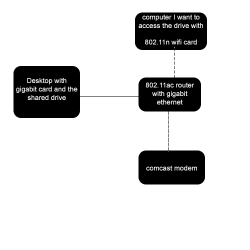
The WAN speeds wont matter over LAN because the traffic never touches the device. The VPN on the other hand will touch it and effect your speeds. Max speed will always be your slowest device. NIC, hard drive, etc.....

Remember when your connecting to the VPN your going off the upload speed of your WAN and the download speed of the connection holding the VPN. Upload will probably be slower.
 

My Computer

OS
Windows 7 Ultimate x64
Well if 100mbps is about 12MB/s, why when I try to copy to the drive I have now on a 100mbps connection does it only transfer at 200-500KB/s? I get 6-10MB/s down but only .2-.5MB/s uploading to it. This is all inclusive on my LAN.
 

My Computer

Computer Manufacturer/Model Number
Toshiba Satellite L505D-S9565
OS
Windows 7 Home Premium x64, Mac OS X 10.6.2 x64
CPU
AMD Athlon X2 Dual-Core 2.1 GHz
Motherboard
Toshiba Built-In with Insyde H20 BIOS 1.40
Memory
4 GB DDR2 800 MHz
Graphics Card(s)
ATI Radeon HD Mobility 3100 Graphics 256MB to 1468 MB Shared
Sound Card
Realtek Mobile ALC272 HD Audio
Monitor(s) Displays
15.6" TFT LCD with TruBrite, Samsung 1080p HDTV
Screen Resolution
1366x768, 1920x1080
Hard Drives
❶:Main: Toshiba 250 GB SATA 5400 RPM
PSU
N/A
Case
N/A
Cooling
Built-in/Open window in winter :P
Keyboard
Built-in
Mouse
Build-in Symantics SmartTouch Pad
Internet Speed
55 MB/sec Down, 9 MB/sec Up
Other Info
❷:Backup: Seagate FreeAgent Desk USB 2.0 5400 RPM
❸:Media: Toshiba 640 GB USB 2.0 5400 RPM Portable Edition
Again it's about finding the bottleneck, and other traffic that might be going over the network.

The speeds your talking about are theoretical speeds.
 

My Computer

OS
Windows 7 Ultimate x64
I don't think there's a bottleneck.

I set up the desktop as an ftp server, and transffered a 50MB video, and transffered at 10-15MB/s. I tried transffering the same video to the same spot with smb shares and only got .5-2.5MB/s. How can I speed that up?
 

My Computer

Computer Manufacturer/Model Number
Toshiba Satellite L505D-S9565
OS
Windows 7 Home Premium x64, Mac OS X 10.6.2 x64
CPU
AMD Athlon X2 Dual-Core 2.1 GHz
Motherboard
Toshiba Built-In with Insyde H20 BIOS 1.40
Memory
4 GB DDR2 800 MHz
Graphics Card(s)
ATI Radeon HD Mobility 3100 Graphics 256MB to 1468 MB Shared
Sound Card
Realtek Mobile ALC272 HD Audio
Monitor(s) Displays
15.6" TFT LCD with TruBrite, Samsung 1080p HDTV
Screen Resolution
1366x768, 1920x1080
Hard Drives
❶:Main: Toshiba 250 GB SATA 5400 RPM
PSU
N/A
Case
N/A
Cooling
Built-in/Open window in winter :P
Keyboard
Built-in
Mouse
Build-in Symantics SmartTouch Pad
Internet Speed
55 MB/sec Down, 9 MB/sec Up
Other Info
❷:Backup: Seagate FreeAgent Desk USB 2.0 5400 RPM
❸:Media: Toshiba 640 GB USB 2.0 5400 RPM Portable Edition
I think what Parman meant by bottleneck is that while you may have a gigabit NIC, cat5e cables, a gigabit router/switch, and an 802.11n connection, you'll never see the max speeds of any of those during a file transfer, because you can only read from the drive at a certain speed and you can only write to it at a certain speed. So in terms of hardware, your hard drive is definitely the bottleneck, because it has the slowest transfer rates. To increase this, you would need to upgrade to solid state drives (Not just on your network share, but your local machines as well. Remember that while you're reading from the remote drive, you're writing to the local, and vice versa. You'll need to upgrade both to effectively eliminate the bottleneck effect from your hard drives.)

As far as software bottlenecks go (the network traffic load, protocol, etc), I think you just found yours. FTP is renowned as a very low overhead protocol. I think you may have to search out another sharing option that can perform on par if you don't want to go with FTP.
 

My Computer

Computer Manufacturer/Model Number
Always changing!
OS
Windows 7/8/8.1 x64 &&& Debian-Based Linux
CPU
Always AMD
Motherboard
Always Asus
Memory
Always G-Skill
Graphics Card(s)
Always ATi/AMD
Internet Speed
Never fast enough
Antivirus
MBAM, MBAR, MBAE, Outpost (WinDefender Disabled)
Browser
Firefox w/plugins galore
Back
Top