
Hi all,
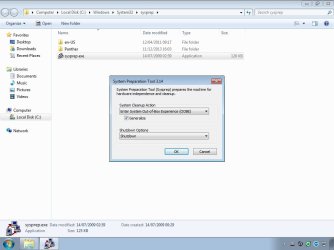
I am trying to run Sysprep on a custom image that I have created. I ran the sysprep.exe from c:\Windows\System32\sysprep and used the OOBE and Generalize commands. I then selected shutdown for once the sysprep was complete.
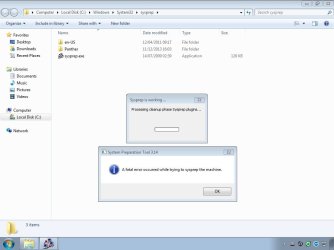
After clicking on Ok the kick off the sysprep, almost immediately an error occurred. The error read:
"A fatal error occurred while trying to sysprep the machine."
Clicking Ok on the message simply takes me back to the sysprep folder with everything as it was.
After reading various forums, websites, blogs etc I have already tried the following suggestions but to no joy:
- stop the Windows Media Player Network Sharing service
- change the HKLM\System\Setup\Status\SysprepStaus registry file but amending the CleanupState to 2 and the GeneralizationState to 7
- unplug the network cable
- uninstall internet explorer
A lot of other suggestions were that I may have exceeded the realm count, which is not the case as this was a clean installation of windows only yesterday using the cd media.
Here are the sysprep log files (found in the c:\windows\system32\sysprep\panther folder)
setupact.log
2013-12-11 16:03:03, Info SYSPRP ========================================================
2013-12-11 16:03:03, Info SYSPRP === Beginning of a new sysprep run ===
2013-12-11 16:03:03, Info SYSPRP ========================================================
2013-12-11 16:03:03, Info [0x0f004d] SYSPRP The time is now 2013-12-11 16:03:03
2013-12-11 16:03:03, Info [0x0f004e] SYSPRP Initialized SysPrep log at C:\Windows\System32\sysprep\Panther
2013-12-11 16:03:03, Info [0x0f0054] SYSPRP ValidateUser:User has required privileges to sysprep machine
2013-12-11 16:03:03, Info [0x0f007e] SYSPRP FCreateTagFile:Tag file C:\Windows\System32\sysprep\Sysprep_succeeded.tag does not already exist, no need to delete anything
2013-12-11 16:03:04, Info [0x0f003d] SYSPRP WinMain: Displaying dialog box for user to choose sysprep mode...
2013-12-11 16:03:09, Info [0x0f004a] SYSPRP WaitThread:Entering spawned waiting thread
2013-12-11 16:03:09, Info SYSPRP SysprepSearchForUnattend: No unattend file was specified or located; skipping unattend generalize pass.
2013-12-11 16:03:09, Info [0x0f00ac] SYSPRP WinMain rocessing 'cleanup' external provider request.
2013-12-11 16:03:09, Info [0x0f006c] SYSPRP RunExternalDlls:Running DLLs listed in registry for phase 3
2013-12-11 16:03:09, Info [0x0f008a] SYSPRP RunRegistryDlls:Retrieved section name for this phase as Cleanup
2013-12-11 16:03:09, Warning [0x0f008f] SYSPRP RunRegistryDlls:Registry key is either empty or malformed: SOFTWARE\Microsoft\Windows\CurrentVersion\Setup\SysPrepExternal\Cleanup
2013-12-11 16:03:09, Info [0x0f00ad] SYSPRP WinMainrocessing 'generalize' extrenal provider request.
2013-12-11 16:03:09, Info [0x0f006c] SYSPRP RunExternalDlls:Running DLLs listed in registry for phase 1
2013-12-11 16:03:09, Info [0x0f008a] SYSPRP RunRegistryDlls:Retrieved section name for this phase as Generalize
2013-12-11 16:03:09, Warning [0x0f008f] SYSPRP RunRegistryDlls:Registry key is either empty or malformed: SOFTWARE\Microsoft\Windows\CurrentVersion\Setup\SysPrepExternal\Generalize
2013-12-11 16:03:09, Info [0x0f003f] SYSPRP WinMainrocessing 'cleanup' internal provider request.
2013-12-11 16:03:09, Info [0x0f006c] SYSPRP RunExternalDlls:Running DLLs listed in registry for phase 3
2013-12-11 16:03:09, Info [0x0f008a] SYSPRP RunRegistryDlls:Retrieved section name for this phase as Cleanup
2013-12-11 16:03:09, Info [0x0f008b] SYSPRP RunRegistryDlls:Found entrypoint in registry at SOFTWARE\Microsoft\Windows\CurrentVersion\Setup\SysPrep\Cleanup\{67196725-a666-73a6-a048-412e48a3b856}; will try to launch 'C:\Windows\System32\spopk.dll,Sysprep_Clean_Opk'
2013-12-11 16:03:09, Info [0x0f0080] SYSPRP LaunchDll:Found 'C:\Windows\System32\spopk.dll,Sysprep_Clean_Opk'; executing it
2013-12-11 16:03:09, Info [0x0f0081] SYSPRP LaunchDll:Successfully executed 'C:\Windows\System32\spopk.dll,Sysprep_Clean_Opk' without error
2013-12-11 16:03:09, Info [0x0f008b] SYSPRP RunRegistryDlls:Found entrypoint in registry at SOFTWARE\Microsoft\Windows\CurrentVersion\Setup\SysPrep\Cleanup\{1e7f4452-a4b4-5a32-d01e-70397b096ced}; will try to launch 'sqmapi.dll,SqmSysprepCleanup'
2013-12-11 16:03:09, Info [0x0f0080] SYSPRP LaunchDll:Found 'sqmapi.dll,SqmSysprepCleanup'; executing it
2013-12-11 16:03:09, Info [0x0f0081] SYSPRP LaunchDll:Successfully executed 'sqmapi.dll,SqmSysprepCleanup' without error
2013-12-11 16:03:09, Info [0x0f008b] SYSPRP RunRegistryDlls:Found entrypoint in registry at SOFTWARE\Microsoft\Windows\CurrentVersion\Setup\SysPrep\Cleanup\{2c8a362b-4dc1-38b9-c4d8-ce732ddcc48e}; will try to launch 'C:\Windows\System32\wevtapi.dll,EvtIntSysprepCleanup'
2013-12-11 16:03:09, Info [0x0f0080] SYSPRP LaunchDll:Found 'C:\Windows\System32\wevtapi.dll,EvtIntSysprepCleanup'; executing it
2013-12-11 16:03:09, Error [0x0f0082] SYSPRP LaunchDll:Failure occurred while executing 'C:\Windows\System32\wevtapi.dll,EvtIntSysprepCleanup', returned error code 4201[gle=0x00001069]
2013-12-11 16:03:09, Error [0x0f0070] SYSPRP RunExternalDlls:An error occurred while running registry sysprep DLLs, halting sysprep execution. dwRet = 4201[gle=0x00001069]
2013-12-11 16:03:09, Error [0x0f00a8] SYSPRP WinMain:Hit failure while processing sysprep cleanup providers; hr = 0x80071069[gle=0x00001069]
2013-12-11 16:03:15, Info [0x0f004c] SYSPRP WaitThread:Exiting spawned waiting thread
2013-12-11 16:03:15, Info [0x0f0052] SYSPRP Shutting down SysPrep log
2013-12-11 16:03:15, Info [0x0f004d] SYSPRP The time is now 2013-12-11 16:03:15
setuperr.log
2013-12-11 16:03:09, Error [0x0f0082] SYSPRP LaunchDll:Failure occurred while executing 'C:\Windows\System32\wevtapi.dll,EvtIntSysprepCleanup', returned error code 4201[gle=0x00001069]
2013-12-11 16:03:09, Error [0x0f0070] SYSPRP RunExternalDlls:An error occurred while running registry sysprep DLLs, halting sysprep execution. dwRet = 4201[gle=0x00001069]
2013-12-11 16:03:09, Error [0x0f00a8] SYSPRP WinMain:Hit failure while processing sysprep cleanup providers; hr = 0x80071069[gle=0x00001069]
As mentioned, I have hit the web for answers using the error codes found in these log files but to no joy. Hopefully somebody may be able to help!
I have attached the log files and images of my sysprep settings along with error.
Thanks
James
I am trying to run Sysprep on a custom image that I have created. I ran the sysprep.exe from c:\Windows\System32\sysprep and used the OOBE and Generalize commands. I then selected shutdown for once the sysprep was complete.
After clicking on Ok the kick off the sysprep, almost immediately an error occurred. The error read:
"A fatal error occurred while trying to sysprep the machine."
Clicking Ok on the message simply takes me back to the sysprep folder with everything as it was.
After reading various forums, websites, blogs etc I have already tried the following suggestions but to no joy:
- stop the Windows Media Player Network Sharing service
- change the HKLM\System\Setup\Status\SysprepStaus registry file but amending the CleanupState to 2 and the GeneralizationState to 7
- unplug the network cable
- uninstall internet explorer
A lot of other suggestions were that I may have exceeded the realm count, which is not the case as this was a clean installation of windows only yesterday using the cd media.
Here are the sysprep log files (found in the c:\windows\system32\sysprep\panther folder)
setupact.log
2013-12-11 16:03:03, Info SYSPRP ========================================================
2013-12-11 16:03:03, Info SYSPRP === Beginning of a new sysprep run ===
2013-12-11 16:03:03, Info SYSPRP ========================================================
2013-12-11 16:03:03, Info [0x0f004d] SYSPRP The time is now 2013-12-11 16:03:03
2013-12-11 16:03:03, Info [0x0f004e] SYSPRP Initialized SysPrep log at C:\Windows\System32\sysprep\Panther
2013-12-11 16:03:03, Info [0x0f0054] SYSPRP ValidateUser:User has required privileges to sysprep machine
2013-12-11 16:03:03, Info [0x0f007e] SYSPRP FCreateTagFile:Tag file C:\Windows\System32\sysprep\Sysprep_succeeded.tag does not already exist, no need to delete anything
2013-12-11 16:03:04, Info [0x0f003d] SYSPRP WinMain: Displaying dialog box for user to choose sysprep mode...
2013-12-11 16:03:09, Info [0x0f004a] SYSPRP WaitThread:Entering spawned waiting thread
2013-12-11 16:03:09, Info SYSPRP SysprepSearchForUnattend: No unattend file was specified or located; skipping unattend generalize pass.
2013-12-11 16:03:09, Info [0x0f00ac] SYSPRP WinMain
rocessing 'cleanup' external provider request.2013-12-11 16:03:09, Info [0x0f006c] SYSPRP RunExternalDlls:Running DLLs listed in registry for phase 3
2013-12-11 16:03:09, Info [0x0f008a] SYSPRP RunRegistryDlls:Retrieved section name for this phase as Cleanup
2013-12-11 16:03:09, Warning [0x0f008f] SYSPRP RunRegistryDlls:Registry key is either empty or malformed: SOFTWARE\Microsoft\Windows\CurrentVersion\Setup\SysPrepExternal\Cleanup
2013-12-11 16:03:09, Info [0x0f00ad] SYSPRP WinMain
rocessing 'generalize' extrenal provider request.2013-12-11 16:03:09, Info [0x0f006c] SYSPRP RunExternalDlls:Running DLLs listed in registry for phase 1
2013-12-11 16:03:09, Info [0x0f008a] SYSPRP RunRegistryDlls:Retrieved section name for this phase as Generalize
2013-12-11 16:03:09, Warning [0x0f008f] SYSPRP RunRegistryDlls:Registry key is either empty or malformed: SOFTWARE\Microsoft\Windows\CurrentVersion\Setup\SysPrepExternal\Generalize
2013-12-11 16:03:09, Info [0x0f003f] SYSPRP WinMain
rocessing 'cleanup' internal provider request.2013-12-11 16:03:09, Info [0x0f006c] SYSPRP RunExternalDlls:Running DLLs listed in registry for phase 3
2013-12-11 16:03:09, Info [0x0f008a] SYSPRP RunRegistryDlls:Retrieved section name for this phase as Cleanup
2013-12-11 16:03:09, Info [0x0f008b] SYSPRP RunRegistryDlls:Found entrypoint in registry at SOFTWARE\Microsoft\Windows\CurrentVersion\Setup\SysPrep\Cleanup\{67196725-a666-73a6-a048-412e48a3b856}; will try to launch 'C:\Windows\System32\spopk.dll,Sysprep_Clean_Opk'
2013-12-11 16:03:09, Info [0x0f0080] SYSPRP LaunchDll:Found 'C:\Windows\System32\spopk.dll,Sysprep_Clean_Opk'; executing it
2013-12-11 16:03:09, Info [0x0f0081] SYSPRP LaunchDll:Successfully executed 'C:\Windows\System32\spopk.dll,Sysprep_Clean_Opk' without error
2013-12-11 16:03:09, Info [0x0f008b] SYSPRP RunRegistryDlls:Found entrypoint in registry at SOFTWARE\Microsoft\Windows\CurrentVersion\Setup\SysPrep\Cleanup\{1e7f4452-a4b4-5a32-d01e-70397b096ced}; will try to launch 'sqmapi.dll,SqmSysprepCleanup'
2013-12-11 16:03:09, Info [0x0f0080] SYSPRP LaunchDll:Found 'sqmapi.dll,SqmSysprepCleanup'; executing it
2013-12-11 16:03:09, Info [0x0f0081] SYSPRP LaunchDll:Successfully executed 'sqmapi.dll,SqmSysprepCleanup' without error
2013-12-11 16:03:09, Info [0x0f008b] SYSPRP RunRegistryDlls:Found entrypoint in registry at SOFTWARE\Microsoft\Windows\CurrentVersion\Setup\SysPrep\Cleanup\{2c8a362b-4dc1-38b9-c4d8-ce732ddcc48e}; will try to launch 'C:\Windows\System32\wevtapi.dll,EvtIntSysprepCleanup'
2013-12-11 16:03:09, Info [0x0f0080] SYSPRP LaunchDll:Found 'C:\Windows\System32\wevtapi.dll,EvtIntSysprepCleanup'; executing it
2013-12-11 16:03:09, Error [0x0f0082] SYSPRP LaunchDll:Failure occurred while executing 'C:\Windows\System32\wevtapi.dll,EvtIntSysprepCleanup', returned error code 4201[gle=0x00001069]
2013-12-11 16:03:09, Error [0x0f0070] SYSPRP RunExternalDlls:An error occurred while running registry sysprep DLLs, halting sysprep execution. dwRet = 4201[gle=0x00001069]
2013-12-11 16:03:09, Error [0x0f00a8] SYSPRP WinMain:Hit failure while processing sysprep cleanup providers; hr = 0x80071069[gle=0x00001069]
2013-12-11 16:03:15, Info [0x0f004c] SYSPRP WaitThread:Exiting spawned waiting thread
2013-12-11 16:03:15, Info [0x0f0052] SYSPRP Shutting down SysPrep log
2013-12-11 16:03:15, Info [0x0f004d] SYSPRP The time is now 2013-12-11 16:03:15
setuperr.log
2013-12-11 16:03:09, Error [0x0f0082] SYSPRP LaunchDll:Failure occurred while executing 'C:\Windows\System32\wevtapi.dll,EvtIntSysprepCleanup', returned error code 4201[gle=0x00001069]
2013-12-11 16:03:09, Error [0x0f0070] SYSPRP RunExternalDlls:An error occurred while running registry sysprep DLLs, halting sysprep execution. dwRet = 4201[gle=0x00001069]
2013-12-11 16:03:09, Error [0x0f00a8] SYSPRP WinMain:Hit failure while processing sysprep cleanup providers; hr = 0x80071069[gle=0x00001069]
As mentioned, I have hit the web for answers using the error codes found in these log files but to no joy. Hopefully somebody may be able to help!
I have attached the log files and images of my sysprep settings along with error.
Thanks
James
Attachments
My Computer
- OS
- Windows 7 Professional x64

