Faulty 'empty temporary internet files folder when browser is closed'

urbanspaceman1

New member
Power User
VIP
Local time
12:20 PM
Messages
332
Hi Folks. I've been wading through all the threads associated with my problem - at least I think I have - but I don't see an answer, so I am going to start this new thread and risk the slings and arrows of the more perspicacious.
This little issue has followed me from XP to 7 and is actually more of a curiosity than a problem:
I check the Empty temporary internet files folder when browser is closed in the advanced section of internet options but it doesn’t work and never has. Does anyone know why?
I can easily do it manually but it annoys me that it doesn't work.
 

My Computer

Computer type
PC/Desktop
Computer Manufacturer/Model Number
Cyberpower PC
OS
windows 7 premium home 64bit
CPU
intel core i5 2500 3.3Ghz 6mb cache OEM
Motherboard
Asus P8Z68-V LX Intel Z68 Chipset DDR3 ATX USB 3
Memory
8GB (2x4GB) PC10666 DDR3/1333mhz Dual
Graphics Card(s)
AMD ATI Radeon Powercolor HD5670 1GB passive cooled
Sound Card
Creative/Soundblaster Digital Music Premium HD/X-Fi-HD
Monitor(s) Displays
Samsung 22; Hanns.G 19
Screen Resolution
1680 x 1050
Hard Drives
SSD: 120 GB Intel 520 Series SATA III
HDD2:West Dig 1TB SATA III 32mb 6gb/s
Hot swap HDD3: 1tb Barracuda Sata 3 32mb 6gb/s
PSU
Coolermaster Elitepower 500wt
Case
NZXT Hush 2
Cooling
Coolermaster Hyper TX3
Mouse
Logitech M570 Trackball
Internet Speed
50mbs
Antivirus
Malwarebytes3. cont' below:
Browser
IE11
Other Info
Windows Firewall.
Hitman-Pro.alert3.
Perhaps my fear of slings and arrows was ill judged when what I should worry about is someone answering my question. My thanks Mr Bright for your blessings: I am pleased I am not alone. However, I'm afraid I didn't understand the majority of the posts except inasmuch as the possibility of another program holding open the data. I used to have nightmares about IE.5; are they going to come back and haunt me yet again? I definitely had this issue with XP as well.
 

My Computer

Computer type
PC/Desktop
Computer Manufacturer/Model Number
Cyberpower PC
OS
windows 7 premium home 64bit
CPU
intel core i5 2500 3.3Ghz 6mb cache OEM
Motherboard
Asus P8Z68-V LX Intel Z68 Chipset DDR3 ATX USB 3
Memory
8GB (2x4GB) PC10666 DDR3/1333mhz Dual
Graphics Card(s)
AMD ATI Radeon Powercolor HD5670 1GB passive cooled
Sound Card
Creative/Soundblaster Digital Music Premium HD/X-Fi-HD
Monitor(s) Displays
Samsung 22; Hanns.G 19
Screen Resolution
1680 x 1050
Hard Drives
SSD: 120 GB Intel 520 Series SATA III
HDD2:West Dig 1TB SATA III 32mb 6gb/s
Hot swap HDD3: 1tb Barracuda Sata 3 32mb 6gb/s
PSU
Coolermaster Elitepower 500wt
Case
NZXT Hush 2
Cooling
Coolermaster Hyper TX3
Mouse
Logitech M570 Trackball
Internet Speed
50mbs
Antivirus
Malwarebytes3. cont' below:
Browser
IE11
Other Info
Windows Firewall.
Hitman-Pro.alert3.
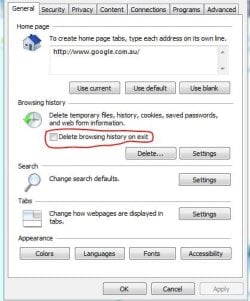
Have you checked this box?

Capture.JPG
 

My Computer

Computer Manufacturer/Model Number
Put together
OS
Win7 Pro-64 Bit
CPU
i7-2600-3.4GHz
Motherboard
ASRock Z68M
Memory
8 GIG DDR3
Graphics Card(s)
onboard
Sound Card
onboard
Hard Drives
Seagate 1TB 7200RPM
PSU
680 W
Case
black
Cooling
stock fans
Keyboard
Microsoft
Mouse
Microsoft optical
No, because I don't want to clear browsing history only cookies.
The more I read those \technet posts the more confused I become: they seem to be saying the opposite of what would logically apply; at least using my logic anyway.
 

My Computer

Computer type
PC/Desktop
Computer Manufacturer/Model Number
Cyberpower PC
OS
windows 7 premium home 64bit
CPU
intel core i5 2500 3.3Ghz 6mb cache OEM
Motherboard
Asus P8Z68-V LX Intel Z68 Chipset DDR3 ATX USB 3
Memory
8GB (2x4GB) PC10666 DDR3/1333mhz Dual
Graphics Card(s)
AMD ATI Radeon Powercolor HD5670 1GB passive cooled
Sound Card
Creative/Soundblaster Digital Music Premium HD/X-Fi-HD
Monitor(s) Displays
Samsung 22; Hanns.G 19
Screen Resolution
1680 x 1050
Hard Drives
SSD: 120 GB Intel 520 Series SATA III
HDD2:West Dig 1TB SATA III 32mb 6gb/s
Hot swap HDD3: 1tb Barracuda Sata 3 32mb 6gb/s
PSU
Coolermaster Elitepower 500wt
Case
NZXT Hush 2
Cooling
Coolermaster Hyper TX3
Mouse
Logitech M570 Trackball
Internet Speed
50mbs
Antivirus
Malwarebytes3. cont' below:
Browser
IE11
Other Info
Windows Firewall.
Hitman-Pro.alert3.
One of the instructions I see is to keep the check box for Preserve favourite wesite data clear if you want to retain usefull cookies, but surely you need to check it to do that. Am I missing something here?
 

My Computer

Computer type
PC/Desktop
Computer Manufacturer/Model Number
Cyberpower PC
OS
windows 7 premium home 64bit
CPU
intel core i5 2500 3.3Ghz 6mb cache OEM
Motherboard
Asus P8Z68-V LX Intel Z68 Chipset DDR3 ATX USB 3
Memory
8GB (2x4GB) PC10666 DDR3/1333mhz Dual
Graphics Card(s)
AMD ATI Radeon Powercolor HD5670 1GB passive cooled
Sound Card
Creative/Soundblaster Digital Music Premium HD/X-Fi-HD
Monitor(s) Displays
Samsung 22; Hanns.G 19
Screen Resolution
1680 x 1050
Hard Drives
SSD: 120 GB Intel 520 Series SATA III
HDD2:West Dig 1TB SATA III 32mb 6gb/s
Hot swap HDD3: 1tb Barracuda Sata 3 32mb 6gb/s
PSU
Coolermaster Elitepower 500wt
Case
NZXT Hush 2
Cooling
Coolermaster Hyper TX3
Mouse
Logitech M570 Trackball
Internet Speed
50mbs
Antivirus
Malwarebytes3. cont' below:
Browser
IE11
Other Info
Windows Firewall.
Hitman-Pro.alert3.

My Computer

Computer Manufacturer/Model Number
Put together
OS
Win7 Pro-64 Bit
CPU
i7-2600-3.4GHz
Motherboard
ASRock Z68M
Memory
8 GIG DDR3
Graphics Card(s)
onboard
Sound Card
onboard
Hard Drives
Seagate 1TB 7200RPM
PSU
680 W
Case
black
Cooling
stock fans
Keyboard
Microsoft
Mouse
Microsoft optical
Yes, I have definitely checked that box.
 

My Computer

Computer type
PC/Desktop
Computer Manufacturer/Model Number
Cyberpower PC
OS
windows 7 premium home 64bit
CPU
intel core i5 2500 3.3Ghz 6mb cache OEM
Motherboard
Asus P8Z68-V LX Intel Z68 Chipset DDR3 ATX USB 3
Memory
8GB (2x4GB) PC10666 DDR3/1333mhz Dual
Graphics Card(s)
AMD ATI Radeon Powercolor HD5670 1GB passive cooled
Sound Card
Creative/Soundblaster Digital Music Premium HD/X-Fi-HD
Monitor(s) Displays
Samsung 22; Hanns.G 19
Screen Resolution
1680 x 1050
Hard Drives
SSD: 120 GB Intel 520 Series SATA III
HDD2:West Dig 1TB SATA III 32mb 6gb/s
Hot swap HDD3: 1tb Barracuda Sata 3 32mb 6gb/s
PSU
Coolermaster Elitepower 500wt
Case
NZXT Hush 2
Cooling
Coolermaster Hyper TX3
Mouse
Logitech M570 Trackball
Internet Speed
50mbs
Antivirus
Malwarebytes3. cont' below:
Browser
IE11
Other Info
Windows Firewall.
Hitman-Pro.alert3.
One of the instructions I see is to keep the check box for Preserve favourite wesite data clear if you want to retain usefull cookies, but surely you need to check it to do that. Am I missing something here?
If it is unchecked it won't keep the cookies and checked it will preserve them. Which is why it was unchecked in the pic you saw.
 

My Computer

Computer Manufacturer/Model Number
Put together
OS
Win7 Pro-64 Bit
CPU
i7-2600-3.4GHz
Motherboard
ASRock Z68M
Memory
8 GIG DDR3
Graphics Card(s)
onboard
Sound Card
onboard
Hard Drives
Seagate 1TB 7200RPM
PSU
680 W
Case
black
Cooling
stock fans
Keyboard
Microsoft
Mouse
Microsoft optical
Yes, that is precisely my reading of the issue, but instructions on the Technet postings stated the opposite and I was wondering if there is a secret language employed by professionals. I mentioned IE5 earlier: is this still a secret folder used by Microsoft to store browsing history, as used to be believed by the paranoid among us?
 

My Computer

Computer type
PC/Desktop
Computer Manufacturer/Model Number
Cyberpower PC
OS
windows 7 premium home 64bit
CPU
intel core i5 2500 3.3Ghz 6mb cache OEM
Motherboard
Asus P8Z68-V LX Intel Z68 Chipset DDR3 ATX USB 3
Memory
8GB (2x4GB) PC10666 DDR3/1333mhz Dual
Graphics Card(s)
AMD ATI Radeon Powercolor HD5670 1GB passive cooled
Sound Card
Creative/Soundblaster Digital Music Premium HD/X-Fi-HD
Monitor(s) Displays
Samsung 22; Hanns.G 19
Screen Resolution
1680 x 1050
Hard Drives
SSD: 120 GB Intel 520 Series SATA III
HDD2:West Dig 1TB SATA III 32mb 6gb/s
Hot swap HDD3: 1tb Barracuda Sata 3 32mb 6gb/s
PSU
Coolermaster Elitepower 500wt
Case
NZXT Hush 2
Cooling
Coolermaster Hyper TX3
Mouse
Logitech M570 Trackball
Internet Speed
50mbs
Antivirus
Malwarebytes3. cont' below:
Browser
IE11
Other Info
Windows Firewall.
Hitman-Pro.alert3.
Yes it is a hidden folder. Check out the second link I posted and it will show you how to access it.
 

My Computer

Computer Manufacturer/Model Number
Put together
OS
Win7 Pro-64 Bit
CPU
i7-2600-3.4GHz
Motherboard
ASRock Z68M
Memory
8 GIG DDR3
Graphics Card(s)
onboard
Sound Card
onboard
Hard Drives
Seagate 1TB 7200RPM
PSU
680 W
Case
black
Cooling
stock fans
Keyboard
Microsoft
Mouse
Microsoft optical
I'm sorry to appear obtuse but the second link is the Brink tutorial and I can't find any reference to IE5 there.
 

My Computer

Computer type
PC/Desktop
Computer Manufacturer/Model Number
Cyberpower PC
OS
windows 7 premium home 64bit
CPU
intel core i5 2500 3.3Ghz 6mb cache OEM
Motherboard
Asus P8Z68-V LX Intel Z68 Chipset DDR3 ATX USB 3
Memory
8GB (2x4GB) PC10666 DDR3/1333mhz Dual
Graphics Card(s)
AMD ATI Radeon Powercolor HD5670 1GB passive cooled
Sound Card
Creative/Soundblaster Digital Music Premium HD/X-Fi-HD
Monitor(s) Displays
Samsung 22; Hanns.G 19
Screen Resolution
1680 x 1050
Hard Drives
SSD: 120 GB Intel 520 Series SATA III
HDD2:West Dig 1TB SATA III 32mb 6gb/s
Hot swap HDD3: 1tb Barracuda Sata 3 32mb 6gb/s
PSU
Coolermaster Elitepower 500wt
Case
NZXT Hush 2
Cooling
Coolermaster Hyper TX3
Mouse
Logitech M570 Trackball
Internet Speed
50mbs
Antivirus
Malwarebytes3. cont' below:
Browser
IE11
Other Info
Windows Firewall.
Hitman-Pro.alert3.
Actually I was under the impression that you were inquiring about ie9 in win7. Sorry I assumed.
 

My Computer

Computer Manufacturer/Model Number
Put together
OS
Win7 Pro-64 Bit
CPU
i7-2600-3.4GHz
Motherboard
ASRock Z68M
Memory
8 GIG DDR3
Graphics Card(s)
onboard
Sound Card
onboard
Hard Drives
Seagate 1TB 7200RPM
PSU
680 W
Case
black
Cooling
stock fans
Keyboard
Microsoft
Mouse
Microsoft optical
Yes I am. It is my fault. The issue I hopped over to was the secret file ie5 and I got there because I wondered if it was that which had a handle on the Temp IE files folder and was preventing it from emptying; it was mentioned in one of the Technet postings as a possibility.
 

My Computer

Computer type
PC/Desktop
Computer Manufacturer/Model Number
Cyberpower PC
OS
windows 7 premium home 64bit
CPU
intel core i5 2500 3.3Ghz 6mb cache OEM
Motherboard
Asus P8Z68-V LX Intel Z68 Chipset DDR3 ATX USB 3
Memory
8GB (2x4GB) PC10666 DDR3/1333mhz Dual
Graphics Card(s)
AMD ATI Radeon Powercolor HD5670 1GB passive cooled
Sound Card
Creative/Soundblaster Digital Music Premium HD/X-Fi-HD
Monitor(s) Displays
Samsung 22; Hanns.G 19
Screen Resolution
1680 x 1050
Hard Drives
SSD: 120 GB Intel 520 Series SATA III
HDD2:West Dig 1TB SATA III 32mb 6gb/s
Hot swap HDD3: 1tb Barracuda Sata 3 32mb 6gb/s
PSU
Coolermaster Elitepower 500wt
Case
NZXT Hush 2
Cooling
Coolermaster Hyper TX3
Mouse
Logitech M570 Trackball
Internet Speed
50mbs
Antivirus
Malwarebytes3. cont' below:
Browser
IE11
Other Info
Windows Firewall.
Hitman-Pro.alert3.
still mystified

Does no-one out there have any idea why the 'Empty Temporary Internet Files Folder on Exit' didn't work in XP and still doesn't in 7? I have pushed all the right buttons.
 

My Computer

Computer type
PC/Desktop
Computer Manufacturer/Model Number
Cyberpower PC
OS
windows 7 premium home 64bit
CPU
intel core i5 2500 3.3Ghz 6mb cache OEM
Motherboard
Asus P8Z68-V LX Intel Z68 Chipset DDR3 ATX USB 3
Memory
8GB (2x4GB) PC10666 DDR3/1333mhz Dual
Graphics Card(s)
AMD ATI Radeon Powercolor HD5670 1GB passive cooled
Sound Card
Creative/Soundblaster Digital Music Premium HD/X-Fi-HD
Monitor(s) Displays
Samsung 22; Hanns.G 19
Screen Resolution
1680 x 1050
Hard Drives
SSD: 120 GB Intel 520 Series SATA III
HDD2:West Dig 1TB SATA III 32mb 6gb/s
Hot swap HDD3: 1tb Barracuda Sata 3 32mb 6gb/s
PSU
Coolermaster Elitepower 500wt
Case
NZXT Hush 2
Cooling
Coolermaster Hyper TX3
Mouse
Logitech M570 Trackball
Internet Speed
50mbs
Antivirus
Malwarebytes3. cont' below:
Browser
IE11
Other Info
Windows Firewall.
Hitman-Pro.alert3.
Back
Top