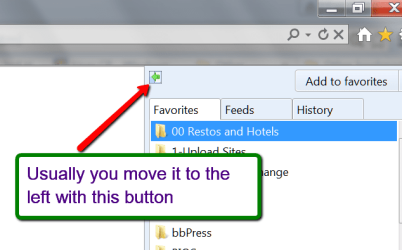
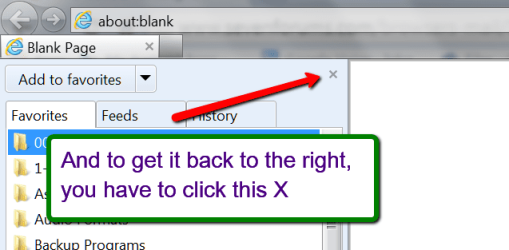
alright so this is fairly inconsequential, but i'm fairly OCD so it's driving me insane.
my computer did a update and restarted itself, and i went to go browse through my favorites when i noticed something odd. it wasn't until i did an image search to see exactly what was wrong did i realize it.
normally the menus for the top buttons( file, edit, view, favorites, etc.) would open on the right side of the clicked option. but all of them are opening on the left side! it's slightly aggrivating. so any help please?
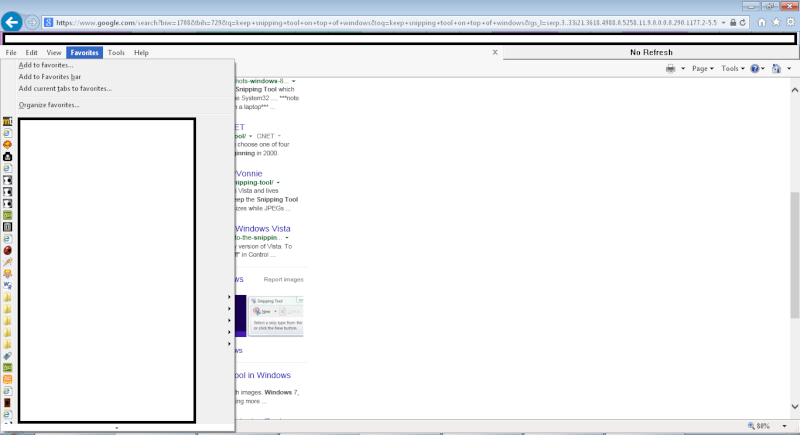
my computer did a update and restarted itself, and i went to go browse through my favorites when i noticed something odd. it wasn't until i did an image search to see exactly what was wrong did i realize it.
normally the menus for the top buttons( file, edit, view, favorites, etc.) would open on the right side of the clicked option. but all of them are opening on the left side! it's slightly aggrivating. so any help please?
My Computer
At a glance
Windows 7 Professional 64 bit
- Computer type
- Laptop
- Computer Manufacturer/Model Number
- Lenovo Thinkpad SL510 Laptop
- OS
- Windows 7 Professional 64 bit
- Antivirus
- None
- Browser
- IE 11