Solved Favorites

luckyladee

New member
Local time
1:02 AM
Messages
4
I do not know what has happened but now whenever I open any one page web page in my favorites the screen opens only half way. If I go to IE no problem I have a full screen but from favorites half sceen. any suggestions on how to reset to a full screen in my favorites?:mad:
 

My Computer

OS
64
Hi luckyladee, Welcome to Seven Forums.

What is your default browser ?
 

My Computer

Computer Manufacturer/Model Number
Look in my Signature.
OS
Win7 H.Prem. 32bit+SP1
Why not try Firefox ?
 

My Computer

Computer Manufacturer/Model Number
Look in my Signature.
OS
Win7 H.Prem. 32bit+SP1
because I have always used IE and now I want to know why this has happened and how I can repair it.
 

My Computer

OS
64
AFAIK their is no fix for IE. It, for reasons unknown decides how it opens.
 

My Computer

Computer Manufacturer/Model Number
Look in my Signature.
OS
Win7 H.Prem. 32bit+SP1
well I guess I will have to go to firefox Thanks anyway
 

My Computer

OS
64
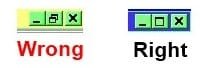
Their is one method now that I remember. Click the middle button (the one next to the x used to close it ) it should show only a single square. Image below. Use the cursor to grab any side & top or bottom (twin arrows will show) then drag it to full screen. Hold Ctrl button and click x to close IE.

White Paper.JPG
 

My Computer

Computer Manufacturer/Model Number
Look in my Signature.
OS
Win7 H.Prem. 32bit+SP1
Back
Top