
FC3 Lag

Quadrider10

Banned
Local time
7:42 PM
Messages
818
so just built my gaming rig, and im having problems with FC3 lag. its really only this game.

i checked my FPS, and im getting between 50-80FPS. but for some reason, its stuttering A LOT! no matter that graphics, it stutters. but if i have been in am area for a long time, the stutters do not happen, and its smooth as butter. as soon as i go to a new area, it stutters again. and repeat.

the only thing is that im running only ONE stick of 4gb memory rite now. otherwise all specs are below!
 

My Computer

Computer type
PC/Desktop
Computer Manufacturer/Model Number
Custom Build
OS
Windows 7 Professional x64
CPU
AMD FX 4300 @ 4.2 GHZ
Motherboard
MSI 970A-G43
Memory
G.SKILL Ripjaws X Series 8GB
Graphics Card(s)
PNY GTX 560 Ti OC
Sound Card
Realtek ALC892
Monitor(s) Displays
20" Hanns-G HL203
Screen Resolution
1600x900
Hard Drives
WD Caviar Black 500GB 7200RPM
PSU
Corsair CX500M
Case
Athena Power- Black Widow
Cooling
Cooler Master GeminII S524
Keyboard
Logitech K360 LE
Mouse
Rocketfish Nano
Internet Speed
60Mbps Down 8Mbps Up
Other Info
Dell Studio 1458 Laptop Setup:

Windows 7 Home Premium~
Intel Core i5 560M @3.2GHZ~
6GB DDR3 RAM~
ATI Mobility Radeon 540v 512MB~
Intel 330 Sata III 120GB SSD~
Illuminated Keyboard
Is this in the Online or offline game mode?

Edit: And did you try running the game at lower settings like I asked in your other thread?

If it's happening in both modes try running it on minimum settings to test it.
 

My Computer

OS
Windows 7 Professional 64 bit
Is this in the Online or offline game mode?

Edit: And did you try running the game at lower settings like I asked in your other thread?

If it's happening in both modes try running it on minimum settings to test it.

never played online. lol so its happening in offline mode.

alright will try minimum settings.
 

My Computer

Computer type
PC/Desktop
Computer Manufacturer/Model Number
Custom Build
OS
Windows 7 Professional x64
CPU
AMD FX 4300 @ 4.2 GHZ
Motherboard
MSI 970A-G43
Memory
G.SKILL Ripjaws X Series 8GB
Graphics Card(s)
PNY GTX 560 Ti OC
Sound Card
Realtek ALC892
Monitor(s) Displays
20" Hanns-G HL203
Screen Resolution
1600x900
Hard Drives
WD Caviar Black 500GB 7200RPM
PSU
Corsair CX500M
Case
Athena Power- Black Widow
Cooling
Cooler Master GeminII S524
Keyboard
Logitech K360 LE
Mouse
Rocketfish Nano
Internet Speed
60Mbps Down 8Mbps Up
Other Info
Dell Studio 1458 Laptop Setup:

Windows 7 Home Premium~
Intel Core i5 560M @3.2GHZ~
6GB DDR3 RAM~
ATI Mobility Radeon 540v 512MB~
Intel 330 Sata III 120GB SSD~
Illuminated Keyboard
Quad, I found this on a game site, it may help you

When playing Far Cry 3 on DirectX 11, you can’t disable Ambient Occlusion via in-game settings — you can only switch between different types of rendering techniques. In order to disable it completely, which would improve performance at the cost of enhanced shading visuals, follow these steps:

Go to %USERPROFILE%\Documents\My Games\Far Cry 3
Right click on GamerProfile.xml and select Open With -> Notepad.
CTRL+F and search for SSAOLevel. Set SSAOLevel=”0″ and save the file
 

My Computer

Computer type
PC/Desktop
Computer Manufacturer/Model Number
Dude Build
OS
Windows 10 Pro X64
CPU
Intel(R) Core(TM) i5-3570K CPU OC@ 4.5GHZ Turbo
Motherboard
MSI Z77A-G45 Gaming
Memory
8.00 GB DDR3 1600Mhz
Graphics Card(s)
MSI Gaming X GTX 1070
Sound Card
Realtek High Definition
Monitor(s) Displays
Dell S23O9W, HP L1710
Screen Resolution
DELL-1920 x 1080 HP-1280 x1024
Hard Drives
Crucial m4 256 SSD, WD 7200RPM 500GB WD 1TB
PSU
Seasonic X650 GOLD
Case
Zalman Z12
Cooling
Antec Kuhler 920
Keyboard
Logitech
Mouse
MSI DS100 Interceptor
Internet Speed
50 down and 5 up
Antivirus
MSE
Browser
Chrome, IE 11
Other Info
Logitech X-620 Speakers
Quad, I found this on a game site, it may help you

When playing Far Cry 3 on DirectX 11, you can’t disable Ambient Occlusion via in-game settings — you can only switch between different types of rendering techniques. In order to disable it completely, which would improve performance at the cost of enhanced shading visuals, follow these steps:

Go to %USERPROFILE%\Documents\My Games\Far Cry 3
Right click on GamerProfile.xml and select Open With -> Notepad.
CTRL+F and search for SSAOLevel. Set SSAOLevel=”0″ and save the file

alright wil do thanks!
 

My Computer

Computer type
PC/Desktop
Computer Manufacturer/Model Number
Custom Build
OS
Windows 7 Professional x64
CPU
AMD FX 4300 @ 4.2 GHZ
Motherboard
MSI 970A-G43
Memory
G.SKILL Ripjaws X Series 8GB
Graphics Card(s)
PNY GTX 560 Ti OC
Sound Card
Realtek ALC892
Monitor(s) Displays
20" Hanns-G HL203
Screen Resolution
1600x900
Hard Drives
WD Caviar Black 500GB 7200RPM
PSU
Corsair CX500M
Case
Athena Power- Black Widow
Cooling
Cooler Master GeminII S524
Keyboard
Logitech K360 LE
Mouse
Rocketfish Nano
Internet Speed
60Mbps Down 8Mbps Up
Other Info
Dell Studio 1458 Laptop Setup:

Windows 7 Home Premium~
Intel Core i5 560M @3.2GHZ~
6GB DDR3 RAM~
ATI Mobility Radeon 540v 512MB~
Intel 330 Sata III 120GB SSD~
Illuminated Keyboard
alright i set everything to the lowest possible settings, and it still lags and chops. not as bad tho.

maybe its because of the ram?
 
Last edited:

My Computer

Computer type
PC/Desktop
Computer Manufacturer/Model Number
Custom Build
OS
Windows 7 Professional x64
CPU
AMD FX 4300 @ 4.2 GHZ
Motherboard
MSI 970A-G43
Memory
G.SKILL Ripjaws X Series 8GB
Graphics Card(s)
PNY GTX 560 Ti OC
Sound Card
Realtek ALC892
Monitor(s) Displays
20" Hanns-G HL203
Screen Resolution
1600x900
Hard Drives
WD Caviar Black 500GB 7200RPM
PSU
Corsair CX500M
Case
Athena Power- Black Widow
Cooling
Cooler Master GeminII S524
Keyboard
Logitech K360 LE
Mouse
Rocketfish Nano
Internet Speed
60Mbps Down 8Mbps Up
Other Info
Dell Studio 1458 Laptop Setup:

Windows 7 Home Premium~
Intel Core i5 560M @3.2GHZ~
6GB DDR3 RAM~
ATI Mobility Radeon 540v 512MB~
Intel 330 Sata III 120GB SSD~
Illuminated Keyboard
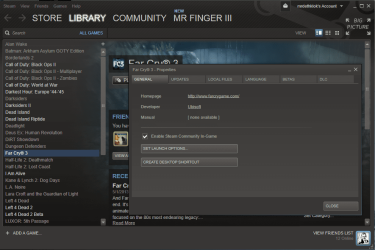
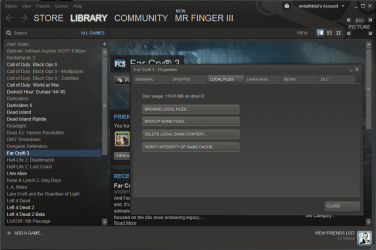
If it is through steam I would verify game integrity cache
scan it for a bad file usually that will resolve the issue or your 560 ti needs to be optimized
better

I would look into the game integrity if it is bad it will download the file and replace and that might make the stutters go away remember steam has online and offline issues as well
 

My Computer

Computer type
PC/Desktop
Computer Manufacturer/Model Number
CoreI7-6700K MrFingerIII Special Builds
OS
Windows 10 Home Premium 64bit sp1
CPU
Intel I7-6700K @ 4.6 Ghz 1.344 volts everyday OC
Motherboard
Asrock Fatality K6 Z170 Socket 1151
Memory
32GB G-Skill TridentZ 3200mhz 16-18-18-38 DDR4
Graphics Card(s)
Sli Gigabyte Windforce GTX 980 G1
Sound Card
AC97 Creative Rage Tactic 3D Headphones Bluetooth
Monitor(s) Displays
27" Asus ROG Swift PG278Q G-Sync 48" Vizio Smart HD TV
Screen Resolution
2560x1440p 27"- 48" Currently Gaming at 2560x1440p Res 2K
Hard Drives
250GB Samsung Evo840SSD Seagate baracuda 500 GB WD Mybook 500Gb 1TB Seagate Barracuda
PSU
HX1050w Corsair Silver 80plus certified crosfire/sli
Case
Enthod Pro Full Tower
Cooling
Corsair H110i GT 280 mm High Performance WaterBlock
Keyboard
Logitech wireless keyboard
Mouse
Logitech wireless mouse
Internet Speed
Cox Cable 100+ mb
Antivirus
WebRoot Spysweeper with Antivirus
Browser
IE-10, Chrome, Opera
Other Info
My Other Rig is a AMD FX8320E @4.6Ghz 16GB Ballistic Sport Ram
Mobo Asrock Fatality 990FX 120GB OCZ SSD 1TB Seagate Barracuda Corsair H75 Cooling PSU Corsair CX750
GPU GTX Gigabyte 970G1
If it is through steam I would verify game integrity cache
scan it for a bad file usually that will resolve the issue or your 560 ti needs to be optimized
better

I would look into the game integrity if it is bad it will download the file and replace and that might make the stutters go away remember steam has online and offline issues as well

illl try. in nvidia CP, i have it set to "use application" for overall graphics.
 

My Computer

Computer type
PC/Desktop
Computer Manufacturer/Model Number
Custom Build
OS
Windows 7 Professional x64
CPU
AMD FX 4300 @ 4.2 GHZ
Motherboard
MSI 970A-G43
Memory
G.SKILL Ripjaws X Series 8GB
Graphics Card(s)
PNY GTX 560 Ti OC
Sound Card
Realtek ALC892
Monitor(s) Displays
20" Hanns-G HL203
Screen Resolution
1600x900
Hard Drives
WD Caviar Black 500GB 7200RPM
PSU
Corsair CX500M
Case
Athena Power- Black Widow
Cooling
Cooler Master GeminII S524
Keyboard
Logitech K360 LE
Mouse
Rocketfish Nano
Internet Speed
60Mbps Down 8Mbps Up
Other Info
Dell Studio 1458 Laptop Setup:

Windows 7 Home Premium~
Intel Core i5 560M @3.2GHZ~
6GB DDR3 RAM~
ATI Mobility Radeon 540v 512MB~
Intel 330 Sata III 120GB SSD~
Illuminated Keyboard
any ideas?
 

My Computer

Computer type
PC/Desktop
Computer Manufacturer/Model Number
Custom Build
OS
Windows 7 Professional x64
CPU
AMD FX 4300 @ 4.2 GHZ
Motherboard
MSI 970A-G43
Memory
G.SKILL Ripjaws X Series 8GB
Graphics Card(s)
PNY GTX 560 Ti OC
Sound Card
Realtek ALC892
Monitor(s) Displays
20" Hanns-G HL203
Screen Resolution
1600x900
Hard Drives
WD Caviar Black 500GB 7200RPM
PSU
Corsair CX500M
Case
Athena Power- Black Widow
Cooling
Cooler Master GeminII S524
Keyboard
Logitech K360 LE
Mouse
Rocketfish Nano
Internet Speed
60Mbps Down 8Mbps Up
Other Info
Dell Studio 1458 Laptop Setup:

Windows 7 Home Premium~
Intel Core i5 560M @3.2GHZ~
6GB DDR3 RAM~
ATI Mobility Radeon 540v 512MB~
Intel 330 Sata III 120GB SSD~
Illuminated Keyboard

My Computer

Computer type
PC/Desktop
Computer Manufacturer/Model Number
CoreI7-6700K MrFingerIII Special Builds
OS
Windows 10 Home Premium 64bit sp1
CPU
Intel I7-6700K @ 4.6 Ghz 1.344 volts everyday OC
Motherboard
Asrock Fatality K6 Z170 Socket 1151
Memory
32GB G-Skill TridentZ 3200mhz 16-18-18-38 DDR4
Graphics Card(s)
Sli Gigabyte Windforce GTX 980 G1
Sound Card
AC97 Creative Rage Tactic 3D Headphones Bluetooth
Monitor(s) Displays
27" Asus ROG Swift PG278Q G-Sync 48" Vizio Smart HD TV
Screen Resolution
2560x1440p 27"- 48" Currently Gaming at 2560x1440p Res 2K
Hard Drives
250GB Samsung Evo840SSD Seagate baracuda 500 GB WD Mybook 500Gb 1TB Seagate Barracuda
PSU
HX1050w Corsair Silver 80plus certified crosfire/sli
Case
Enthod Pro Full Tower
Cooling
Corsair H110i GT 280 mm High Performance WaterBlock
Keyboard
Logitech wireless keyboard
Mouse
Logitech wireless mouse
Internet Speed
Cox Cable 100+ mb
Antivirus
WebRoot Spysweeper with Antivirus
Browser
IE-10, Chrome, Opera
Other Info
My Other Rig is a AMD FX8320E @4.6Ghz 16GB Ballistic Sport Ram
Mobo Asrock Fatality 990FX 120GB OCZ SSD 1TB Seagate Barracuda Corsair H75 Cooling PSU Corsair CX750
GPU GTX Gigabyte 970G1

My Computer

Computer type
PC/Desktop
Computer Manufacturer/Model Number
Custom Build
OS
Windows 7 Professional x64
CPU
AMD FX 4300 @ 4.2 GHZ
Motherboard
MSI 970A-G43
Memory
G.SKILL Ripjaws X Series 8GB
Graphics Card(s)
PNY GTX 560 Ti OC
Sound Card
Realtek ALC892
Monitor(s) Displays
20" Hanns-G HL203
Screen Resolution
1600x900
Hard Drives
WD Caviar Black 500GB 7200RPM
PSU
Corsair CX500M
Case
Athena Power- Black Widow
Cooling
Cooler Master GeminII S524
Keyboard
Logitech K360 LE
Mouse
Rocketfish Nano
Internet Speed
60Mbps Down 8Mbps Up
Other Info
Dell Studio 1458 Laptop Setup:

Windows 7 Home Premium~
Intel Core i5 560M @3.2GHZ~
6GB DDR3 RAM~
ATI Mobility Radeon 540v 512MB~
Intel 330 Sata III 120GB SSD~
Illuminated Keyboard
Attachments

  • right click.PNG
    right click.PNG
    87.5 KB · Views: 2
  • click.PNG
    click.PNG
    86.5 KB · Views: 2

My Computer

Computer type
PC/Desktop
Computer Manufacturer/Model Number
CoreI7-6700K MrFingerIII Special Builds
OS
Windows 10 Home Premium 64bit sp1
CPU
Intel I7-6700K @ 4.6 Ghz 1.344 volts everyday OC
Motherboard
Asrock Fatality K6 Z170 Socket 1151
Memory
32GB G-Skill TridentZ 3200mhz 16-18-18-38 DDR4
Graphics Card(s)
Sli Gigabyte Windforce GTX 980 G1
Sound Card
AC97 Creative Rage Tactic 3D Headphones Bluetooth
Monitor(s) Displays
27" Asus ROG Swift PG278Q G-Sync 48" Vizio Smart HD TV
Screen Resolution
2560x1440p 27"- 48" Currently Gaming at 2560x1440p Res 2K
Hard Drives
250GB Samsung Evo840SSD Seagate baracuda 500 GB WD Mybook 500Gb 1TB Seagate Barracuda
PSU
HX1050w Corsair Silver 80plus certified crosfire/sli
Case
Enthod Pro Full Tower
Cooling
Corsair H110i GT 280 mm High Performance WaterBlock
Keyboard
Logitech wireless keyboard
Mouse
Logitech wireless mouse
Internet Speed
Cox Cable 100+ mb
Antivirus
WebRoot Spysweeper with Antivirus
Browser
IE-10, Chrome, Opera
Other Info
My Other Rig is a AMD FX8320E @4.6Ghz 16GB Ballistic Sport Ram
Mobo Asrock Fatality 990FX 120GB OCZ SSD 1TB Seagate Barracuda Corsair H75 Cooling PSU Corsair CX750
GPU GTX Gigabyte 970G1
I do believe there were 3 patches for that game, check it out.

Now, I played on a lesser rig w/o problems so it seems to me that would I try is the following... no harm, just waste of a little time.
Download the patches first, not through the game but direct source and save on a local temp folder.
Download the latest drivers for your audio and Video
Uninstall the game completely, before you restart...do the same with video and audio drivers
Get into safe mode
Run CCleaner once you are there... clean temp files and Registry
Back to windows and let windows install generic drivers for audio and video
Go to Temp folder and install newer versions of your drivers... don't forget to Run as Administrator.
Restart if needed.
Install fresh FC3 game... restart for good measure
Install Patch 1.0 and restart
Ditto with all the other patches
Try the game with normal setting or the settings that game wants to give you, only change the Video Resolution so it is in your native settings.
 

My Computer

Computer type
PC/Desktop
Computer Manufacturer/Model Number
Custom Built... Intel/Nvidia/ASRock
OS
Windows 7 x64 (Ultimate)
CPU
Intel i5-4670K
Motherboard
ASRock Z87 Extreme 6
Memory
8GBs Ripjaws 2133Mhz
Graphics Card(s)
Asus GTX660 (2GBs)
Sound Card
Onboard Realtek HD
Monitor(s) Displays
Acer AL2216W
Screen Resolution
1680 x 1050
Hard Drives
Samsung 840 SSD 120GBs
Samsung 750GB 32MB cache
1.5 TB
PSU
PC Cooling 750w Silencer
Case
Thermaltake Spedo Advance
Cooling
Std Cooler
Keyboard
Logitech G15
Mouse
Logitech G9
Internet Speed
Comcast 20Mbit
Antivirus
Avast
Browser
Firefox
are there any patches for that game I havn't played it in a while

i dont believe so. i JUST downloaded it, so it should be up to date.


did you run verify game integrity cache?

I do believe there were 3 patches for that game, check it out.

Now, I played on a lesser rig w/o problems so it seems to me that would I try is the following... no harm, just waste of a little time.
Download the patches first, not through the game but direct source and save on a local temp folder.
Download the latest drivers for your audio and Video
Uninstall the game completely, before you restart...do the same with video and audio drivers
Get into safe mode
Run CCleaner once you are there... clean temp files and Registry
Back to windows and let windows install generic drivers for audio and video
Go to Temp folder and install newer versions of your drivers... don't forget to Run as Administrator.
Restart if needed.
Install fresh FC3 game... restart for good measure
Install Patch 1.0 and restart
Ditto with all the other patches
Try the game with normal setting or the settings that game wants to give you, only change the Video Resolution so it is in your native settings.


ok thanks! wiil try. i havent been able to check game integrity because i do not have internet on it yet, but will doo asap
 

My Computer

Computer type
PC/Desktop
Computer Manufacturer/Model Number
Custom Build
OS
Windows 7 Professional x64
CPU
AMD FX 4300 @ 4.2 GHZ
Motherboard
MSI 970A-G43
Memory
G.SKILL Ripjaws X Series 8GB
Graphics Card(s)
PNY GTX 560 Ti OC
Sound Card
Realtek ALC892
Monitor(s) Displays
20" Hanns-G HL203
Screen Resolution
1600x900
Hard Drives
WD Caviar Black 500GB 7200RPM
PSU
Corsair CX500M
Case
Athena Power- Black Widow
Cooling
Cooler Master GeminII S524
Keyboard
Logitech K360 LE
Mouse
Rocketfish Nano
Internet Speed
60Mbps Down 8Mbps Up
Other Info
Dell Studio 1458 Laptop Setup:

Windows 7 Home Premium~
Intel Core i5 560M @3.2GHZ~
6GB DDR3 RAM~
ATI Mobility Radeon 540v 512MB~
Intel 330 Sata III 120GB SSD~
Illuminated Keyboard
Back
Top