Solved Fear 2 video help

vett

New member
Member
VIP
Local time
4:08 PM
Messages
156
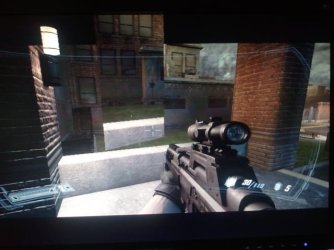
Playing fear 2 and have trouble with the video. As can be seen in the screen shot the ground and fire hydrant are raised above itself and the red dot that should be in the gun sight is up to the right, this is just an example of what is happening and not the worst that I experiance. Any ideas?
 

Attachments
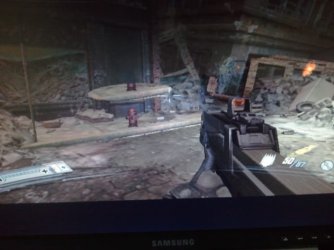
  • 2013-08-30 15.33.20.jpg
    2013-08-30 15.33.20.jpg
    39.6 KB · Views: 13

My Computer

Computer type
PC/Desktop
Computer Manufacturer/Model Number
Asus essentioCM6730 ac2
OS
Windows 7 Home Premium 64bit.
CPU
Intel Core i5-2320 Processor 3.0 GHz
Memory
6GB SDRAM DDR3
Graphics Card(s)
nvidia Geforce 9400gt
Hard Drives
1000 GB 7200 rpm Hard Drive
Hmmmm, not much to go on as far as an explanation so you may get multiple questions before you get an answer.

Have this happens with any other game?

Have you push your game settings to the limit or more?

When was the last time you updated your video and audio drivers?

Does this happens often in the game or just in that particular part of the map?

Have you patch the game to the most recent version?

I take it this happens in the Campaign only and not in Multiplayer?

Sorry, perhaps I am not helping you much now and the easiest answer would be to update your drivers and check again... that would be the first thing I would do anyways.
 

My Computer

Computer type
PC/Desktop
Computer Manufacturer/Model Number
Custom Built... Intel/Nvidia/ASRock
OS
Windows 7 x64 (Ultimate)
CPU
Intel i5-4670K
Motherboard
ASRock Z87 Extreme 6
Memory
8GBs Ripjaws 2133Mhz
Graphics Card(s)
Asus GTX660 (2GBs)
Sound Card
Onboard Realtek HD
Monitor(s) Displays
Acer AL2216W
Screen Resolution
1680 x 1050
Hard Drives
Samsung 840 SSD 120GBs
Samsung 750GB 32MB cache
1.5 TB
PSU
PC Cooling 750w Silencer
Case
Thermaltake Spedo Advance
Cooling
Std Cooler
Keyboard
Logitech G15
Mouse
Logitech G9
Internet Speed
Comcast 20Mbit
Antivirus
Avast
Browser
Firefox
Are you getting lag or juddering when it happens?
 

My Computer

Computer type
PC/Desktop
Computer Manufacturer/Model Number
Custom Build
OS
W7 Pro x64 SP1 | W10 Pro IP x64 | W8.1 Pro x64 VM | Linux Mint VM
CPU
i7-4790k @ 4GHz (4.4GHz Boost)
Motherboard
ASUS Sabertooth Z87 (BIOS Rev 2004)
Memory
16GB DDR3 Kingston HyperX Fury @ 1600MHz CL 9-9-9-27
Graphics Card(s)
EVGA GTX 980 Classified
Sound Card
Realtek Onboard
Monitor(s) Displays
Samsung S27D390
Screen Resolution
1920 x 1080
Hard Drives
240GB Intel 520 Series SSD |
Samsung 850 EVO 120GB SSD |
2TB WD Caviar Black |
2TB WD Caviar Green
PSU
Corsair HX850-80 Gold Modular
Case
Cooler Master Silencio 650
Cooling
Corsair H80i w/2 x Corsair SP120 | 2 x 120mm Noctua NF-S12B
Keyboard
Microsoft Sidewinder X4
Mouse
Gigabyte M6900 optical
Internet Speed
152mb
Antivirus
F-Secure
Browser
Firefox 38.0
Other Info
Backup Rig: Win 7 Pro 64-bit | AMD A10-5800k | ASUS F2A85-V Pro | 8GB Samsung DDR3 @1600MHz | 120GB Toshiba SDD | 2TB Seagate HDD | Cooler Master Silencio 550
Thanks, no no other game
Drivers updated a couple of days ago
Game has not been pushed I actually lowered the settings to I think 600 x800 something like that
It happens all over the game sometimes it is hard to see at all
Yes camp. Only have not tried multi
No patch but will look
 

My Computer

Computer type
PC/Desktop
Computer Manufacturer/Model Number
Asus essentioCM6730 ac2
OS
Windows 7 Home Premium 64bit.
CPU
Intel Core i5-2320 Processor 3.0 GHz
Memory
6GB SDRAM DDR3
Graphics Card(s)
nvidia Geforce 9400gt
Hard Drives
1000 GB 7200 rpm Hard Drive
Boo no the game runs smoothly
 

My Computer

Computer type
PC/Desktop
Computer Manufacturer/Model Number
Asus essentioCM6730 ac2
OS
Windows 7 Home Premium 64bit.
CPU
Intel Core i5-2320 Processor 3.0 GHz
Memory
6GB SDRAM DDR3
Graphics Card(s)
nvidia Geforce 9400gt
Hard Drives
1000 GB 7200 rpm Hard Drive
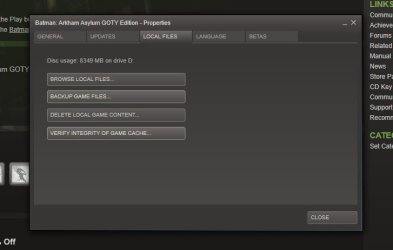
Are you playing through Steam? If so try verifying the integrity of the cache.
 

My Computer

Computer type
PC/Desktop
Computer Manufacturer/Model Number
Custom Build
OS
W7 Pro x64 SP1 | W10 Pro IP x64 | W8.1 Pro x64 VM | Linux Mint VM
CPU
i7-4790k @ 4GHz (4.4GHz Boost)
Motherboard
ASUS Sabertooth Z87 (BIOS Rev 2004)
Memory
16GB DDR3 Kingston HyperX Fury @ 1600MHz CL 9-9-9-27
Graphics Card(s)
EVGA GTX 980 Classified
Sound Card
Realtek Onboard
Monitor(s) Displays
Samsung S27D390
Screen Resolution
1920 x 1080
Hard Drives
240GB Intel 520 Series SSD |
Samsung 850 EVO 120GB SSD |
2TB WD Caviar Black |
2TB WD Caviar Green
PSU
Corsair HX850-80 Gold Modular
Case
Cooler Master Silencio 650
Cooling
Corsair H80i w/2 x Corsair SP120 | 2 x 120mm Noctua NF-S12B
Keyboard
Microsoft Sidewinder X4
Mouse
Gigabyte M6900 optical
Internet Speed
152mb
Antivirus
F-Secure
Browser
Firefox 38.0
Other Info
Backup Rig: Win 7 Pro 64-bit | AMD A10-5800k | ASUS F2A85-V Pro | 8GB Samsung DDR3 @1600MHz | 120GB Toshiba SDD | 2TB Seagate HDD | Cooler Master Silencio 550
Yes playing through steam would rather not but have no choice
 

My Computer

Computer type
PC/Desktop
Computer Manufacturer/Model Number
Asus essentioCM6730 ac2
OS
Windows 7 Home Premium 64bit.
CPU
Intel Core i5-2320 Processor 3.0 GHz
Memory
6GB SDRAM DDR3
Graphics Card(s)
nvidia Geforce 9400gt
Hard Drives
1000 GB 7200 rpm Hard Drive
Give that a shot and see if it works.
 

My Computer

Computer type
PC/Desktop
Computer Manufacturer/Model Number
Custom Build
OS
W7 Pro x64 SP1 | W10 Pro IP x64 | W8.1 Pro x64 VM | Linux Mint VM
CPU
i7-4790k @ 4GHz (4.4GHz Boost)
Motherboard
ASUS Sabertooth Z87 (BIOS Rev 2004)
Memory
16GB DDR3 Kingston HyperX Fury @ 1600MHz CL 9-9-9-27
Graphics Card(s)
EVGA GTX 980 Classified
Sound Card
Realtek Onboard
Monitor(s) Displays
Samsung S27D390
Screen Resolution
1920 x 1080
Hard Drives
240GB Intel 520 Series SSD |
Samsung 850 EVO 120GB SSD |
2TB WD Caviar Black |
2TB WD Caviar Green
PSU
Corsair HX850-80 Gold Modular
Case
Cooler Master Silencio 650
Cooling
Corsair H80i w/2 x Corsair SP120 | 2 x 120mm Noctua NF-S12B
Keyboard
Microsoft Sidewinder X4
Mouse
Gigabyte M6900 optical
Internet Speed
152mb
Antivirus
F-Secure
Browser
Firefox 38.0
Other Info
Backup Rig: Win 7 Pro 64-bit | AMD A10-5800k | ASUS F2A85-V Pro | 8GB Samsung DDR3 @1600MHz | 120GB Toshiba SDD | 2TB Seagate HDD | Cooler Master Silencio 550
Are you sure your card meets the recommended video card and not just barely the minimum?

Curious as to where you get the new drivers and how you went about installing them. Not calling you a noob or anything but, it seems there are good and bad ways to install drivers now a days and the majority of people don't do them correctly. My apologies if this offends you.
 

My Computer

Computer type
PC/Desktop
Computer Manufacturer/Model Number
Custom Built... Intel/Nvidia/ASRock
OS
Windows 7 x64 (Ultimate)
CPU
Intel i5-4670K
Motherboard
ASRock Z87 Extreme 6
Memory
8GBs Ripjaws 2133Mhz
Graphics Card(s)
Asus GTX660 (2GBs)
Sound Card
Onboard Realtek HD
Monitor(s) Displays
Acer AL2216W
Screen Resolution
1680 x 1050
Hard Drives
Samsung 840 SSD 120GBs
Samsung 750GB 32MB cache
1.5 TB
PSU
PC Cooling 750w Silencer
Case
Thermaltake Spedo Advance
Cooling
Std Cooler
Keyboard
Logitech G15
Mouse
Logitech G9
Internet Speed
Comcast 20Mbit
Antivirus
Avast
Browser
Firefox
the updates come automatic
 

My Computer

Computer type
PC/Desktop
Computer Manufacturer/Model Number
Asus essentioCM6730 ac2
OS
Windows 7 Home Premium 64bit.
CPU
Intel Core i5-2320 Processor 3.0 GHz
Memory
6GB SDRAM DDR3
Graphics Card(s)
nvidia Geforce 9400gt
Hard Drives
1000 GB 7200 rpm Hard Drive
here are two more shots
 

Attachments

  • 2013-09-01 09.35.05.jpg
    2013-09-01 09.35.05.jpg
    43.5 KB · Views: 4
  • 2013-09-01 09.35.31.jpg
    2013-09-01 09.35.31.jpg
    44.4 KB · Views: 4

My Computer

Computer type
PC/Desktop
Computer Manufacturer/Model Number
Asus essentioCM6730 ac2
OS
Windows 7 Home Premium 64bit.
CPU
Intel Core i5-2320 Processor 3.0 GHz
Memory
6GB SDRAM DDR3
Graphics Card(s)
nvidia Geforce 9400gt
Hard Drives
1000 GB 7200 rpm Hard Drive
By automatic, do you mean with Windows Update or from Nvidia and Realtek. and either or, if you are installing on top of the old ones, therein may lie your problem.

If its not to much to ask... can you tell us what exactly you do to install these updates

In my HDTV I can't see anything wrong with those images but then again, I may not be getting the full pictue.
 

My Computer

Computer type
PC/Desktop
Computer Manufacturer/Model Number
Custom Built... Intel/Nvidia/ASRock
OS
Windows 7 x64 (Ultimate)
CPU
Intel i5-4670K
Motherboard
ASRock Z87 Extreme 6
Memory
8GBs Ripjaws 2133Mhz
Graphics Card(s)
Asus GTX660 (2GBs)
Sound Card
Onboard Realtek HD
Monitor(s) Displays
Acer AL2216W
Screen Resolution
1680 x 1050
Hard Drives
Samsung 840 SSD 120GBs
Samsung 750GB 32MB cache
1.5 TB
PSU
PC Cooling 750w Silencer
Case
Thermaltake Spedo Advance
Cooling
Std Cooler
Keyboard
Logitech G15
Mouse
Logitech G9
Internet Speed
Comcast 20Mbit
Antivirus
Avast
Browser
Firefox
Are you playing through Steam? If so try verifying the integrity of the cache.

here are two more shots

Have you given Boozad's suggestion a try???

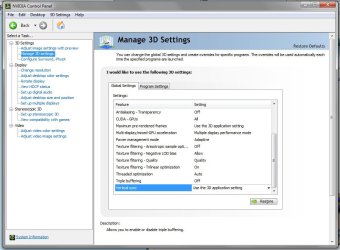
You might also check your video card drivers and/or the video settings as well, to include making sure v-sync is turned on.
 

My Computer

Computer type
PC/Desktop
Computer Manufacturer/Model Number
Custom built by me.
OS
Windows 10 Pro
CPU
Intel Core i7-4770K (3.5Ghz)
Motherboard
Gigabyte G1 Sniper 5 (F10 Bios)
Memory
32 gig Corsair Dominator Platinum (4x8Gig)
Graphics Card(s)
Sapphire Tri-X R9 Fury
Sound Card
Soundblaster ZXR
Monitor(s) Displays
NEC PA242W 24" LCD Monitor
Screen Resolution
1920 x 1200
Hard Drives
Primary - Samsung 850 Pro (512gig), Samsung 840 Pro (256gig), 2TB WD Caviar Black.
PSU
EVGA Supernova 1000 G2
Case
Cooler Master HAF X
Cooling
Corsair H100i with Corsair Air Series SP120 Quiet Fans
Keyboard
Logitech Wireless Wave
Mouse
Logitech Performance MX
Internet Speed
High Speed Cable
Antivirus
Norton Security
Browser
IE11
Other Info
Memory Timings - 1866MHz @ 9-9-9-27-1T @ 1.5 volts
You might also check your video card drivers and/or the video settings as well, to include making sure v-sync is turned on.

Good call.
 

My Computer

Computer type
PC/Desktop
Computer Manufacturer/Model Number
Custom Build
OS
W7 Pro x64 SP1 | W10 Pro IP x64 | W8.1 Pro x64 VM | Linux Mint VM
CPU
i7-4790k @ 4GHz (4.4GHz Boost)
Motherboard
ASUS Sabertooth Z87 (BIOS Rev 2004)
Memory
16GB DDR3 Kingston HyperX Fury @ 1600MHz CL 9-9-9-27
Graphics Card(s)
EVGA GTX 980 Classified
Sound Card
Realtek Onboard
Monitor(s) Displays
Samsung S27D390
Screen Resolution
1920 x 1080
Hard Drives
240GB Intel 520 Series SSD |
Samsung 850 EVO 120GB SSD |
2TB WD Caviar Black |
2TB WD Caviar Green
PSU
Corsair HX850-80 Gold Modular
Case
Cooler Master Silencio 650
Cooling
Corsair H80i w/2 x Corsair SP120 | 2 x 120mm Noctua NF-S12B
Keyboard
Microsoft Sidewinder X4
Mouse
Gigabyte M6900 optical
Internet Speed
152mb
Antivirus
F-Secure
Browser
Firefox 38.0
Other Info
Backup Rig: Win 7 Pro 64-bit | AMD A10-5800k | ASUS F2A85-V Pro | 8GB Samsung DDR3 @1600MHz | 120GB Toshiba SDD | 2TB Seagate HDD | Cooler Master Silencio 550
How would I verify the cache?
The updates come from nvidiA and install s it self
Have not tried the vsync. But all drivers are up to date
 

My Computer

Computer type
PC/Desktop
Computer Manufacturer/Model Number
Asus essentioCM6730 ac2
OS
Windows 7 Home Premium 64bit.
CPU
Intel Core i5-2320 Processor 3.0 GHz
Memory
6GB SDRAM DDR3
Graphics Card(s)
nvidia Geforce 9400gt
Hard Drives
1000 GB 7200 rpm Hard Drive
Steam > Library > Right click on game > Properties > Local Files > Verify Integrity of Game Cache

nVidia Control Panel > Manage 3D Settings > Vertical Sync
 

Attachments

  • Untitled.jpg
    Untitled.jpg
    105.7 KB · Views: 1
  • Untitled 2.jpg
    Untitled 2.jpg
    43.3 KB · Views: 1

My Computer

Computer type
PC/Desktop
Computer Manufacturer/Model Number
Custom Build
OS
W7 Pro x64 SP1 | W10 Pro IP x64 | W8.1 Pro x64 VM | Linux Mint VM
CPU
i7-4790k @ 4GHz (4.4GHz Boost)
Motherboard
ASUS Sabertooth Z87 (BIOS Rev 2004)
Memory
16GB DDR3 Kingston HyperX Fury @ 1600MHz CL 9-9-9-27
Graphics Card(s)
EVGA GTX 980 Classified
Sound Card
Realtek Onboard
Monitor(s) Displays
Samsung S27D390
Screen Resolution
1920 x 1080
Hard Drives
240GB Intel 520 Series SSD |
Samsung 850 EVO 120GB SSD |
2TB WD Caviar Black |
2TB WD Caviar Green
PSU
Corsair HX850-80 Gold Modular
Case
Cooler Master Silencio 650
Cooling
Corsair H80i w/2 x Corsair SP120 | 2 x 120mm Noctua NF-S12B
Keyboard
Microsoft Sidewinder X4
Mouse
Gigabyte M6900 optical
Internet Speed
152mb
Antivirus
F-Secure
Browser
Firefox 38.0
Other Info
Backup Rig: Win 7 Pro 64-bit | AMD A10-5800k | ASUS F2A85-V Pro | 8GB Samsung DDR3 @1600MHz | 120GB Toshiba SDD | 2TB Seagate HDD | Cooler Master Silencio 550
ok I did the cache thing and that was OK. I did the v-sync still no differance in the video??
 

My Computer

Computer type
PC/Desktop
Computer Manufacturer/Model Number
Asus essentioCM6730 ac2
OS
Windows 7 Home Premium 64bit.
CPU
Intel Core i5-2320 Processor 3.0 GHz
Memory
6GB SDRAM DDR3
Graphics Card(s)
nvidia Geforce 9400gt
Hard Drives
1000 GB 7200 rpm Hard Drive
If it's the only game it's happening on I'd suggest uninstalling and reinstalling it. Steam games normally have cloud-based backups so your saved game data should be OK as it will re-sync upon re-installation.
Also how do you keep your drivers up to date? Manually?

What other games do you play? If there's nothing else as strenuous as FEAR 2 then it may point to AstaLaVista being right about your card not being up to the task.
 

My Computer

Computer type
PC/Desktop
Computer Manufacturer/Model Number
Custom Build
OS
W7 Pro x64 SP1 | W10 Pro IP x64 | W8.1 Pro x64 VM | Linux Mint VM
CPU
i7-4790k @ 4GHz (4.4GHz Boost)
Motherboard
ASUS Sabertooth Z87 (BIOS Rev 2004)
Memory
16GB DDR3 Kingston HyperX Fury @ 1600MHz CL 9-9-9-27
Graphics Card(s)
EVGA GTX 980 Classified
Sound Card
Realtek Onboard
Monitor(s) Displays
Samsung S27D390
Screen Resolution
1920 x 1080
Hard Drives
240GB Intel 520 Series SSD |
Samsung 850 EVO 120GB SSD |
2TB WD Caviar Black |
2TB WD Caviar Green
PSU
Corsair HX850-80 Gold Modular
Case
Cooler Master Silencio 650
Cooling
Corsair H80i w/2 x Corsair SP120 | 2 x 120mm Noctua NF-S12B
Keyboard
Microsoft Sidewinder X4
Mouse
Gigabyte M6900 optical
Internet Speed
152mb
Antivirus
F-Secure
Browser
Firefox 38.0
Other Info
Backup Rig: Win 7 Pro 64-bit | AMD A10-5800k | ASUS F2A85-V Pro | 8GB Samsung DDR3 @1600MHz | 120GB Toshiba SDD | 2TB Seagate HDD | Cooler Master Silencio 550
I can try reinstalling it but I am almost to the end now. other games bioshock 2 and infinet, borderlands 1 and 2
 

My Computer

Computer type
PC/Desktop
Computer Manufacturer/Model Number
Asus essentioCM6730 ac2
OS
Windows 7 Home Premium 64bit.
CPU
Intel Core i5-2320 Processor 3.0 GHz
Memory
6GB SDRAM DDR3
Graphics Card(s)
nvidia Geforce 9400gt
Hard Drives
1000 GB 7200 rpm Hard Drive
Also how do you keep your drivers up to date? Manually?
As far as I can tell, Nvidia sends a PopUp advising of a new update, he gets it and install on top of the old drivers... not 100% sure but, by not uninstalling the old drivers, he may have some remnants of old drivers corrupting the new ones causing havoc in his registry.

I have seen this happening on some occasions, more so when you don't uninstall PhysX before installing the new one.

Aside from uninstalling and reinstalling the game, I would also make sure to try this from now on...

http://www.nvidia.com/object/IO_13955.html

Or follow this one as well... do the same with PhysX drivers

http://www.overclock.net/t/1150443/how-to-remove-your-nvidia-gpu-drivers
 

My Computer

Computer type
PC/Desktop
Computer Manufacturer/Model Number
Custom Built... Intel/Nvidia/ASRock
OS
Windows 7 x64 (Ultimate)
CPU
Intel i5-4670K
Motherboard
ASRock Z87 Extreme 6
Memory
8GBs Ripjaws 2133Mhz
Graphics Card(s)
Asus GTX660 (2GBs)
Sound Card
Onboard Realtek HD
Monitor(s) Displays
Acer AL2216W
Screen Resolution
1680 x 1050
Hard Drives
Samsung 840 SSD 120GBs
Samsung 750GB 32MB cache
1.5 TB
PSU
PC Cooling 750w Silencer
Case
Thermaltake Spedo Advance
Cooling
Std Cooler
Keyboard
Logitech G15
Mouse
Logitech G9
Internet Speed
Comcast 20Mbit
Antivirus
Avast
Browser
Firefox
Back
Top