Solved Few Questions

Gregocule

Banned
Local time
2:14 AM
Messages
9
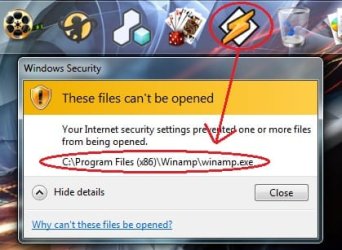
What is wrong with my Windows 7? I use a laptop and have Microsoft Security Essentials as the anti-virus. I get such dialog box when I try to access any program using the shortcut from the dock.
 

Attachments

  • Track.jpg
    Track.jpg
    27.7 KB · Views: 6

My Computer

Computer Manufacturer/Model Number
Dell/Studio 1569 A04
OS
Windows 7 Home Premium x64
CPU
2.27 gigahertz Intel Core i5 M 430
Motherboard
Dell Inc. A04
Monitor(s) Displays
Generic PnP Monitor

My Computer

Computer Manufacturer/Model Number
HP, Dell, Gateway, Toshiba - 4 laptops and 2 desktops
OS
Vista, Windows7, Mint Mate, Zorin, Windows 8
CPU
from 1.6GHz Duo to i7
Monitor(s) Displays
2x HP w2207
Hard Drives
5x HDD, 7x SSD, 12x Externals
Keyboard
with trackball - no mices
Mouse
Trackball mice
Internet Speed
DSL 6000
It says "Your Internet security settings prevented one or more files from being opened" so I would start by checking in your Internet properties > Security tab to see what the settings are. I would maybe check the "Launching applications and unsafe files" option under both the Internet zone and Local intranet zone.

Also, you could just try resetting the Internet Explorer settings under the Advanced tab by clicking the Reset button at the bottom.

To get to Internet properties; go to Control Panel > Network and Internet > Internet Options
or if you have the Control Panel as a list view then it is just Control Panel > Internet Options
 

My Computer

OS
Windows XP Pro x86, Windows Vista Home Premium x86, Windows 7 Pro x64, Win2k3, Win2k8, Ubuntu
CPU
Intel Xeon 5160 3GHz (Dual-Core)
Memory
8GB PC2-5300
Hard Drives
OCZ-Agility 2 - 80GB
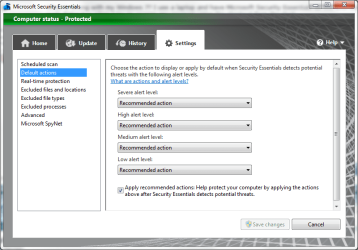
Have a look and see what your MSE settings are:

MSE.PNG

Also, are you using more than one firewall?
 

My Computer

Computer Manufacturer/Model Number
HP Pavilion Elite 495UK
OS
Windows 7 Ultimate SP1 64-Bit
CPU
Intel Core i7 870 @ 2.93GHz
Motherboard
MSI 2A9C (CPU1)
Memory
8Gb Dual-Channel DDR3 @ 664MHz
Graphics Card(s)
nVidia GeForce GTX 460 1024MB dedicated RAM
Sound Card
Realtek HD Audio
Monitor(s) Displays
HP2310i
Screen Resolution
1920 x 1080
Hard Drives
1x1954GB Hitachi HDS22020ALA 330 (RAID), 1x1954GB Hitachi External for backup and storage
PSU
460W
Case
HP Elite
Cooling
Air cooled
Keyboard
Logitech K750 solar-powered keyboard
Mouse
Logitech Wireless M180 mouse
Internet Speed
2Mb
Other Info
Pure Avanti Flow Internet Radio with iPod Dock, 64Gb iPod, HP USB Speakers, Sony MDR-V500 Headphones, Sony Vaio F-Series Laptop
It says "Your Internet security settings prevented one or more files from being opened" so I would start by checking in your Internet properties > Security tab to see what the settings are. I would maybe check the "Launching applications and unsafe files" option under both the Internet zone and Local intranet zone.

Also, you could just try resetting the Internet Explorer settings under the Advanced tab by clicking the Reset button at the bottom.

To get to Internet properties; go to Control Panel > Network and Internet > Internet Options
or if you have the Control Panel as a list view then it is just Control Panel > Internet Options

Thanks, but the directions cited by you couldn't solve my problem. Anyway, thanks a lot for your concern!
 

My Computer

Computer Manufacturer/Model Number
Dell/Studio 1569 A04
OS
Windows 7 Home Premium x64
CPU
2.27 gigahertz Intel Core i5 M 430
Motherboard
Dell Inc. A04
Monitor(s) Displays
Generic PnP Monitor

My Computer

Computer Manufacturer/Model Number
Dell/Studio 1569 A04
OS
Windows 7 Home Premium x64
CPU
2.27 gigahertz Intel Core i5 M 430
Motherboard
Dell Inc. A04
Monitor(s) Displays
Generic PnP Monitor
Back
Top