ff 3.5.6 - problems with viewing page

olfrud

New member
Local time
8:46 AM
Messages
11
Hello!

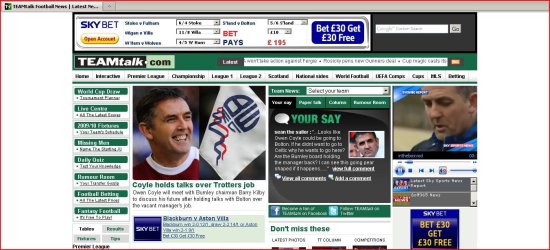
I installed win 7 and with ff (ver. 3.5.6) it asks me for plugin to be installed when view TEAMtalk Football News | Latest News |. Also, some buttons are not on pages. Check out the pic
http://img2.imageshack.us/img2/4075/ffresize.jpg

When click on "click here to dl plugin", no suitable plugins msg appears.
I've the newest java and flash installed.
Withe IE, have no problems. Also, in XP everything is OK.
http://img137.imageshack.us/img137/2227/ieresize.jpg

Can some1 else try to open teamtalk.com, or to explain this issue if noted b4?

Tnq
Rudolf
 

My Computer

OS
win xp&7
CPU
c2d 8400
Motherboard
gigabyte ds3l-p35
Memory
Kingston HyperX 2*1GB DDR2 1066
Graphics Card(s)
MSI 8500
Sound Card
Creative X-FI Gamer
Monitor(s) Displays
Samsung 971P
Hard Drives
WD 320GB aaks
ok, I see You need Windows Media Player for Firefox.

Wait, will try to find download link.. ;)

EDIT

Found it!
Support page, where they explain it:
http://support.mozilla.com/en-US/kb/Using+the+Windows+Media+Player+plugin+with+Firefox

Download page:
http://port25.technet.com/pages/windows-media-player-firefox-plugin-download.aspx

note it says:
Platforms:

Windows XP SP2 (x86)
Windows XP SP2 (x64)
Windows Vista (x86)
Windows Vista (x64)

Browsers: Firefox

I can't anywhere windows 7, so this should work.
Hope it will help you ;)
 

My Computer

OS
Windows 7 Ultimate x86 SP1
hm, but why is it working properly in xp? I can't remember I installed explicitly wmp for ff in xp...
 

My Computer

OS
win xp&7
CPU
c2d 8400
Motherboard
gigabyte ds3l-p35
Memory
Kingston HyperX 2*1GB DDR2 1066
Graphics Card(s)
MSI 8500
Sound Card
Creative X-FI Gamer
Monitor(s) Displays
Samsung 971P
Hard Drives
WD 320GB aaks
hm, but why is it working properly in xp? I can't remember I installed explicitly wmp for ff in xp...

Using the Windows Media Player plugin with Firefox
It explains why.
  • The original, which is usually included with Windows from 98 up to XP Home/Professional
  • The new version, which is specifically for Windows XP and Windows Vista and is only available by download.
Many Windows XP users will have the old plugin already, but it is recommended that you install the new plugin anyway.
 

My Computer

OS
Windows 7 Ultimate x86 SP1
Tnx.
I'll install it and let u know about the result :)
 

My Computer

OS
win xp&7
CPU
c2d 8400
Motherboard
gigabyte ds3l-p35
Memory
Kingston HyperX 2*1GB DDR2 1066
Graphics Card(s)
MSI 8500
Sound Card
Creative X-FI Gamer
Monitor(s) Displays
Samsung 971P
Hard Drives
WD 320GB aaks

My Computer

OS
win xp&7
CPU
c2d 8400
Motherboard
gigabyte ds3l-p35
Memory
Kingston HyperX 2*1GB DDR2 1066
Graphics Card(s)
MSI 8500
Sound Card
Creative X-FI Gamer
Monitor(s) Displays
Samsung 971P
Hard Drives
WD 320GB aaks
adblock is disabled. You can see the green icon down-right (which means it's disabled on teamtalk).
 

My Computer

OS
win xp&7
CPU
c2d 8400
Motherboard
gigabyte ds3l-p35
Memory
Kingston HyperX 2*1GB DDR2 1066
Graphics Card(s)
MSI 8500
Sound Card
Creative X-FI Gamer
Monitor(s) Displays
Samsung 971P
Hard Drives
WD 320GB aaks

Attachments

  • Capture.JPG
    Capture.JPG
    145.9 KB · Views: 5
  • Capture1.JPG
    Capture1.JPG
    49.9 KB · Views: 3

My Computer

OS
Windows 7 Ultimate x86 SP1
Don't think it's a security issue because I have problems from the first day with it in win 7 (only with teamtalk), without additional plug-ins and addons installed. In XP it's working fine and couldn't figure out what is the problem.

Thanks for suggestions
Would like to see somebody with Win 7 and ff to open teamtalk...
 

My Computer

OS
win xp&7
CPU
c2d 8400
Motherboard
gigabyte ds3l-p35
Memory
Kingston HyperX 2*1GB DDR2 1066
Graphics Card(s)
MSI 8500
Sound Card
Creative X-FI Gamer
Monitor(s) Displays
Samsung 971P
Hard Drives
WD 320GB aaks
Hi, olfrud.

As Jav indicated, you need the Firefox Windows Media Player Plugin. You also need the Adobe Flash plugin. After adding both of those I was able to see the video with Firefox on Windows 7 Ultimate 64-bit.

A question for you -- why are you jeopardizing your computer security by having Internet Protected Mode off in IE?
 

My Computer

OS
Windows 7 & Windows Vista Ultimate
Don't think it's a security issue because I have problems from the first day with it in win 7 (only with teamtalk), without additional plug-ins and addons installed. In XP it's working fine and couldn't figure out what is the problem.

Thanks for suggestions
Would like to see somebody with Win 7 and ff to open teamtalk...

1. Download - Personal (PSI) - Vulnerability Scanning - Secunia.com
It's not just about security.
Just run it, it will check if your programms up to date. (including your plugins)
2. Have really tried with all extension turned off as I asked? ( I mean ALL!)
3. Do as Corrine told. go to Adobe and download the newest version of Adobe Flash Player. (first run do 2 previous steps)
 

My Computer

OS
Windows 7 Ultimate x86 SP1
@Corrine.
I don't use IE, just wanted to present it opens teamtalk properly

@jav
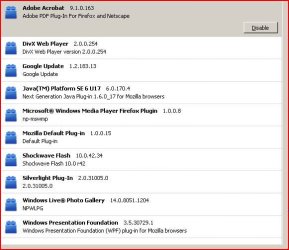
I regularly update everything and pay attention to security and vulnerability. I disabled all extensions I have, revert to default skin and tried to open teamtalk, but the same happened. Here are the print screens with flash player versions, secure browsing tab from secunia (these insecure things are from c drive, where my windows XP are installed, which wasn't updated from day I started to use 7, except adobe reader, although have the newest version installed on 7) and the teamtalk opened with ff.

http://img98.imageshack.us/img98/7397/clipn.jpg
http://img526.imageshack.us/img526/5100/clip2my.jpg
http://img137.imageshack.us/img137/6776/clip3o.jpg
 

My Computer

OS
win xp&7
CPU
c2d 8400
Motherboard
gigabyte ds3l-p35
Memory
Kingston HyperX 2*1GB DDR2 1066
Graphics Card(s)
MSI 8500
Sound Card
Creative X-FI Gamer
Monitor(s) Displays
Samsung 971P
Hard Drives
WD 320GB aaks
Back
Top