Fiducial Anchor

ron silberman

New member
Local time
9:17 PM
Messages
6
hello . . .

I am seeking help to alter a new i7 desktop computer to boot from a Solid State Drive (SSD) instead of the HDD.

The machine currently boots from a 1TB Hitachi DeskStar hard drive and the entire C: drive image is 33GB including

System Reserved (swap) space.

I recently plugged in (SATA) two 64 GB SDDs from Western Digital.

I need to create a full System Image backup from HDD to the first SDD #1 (it will be compressed), then restore the

system image from SDD #1 to SDD #2 such that the machine boots from SDD #2. Finally I'd like to move the swap space

from SDD #2 to SDD #1 and delete the compressed system image from #1. Has anyone done something like this? Can

you warn me of obstacles I may encounter?
 

My Computer

Computer Manufacturer/Model Number
Custom
OS
Windows 7
CPU
Intel i7 875k CPU
Motherboard
Gigabyte GA-H55M-S2H
Memory
4 GB Corsair
Graphics Card(s)
SAPPHIRE RADEON 4850 512 MB VIDEO CARD
Sound Card
none
Monitor(s) Displays
Hanns-G 28"
Hard Drives
HITACHI 1TB HARD DRIVE Deskstar 7K1000C HDS721010CLA332

and soon 2 Western Digital SiliconEdge Blue 64 GB SSDs
PSU
400 W. Corsair PSU
Case
ANTEC 300 CASE
Cooling
Fans
Hello ron silberman, welcome to Seven Forums!


Before we make any specific recommendations will you please post a snip/screen-shot of the entire disk management drive map with a full description as to which drive/partition is which, so we can see what you have going.

In the Windows start menu right click computer and click manage, in the left pane of the "Computer Management" window that opens click disk management and post a snip of that.

Be sure to post back with any further questions you may have and to keep us informed.


How to Upload and Post a Screenshot and File in Seven Forums
 

My Computer

Computer Manufacturer/Model Number
* BFK Customs *
OS
W 7 64-bit Ultimate
CPU
Intel Q9550 Yorkfield
Motherboard
ASUS P5Q Pro
Memory
8GB Dominator 8500C5D
Graphics Card(s)
ATI : XFX 5870
Sound Card
Realtek HD Audio 7-1
Monitor(s) Displays
1x 47" LCD HDMI & 3x 26" LCD HDMI
Screen Resolution
1920x1080P & 1920x1200
Hard Drives
1x 80GB Intel X25-M G2 SSD : 1x 500GB & 1x 640GB WD Caviar Black(s)
PSU
Corsair 620HX
Case
Cooler Master RC-690
Cooling
Tuniq Tower 120, 2x 140mm and 3x 120mm case fans
Keyboard
Microsoft 500
Mouse
Razer Diamondback 3G
Internet Speed
14 Mb/s
Other Info
1x Koutech 3Gb/s SATA HDD Hot Swap Rack
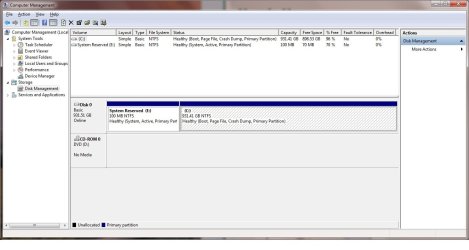
Advanced thanks to the Bare Foot Kid for step-by-step explanation . . . I'm new to all of this. If I followed you're bread crumb trail there will be a disk map in the attached management screen.
 

Attachments

  • disk map.jpg
    disk map.jpg
    83.7 KB · Views: 8

My Computer

Computer Manufacturer/Model Number
Custom
OS
Windows 7
CPU
Intel i7 875k CPU
Motherboard
Gigabyte GA-H55M-S2H
Memory
4 GB Corsair
Graphics Card(s)
SAPPHIRE RADEON 4850 512 MB VIDEO CARD
Sound Card
none
Monitor(s) Displays
Hanns-G 28"
Hard Drives
HITACHI 1TB HARD DRIVE Deskstar 7K1000C HDS721010CLA332

and soon 2 Western Digital SiliconEdge Blue 64 GB SSDs
PSU
400 W. Corsair PSU
Case
ANTEC 300 CASE
Cooling
Fans
Why not use WD's excellent free Acronis cloning utility to clone over your HD to SSD? It should work without problem. WD Support

If you select Manual clone you can change partition sizes during the cloning process. I would keep 100mb the same and have to shrink C to fit into the rest of the SSD.

If it balks at the huge WIn7 partition size, you can shrink it first in Disk Mgmt as much as it will allow, or even more using free Partition Wizard bootable CD.

You may need to initialize the SSD first in Disk Mgmt by clicking on panel to left of SSD on map.
 
Disk Map is of C: drive only

Gregrocker -- the two new SSD drives are not ready to be exercised yet -- I'm awaiting 2 SATA cables in the mail -- should be here soon. I'd like to try using the Windows 7 backup and restore capability first. If I can keep a compressed System Image on the hard drive, then in the future if my working system image gets too bloated, I can just restore the smaller image to the boot-up SDD. I may even move the HDD to a network attached storage (NAS) cabinet.
 

My Computer

Computer Manufacturer/Model Number
Custom
OS
Windows 7
CPU
Intel i7 875k CPU
Motherboard
Gigabyte GA-H55M-S2H
Memory
4 GB Corsair
Graphics Card(s)
SAPPHIRE RADEON 4850 512 MB VIDEO CARD
Sound Card
none
Monitor(s) Displays
Hanns-G 28"
Hard Drives
HITACHI 1TB HARD DRIVE Deskstar 7K1000C HDS721010CLA332

and soon 2 Western Digital SiliconEdge Blue 64 GB SSDs
PSU
400 W. Corsair PSU
Case
ANTEC 300 CASE
Cooling
Fans
Can the System Image be restoredfrom SSD 2 to SSD 1?

Hello all . . .

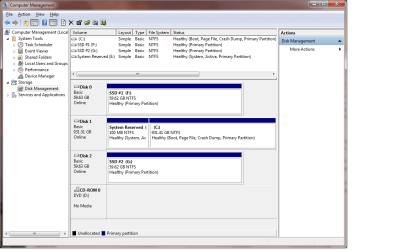
An updated disk configuration is attached under the paper clip, above.

The SATA cables finally arrived, so I plugged in both SSDs, initialized, and formatted them. The System Image from the HDD was generated onto SSD #2. I'm now trying to restore it onto SSD 1, so I can boot from it instead of the HDD, but I've encountered a road block.

The Win 7 Systems Image recovery process includes a reboot step, but I don't think it allows the destination drive to be anything other than the HDD. Does anyone know how to change the recovery destination to an SDD?
 

Attachments

  • disk config.png
    disk config.png
    33.5 KB · Views: 5

My Computer

Computer Manufacturer/Model Number
Custom
OS
Windows 7
CPU
Intel i7 875k CPU
Motherboard
Gigabyte GA-H55M-S2H
Memory
4 GB Corsair
Graphics Card(s)
SAPPHIRE RADEON 4850 512 MB VIDEO CARD
Sound Card
none
Monitor(s) Displays
Hanns-G 28"
Hard Drives
HITACHI 1TB HARD DRIVE Deskstar 7K1000C HDS721010CLA332

and soon 2 Western Digital SiliconEdge Blue 64 GB SSDs
PSU
400 W. Corsair PSU
Case
ANTEC 300 CASE
Cooling
Fans
This is why I suggested you clone between the HD and one SSD using WD's excellent Acronis cloning app. Be sure to copy MBR, too. WD Support

But go ahead and try unplugging the source HD, boot the WIn7 DVD Repair console, select Recover Using an Image. let it detect the stored image and see if it will allow you to reimage to the SSD.
 
No Win 7 solution

Tried the following:
- powered down
- unplugged the HDD
- booted off of DVD to a Win 7 recovery console
- stepped through all options in a "Re-image your computer" wizard
Windows reply: "The System image restore failed - no disk that can be used for recovering the system disk can be found"

Perhaps some drivers need to be installed on the restoration target (SDD #1). I guess the only reason for a Win 7 Sys Image backup is to restore the HDD.

So tomorrow I'll follow your good advice and install WD's Acronis cloning app.

thanks . . .
 

My Computer

Computer Manufacturer/Model Number
Custom
OS
Windows 7
CPU
Intel i7 875k CPU
Motherboard
Gigabyte GA-H55M-S2H
Memory
4 GB Corsair
Graphics Card(s)
SAPPHIRE RADEON 4850 512 MB VIDEO CARD
Sound Card
none
Monitor(s) Displays
Hanns-G 28"
Hard Drives
HITACHI 1TB HARD DRIVE Deskstar 7K1000C HDS721010CLA332

and soon 2 Western Digital SiliconEdge Blue 64 GB SSDs
PSU
400 W. Corsair PSU
Case
ANTEC 300 CASE
Cooling
Fans
Unfortunately backup imaging is new to Windows and yet to evolve.

Acronis is outstanding. Read its manual at the link to choose Auto cloning or make changes manually.
 
Tried an Acronis clone

The Acronis True Image app appeared to work well for cloning the HDD to an SDD. It automatically resized partitions and assigned new drive letters for each partition. It appeared to complete successfully (see attached layout) so I powered down, disconnected the HDD, and booted up. It found the cloned SDD and Win 7 sort of loaded after some delay. There were no icons on the desktop, and the task bar showed only a message on the right:

"Windows 7 build 7600 - this copy of Windows is not genuine".

After re-plugging in the HDD, Win 7 Pro seems to boot up O.K., but I'm still seeking a way to configure the SDD as a bootable drive.

I contacted WD Support and explained my dilemma, but after some delays they replied that the True Image software is not meant for SDDs. I know there must be gobs of technical gurus successfully establishing similar configurations -- anyone out there?
 

My Computer

Computer Manufacturer/Model Number
Custom
OS
Windows 7
CPU
Intel i7 875k CPU
Motherboard
Gigabyte GA-H55M-S2H
Memory
4 GB Corsair
Graphics Card(s)
SAPPHIRE RADEON 4850 512 MB VIDEO CARD
Sound Card
none
Monitor(s) Displays
Hanns-G 28"
Hard Drives
HITACHI 1TB HARD DRIVE Deskstar 7K1000C HDS721010CLA332

and soon 2 Western Digital SiliconEdge Blue 64 GB SSDs
PSU
400 W. Corsair PSU
Case
ANTEC 300 CASE
Cooling
Fans
Back
Top