Solved File and folder sharing W7

WacoJohn

New member
Local time
9:58 AM
Messages
27
W7-32 ACER-PC shares with all others except Tosh-64 and DELL-64

W7-64 Toshiba TOSH-64 shares with all others except Acer-PC

W10-64 DELL-64 shares with all others except ACER-PC and EMATIC

W10-64 ACER-64 shares with all others except ACER-PC and EMATIC

W10-32 EMATIC shares with all others except ACER-PC


The failures are:

Windows cannot access (machine name)
You do not have permission to access \\machine name). Contact your administrator etc etc

They are all members of WORKGROUP. They have worked OK before. Function Discovery Provider Host and Function Discovery Resource Publication are both started and set to AUTOMATIC.

Things got much better when I set those two services as instructed in another forum .. but still having these problems. Help is appreciated in advance.
 

My Computer

OS
Windows 7 Professional
There are 2 things first is share permissions they should be set to everyone second is the NTFS permission on the folder often they are owned by a users so no one else will have rights on it By default windows passes your username /password your logged in as so if there is a user with same details on the pc its ok if not you wont get in unless its set to everyone
 

My Computer

Computer type
PC/Desktop
OS
win 8 32 bit
Thank you. I am having difficulty finding where to check/change the share permissions to "everyone". Sorry. This is all pretty strange to me.
 

My Computer

OS
Windows 7 Professional
OK. Will do. Thank you.

edit:

I watched several videos. They explain how to share a folder. I am simply trying to get all my machines to see each other's PUBLIC folders. From what I have seen, the videos are barking up a different tree.

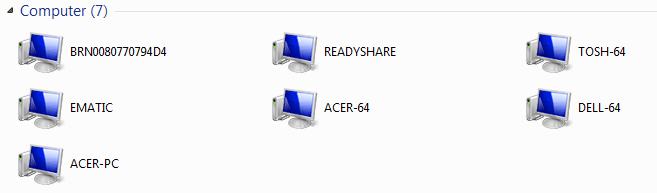
Here is a shot of NETWORK. It is the Tosh W7-64 machine. I can click on any computer and get USERS SHARE which opens to OWNER PUBLIC except for computer ACER-PC. On it, I get "you don't have permission to access". Same problem going the other way ... ACER-PC to TOSH-64. It isn't so much folders as it is devices I am having problems accessing:
 

Attachments

  • Capture.PNG
    Capture.PNG
    19.3 KB · Views: 17
Last edited:

My Computer

OS
Windows 7 Professional
Here is some more info: I was told the default network name for wired connections is NETWORK. For wireless, it is whatever I set it to when I set up the wireless connection. Here is the weird part.

Some of my ethernet machies say NETWORK and others say LAKESIDE (which is the SSID of my wireless connections). I don't know how this happened. All the wireless connected computers say LAKESIDE. I am wondering if this has to do with my sharing problems. I GOOGLED 'change home network name' and came up with a registry edit.

networking - How do I change a network's name in Windows 8? - Super User

OPTION 1. When I looked, all ethernet machines that express LAKESIDE say LAKESIDE in that registry key.

EDIT: So, i made the edit on the Toshiba machine and now its network name is NETWORK as it should be. The Acer-PC (also ethernet) already says NETWORK. Unfortunately, it did not solve the original problem between the two.
 
Last edited:

My Computer

OS
Windows 7 Professional
I have done a factory restore and full update to the computer and the problem is solved. Thanks anyway.
 

My Computer

OS
Windows 7 Professional
Back
Top