File Association keeps Dropping for Karaoke files !

swhoelefp69

New member
Local time
9:32 PM
Messages
16
Heh gang... first post, after LOTS of reading !

I'm using Win 7 7127 on a tablet PC... I'm using the free program Karafun to play .CDG files...

I've gone through the "Associate file type" utility, having Karafun play .CDG files... but, I'm able to play a few files, then Win 7 drops the association when I try and play a file... I have to manually associate the program each time I want to launch a tune... I was hoping to use Explorer as my file database, vs. the program's database.

Could any of your Win 7 guru's offer any guidance ?... can I do something to the Registery to permantly have Karafun.exe play .CDG files ?

This is a moot point for me, before reverting back to XP - and I really don't want to go back !

Thanks folks !
Kevin
 

My Computer My Computer

OS
Windows XP
You have gone through both Control Panel\Programs\Default Programs\Set Associations and through Control Panel\Programs\Default Programs\Set Default Programs.

Those are the only places i know to set the association. You also set the association in the program you are using as well? They should have an option to association file types with that program within the program itself.
 

My Computer My Computer

Computer Manufacturer/Model Number
Custom Made
OS
Windows 7 Build 7600|16384- 64bit
CPU
AMD Phenom II X4 810 - 2.61ghz Deneb
Motherboard
Asus M4A79T Deluxe
Memory
4GB DDR3 Mushkin (1600 O.C. Rated)
Graphics Card(s)
ATI HD Radeon 4890 1GB
Sound Card
Realtek HD Onboard Audio
Monitor(s) Displays
AOC 912vwa-1
Screen Resolution
1440x900 (Max Monitor)
Hard Drives
10000RPM 150GB Western Digital Velociraptor
PSU
Corsair TSX750W
Case
Antec Nine Hundred
Cooling
Air Cooled
Keyboard
Logitech Elite
Mouse
Logitech MX518
Internet Speed
Comcast High-Speed (+Powerboost)
Hi swhoelefp69, welcome to the forums.

Was it through 'Default Programs' on the Start Menu that you made your changes?

If so, you could try the following,

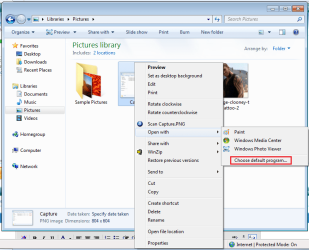
Open up a folder with your .CDG files located, right-click 1 of the files & in the 'Open With' option select 'Choose default program'.
Untitled.png

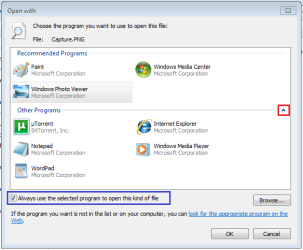
In the next screen, if your program is not in the top list, click the small arrow to expand the view. Select your program from the list (if it's still not listed, select browse & navigate to the main executable file).
Capture.PNG
   Note
Make sure the 'Always use the selected program to open this type of file' is selected


Hope this helps :)


Jeff
 

My Computer My Computer

Computer Manufacturer/Model Number
Compaq Desktop
OS
Windows 7 Ultimate x64
CPU
AMD Sempron Dual Core
Memory
3GB
Graphics Card(s)
NVIDIA GeForce 6150SE nForce 430
Screen Resolution
1024x768
Hard Drives
150GB Sata
tkx guys. this is really strange.

I've tried every possibility imaginable... after I associate the file, I can close explorer, and re-open... look at the CDG file, and it's associated... I reboot Win 7, and it's dropped !

I've added the association through explorer - right click - open with... then, "clicked the box that says always use the selected program....."

One thing I did notice, is that when I go through the default progams option, and associate the file type, the "always use the selected..." is dimmed ??? i can still choose Karafun.exe, and close the program...

Another thing to note, this "Karafun.exe" doesn't show up in the list of defaut programs... is there a way to "force" this ?...

Really appreciate the help gang.

Kevin

Oh, and one other thing... I don't get the option to click the "little arrow" to show more programs... this is really puzzling...
 
Last edited by a moderator:

My Computer My Computer

OS
Windows XP
I know of no way to add a default program to the list. I see no add or browse button in that area. Is your 7127 a clean install or a upgrade?
 

My Computer My Computer

Computer Manufacturer/Model Number
Custom Made
OS
Windows 7 Build 7600|16384- 64bit
CPU
AMD Phenom II X4 810 - 2.61ghz Deneb
Motherboard
Asus M4A79T Deluxe
Memory
4GB DDR3 Mushkin (1600 O.C. Rated)
Graphics Card(s)
ATI HD Radeon 4890 1GB
Sound Card
Realtek HD Onboard Audio
Monitor(s) Displays
AOC 912vwa-1
Screen Resolution
1440x900 (Max Monitor)
Hard Drives
10000RPM 150GB Western Digital Velociraptor
PSU
Corsair TSX750W
Case
Antec Nine Hundred
Cooling
Air Cooled
Keyboard
Logitech Elite
Mouse
Logitech MX518
Internet Speed
Comcast High-Speed (+Powerboost)
7127 was installed uber clean... had the regular driver issues for display, touchscreen, wireless... but no other issues... this is heartbreaking !... i have 3,950 karaoke files that won't play when I click them !!!!
 

My Computer My Computer

OS
Windows XP
Stupid question, but have you tried uninstalling and reinstalling the program you use? There may have been an issue with some registry settings getting written. If that doesnt work, can you manually open the files through the program? Also what happens when you just double click on the file you want to play? Doesn't the open with box appear since windows does not know how to open them?
 

My Computer My Computer

Computer Manufacturer/Model Number
Custom Made
OS
Windows 7 Build 7600|16384- 64bit
CPU
AMD Phenom II X4 810 - 2.61ghz Deneb
Motherboard
Asus M4A79T Deluxe
Memory
4GB DDR3 Mushkin (1600 O.C. Rated)
Graphics Card(s)
ATI HD Radeon 4890 1GB
Sound Card
Realtek HD Onboard Audio
Monitor(s) Displays
AOC 912vwa-1
Screen Resolution
1440x900 (Max Monitor)
Hard Drives
10000RPM 150GB Western Digital Velociraptor
PSU
Corsair TSX750W
Case
Antec Nine Hundred
Cooling
Air Cooled
Keyboard
Logitech Elite
Mouse
Logitech MX518
Internet Speed
Comcast High-Speed (+Powerboost)
ok - I tried 2 things, and now it's working ok... not sure which solved it... I was logging in as user "Kevin", with admin privileges... making changes, etc.... I logged in as Admin, and removed the personal account... then, I reinstalled Karafun, and it's working ok now... go figure !

My guess, it was the app that needed to be reinstalled...

Tks for all the responses and support... great resource, this forum !

Kevin
 

My Computer My Computer

OS
Windows XP
You might not have installed it for all users to begin with, so it only worked with Admin? Not sure though, since i am sure your user "Kevin" was an administrator. Oh well.

Glad you got it fixed.
 

My Computer My Computer

Computer Manufacturer/Model Number
Custom Made
OS
Windows 7 Build 7600|16384- 64bit
CPU
AMD Phenom II X4 810 - 2.61ghz Deneb
Motherboard
Asus M4A79T Deluxe
Memory
4GB DDR3 Mushkin (1600 O.C. Rated)
Graphics Card(s)
ATI HD Radeon 4890 1GB
Sound Card
Realtek HD Onboard Audio
Monitor(s) Displays
AOC 912vwa-1
Screen Resolution
1440x900 (Max Monitor)
Hard Drives
10000RPM 150GB Western Digital Velociraptor
PSU
Corsair TSX750W
Case
Antec Nine Hundred
Cooling
Air Cooled
Keyboard
Logitech Elite
Mouse
Logitech MX518
Internet Speed
Comcast High-Speed (+Powerboost)
Hello swhoelefp69,

Welcome to Seven Forums.

Sometimes a program will not install correctly unless the installer is run as admin. Sounds like that may have been what happened here. More info here: http://www.sevenforums.com/tutorials/316-compatibility-mode.html

I have run into several programs that need to be installed with Admin rights, especially older programs.

Gary
 

My Computer My Computer

Computer Manufacturer/Model Number
Dell XPS420
OS
Vista Ult 64 bit Seven Ult RTM x64
CPU
Intel Core2 Quad Q6600 2.40 gigahertz
Memory
Crucial Ballistix 4x2GB PC2 6400
Graphics Card(s)
NVIDIA GeForce 8600 GTS 256 MB
Sound Card
Creative SB X-Fi audio
Monitor(s) Displays
HP w2207 + HPvs15
Screen Resolution
1680x1050 + 1024x768
Hard Drives
2-WD5000AAKS-500 GB
WD5000AAV-500 GB external
Keyboard
Microsoft Comfort Curve
Mouse
MX Revolution
Other Info
Wacom Intuos 2 Graphics Tablet
Experience Index=5.5
I spoke too soon...

Most of my Karaoke files, are in the .zip format... and Karafun, will open zip files, and play the compressed .cdg file contained in the zip.

I just associated .zip files with Karafun. Opened one, by clicking on the zip file, and it played. I rebooted, and low and behold, back in explorer, the zip files are no longer associated with Karafun. Different that .cdg, Karafun doesn't have .zip as a "checkable" option to open. It just opens then automatically...

Does anyone have any idea how to associate zip files with programs other than WinZip ?

This is the real dealbraker, as over 3000 of my Karaoke files are zipped !

the dilema continues..
 

My Computer My Computer

OS
Windows XP
You cant set Karafun to .zip in file associations under the control panel? I am runnin out of ideas or places to determine file types.
 

My Computer My Computer

Computer Manufacturer/Model Number
Custom Made
OS
Windows 7 Build 7600|16384- 64bit
CPU
AMD Phenom II X4 810 - 2.61ghz Deneb
Motherboard
Asus M4A79T Deluxe
Memory
4GB DDR3 Mushkin (1600 O.C. Rated)
Graphics Card(s)
ATI HD Radeon 4890 1GB
Sound Card
Realtek HD Onboard Audio
Monitor(s) Displays
AOC 912vwa-1
Screen Resolution
1440x900 (Max Monitor)
Hard Drives
10000RPM 150GB Western Digital Velociraptor
PSU
Corsair TSX750W
Case
Antec Nine Hundred
Cooling
Air Cooled
Keyboard
Logitech Elite
Mouse
Logitech MX518
Internet Speed
Comcast High-Speed (+Powerboost)
You cant set Karafun to .zip in file associations under the control panel? I am runnin out of ideas or places to determine file types.

I think you meant 'default programs' not control panel.. I don't know if there are any file association options in CP

I have installed Karafun, and choosen install as Admin every time... tried with Win XP, and Vista compatability.

Could the fact that Windows has it's own zipping ability, (and it reads .zip files) be the problem with permantly associating .zip files with non-zip apps like Karafun ?

thanks gang,
Kevin
 

My Computer My Computer

OS
Windows XP
I wouldnt think there would be a problem with it. As for the Control Panel statement, i open control panel and search for File types, hence i said COntrol Panel. Sorry for the confusion.

Have you tried any other program that possibly supports CDG?
 

My Computer My Computer

Computer Manufacturer/Model Number
Custom Made
OS
Windows 7 Build 7600|16384- 64bit
CPU
AMD Phenom II X4 810 - 2.61ghz Deneb
Motherboard
Asus M4A79T Deluxe
Memory
4GB DDR3 Mushkin (1600 O.C. Rated)
Graphics Card(s)
ATI HD Radeon 4890 1GB
Sound Card
Realtek HD Onboard Audio
Monitor(s) Displays
AOC 912vwa-1
Screen Resolution
1440x900 (Max Monitor)
Hard Drives
10000RPM 150GB Western Digital Velociraptor
PSU
Corsair TSX750W
Case
Antec Nine Hundred
Cooling
Air Cooled
Keyboard
Logitech Elite
Mouse
Logitech MX518
Internet Speed
Comcast High-Speed (+Powerboost)
there are a couple others, but they don't open zip files like Karafun

OK - now i've really screwed things up...

I went into default programs, and set rar to open .zip files... I was trying to change the file type, hoping I could get the program to open (and remember) rar files..

now, rar is the default program for .zip and it looks like it can't be changed ??? there is a selection box, but it can't be "unchecked"

Any help with this one guys ? think I read another post about someone who wanted to revert back to where a program wasn't the default...

what a pain !
 

My Computer My Computer

OS
Windows XP
Winrar, open it up and change the file associations in there.
 

My Computer My Computer

Computer Manufacturer/Model Number
Custom Made
OS
Windows 7 Build 7600|16384- 64bit
CPU
AMD Phenom II X4 810 - 2.61ghz Deneb
Motherboard
Asus M4A79T Deluxe
Memory
4GB DDR3 Mushkin (1600 O.C. Rated)
Graphics Card(s)
ATI HD Radeon 4890 1GB
Sound Card
Realtek HD Onboard Audio
Monitor(s) Displays
AOC 912vwa-1
Screen Resolution
1440x900 (Max Monitor)
Hard Drives
10000RPM 150GB Western Digital Velociraptor
PSU
Corsair TSX750W
Case
Antec Nine Hundred
Cooling
Air Cooled
Keyboard
Logitech Elite
Mouse
Logitech MX518
Internet Speed
Comcast High-Speed (+Powerboost)
k guys... I'm not losing my mind here...

all along, when I looked at the file types to associate aprogram with under "associate a file type or protocol wth a program', winzip was NEVER on the list... it was only since I associated WinRAR with winzip, in the "set your default programs', that it NOW shows on that list...

so, I selected .zip from that list, associated it with Karafun, and I think it's working and sticking ! I rebooted a few times (love the speed of win 7) and zip files are still opening with karafun

tkx gang.. really appreciate the help and guidance...

Kevin
 

My Computer My Computer

OS
Windows XP
Glad you got it to work. Guess when it comes down to it, just reinstall all the zip programs till they show up in the Default Programs area? lol
 

My Computer My Computer

Computer Manufacturer/Model Number
Custom Made
OS
Windows 7 Build 7600|16384- 64bit
CPU
AMD Phenom II X4 810 - 2.61ghz Deneb
Motherboard
Asus M4A79T Deluxe
Memory
4GB DDR3 Mushkin (1600 O.C. Rated)
Graphics Card(s)
ATI HD Radeon 4890 1GB
Sound Card
Realtek HD Onboard Audio
Monitor(s) Displays
AOC 912vwa-1
Screen Resolution
1440x900 (Max Monitor)
Hard Drives
10000RPM 150GB Western Digital Velociraptor
PSU
Corsair TSX750W
Case
Antec Nine Hundred
Cooling
Air Cooled
Keyboard
Logitech Elite
Mouse
Logitech MX518
Internet Speed
Comcast High-Speed (+Powerboost)
fourth reboot, and .zip files are back associated with windows extractor... (winrar has no associations within the program, nor does winzip)

so, no go

it must be something to do with windows, and it's ability to extract zip files ??? without winzip or winrar ?

I spoke too soon a 2nd time... ok, I'm gettin ready to give up !

my problem is, these files need to open with a single click... i have all these karaoke files on a touchscreen tablet... there will be no option to "right click, open as, choose program, etc)

I need .zip files to open with a program other than windows, winzip or winrar

that's it in a nutshell...
 

My Computer My Computer

OS
Windows XP
Uninstall Winzip, Winrar, and the karafun thing. Restart, open the zips with the default windows zip manager. then install karafun again and see if that works. Problem is there may be tooo many zip programs of your computer and they are all fighting for zip control.
 

My Computer My Computer

Computer Manufacturer/Model Number
Custom Made
OS
Windows 7 Build 7600|16384- 64bit
CPU
AMD Phenom II X4 810 - 2.61ghz Deneb
Motherboard
Asus M4A79T Deluxe
Memory
4GB DDR3 Mushkin (1600 O.C. Rated)
Graphics Card(s)
ATI HD Radeon 4890 1GB
Sound Card
Realtek HD Onboard Audio
Monitor(s) Displays
AOC 912vwa-1
Screen Resolution
1440x900 (Max Monitor)
Hard Drives
10000RPM 150GB Western Digital Velociraptor
PSU
Corsair TSX750W
Case
Antec Nine Hundred
Cooling
Air Cooled
Keyboard
Logitech Elite
Mouse
Logitech MX518
Internet Speed
Comcast High-Speed (+Powerboost)
Back
Top