
File can be seen only through the upload window in IE

dc2000

New member
Member
VIP
Local time
4:23 PM
Messages
153
I'm not sure how this could be possible, so I'd appreciate if someone suggested what's going on?

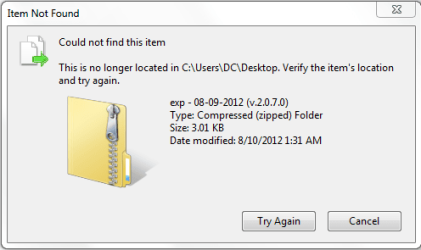
On my Windows 7 desktop when I open the "Choose File To Upload" dialog window from IE9 and navigate to my desktop, I see there a ZIP file listed (see attached), but when I go to the actual desktop I don't see that file there. Further more, when I try to cut that file from the "Choose File To Upload" dialog and paste it somewhere else I get the message telling me that "Item Not Found" (see attached).
 

Attachments
  • 1.PNG
    1.PNG
    10.2 KB · Views: 14
  • 2.PNG
    2.PNG
    70.6 KB · Views: 14

My Computer My Computer

At a glance

Windows
OS
Windows
First, please fill out your system specs using the info for the computer that has this problem.

This tutorial might help: http://www.sevenforums.com/tutorials/180324-system-info-see-your-system-specs.html

Please include these two items in your system spec info:

1) the version of the browser that you are using
(IE8, IE9, IE10) 32bit or 64bit <<< see task manager

2) the anti-virus tool you are using

~~~~~~~~~

3) Are you logged on using a account with admin rights?

4) Is the UAC turned on?

Please show all folders/files:

5) Can you see the zip file of interest if you open the Windows (file) Explorer to this location?
C:\Users\Public\Desktop

6) If not, then can you see it in this location?
C:\Users\username\Desktop

We can save these for later:
http://www.sevenforums.com/tutorials/1538-sfc-scannow-command-system-file-checker.html
http://www.sevenforums.com/tutorials/433-disk-check.html
http://www.sevenforums.com/tutorials/96938-check-disk-chkdsk-read-event-viewer-log.html
 

My Computer My Computer

At a glance

W7 Pro SP1 64biti78GBIntel HD Graphics
Computer type
Laptop
Computer Manufacturer/Model Number
Employer provided Dell Latitude
OS
W7 Pro SP1 64bit
CPU
i7
Memory
8GB
Graphics Card(s)
Intel HD Graphics
Hard Drives
crappy SSD
Antivirus
Employer mandated Symantec Endpoint Protection
Browser
Pale Moon 64bit, IE11 64bit & Chrome 64bit
Try to delete it from an advanced command prompt. If still not found, I'll look tomorrow for a method that worked in another thread,

Start> In search box type cmd> Right click on cmd.exe in results above and choose Run as administrator> When command prompt opens type

cd:(your username)\desktop

Enter

The directory will be changed to desktop> Now type

del (name of folder)

Enter

From your picture it appears to be exp - 08-09-2012 (v.2.0.7.0), so you'd type

del exp - 08-09-2012 (v.2.0.7.0)

Enter

A Guy
 

My Computer My Computer

At a glance

Windows 10 Home x64INTEL Core i5-750 Quad-Core 3.37GHzHyperX Fury Black Series 8GB (2 x 4GB) 1866MhzEVGA GeForce GTX 750 Superclocked 1GB 128-Bit...
Computer type
PC/Desktop
OS
Windows 10 Home x64
CPU
INTEL Core i5-750 Quad-Core 3.37GHz
Motherboard
ASUS P7P55D
Memory
HyperX Fury Black Series 8GB (2 x 4GB) 1866Mhz
Graphics Card(s)
EVGA GeForce GTX 750 Superclocked 1GB 128-Bit GDDR5
Monitor(s) Displays
LG 32MA68HY 32" IPS
Screen Resolution
1920 x 1080
Hard Drives
Samsung 840 Evo 120GB, SEAGATE 500GB Barracuda® 7200.12, SATA 3 Gb/s, 7200 RPM, 16MB cache
PSU
ANTEC TruePower New TP-550, 80 PLUS, 550W
Case
ANTEC Three Hundred Illusion
Cooling
COOLER MASTER Hyper 212 Plus, 4 x 120mm 1 x 140mm Noctua's
Internet Speed
85 + Mbps
Antivirus
Avast
Browser
Vivaldi
This happens in IE 9.0.8112.16421. It runs as a 32-bit process (more than one actually.) I use MS Security Essentials. UAC is on. I'm on a standard user account. "C:\Users\Public\Desktop" nor "C:\Users\username\Desktop" have that file. As per "A Guy"'s suggestion doing del from an admin console doesn't help either -- there's no such file there. That file seems to be visible only from IE.
 

My Computer My Computer

At a glance

Windows
OS
Windows
First, please fill out your system specs using the info for the computer that has this problem.....
You know, it always helps to know your audience. In this case, you (the OP) are my audience. If I had remembered you, I would not have asked for system specs since you work with several system. Now I recall where I saw you before - it was in this post:
http://www.sevenforums.com/browsers-mail/280930-ie-9-plug-print-pages-windows-7-a.html

You mentioned that you are seeing this file while logged on as a standard user. Try the built in administrator account (not a user with admin rights): http://www.sevenforums.com/tutorials/507-built-administrator-account-enable-disable.html

How about getting to it via a Live CD?

A chkdsk might be in order.

Can you see this file via the File > Open file dialog box in notepad? Just curious. Notepad calls the same API that IE is calling, but the integrity level could be different.

Have you searched the whole drive for this file? I know where Windows thinks that this file is but something has barfed. The "item not found" screenshot shows a path to the file, but do you see that same path if you right click on the file and look at the properties?

And the security tab, does that give a clue?

Does the end-user need this file? Or is it just an annoyance/curiosity?
 

My Computer My Computer

At a glance

W7 Pro SP1 64biti78GBIntel HD Graphics
Computer type
Laptop
Computer Manufacturer/Model Number
Employer provided Dell Latitude
OS
W7 Pro SP1 64bit
CPU
i7
Memory
8GB
Graphics Card(s)
Intel HD Graphics
Hard Drives
crappy SSD
Antivirus
Employer mandated Symantec Endpoint Protection
Browser
Pale Moon 64bit, IE11 64bit & Chrome 64bit
It occurs to me that if the file is still actually there, it may show on a 3rd party file manager, or, as UsernameIssues mentioned, a Linux live CD. I wonder if a search with something like Everything (better then windows search), for that file name might show something? I doubt it is in IE's cache, as it shows in the upload dialog. A Guy
 

My Computer My Computer

At a glance

Windows 10 Home x64INTEL Core i5-750 Quad-Core 3.37GHzHyperX Fury Black Series 8GB (2 x 4GB) 1866MhzEVGA GeForce GTX 750 Superclocked 1GB 128-Bit...
Computer type
PC/Desktop
OS
Windows 10 Home x64
CPU
INTEL Core i5-750 Quad-Core 3.37GHz
Motherboard
ASUS P7P55D
Memory
HyperX Fury Black Series 8GB (2 x 4GB) 1866Mhz
Graphics Card(s)
EVGA GeForce GTX 750 Superclocked 1GB 128-Bit GDDR5
Monitor(s) Displays
LG 32MA68HY 32" IPS
Screen Resolution
1920 x 1080
Hard Drives
Samsung 840 Evo 120GB, SEAGATE 500GB Barracuda® 7200.12, SATA 3 Gb/s, 7200 RPM, 16MB cache
PSU
ANTEC TruePower New TP-550, 80 PLUS, 550W
Case
ANTEC Three Hundred Illusion
Cooling
COOLER MASTER Hyper 212 Plus, 4 x 120mm 1 x 140mm Noctua's
Internet Speed
85 + Mbps
Antivirus
Avast
Browser
Vivaldi
@UsernameIssues. Yes. That was a different computer though.

So, guess what, guys? I guess we'll never know... Windows update installed IE10 and that file is gone from its upload window. I have no idea what that was... must've been one of many bugs in IE9...
 

My Computer My Computer

At a glance

Windows
OS
Windows
Thanks for posting back with the status.
 

My Computer My Computer

At a glance

W7 Pro SP1 64biti78GBIntel HD Graphics
Computer type
Laptop
Computer Manufacturer/Model Number
Employer provided Dell Latitude
OS
W7 Pro SP1 64bit
CPU
i7
Memory
8GB
Graphics Card(s)
Intel HD Graphics
Hard Drives
crappy SSD
Antivirus
Employer mandated Symantec Endpoint Protection
Browser
Pale Moon 64bit, IE11 64bit & Chrome 64bit
Back
Top