File Change

roxylee

New member
Local time
1:44 PM
Messages
4
I have a SATA external hard drive with just over 100 AVI files on it.
I plugged in the drive yesterday and all of the files have been moved to a
single folder marked "found000", the folder is grayed out and I cannot open it.
When I select properties, all the data is still listed as being there (1.45 TB). I did
a copy to another external 1.5TB drive and it copied 1.3TB worth of data, all good. I have to purchase another 2TB to repeat so it will all fit.

My question, is there a way to reclaim this hard drive and the data that is there. I am not versed on this type of problem, but it seems my access to the data has been changed, not the data itself and I am locked out.
I ran a chkdsk per exploring options on google before finding this forum and it gave me:
1953512447 KB total disk space
1449083184 KB in 354 files

I can rename the "found000" folder, but it still does not allow me access to it. I get an error message reading F:(file name) is not accessible. Access is denied.

Any help or suggestions to reaccess this drive?

Thank you,
Roxylee
 

My Computer

Computer Manufacturer/Model Number
Powerspec B17
OS
Windows 7 Pro 64bit
CPU
intel core i5
Motherboard
MicroATX
Memory
4GB
Graphics Card(s)
Radeon HD4650 PCI Express
Sound Card
Integrated Realtek® Audio ALC888
Monitor(s) Displays
Gateway FPD2485W
Hard Drives
1TB 7200 RPM SATA Hard
Drive
2TB Seagate Barracuda
PSU
500 Watt Power Supply
Case
???
Cooling
???
Hi Roxylee,

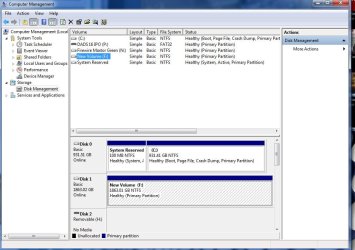
Can you please take a screen capture image of your Disk Management that shows this disk?

So, if I understand correctly, you have been able to copy off all your AVI's, and now just want to attempt to "fix" it so you can use it again? Is that correct?

Regards,
Golden
 

My Computer

Computer type
PC/Desktop
Computer Manufacturer/Model Number
Golden Mk. I.4
OS
Windows 10 Pro x64 ; Xubuntu x64
CPU
Intel i7 860 @ 2.80 GHz O/C'ed to 4.0GHz
Motherboard
Gigabyte P55A-UD3R Rev.1. Award BIOS F13
Memory
16GB Corsair Vengance DDR3 @ 661 MHz Dual Channel (9-9-9-24)
Graphics Card(s)
EVGA NVidia GTX 560 1024MB
Sound Card
Realtek Integrated
Monitor(s) Displays
Dual Samsung SyncMaster 2494HS
Screen Resolution
1920*1080 and 1920*1080
Hard Drives
1*Samsung 840 EVO 120GB SSD;
1*OCZ Vertex 2 60GB SSD;
2*Samsung F3 SpinPoint 1TB in RAID0;
1*Samsung F1 SpinPoint 1TB;
2*Western Digital 1TB External USB 3.0
1*Western Digital 500GB External USB 3.0
1*Seagate 500GB External USB 2.0
PSU
Thermaltake ToughPower QFan 750W
Case
Thermaltake Element S VK60001W2Z
Cooling
Corsair H60 Water Cooling, 2*230mm and 2*80mm case fans
Keyboard
Logitech G110
Mouse
Logitech MX518
Yes, I have a capture, first time attaching so I hope this works correctly. You summation is correct but not every file has copied due to size restrictions of what I have on hand. So fixing this has benefits for a complete recovery.

I'm concerned how/why this happened so it does not reoccur and I'm simply fixing a problem that may repeat.
 

Attachments

  • Bad HD Capture.jpg
    Bad HD Capture.jpg
    87.4 KB · Views: 11

My Computer

Computer Manufacturer/Model Number
Powerspec B17
OS
Windows 7 Pro 64bit
CPU
intel core i5
Motherboard
MicroATX
Memory
4GB
Graphics Card(s)
Radeon HD4650 PCI Express
Sound Card
Integrated Realtek® Audio ALC888
Monitor(s) Displays
Gateway FPD2485W
Hard Drives
1TB 7200 RPM SATA Hard
Drive
2TB Seagate Barracuda
PSU
500 Watt Power Supply
Case
???
Cooling
???
Hi ,

Ok I get you. Well, the disk seems healthy enough at first glance. What sort of chkdsk did you do? Did you use any switches after chkdsk?

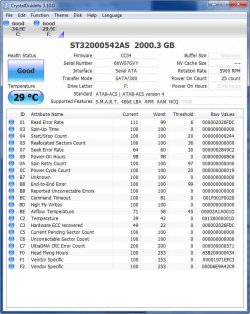
To get a more complete health report on your disk, please download, install and run free CrystalDiskInfo. Once it runs, please maximise the resultant image and post a screen capture of it here.

Regards,
Golden
 

My Computer

Computer type
PC/Desktop
Computer Manufacturer/Model Number
Golden Mk. I.4
OS
Windows 10 Pro x64 ; Xubuntu x64
CPU
Intel i7 860 @ 2.80 GHz O/C'ed to 4.0GHz
Motherboard
Gigabyte P55A-UD3R Rev.1. Award BIOS F13
Memory
16GB Corsair Vengance DDR3 @ 661 MHz Dual Channel (9-9-9-24)
Graphics Card(s)
EVGA NVidia GTX 560 1024MB
Sound Card
Realtek Integrated
Monitor(s) Displays
Dual Samsung SyncMaster 2494HS
Screen Resolution
1920*1080 and 1920*1080
Hard Drives
1*Samsung 840 EVO 120GB SSD;
1*OCZ Vertex 2 60GB SSD;
2*Samsung F3 SpinPoint 1TB in RAID0;
1*Samsung F1 SpinPoint 1TB;
2*Western Digital 1TB External USB 3.0
1*Western Digital 500GB External USB 3.0
1*Seagate 500GB External USB 2.0
PSU
Thermaltake ToughPower QFan 750W
Case
Thermaltake Element S VK60001W2Z
Cooling
Corsair H60 Water Cooling, 2*230mm and 2*80mm case fans
Keyboard
Logitech G110
Mouse
Logitech MX518
Here is the Crystal Disk Info Capture
 

Attachments

  • Crystal Disk Info F Drive.jpg
    Crystal Disk Info F Drive.jpg
    106.9 KB · Views: 10

My Computer

Computer Manufacturer/Model Number
Powerspec B17
OS
Windows 7 Pro 64bit
CPU
intel core i5
Motherboard
MicroATX
Memory
4GB
Graphics Card(s)
Radeon HD4650 PCI Express
Sound Card
Integrated Realtek® Audio ALC888
Monitor(s) Displays
Gateway FPD2485W
Hard Drives
1TB 7200 RPM SATA Hard
Drive
2TB Seagate Barracuda
PSU
500 Watt Power Supply
Case
???
Cooling
???
Hi,

OK - that disk is perfectly healthy. Let see if we can get you take ownership of that found000 folder. That way you can get acess to it, and move the files out of it - which is what I assume you want to do.

Please follow the instructions in this tutorial. Once you have done that, see it you can get access to it, and then post back here.

http://www.sevenforums.com/tutorials/1911-take-ownership-shortcut.html

Regards,
Golden
 

My Computer

Computer type
PC/Desktop
Computer Manufacturer/Model Number
Golden Mk. I.4
OS
Windows 10 Pro x64 ; Xubuntu x64
CPU
Intel i7 860 @ 2.80 GHz O/C'ed to 4.0GHz
Motherboard
Gigabyte P55A-UD3R Rev.1. Award BIOS F13
Memory
16GB Corsair Vengance DDR3 @ 661 MHz Dual Channel (9-9-9-24)
Graphics Card(s)
EVGA NVidia GTX 560 1024MB
Sound Card
Realtek Integrated
Monitor(s) Displays
Dual Samsung SyncMaster 2494HS
Screen Resolution
1920*1080 and 1920*1080
Hard Drives
1*Samsung 840 EVO 120GB SSD;
1*OCZ Vertex 2 60GB SSD;
2*Samsung F3 SpinPoint 1TB in RAID0;
1*Samsung F1 SpinPoint 1TB;
2*Western Digital 1TB External USB 3.0
1*Western Digital 500GB External USB 3.0
1*Seagate 500GB External USB 2.0
PSU
Thermaltake ToughPower QFan 750W
Case
Thermaltake Element S VK60001W2Z
Cooling
Corsair H60 Water Cooling, 2*230mm and 2*80mm case fans
Keyboard
Logitech G110
Mouse
Logitech MX518
Back
Top