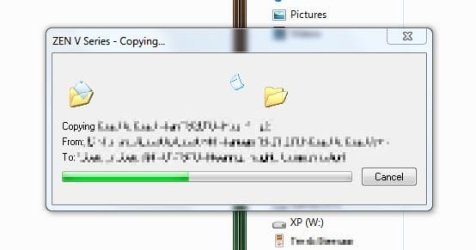
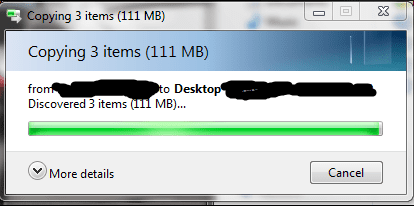
File Copy dialog. fix it?

Frank80

New member
Local time
1:29 PM
Messages
29
i feel that this is really ugly and a bit strange that they haven't fixed it.
is there any simple way to do it?

I'm talking og the folders and the documents flying across...
 

Attachments

  • Capture.JPG
    Capture.JPG
    16.6 KB · Views: 124

My Computer

OS
vista, windows 7
CPU
AMD Phenom 9850
Motherboard
ASUS M3N-HT Deluxe
Memory
Kingston ddr2 2x2gb
Graphics Card(s)
Nvidia Gforce 8600gt
Sound Card
M-audio Audiophile USB
Monitor(s) Displays
BenQ 22"
Screen Resolution
1680x1050
Hard Drives
2x750gb samsung
1x350gb ^^
Case
Antech Coolmaster
Keyboard
Microsoft Sidewinder x4
Mouse
Logitech Mx620 / Oscar X7 gaming mouse.
Internet Speed
10mb fiber
more details would be great. :p

Have you tried changing theme?
 

Attachments

  • Untitled.png
    Untitled.png
    13.7 KB · Views: 33

My Computer

OS
Windows 7 Ultimate x86 SP1
Are you using a namespace extension (NSE) by any chance?

If you are copying a file TO a NSE it is up to the extension to perform the operation and display the progress UI. Older NSEs will of course not use the new animation. And even new NSEs might not, because Windows doesn't have a documented way to access the new animation by 3rd party code.

Edit: On second look, the Zen V in the screenshot is an MP3 player. It may be exposing its file system as a NSE, and not as a regular external drive. Does the Zen file system appear directly under Desktop, or does it have a drive letter under Computer?
 

My Computer

Computer Manufacturer/Model Number
Me :) I build all my PCs
OS
Windows 7 Home 64, Vista Ultimate 64
more details would be great. :p

Have you tried changing theme?

Well, what do you know... it worked.
Seems like there is some uxtheme BS going on here.
Sorry for the inconvenience.
And Thank YOU very much man :):o
 

My Computer

OS
vista, windows 7
CPU
AMD Phenom 9850
Motherboard
ASUS M3N-HT Deluxe
Memory
Kingston ddr2 2x2gb
Graphics Card(s)
Nvidia Gforce 8600gt
Sound Card
M-audio Audiophile USB
Monitor(s) Displays
BenQ 22"
Screen Resolution
1680x1050
Hard Drives
2x750gb samsung
1x350gb ^^
Case
Antech Coolmaster
Keyboard
Microsoft Sidewinder x4
Mouse
Logitech Mx620 / Oscar X7 gaming mouse.
Internet Speed
10mb fiber
Are you using a namespace extension (NSE) by any chance?

If you are copying a file TO a NSE it is up to the extension to perform the operation and display the progress UI. Older NSEs will of course not use the new animation. And even new NSEs might not, because Windows doesn't have a documented way to access the new animation by 3rd party code.

Edit: On second look, the Zen V in the screenshot is an MP3 player. It may be exposing its file system as a NSE, and not as a regular external drive. Does the Zen file system appear directly under Desktop, or does it have a drive letter under Computer?

It has a assigned a storage letter for the data part of it.
And another part of it can only be reached trough software.
This Screen-shot is taken from within the process on the Zen V explorer tool,
transferring music to the player.
 

My Computer

OS
vista, windows 7
CPU
AMD Phenom 9850
Motherboard
ASUS M3N-HT Deluxe
Memory
Kingston ddr2 2x2gb
Graphics Card(s)
Nvidia Gforce 8600gt
Sound Card
M-audio Audiophile USB
Monitor(s) Displays
BenQ 22"
Screen Resolution
1680x1050
Hard Drives
2x750gb samsung
1x350gb ^^
Case
Antech Coolmaster
Keyboard
Microsoft Sidewinder x4
Mouse
Logitech Mx620 / Oscar X7 gaming mouse.
Internet Speed
10mb fiber
Well, what do you know... it worked.
Seems like there is some uxtheme BS going on here.
Sorry for the inconvenience.
And Thank YOU very much man :):o

Glad that you got it working. :)
 

My Computer

OS
Windows 7 Ultimate x86 SP1
Back
Top