
File corruption?

HydroHoney

New member
Local time
8:57 AM
Messages
2
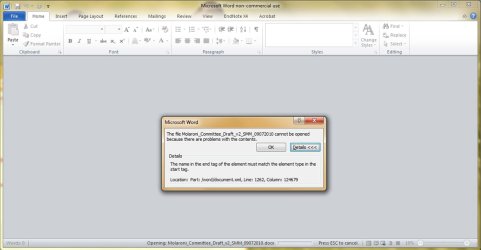
I have a copy of my thesis (my most recent version...not backed up of course) that I have been unable to open. The error is:

The file cannot be opened because there are problems with the contents. Details: The name in the end tag of the element must match the element type in the start tag. Location: Part:/word/document.xml, Line: 1262, Column: 124679.

Does anyone happen to know how to correct this error? I am working with Word 2010.

Many thanks!
 

Attachments
  • Thesis_Error.jpg
    Thesis_Error.jpg
    46.7 KB · Views: 59

My Computer

Computer Manufacturer/Model Number
Dell Inspiron
OS
Windows 7 Home Premium 64 bit
CPU
Intel Core i5
I have a copy of my thesis (my most recent version...not backed up of course) that I have been unable to open. The error is:

The file cannot be opened because there are problems with the contents. Details: The name in the end tag of the element must match the element type in the start tag. Location: Part:/word/document.xml, Line: 1262, Column: 124679.

Does anyone happen to know how to correct this error? I am working with Word 2010.

Many thanks!

If word (I assume) is set up to auto save there is another copy. I am not an office guru so you may be best served googling restoring from auto save
 

My Computer

Computer Manufacturer/Model Number
HP Pavillion dv-7 1005 Tx
OS
Win 8 Release candidate 8400
CPU
[email protected]
Memory
4 gigs
Graphics Card(s)
Nvidia 9600M
Sound Card
HD built-in
Monitor(s) Displays
17" Wxga
Screen Resolution
1440x900
Cooling
none
Internet Speed
45Mb down 5Mb up
As per my research, there is no fix other than the work around by zigzag :(. Or to use some 3rd party word recovery tools.
 

My Computer

Computer Manufacturer/Model Number
Custom Built
OS
Windows 7 Ultimate 64bit
CPU
Intel(R) Core(TM)2 Duo CPU E7500
Motherboard
DG41RQ
Memory
2.00 GB
Graphics Card(s)
Intel(R) G41 Express Chipset
Sound Card
Realtek
Monitor(s) Displays
Acer 20" Wide LCD
Screen Resolution
1600x900
Hard Drives
Seagate 500 GB Internal
Keyboard
Microsoft Cordless
Mouse
Microsoft Cordless
This is from Word Help:

Open a backup copy

  1. Click the Microsoft Office Button
    ZA010077102.gif
    , and then click Open.
  1. In the box next to the File name box on a computer that is running Windows Vista, or in the Files of type box on a computer that is running Microsoft Windows XP, click All Files.
  2. If you want to open a backup copy that was saved in a different folder, locate and open the folder.
  3. Click the arrow next to Views
    ZA010067400.gif
    , and then click Details.
    1. In the Name column, the backup copy name appears as Backup of document name. In the Type column, the file type for the backup copy appears as Microsoft Word Backup Document.
  4. Locate and double-click the backup copy to open it.
  5. If you want to work with the backup copy as a regular Word document, click the Microsoft Office Button
    ZA010077102.gif
    , click Save As, and then type a name for the file in the File Name box.
 

My Computer

Computer Manufacturer/Model Number
HP, Dell, Gateway, Toshiba - 4 laptops and 2 desktops
OS
Vista, Windows7, Mint Mate, Zorin, Windows 8
CPU
from 1.6GHz Duo to i7
Monitor(s) Displays
2x HP w2207
Hard Drives
5x HDD, 7x SSD, 12x Externals
Keyboard
with trackball - no mices
Mouse
Trackball mice
Internet Speed
DSL 6000
If you have some knowledge in XTML you might be able to fix it:
First of all, make a copy before you mess with the docx to be on the safe side ;)
If the open/Repair function of Word doesn't fix it, rename it (docx is effectively a ZIP file)
pull out the document.xml and open it with an editor...most likely some of the xml tags need to be balanced ( = open tag must match closing tag). Once you're done, replace the one inside the ZIP with the edited one, rename it back to docx and hopefully you're back in the game

-DG
 

My Computer

Computer Manufacturer/Model Number
HP m8000n
OS
Windows 7 Ultimate x86
CPU
DualCore AMD Athlon 64 X2, 2600 MHz 5200+
Motherboard
Asus M2N68-LA (Narra)
Memory
Samsung 2GB DDR2
Graphics Card(s)
Onboard NVIDIA GeForce 6150SE nForce 430
Sound Card
Onboard nVIDIA nForce 6100-430 (MCP61P)
Monitor(s) Displays
Westinghouse 19" LED
Screen Resolution
1280x1024
Hard Drives
SATA II Seagate Barracuda 500GB
USB II WD Elements 500GB
USB II WD My Book 1TB
USB II WD My Book 2TB
PSU
Stock (HP)
Case
Stock (HP)
Cooling
Stock
Keyboard
Logitech Classic KB 200
Mouse
Standard HP opticle USB mouse
Back
Top