Solved File Explorer crashing (constantly), mostly in directories with images

webbeetle

New member
Local time
8:56 AM
Messages
12
Location
traveling
Hi, I've used this forum many years to find advice, now I'm stuck and need to ask a question (hopefully in the right section):

My Window File Explorer is constantly crashing (say at least 10 times a day!). This happens mostly when I open file directories which contain image files, some directories with thumbnails, some without. Occasionally it happens in other directories too. It's bloody not helping to get anything done.

System: Windows 7 Pro 64bit

History: my previous computer had hardware problems, went back and forth to ASUS 3 times, in the end there wasn't much left to change (first display, then harddisk, then motherboard plus SSD). At a late stage of this back-and-forth I tried to back up my data with Paragon, but failed (the was an i/o conflict - reason ASUS changed the motherboard), so I simply copied all contents of my D-drive onto an external harddisk (WD MyPassport). I finally received an exchange computer from ASUS and copied the entire contents back onto D. Ever since my File Explorer is crashing constantly, specially when I try to open any directory which contains images or graphic files. These crashes occur since day one after I moved the files back onto the freshly installed (and virgin) Windows system!

I have since tried all sorts of fixes (like clear and reset the thumbnail cache via disk cleanup, run Ccleaner, TuneUp 2014, etc.), but I seem to get nowhere.

Currently I cannot do a system repair from DVD, because both my system copies on DVD and my external DVD drive [the ultrabook doesn't have a built-in DVD] are in our camping vehicle, which is on a boat being shipped to South America (my flight luggage was full without the extra stuff). I have access to a repair partition on my computer.

Any help?!!?

Thank you.
 

My Computer My Computer

At a glance

Win 7 Pro 64biti74 gigNVIDIA Geforce GT620M
Computer type
Laptop
Computer Manufacturer/Model Number
ASUS UX32
OS
Win 7 Pro 64bit
CPU
i7
Memory
4 gig
Graphics Card(s)
NVIDIA Geforce GT620M
Antivirus
Avast free
Suspect a corrupt media file

The same thing happened on my machine and after identifying and deleting all corrupt image files the problem remained. The solution for me was to move all user created video files onto an external HD.

Anyway in your case it looks like the culprit is one or more corrupt image files.

Look at item 7 in this article for confirmation.

Windows Explorer Has Stopped Working Fix | gHacks Technology News

If you need help in identifying corrupt images I'll post a link to the software that I use but a simple solution would probably be to suspect the folder that you just opened when explorer crashed.
 

My Computer My Computer

At a glance

Microsoft Windows 7 Home Premium 64-bit 7601 ...AMD C-60 APU with Radeon(tm) HD Graphics4.00 GBAMD Radeon HD 6290 Graphics
Computer type
Laptop
Computer Manufacturer/Model Number
ASUS
OS
Microsoft Windows 7 Home Premium 64-bit 7601 Multiprocessor Free Service Pack 1
CPU
AMD C-60 APU with Radeon(tm) HD Graphics
Motherboard
ASUSTeK COMPUTER INC. X501U
Memory
4.00 GB
Graphics Card(s)
AMD Radeon HD 6290 Graphics
Sound Card
(1) AMD High Definition Audio Device (2) Realtek High Defi
Screen Resolution
1366 x 768 x 32 bits (4294967296 colors) @ 60 Hz
Hard Drives
Hitachi HTS545050A7E380 SATA Disk Device
Antivirus
Comodo CIS & FW, SecureAplus App Whitelisting, Threatfire
Browser
Cyberfox 64bit, Opera 64bit, Airfox
Other Info
Spy-The-Spy, HitmanPro.Alert, Norton Connect Safe, MJRegWatcher, BitDefender TrafficLight, Voodoo Shield, Zemana AntiMalware
Thanks, Callender - but that raises some more questions:
I'm sure that, if at all, that there aren't many corrupted images files, at least not in ALL my directories I try to open... Should a corrupted file in directory xyz-photos cause explorer to crash when I open directory web-icons? Confused...

I followed a few more links here and run sfc/scannnow (I seem to recall I did that before) - but now I cannot even open the resulting log file:

CBS-log.GIF


[just now it crashed when I opened d:\(root) and then again on c:\, where it didn't use to happen = it's getting worse!]

I just followed some other instructions found here
Download : Registry Fix

  1. Right click on the .reg file and click on Merge.
  2. Click on the Run button in the Security Warning pop-up.
  3. Click on Continue (UAC), Yes, and OK when prompted.
Then once the Explorer crashes it will create a Dump File under C:\Localdump then follow this article Dump Files - Upload to SevenForums from Step 2
but I do NOT get a dump file! Enough for today!

Anyhow, it's now well after 1am - I'm off to bed, wait and see what tomorrow brings...
 

My Computer My Computer

At a glance

Win 7 Pro 64biti74 gigNVIDIA Geforce GT620M
Computer type
Laptop
Computer Manufacturer/Model Number
ASUS UX32
OS
Win 7 Pro 64bit
CPU
i7
Memory
4 gig
Graphics Card(s)
NVIDIA Geforce GT620M
Antivirus
Avast free
Dump file

I took a look at that reg file but the only comment that I can make is that perhaps Windows Error Reporting is disabled on your machine or else there's something wrong with the code in the file.

Since the problem started when you copied files from your backup drive to your current drive I'd still suspect media file corruption rather than shell extension issues. As for SFC - I'm no expert on that and tend to find that it will often detect problems when run that are not really problems at all. (Like if you've made custom changes such as disabling hibernation).

Upload the log for an expert on system files to look at.

Other things tat you could try:

Remove all media files and folders - copy them back to your other drive (must be external) then disconnect the drive and reboot. If the problem remains then media file corruption isn't the issue. Media files means any image or video file that you've created/ downloaded.

Temporarily disable thumbnail caching:

http://www.sevenforums.com/tutorials/10794-thumbnail-cache-enable-disable.html

Set view for all folders to "Always show icons, never thumbnails" and uncheck "display file icon on thumbnails"
 

My Computer My Computer

At a glance

Microsoft Windows 7 Home Premium 64-bit 7601 ...AMD C-60 APU with Radeon(tm) HD Graphics4.00 GBAMD Radeon HD 6290 Graphics
Computer type
Laptop
Computer Manufacturer/Model Number
ASUS
OS
Microsoft Windows 7 Home Premium 64-bit 7601 Multiprocessor Free Service Pack 1
CPU
AMD C-60 APU with Radeon(tm) HD Graphics
Motherboard
ASUSTeK COMPUTER INC. X501U
Memory
4.00 GB
Graphics Card(s)
AMD Radeon HD 6290 Graphics
Sound Card
(1) AMD High Definition Audio Device (2) Realtek High Defi
Screen Resolution
1366 x 768 x 32 bits (4294967296 colors) @ 60 Hz
Hard Drives
Hitachi HTS545050A7E380 SATA Disk Device
Antivirus
Comodo CIS & FW, SecureAplus App Whitelisting, Threatfire
Browser
Cyberfox 64bit, Opera 64bit, Airfox
Other Info
Spy-The-Spy, HitmanPro.Alert, Norton Connect Safe, MJRegWatcher, BitDefender TrafficLight, Voodoo Shield, Zemana AntiMalware
Thanks, YES, Windows error reporting is disabled because I use my notebook very often without internet access (because I cannot get any whilst on the road) - will enable it temporarily.
 

My Computer My Computer

At a glance

Win 7 Pro 64biti74 gigNVIDIA Geforce GT620M
Computer type
Laptop
Computer Manufacturer/Model Number
ASUS UX32
OS
Win 7 Pro 64bit
CPU
i7
Memory
4 gig
Graphics Card(s)
NVIDIA Geforce GT620M
Antivirus
Avast free
REG file

Thanks, YES, Windows error reporting is disabled because I use my notebook very often without internet access (because I cannot get any whilst on the road) - will enable it temporarily.

It's possible that you might need to re-merge that reg file after enabling WER for the registry settings to take effect!

On another note: Until the probem is fixed there's a handy utility that can restart Explorer with a single click.

Sordum's Small tools | Sordum.org

Rexplorer is part of Sordum's Small Tools package. If you extract the files and copy rexplorer.exe to somewhere handy you can run it when needed.
 

My Computer My Computer

At a glance

Microsoft Windows 7 Home Premium 64-bit 7601 ...AMD C-60 APU with Radeon(tm) HD Graphics4.00 GBAMD Radeon HD 6290 Graphics
Computer type
Laptop
Computer Manufacturer/Model Number
ASUS
OS
Microsoft Windows 7 Home Premium 64-bit 7601 Multiprocessor Free Service Pack 1
CPU
AMD C-60 APU with Radeon(tm) HD Graphics
Motherboard
ASUSTeK COMPUTER INC. X501U
Memory
4.00 GB
Graphics Card(s)
AMD Radeon HD 6290 Graphics
Sound Card
(1) AMD High Definition Audio Device (2) Realtek High Defi
Screen Resolution
1366 x 768 x 32 bits (4294967296 colors) @ 60 Hz
Hard Drives
Hitachi HTS545050A7E380 SATA Disk Device
Antivirus
Comodo CIS & FW, SecureAplus App Whitelisting, Threatfire
Browser
Cyberfox 64bit, Opera 64bit, Airfox
Other Info
Spy-The-Spy, HitmanPro.Alert, Norton Connect Safe, MJRegWatcher, BitDefender TrafficLight, Voodoo Shield, Zemana AntiMalware
I'm still at it, it seems to be getting worse (not better), but in the meantime I have found some corrupted image files and deleted them. Though: the crashes now happen more frequently in other directories, too :(
I work through the suggestions and then come back.

Bugger is: I actually have other work to do, for which I would need a functioning file explorer! So I'm trying to get some work done at the same time, and due to the constant crashes I get more frustrated...
 

My Computer My Computer

At a glance

Win 7 Pro 64biti74 gigNVIDIA Geforce GT620M
Computer type
Laptop
Computer Manufacturer/Model Number
ASUS UX32
OS
Win 7 Pro 64bit
CPU
i7
Memory
4 gig
Graphics Card(s)
NVIDIA Geforce GT620M
Antivirus
Avast free
Dump File

I'm wondering if that dump file is being created now that you've enabled WER?

It's not something that I could analyze but if it's present you could upload it for someone to look at.

On another note: If you're still stuck after trying suggestions you could tale a look at shell extensions just to rule them out as a possible culprit.

If you can pin down the date when the problem started - you can take a look at:

ShellExView - Shell Extension Manager For Windows

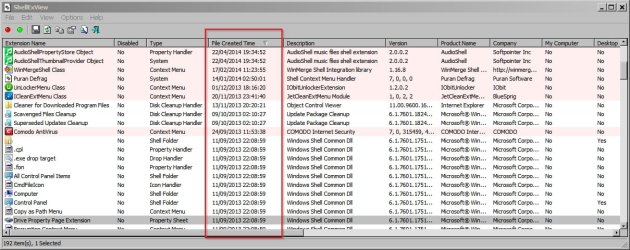
Download link is near the bottom of the page. You need "Download ShellExView for x64" for your machine. If you extract the files and run the executable you'll get a list of shell extensions. Sort them by date (newest first) by clicking on the "File Created Time" column. If you see anything that was installed on or just before explorer started crashing try disabling it.

ShellExView.jpg

If you navigate to the shexview.exe executable and right click it then choose "copy as path" paste the result into notepad.

You should see something like this:

"C:\Users\Username\Desktop\NirSoft\shexview.exe"

If you modify the text and add /stext extensions.txt (including the space) you should see something like:

"C:\Users\Username\Desktop\NirSoft\shexview.exe" /stext extensions.txt

Copy that text into your Run dialog box. Start> Run then press enter.

Attach the results to your next post. You'll find them in the same folder as the shexview.exe executable with the filename "extensions.txt"

I know of a tool that will deal with corrupt image files but only .jpg extension.
 
Last edited:

My Computer My Computer

At a glance

Microsoft Windows 7 Home Premium 64-bit 7601 ...AMD C-60 APU with Radeon(tm) HD Graphics4.00 GBAMD Radeon HD 6290 Graphics
Computer type
Laptop
Computer Manufacturer/Model Number
ASUS
OS
Microsoft Windows 7 Home Premium 64-bit 7601 Multiprocessor Free Service Pack 1
CPU
AMD C-60 APU with Radeon(tm) HD Graphics
Motherboard
ASUSTeK COMPUTER INC. X501U
Memory
4.00 GB
Graphics Card(s)
AMD Radeon HD 6290 Graphics
Sound Card
(1) AMD High Definition Audio Device (2) Realtek High Defi
Screen Resolution
1366 x 768 x 32 bits (4294967296 colors) @ 60 Hz
Hard Drives
Hitachi HTS545050A7E380 SATA Disk Device
Antivirus
Comodo CIS & FW, SecureAplus App Whitelisting, Threatfire
Browser
Cyberfox 64bit, Opera 64bit, Airfox
Other Info
Spy-The-Spy, HitmanPro.Alert, Norton Connect Safe, MJRegWatcher, BitDefender TrafficLight, Voodoo Shield, Zemana AntiMalware
I didn't have time to deal with anything today because I had to go to a government office (here in Montevideo), where one sits around all day waiting...

I've got a explorer.exe.2036.dmp file by now, but I have no idea how to
a) upload it here, as it is NOT a supported file format
b) or how to open and read it...
(I found somewhere a reference to WinDbg, but don't seem to have that installed on my notebook - right now I rather stay away from installing new things onto an instable system, otherwise I would continue my "real" work and install wampserver next, which I actually need to pre-customise a WordPress server install.)
:zip:
 

My Computer My Computer

At a glance

Win 7 Pro 64biti74 gigNVIDIA Geforce GT620M
Computer type
Laptop
Computer Manufacturer/Model Number
ASUS UX32
OS
Win 7 Pro 64bit
CPU
i7
Memory
4 gig
Graphics Card(s)
NVIDIA Geforce GT620M
Antivirus
Avast free
Dump file upload

I didn't have time to deal with anything today because I had to go to a government office (here in Montevideo), where one sits around all day waiting...

I've got a explorer.exe.2036.dmp file by now, but I have no idea how to
a) upload it here, as it is NOT a supported file format
b) or how to open and read it...
(I found somewhere a reference to WinDbg, but don't seem to have that installed on my notebook - right now I rather stay away from installing new things onto an instable system, otherwise I would continue my "real" work and install wampserver next, which I actually need to pre-customise a WordPress server install.)
:zip:

Usually a dump file will upload if it's zipped. See:

http://www.sevenforums.com/tutorials/179397-dump-files-upload-sevenforums.html

You don't need to install the software suggested - it's your choice. Hopefully the dump file will help!
 

My Computer My Computer

At a glance

Microsoft Windows 7 Home Premium 64-bit 7601 ...AMD C-60 APU with Radeon(tm) HD Graphics4.00 GBAMD Radeon HD 6290 Graphics
Computer type
Laptop
Computer Manufacturer/Model Number
ASUS
OS
Microsoft Windows 7 Home Premium 64-bit 7601 Multiprocessor Free Service Pack 1
CPU
AMD C-60 APU with Radeon(tm) HD Graphics
Motherboard
ASUSTeK COMPUTER INC. X501U
Memory
4.00 GB
Graphics Card(s)
AMD Radeon HD 6290 Graphics
Sound Card
(1) AMD High Definition Audio Device (2) Realtek High Defi
Screen Resolution
1366 x 768 x 32 bits (4294967296 colors) @ 60 Hz
Hard Drives
Hitachi HTS545050A7E380 SATA Disk Device
Antivirus
Comodo CIS & FW, SecureAplus App Whitelisting, Threatfire
Browser
Cyberfox 64bit, Opera 64bit, Airfox
Other Info
Spy-The-Spy, HitmanPro.Alert, Norton Connect Safe, MJRegWatcher, BitDefender TrafficLight, Voodoo Shield, Zemana AntiMalware
I didn't have time to deal with anything today because I had to go to a government office (here in Montevideo), where one sits around all day waiting...

I've got a explorer.exe.2036.dmp file by now, but I have no idea how to
a) upload it here, as it is NOT a supported file format
b) or how to open and read it...
(I found somewhere a reference to WinDbg, but don't seem to have that installed on my notebook - right now I rather stay away from installing new things onto an instable system, otherwise I would continue my "real" work and install wampserver next, which I actually need to pre-customise a WordPress server install.)
:zip:

Usually a dump file will upload if it's zipped.

Doh! Should have thought of that... :o
See attached ZIP of my dmp!

Hopefully somebody can analyse it...

Callender, if you're in the UK shouldn't you be in bed? Just asking...
 

Attachments

My Computer My Computer

At a glance

Win 7 Pro 64biti74 gigNVIDIA Geforce GT620M
Computer type
Laptop
Computer Manufacturer/Model Number
ASUS UX32
OS
Win 7 Pro 64bit
CPU
i7
Memory
4 gig
Graphics Card(s)
NVIDIA Geforce GT620M
Antivirus
Avast free
[/QUOTE]

Doh! Should have thought of that... :o
See attached ZIP of my dmp!

Hopefully somebody can analyse it...

Callender, if you're in the UK shouldn't you be in bed? Just asking...[/QUOTE]

I'm off to bed now! Yawn.

I'll look at the dump file but I'm no expert on dump files! Hopefully an expert will take a look or if not - I'll try asking someone to look at the file.
 

My Computer My Computer

At a glance

Microsoft Windows 7 Home Premium 64-bit 7601 ...AMD C-60 APU with Radeon(tm) HD Graphics4.00 GBAMD Radeon HD 6290 Graphics
Computer type
Laptop
Computer Manufacturer/Model Number
ASUS
OS
Microsoft Windows 7 Home Premium 64-bit 7601 Multiprocessor Free Service Pack 1
CPU
AMD C-60 APU with Radeon(tm) HD Graphics
Motherboard
ASUSTeK COMPUTER INC. X501U
Memory
4.00 GB
Graphics Card(s)
AMD Radeon HD 6290 Graphics
Sound Card
(1) AMD High Definition Audio Device (2) Realtek High Defi
Screen Resolution
1366 x 768 x 32 bits (4294967296 colors) @ 60 Hz
Hard Drives
Hitachi HTS545050A7E380 SATA Disk Device
Antivirus
Comodo CIS & FW, SecureAplus App Whitelisting, Threatfire
Browser
Cyberfox 64bit, Opera 64bit, Airfox
Other Info
Spy-The-Spy, HitmanPro.Alert, Norton Connect Safe, MJRegWatcher, BitDefender TrafficLight, Voodoo Shield, Zemana AntiMalware
Dump file analysis

I took a look at the dump file and bearing in mind that I'm not at all experienced in dump file analysis - it might indicate a problem with ASUS Web Storage shell extension (ASUSWSShellExt64.dll)

So my question is do you make use of ASUS Web Storage? If the answer is no you might try uninstalling it from Control Panel then reboot.

Or update to the latest version if it's not up to date:

https://www.asuswebstorage.com/navigate/downloads/

On the other hand you might want to wait for a response from another member as I'll be asking around for help just to make sure that my suspicion is correct!
 

My Computer My Computer

At a glance

Microsoft Windows 7 Home Premium 64-bit 7601 ...AMD C-60 APU with Radeon(tm) HD Graphics4.00 GBAMD Radeon HD 6290 Graphics
Computer type
Laptop
Computer Manufacturer/Model Number
ASUS
OS
Microsoft Windows 7 Home Premium 64-bit 7601 Multiprocessor Free Service Pack 1
CPU
AMD C-60 APU with Radeon(tm) HD Graphics
Motherboard
ASUSTeK COMPUTER INC. X501U
Memory
4.00 GB
Graphics Card(s)
AMD Radeon HD 6290 Graphics
Sound Card
(1) AMD High Definition Audio Device (2) Realtek High Defi
Screen Resolution
1366 x 768 x 32 bits (4294967296 colors) @ 60 Hz
Hard Drives
Hitachi HTS545050A7E380 SATA Disk Device
Antivirus
Comodo CIS & FW, SecureAplus App Whitelisting, Threatfire
Browser
Cyberfox 64bit, Opera 64bit, Airfox
Other Info
Spy-The-Spy, HitmanPro.Alert, Norton Connect Safe, MJRegWatcher, BitDefender TrafficLight, Voodoo Shield, Zemana AntiMalware
Help

I've asked for help so hopefully someone else will take a look at the dump file.
 

My Computer My Computer

At a glance

Microsoft Windows 7 Home Premium 64-bit 7601 ...AMD C-60 APU with Radeon(tm) HD Graphics4.00 GBAMD Radeon HD 6290 Graphics
Computer type
Laptop
Computer Manufacturer/Model Number
ASUS
OS
Microsoft Windows 7 Home Premium 64-bit 7601 Multiprocessor Free Service Pack 1
CPU
AMD C-60 APU with Radeon(tm) HD Graphics
Motherboard
ASUSTeK COMPUTER INC. X501U
Memory
4.00 GB
Graphics Card(s)
AMD Radeon HD 6290 Graphics
Sound Card
(1) AMD High Definition Audio Device (2) Realtek High Defi
Screen Resolution
1366 x 768 x 32 bits (4294967296 colors) @ 60 Hz
Hard Drives
Hitachi HTS545050A7E380 SATA Disk Device
Antivirus
Comodo CIS & FW, SecureAplus App Whitelisting, Threatfire
Browser
Cyberfox 64bit, Opera 64bit, Airfox
Other Info
Spy-The-Spy, HitmanPro.Alert, Norton Connect Safe, MJRegWatcher, BitDefender TrafficLight, Voodoo Shield, Zemana AntiMalware
Callender, I think webbeetle was referring to the fact that although you appear to be in the UK your time zone on your profile indicates you are in the US:)
 

My Computer My Computer

At a glance

Microsoft Windows 7 Home Premium 64-bit 7601 ...Intel(R) Core(TM) i7-3770 CPU @ 3.40GHz8.00 GBIntel(R) HD Graphics 4000
Computer type
PC/Desktop
OS
Microsoft Windows 7 Home Premium 64-bit 7601 Multiprocessor Free Service Pack 1
CPU
Intel(R) Core(TM) i7-3770 CPU @ 3.40GHz
Motherboard
ASUSTeK COMPUTER INC. P8H77-M
Memory
8.00 GB
Graphics Card(s)
Intel(R) HD Graphics 4000
Sound Card
On Board
Monitor(s) Displays
Dell 24"
Screen Resolution
1920 x 1080
Hard Drives
(1) INTEL SSDSC2CT180A3 ATA Device (2) ST500DM002-1BD142 ATA Device (3) WDC WD3200AAKS-75L9A0 ATA Device (4) Generic- Compact Flash USB Device (5) Generic- MS/MS-Pro USB Device (6) Generic- SD/MMC USB Device (7) Generic- SM/xD-Picture USB
PSU
500w Corsair
Case
Cooler Master
Cooling
3 Fans
Keyboard
Logitech MK300
Mouse
Logitech WOM
Internet Speed
75Mb
Antivirus
Norton 360
Browser
Firefox, Opera, IE
Profile Time Zone Fixed

Callender, I think webbeetle was referring to the fact that although you appear to be in the UK your time zone on your profile indicates you are in the US:)

Thanks for the pointer. I'd never have noticed!
 

My Computer My Computer

At a glance

Microsoft Windows 7 Home Premium 64-bit 7601 ...AMD C-60 APU with Radeon(tm) HD Graphics4.00 GBAMD Radeon HD 6290 Graphics
Computer type
Laptop
Computer Manufacturer/Model Number
ASUS
OS
Microsoft Windows 7 Home Premium 64-bit 7601 Multiprocessor Free Service Pack 1
CPU
AMD C-60 APU with Radeon(tm) HD Graphics
Motherboard
ASUSTeK COMPUTER INC. X501U
Memory
4.00 GB
Graphics Card(s)
AMD Radeon HD 6290 Graphics
Sound Card
(1) AMD High Definition Audio Device (2) Realtek High Defi
Screen Resolution
1366 x 768 x 32 bits (4294967296 colors) @ 60 Hz
Hard Drives
Hitachi HTS545050A7E380 SATA Disk Device
Antivirus
Comodo CIS & FW, SecureAplus App Whitelisting, Threatfire
Browser
Cyberfox 64bit, Opera 64bit, Airfox
Other Info
Spy-The-Spy, HitmanPro.Alert, Norton Connect Safe, MJRegWatcher, BitDefender TrafficLight, Voodoo Shield, Zemana AntiMalware
Okay, I'm currently running a re-indexing on D:, the drive which causes the most problems. That's taking its time... Since I can't do much else right now I was looking for some errors log I could access, and I found some.

My event log shows 175 of these errors (all the same as far as I checked) in the last 7 days (2 of which I sat on a plane = didn't even use the computer!)

Log Name: System
Source: Disk
Date: 4/05/2014 09:42:48
Event ID: 51
Task Category: None
Level: Warning
Keywords: Classic
User: N/A
Computer: Zenbook
Description:
An error was detected on device \Device\Harddisk1\DR1 during a paging operation.
Event Xml:
<Event xmlns="http://schemas.microsoft.com/win/2004/08/events/event">
<System>
<Provider Name="Disk" />
<EventID Qualifiers="32772">51</EventID>
<Level>3</Level>
<Task>0</Task>
<Keywords>0x80000000000000</Keywords>
<TimeCreated SystemTime="2014-05-04T12:42:48.699705600Z" />
<EventRecordID>31732</EventRecordID>
<Channel>System</Channel>
<Computer>Zenbook</Computer>
<Security />
</System>
<EventData>
<Data>\Device\Harddisk1\DR1</Data>
<Binary>040180000100000000000000330004802D010000560000C000000000000000000000000000000000C1681D0000000000FFFFFFFF01000000580000300001000000200A1280032040000002003C00000000A0CE0480FAFFFFF8C8BB0380FAFFFF000000000000000090A7E20880FAFFFF6043B41080FAFFFF560000C0000000002A0000F3A11800010000000000000000000000000000000000000000000000000000000000000000</Binary>
</EventData>
</Event>
They all seem to be related to these:

- System

- Provider

[ Name] Windows Error Reporting

- EventID 1001

[ Qualifiers] 0

Level 4

Task 0

Keywords 0x80000000000000

- TimeCreated

[ SystemTime] 2014-05-04T22:10:23.000000000Z

EventRecordID 7320

Channel Application

Computer Zenbook

Security


- EventData


0
APPCRASH
Not available
0
explorer.exe
6.1.7601.17567
4d672ee4
ASUSWSShellExt64.dll
1.1.0.27
4c7f631d
c0000005
00000000000051da


C:\Users\Juergen\AppData\Local\Microsoft\Windows\WER\ReportArchive\AppCrash_explorer.exe_38923cf786a1cd13d971de993bde796232b4b5_054de957

0
e125e599-d3d8-11e3-a8f2-c485083c0e41
0
But when I follow up and try to understand the technical explanation on the Microsoft site I have to say "sorry, I'm lost..."

Next I will follow Callender's suggestion and remove some of ASUS' bloat ware. I must confess, that when I got this notebook I did only half of it because I didn't have time [usually I do that rather thoroughly with every new machine - before I set my cache file and start installing my own programs...]. Online storage is often no use to me, because when I'm on the road internet access is very limited to non-existant.
All these things made for desk jockeys with high-speed internet access don't work for travellers...


Thanks for your patience!
 

My Computer My Computer

At a glance

Win 7 Pro 64biti74 gigNVIDIA Geforce GT620M
Computer type
Laptop
Computer Manufacturer/Model Number
ASUS UX32
OS
Win 7 Pro 64bit
CPU
i7
Memory
4 gig
Graphics Card(s)
NVIDIA Geforce GT620M
Antivirus
Avast free
Fingers crossed - right now my File Explorer is behaving itself!

After I deleted some corrupted images (still have to check what they look like on the back-up external hd), re-indexed D:, and removed a bunch of ASUS bloatware (including the "web storage").

I won't close this thread yet as "solved", it's early days (I only tried a few things) so anything could happen - but I will NOT forget it either. If no new explorer crash happens until Saturday (May 10th) then I guess I'm all good!

A big THANK YOU for now!
 
Last edited:

My Computer My Computer

At a glance

Win 7 Pro 64biti74 gigNVIDIA Geforce GT620M
Computer type
Laptop
Computer Manufacturer/Model Number
ASUS UX32
OS
Win 7 Pro 64bit
CPU
i7
Memory
4 gig
Graphics Card(s)
NVIDIA Geforce GT620M
Antivirus
Avast free
I happy to report that my File Explorer is still behaving - - - mostly (= yesterday it crashed once, but I believe that was a different issue). I have been using it extensively, open almost 8 hours/day, in use up to 4 hours/day. Now I realise how much I use it on occasions...

So my BIG THANK YOU to Callender!

I will mark this as "Solved" = always an optimist :D
 

My Computer My Computer

At a glance

Win 7 Pro 64biti74 gigNVIDIA Geforce GT620M
Computer type
Laptop
Computer Manufacturer/Model Number
ASUS UX32
OS
Win 7 Pro 64bit
CPU
i7
Memory
4 gig
Graphics Card(s)
NVIDIA Geforce GT620M
Antivirus
Avast free
Great

Thanks for the feedback! Glad it's still working.
 

My Computer My Computer

At a glance

Microsoft Windows 7 Home Premium 64-bit 7601 ...AMD C-60 APU with Radeon(tm) HD Graphics4.00 GBAMD Radeon HD 6290 Graphics
Computer type
Laptop
Computer Manufacturer/Model Number
ASUS
OS
Microsoft Windows 7 Home Premium 64-bit 7601 Multiprocessor Free Service Pack 1
CPU
AMD C-60 APU with Radeon(tm) HD Graphics
Motherboard
ASUSTeK COMPUTER INC. X501U
Memory
4.00 GB
Graphics Card(s)
AMD Radeon HD 6290 Graphics
Sound Card
(1) AMD High Definition Audio Device (2) Realtek High Defi
Screen Resolution
1366 x 768 x 32 bits (4294967296 colors) @ 60 Hz
Hard Drives
Hitachi HTS545050A7E380 SATA Disk Device
Antivirus
Comodo CIS & FW, SecureAplus App Whitelisting, Threatfire
Browser
Cyberfox 64bit, Opera 64bit, Airfox
Other Info
Spy-The-Spy, HitmanPro.Alert, Norton Connect Safe, MJRegWatcher, BitDefender TrafficLight, Voodoo Shield, Zemana AntiMalware
Back
Top