File Extension Icon - Change Default Icon

How to Change the Default Icon of a File Extension in Windows 7


   Information
This will show you how to change the default icon of any file extension to have a custom icon of your choice instead for it in Windows 7.
   Tip
By default, known file extension types are set to be hidden in Windows 7. You will need to unhide file extensions to see and know what the file extension is to make it easier to change the icon for the file extension.
   Note

  • You will need to use a 256x256 pixel icon for them to display properly at all of the available icon view sizes in Windows 7.
  • Some programs may automatically reset the default file extension icon back to the default one it uses even after you have changed it. This tutorial will not work for these programs.
  • If you change the default program for what opens the file extension, it will also change the icon of the file extension to be whatever it is for the program you selected uses.
   Warning

  • You will need to be logged on to a administrator account to do this.
  • Making changes in the registry can cause problems if you make a mistake. You should create a system restore point before proceeding in case you need to do a system restore with the restore point to undo a mistake made in the registry.

EXAMPLE: Default and New Icon for "MP3" File Extensions Default_MP3_file_Icon.jpgNew_MP3_file_Icon.jpg


OPTION ONE

To Change the Icon of a File Extension Using "FileTypesMan"

1. Click on the Download button below to go the bottom of that site to download, extract, and run the same 32-bit or 64-bit (x64) FileTypesMan as your 32-bit or 64-bit Windows 7 version.
Download


2. Double click on the file extension (ex: .mp3) that you want to change the icon of. (see screenshot below) Program-1.jpg
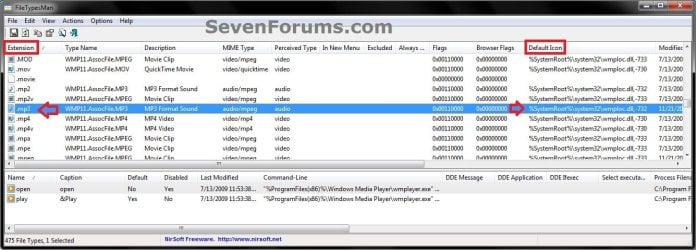
3. Click on the browse... button. (see screenshot below) Program-2.jpg
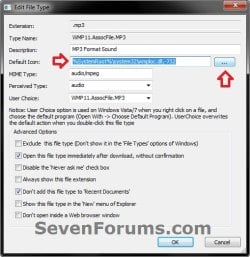
4. Browse to and select the icon you want to use, and click on OK. (see screenshot below) Program-3.jpg
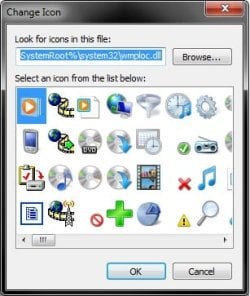
5. Click on OK. (see screenshot below step 3)

6. When finished, close FileTypesMan.


OPTION TWO

To Manually Change the Icon of a File Extension


NOTE: For an example in this option, I will be changing the default icon used for the MP3 file extension. You would just substitute the file extension that you want to change the default icon for instead. 1. Open the Start Menu, then type regedit in the search box and press enter.

2. If prompted by UAC, then click on Yes.

3. If Using the Default Program in Windows 7 to Open the File Extension With
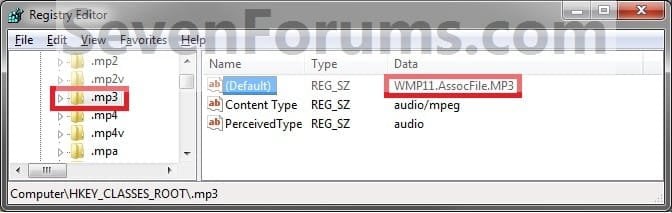
NOTE: You would use this option if you are using the default program that Windows 7 uses to open the file extension with, and not opens with a 3rd party program that you installed. A) In regedit, go to: (see screenshot below)
NOTE: Substitute .mp3 below with the file extension you want to change the icon for instead. HKEY_CLASSES_ROOT\.mp3
Step1.jpg
B) In the right pane of the file extension, make note of the Data value to the right of (Default). (see screenshot above)
NOTE: For example it is WMP11.AssocFile.MP3 for the .mp3 file extension.

C) Go to step 5.
4. If Using a 3rd Party Program as the Default Program to Open the File Extension With
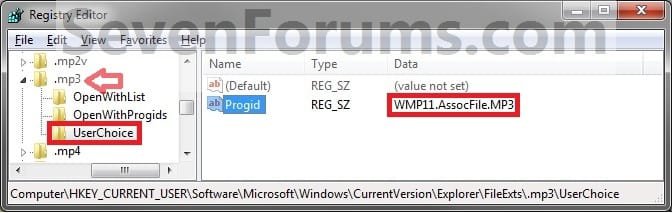
NOTE: You would do this option if you have changed the default program used by Windows 7 to open the file extension with to be opened by a installed 3rd party (not included in Windows 7) program instead. A) In regedit, go to: (see screenshot below)
NOTE: Substitute .mp3 below with the file extension you want to change the icon for instead.
Code:
HKEY_CURRENT_USER\Software\Microsoft\Windows\CurrentVersion\Explorer\FileExts\[B][COLOR=red].mp3[/COLOR][/B]\Userchoice
Step2.jpg
B) In the right pane, look at the Data value to the right of Progid. (see screenshot above)
NOTE: For example it is WMP11.AssocFile.MP3 for the .mp3 file extension type by default. Your value will vary depending on the default program you have set or installed to open this file extension with.
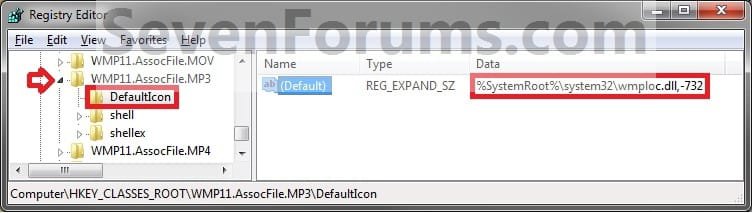
5. In regedit, scroll past the file extensions and go to: (see screenshot below)
NOTE: Substitute WMP11.AssocFile.MP3 with the Data value from step 3B or 4B for the file extension Data value that you want to change the icon for instead. HKEY_CLASSES_ROOT\WMP11.AssocFile.MP3
Step3.jpg
6. Click on the arrow next to for example WMP11.AssocFile.MP3 to expand the key (folder). (see screenshot above)
NOTE: Substitute WMP11.AssocFile.MP3 with the Data value from step 3B or 4B for the file extension Data value that you want to change the icon for instead.

   Tip
To Backup the Default File Extension Icon
NOTE: To restore the default file extension icon from this created backup below, right click on the .reg backup file and click on Merge. Next, approve the merge and log off and log on to apply the change to restore the default icon. A) In the left pane of regedit, right click on DefaultIcon and click on Export. (See screenshot below step 5)

B) Select a location to where you want to save the backup reg file to.

C) Type in a name and click on the Save button.
NOTE: Be sure to type in a name that is easily recognized by you for that file extension. For example, MP3 default icon.


7. In the right pane of DefaultIcon, right click on (Default) and click on Modify. (see screenshot below step 5)
NOTE: If you do not have DefaultIcon in the left pane of for example WMP11.AssocFile.MP3, then right click on WMP11.AssocFile.MP3, click on New and Key, type in DefaultIcon, and press Enter.

8. Select either Method One or Method Two below for what type of icon you want to replace the default file extension icon with.


Method One

To Use Another Icon Included in Windows 7

A. Download and install the same free 32-bit or 64-bit version of IconViewer as your 32-bit or 64-bit Windows 7 version.
NOTE: This program will add a Icons tab to files (ex: imageres.dll) that contain a icon library in them so you can see the icons available in it.

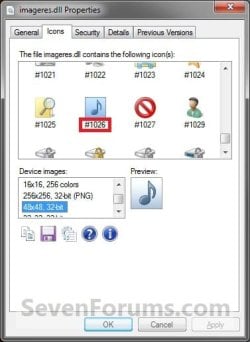
B. In Windows Explorer, navigate to C:\Windows\System32\imageres.dll and right click on imageres.dll, click on Properties, and click on the Icons tab.
NOTE: You can use any of the Windows 7 files that include icons in them that you want though. This is just the most common one.

C. Scroll through the icons and make note of the icon number of the one you want to use to replace the default file extension icon with, then close the properties window. (see screenshot below)
NOTE: For example, icon number 1023. Icons.jpg
D) In the Modify window, type in (full path of the Windows 7 file with file extension),-#### and click on OK. (see screenshot below)
NOTE: For example, I would type in the location exactly as below for what I used in B and C above. C:\Windows\System32\imageres.dll,-1023
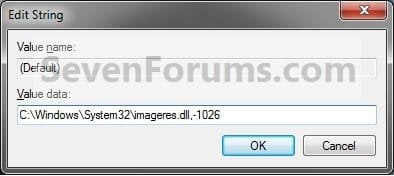
Modify.jpg
E) Go to step 9.


Method Two

To Use a Saved Custom Icon of Your Own

A) Create or download and save a icon (.ico file) of your choice to a location you wish to keep the icon stored at.
NOTE: See the Note box at the top of this tutorial for about what kind of icon to use. Be sure to save the icon at a location (ex: C:\Users\Public) that can be accessed by all users. The icon must stay at this location for as long as it is being used for the file extension.

B) In the Modify window, type in "full path of the icon file with file extension" and click on OK. (see screenshot below)
NOTE: For example, If I I had a icon store on my Desktop name New Icon Location.ico, I would type in the location exactly as below. Just substitute with your icons full path and name with file extension in quotes instead. "C:\Users\UserName\Desktop\New Icon Location.ico"
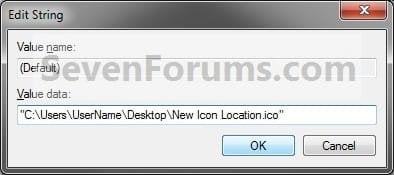
Modify_ICO_file.jpg
9. Close regedit.

10. Log off and log on, or restart the computer, to fully apply the icon change.

11. If this option did not work for you, then use OPTION ONE instead.
That's it,
Shawn


Last edited:
thank you bro for telling me
 

My Computer My Computer

Computer type
Laptop
Computer Manufacturer/Model Number
lenovo
OS
8.1 64
CPU
i7
Memory
8
Graphics Card(s)
4
Hard Drives
1000gp
Antivirus
windows defednder
Browser
chorme
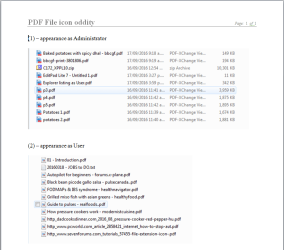
In order not to be 'dumb', a question that has me stumped. Using W7 home premium (64 bit) on a stand-alone desktop - have installed (as admin.) PDF Exchange Viewer as my default pdf reader, and in windows explorer see the file icon as per (1) in attached screenshot. However, as user, for day-to-day work, I see the 'reduced' icon as per (2). Nothing else is changed. Have rebuilt the icon cache with no effect, Nirsoft's FileTypesManager 'allows' a change of icon within his program but does not effect a change in the system, ...
Any and all advice would be most welcome. Thanks. :o

2016-09-16_22h35_21.png
 

Attachments

My Computer My Computer

OS
Windows Home Premium 64 bit
Brink, I have a lot videos of MKV extension, and I want to change the icon with my own creations.
Referring to your tutorial in step 1 that is not found '.mkv' extension in the FileTypesMan (also in Default Programs of Windows).
How to get there, whether it should make a new icon.. but how?
 

My Computer My Computer

Computer type
PC/Desktop
Computer Manufacturer/Model Number
own assembly
OS
Windows 7 Ult x64
CPU
AMD X4 Quad Core 3.1GHz
Motherboard
Gigabyte socket FM2+
Memory
DDR3 16GB
Graphics Card(s)
Radeon R5 230 2GB
Sound Card
Xonar D-KARAX
Monitor(s) Displays
ViewSonic 24'
Hard Drives
SSD + WDC
PSU
Antec VP500W
Antivirus
Kaspersky
Browser
Firefox
Hello Jacky, :)

Do see .mkv listed in the registry under HKEY_CLASSES_ROOT?

If so, what does it have for the (Default) string value?
 

My Computer My Computer

Computer type
PC/Desktop
Computer Manufacturer/Model Number
Self built custom
OS
64-bit Windows 11 Pro for Workstations
CPU
Intel i7-8700K OC'd to 5 GHz
Motherboard
ASUS ROG Maximus XI Formula Z390
Memory
64 GB (4x16GB) G.SKILL TridentZ RGB DDR4 3600 MHz
Graphics Card(s)
ASUS ROG-STRIX-GTX1080TI-O11G-GAMING
Sound Card
Integrated
Monitor(s) Displays
2 x Samsung Odyssey G7 27"
Screen Resolution
2560x1440
Hard Drives
1TB Samsung 990 PRO M.2,
4TB Samsung 990 PRO PRO M.2,
TerraMaster F8 SSD Plus NAS
PSU
Seasonic Prime Titanium 850W
Case
Thermaltake Core P3
Cooling
Corsair Hydro H115i
Keyboard
Logitech wireless K800
Mouse
Logitech MX Master 4
Internet Speed
2 Gb/s Download and 100 Mb/s Upload
Antivirus
Malwarebyte Anti-Malware Premium
Browser
Google Chrome
Other Info
Logitech Z625 speaker system,
Logitech BRIO 4K Pro webcam,
HP Color LaserJet Pro MFP M477fdn,
APC SMART-UPS RT 1000 XL - SURT1000XLI,
Galaxy S23 Plus phone
I have checked and there was nothing there, just have .mk and .mlc, nothing mkv between them.
Strangely, I have installed MPC-HC x64 and has set File Extensions format settings in its options.
 

My Computer My Computer

Computer type
PC/Desktop
Computer Manufacturer/Model Number
own assembly
OS
Windows 7 Ult x64
CPU
AMD X4 Quad Core 3.1GHz
Motherboard
Gigabyte socket FM2+
Memory
DDR3 16GB
Graphics Card(s)
Radeon R5 230 2GB
Sound Card
Xonar D-KARAX
Monitor(s) Displays
ViewSonic 24'
Hard Drives
SSD + WDC
PSU
Antec VP500W
Antivirus
Kaspersky
Browser
Firefox
Odd. Do you have a default program set to open these files?

By default, it would be Windows Media Player.
 

My Computer My Computer

Computer type
PC/Desktop
Computer Manufacturer/Model Number
Self built custom
OS
64-bit Windows 11 Pro for Workstations
CPU
Intel i7-8700K OC'd to 5 GHz
Motherboard
ASUS ROG Maximus XI Formula Z390
Memory
64 GB (4x16GB) G.SKILL TridentZ RGB DDR4 3600 MHz
Graphics Card(s)
ASUS ROG-STRIX-GTX1080TI-O11G-GAMING
Sound Card
Integrated
Monitor(s) Displays
2 x Samsung Odyssey G7 27"
Screen Resolution
2560x1440
Hard Drives
1TB Samsung 990 PRO M.2,
4TB Samsung 990 PRO PRO M.2,
TerraMaster F8 SSD Plus NAS
PSU
Seasonic Prime Titanium 850W
Case
Thermaltake Core P3
Cooling
Corsair Hydro H115i
Keyboard
Logitech wireless K800
Mouse
Logitech MX Master 4
Internet Speed
2 Gb/s Download and 100 Mb/s Upload
Antivirus
Malwarebyte Anti-Malware Premium
Browser
Google Chrome
Other Info
Logitech Z625 speaker system,
Logitech BRIO 4K Pro webcam,
HP Color LaserJet Pro MFP M477fdn,
APC SMART-UPS RT 1000 XL - SURT1000XLI,
Galaxy S23 Plus phone
Yes, I set to open with MPC-HC as default.
I search for more in depth, then I found two mkv, like this:

MKV under MPC-HC:
Code:
[HKEY_CLASSES_ROOT\mplayerc64.mkv]
@="Matroska"

[HKEY_CLASSES_ROOT\mplayerc64.mkv\DefaultIcon]
@="\"C:\\Program Files\\MPC-HC\\mpciconlib.dll\",20"

[HKEY_CLASSES_ROOT\mplayerc64.mkv\shell]

[HKEY_CLASSES_ROOT\mplayerc64.mkv\shell\open]
@=""
"Icon"=""

[HKEY_CLASSES_ROOT\mplayerc64.mkv\shell\open\command]
@="\"C:\\Program Files\\MPC-HC\\mpc-hc64.exe\" \"%1\""
MKV under MediaInfo:
Code:
[HKEY_CLASSES_ROOT\SystemFileAssociations\.mkv]

[HKEY_CLASSES_ROOT\SystemFileAssociations\.mkv\Shell]

[HKEY_CLASSES_ROOT\SystemFileAssociations\.mkv\Shell\MediaInfo]
"Icon"="\"C:\\Program Files\\MediaInfo\\MediaInfo.exe\""

[HKEY_CLASSES_ROOT\SystemFileAssociations\.mkv\Shell\MediaInfo\Command]
@="\"C:\\Program Files\\MediaInfo\\MediaInfo.exe\" \"%1\""
That's it..
 

My Computer My Computer

Computer type
PC/Desktop
Computer Manufacturer/Model Number
own assembly
OS
Windows 7 Ult x64
CPU
AMD X4 Quad Core 3.1GHz
Motherboard
Gigabyte socket FM2+
Memory
DDR3 16GB
Graphics Card(s)
Radeon R5 230 2GB
Sound Card
Xonar D-KARAX
Monitor(s) Displays
ViewSonic 24'
Hard Drives
SSD + WDC
PSU
Antec VP500W
Antivirus
Kaspersky
Browser
Firefox
Changing the "Icon" value at the bottom location may do it for you.
 

My Computer My Computer

Computer type
PC/Desktop
Computer Manufacturer/Model Number
Self built custom
OS
64-bit Windows 11 Pro for Workstations
CPU
Intel i7-8700K OC'd to 5 GHz
Motherboard
ASUS ROG Maximus XI Formula Z390
Memory
64 GB (4x16GB) G.SKILL TridentZ RGB DDR4 3600 MHz
Graphics Card(s)
ASUS ROG-STRIX-GTX1080TI-O11G-GAMING
Sound Card
Integrated
Monitor(s) Displays
2 x Samsung Odyssey G7 27"
Screen Resolution
2560x1440
Hard Drives
1TB Samsung 990 PRO M.2,
4TB Samsung 990 PRO PRO M.2,
TerraMaster F8 SSD Plus NAS
PSU
Seasonic Prime Titanium 850W
Case
Thermaltake Core P3
Cooling
Corsair Hydro H115i
Keyboard
Logitech wireless K800
Mouse
Logitech MX Master 4
Internet Speed
2 Gb/s Download and 100 Mb/s Upload
Antivirus
Malwarebyte Anti-Malware Premium
Browser
Google Chrome
Other Info
Logitech Z625 speaker system,
Logitech BRIO 4K Pro webcam,
HP Color LaserJet Pro MFP M477fdn,
APC SMART-UPS RT 1000 XL - SURT1000XLI,
Galaxy S23 Plus phone
Changing the "Icon" value at the bottom location may do it for you.
Sorry, I'm not smart to catch what you mean. Could you tell me more detail? Actually, I intend to replace the icon like the page 1 step 2, 3 etc.. but mkv icon not show up on FileTypesMan.. how?

Note: I have downloaded a nice mkv.ico on the Internet (128x128), and plans would be replaced.
 

My Computer My Computer

Computer type
PC/Desktop
Computer Manufacturer/Model Number
own assembly
OS
Windows 7 Ult x64
CPU
AMD X4 Quad Core 3.1GHz
Motherboard
Gigabyte socket FM2+
Memory
DDR3 16GB
Graphics Card(s)
Radeon R5 230 2GB
Sound Card
Xonar D-KARAX
Monitor(s) Displays
ViewSonic 24'
Hard Drives
SSD + WDC
PSU
Antec VP500W
Antivirus
Kaspersky
Browser
Firefox
You would basically use the same steps, but in the registry location below instead to replace the part highlighted in red with the full path of your .ico file.

Code:
[HKEY_CLASSES_ROOT\SystemFileAssociations\.mkv\Shell\MediaInfo]
"[B]Icon[/B]"="[B][COLOR="Red"]\"C:\\Program Files\\MediaInfo\\MediaInfo.exe\"[/COLOR][/B]"
 

My Computer My Computer

Computer type
PC/Desktop
Computer Manufacturer/Model Number
Self built custom
OS
64-bit Windows 11 Pro for Workstations
CPU
Intel i7-8700K OC'd to 5 GHz
Motherboard
ASUS ROG Maximus XI Formula Z390
Memory
64 GB (4x16GB) G.SKILL TridentZ RGB DDR4 3600 MHz
Graphics Card(s)
ASUS ROG-STRIX-GTX1080TI-O11G-GAMING
Sound Card
Integrated
Monitor(s) Displays
2 x Samsung Odyssey G7 27"
Screen Resolution
2560x1440
Hard Drives
1TB Samsung 990 PRO M.2,
4TB Samsung 990 PRO PRO M.2,
TerraMaster F8 SSD Plus NAS
PSU
Seasonic Prime Titanium 850W
Case
Thermaltake Core P3
Cooling
Corsair Hydro H115i
Keyboard
Logitech wireless K800
Mouse
Logitech MX Master 4
Internet Speed
2 Gb/s Download and 100 Mb/s Upload
Antivirus
Malwarebyte Anti-Malware Premium
Browser
Google Chrome
Other Info
Logitech Z625 speaker system,
Logitech BRIO 4K Pro webcam,
HP Color LaserJet Pro MFP M477fdn,
APC SMART-UPS RT 1000 XL - SURT1000XLI,
Galaxy S23 Plus phone
Sorry, no luck.. Replacement only applies to MediaInfo (not on the video icon), then I could see shortly in the right-click context menu where the icon of MediaInfo has changed, but after choose MediaInfo to see the info data, it turns back to the original icon. The same thing in the registry was returned back as the beginning.
 

My Computer My Computer

Computer type
PC/Desktop
Computer Manufacturer/Model Number
own assembly
OS
Windows 7 Ult x64
CPU
AMD X4 Quad Core 3.1GHz
Motherboard
Gigabyte socket FM2+
Memory
DDR3 16GB
Graphics Card(s)
Radeon R5 230 2GB
Sound Card
Xonar D-KARAX
Monitor(s) Displays
ViewSonic 24'
Hard Drives
SSD + WDC
PSU
Antec VP500W
Antivirus
Kaspersky
Browser
Firefox
It doesn't look like the program is going to allow it without changing it back. :(
 

My Computer My Computer

Computer type
PC/Desktop
Computer Manufacturer/Model Number
Self built custom
OS
64-bit Windows 11 Pro for Workstations
CPU
Intel i7-8700K OC'd to 5 GHz
Motherboard
ASUS ROG Maximus XI Formula Z390
Memory
64 GB (4x16GB) G.SKILL TridentZ RGB DDR4 3600 MHz
Graphics Card(s)
ASUS ROG-STRIX-GTX1080TI-O11G-GAMING
Sound Card
Integrated
Monitor(s) Displays
2 x Samsung Odyssey G7 27"
Screen Resolution
2560x1440
Hard Drives
1TB Samsung 990 PRO M.2,
4TB Samsung 990 PRO PRO M.2,
TerraMaster F8 SSD Plus NAS
PSU
Seasonic Prime Titanium 850W
Case
Thermaltake Core P3
Cooling
Corsair Hydro H115i
Keyboard
Logitech wireless K800
Mouse
Logitech MX Master 4
Internet Speed
2 Gb/s Download and 100 Mb/s Upload
Antivirus
Malwarebyte Anti-Malware Premium
Browser
Google Chrome
Other Info
Logitech Z625 speaker system,
Logitech BRIO 4K Pro webcam,
HP Color LaserJet Pro MFP M477fdn,
APC SMART-UPS RT 1000 XL - SURT1000XLI,
Galaxy S23 Plus phone
It doesn't look like the program is going to allow it without changing it back. :(
Hey Brink, I have found the solution. In the Registry [HKEY_CLASSES_ROOT\mplayerc64.mkv\DefaultIcon] I replace mpciconlib.dll with the icon of mine where it was. It's simple, just changed from @=""C:\\Program Files\\MPC-HC\\mpciconlib.dll",20" change to @="G:\\MyIconLib\\mkv.ico,0" - then it's successful and works fine without any problems.

Thanks Brink, my problem is resolved now :)
 

My Computer My Computer

Computer type
PC/Desktop
Computer Manufacturer/Model Number
own assembly
OS
Windows 7 Ult x64
CPU
AMD X4 Quad Core 3.1GHz
Motherboard
Gigabyte socket FM2+
Memory
DDR3 16GB
Graphics Card(s)
Radeon R5 230 2GB
Sound Card
Xonar D-KARAX
Monitor(s) Displays
ViewSonic 24'
Hard Drives
SSD + WDC
PSU
Antec VP500W
Antivirus
Kaspersky
Browser
Firefox
Great news. Thank you for posting back with your findings. :)
 

My Computer My Computer

Computer type
PC/Desktop
Computer Manufacturer/Model Number
Self built custom
OS
64-bit Windows 11 Pro for Workstations
CPU
Intel i7-8700K OC'd to 5 GHz
Motherboard
ASUS ROG Maximus XI Formula Z390
Memory
64 GB (4x16GB) G.SKILL TridentZ RGB DDR4 3600 MHz
Graphics Card(s)
ASUS ROG-STRIX-GTX1080TI-O11G-GAMING
Sound Card
Integrated
Monitor(s) Displays
2 x Samsung Odyssey G7 27"
Screen Resolution
2560x1440
Hard Drives
1TB Samsung 990 PRO M.2,
4TB Samsung 990 PRO PRO M.2,
TerraMaster F8 SSD Plus NAS
PSU
Seasonic Prime Titanium 850W
Case
Thermaltake Core P3
Cooling
Corsair Hydro H115i
Keyboard
Logitech wireless K800
Mouse
Logitech MX Master 4
Internet Speed
2 Gb/s Download and 100 Mb/s Upload
Antivirus
Malwarebyte Anti-Malware Premium
Browser
Google Chrome
Other Info
Logitech Z625 speaker system,
Logitech BRIO 4K Pro webcam,
HP Color LaserJet Pro MFP M477fdn,
APC SMART-UPS RT 1000 XL - SURT1000XLI,
Galaxy S23 Plus phone
Great news. Thank you for posting back with your findings. :)
Thanks Brink, here I will share some of my collection icons, there may be someone who wants to replace the existing icon with this nice icons, here's the link: (I recommend using FileTypesMan for easy)
Code:
https://drive.google.com/drive/folders/0B4yfsEXfbYckMDNjaU9kVnpWSEE?usp=sharing
Notes: Some of .ico files can be associate with:
- aac.ico for AAC/M4A
- dvd.ico for IFO/VOB
- flash.ico for FLV
- mp4.ico for MP4/M4V/MP4V
- mpc.ico for MPC-HC player (changed via its shortcut)
- vcd.ico for Oldvideo DAT
- Others in accordance with their names.
- Enjoy...
 

My Computer My Computer

Computer type
PC/Desktop
Computer Manufacturer/Model Number
own assembly
OS
Windows 7 Ult x64
CPU
AMD X4 Quad Core 3.1GHz
Motherboard
Gigabyte socket FM2+
Memory
DDR3 16GB
Graphics Card(s)
Radeon R5 230 2GB
Sound Card
Xonar D-KARAX
Monitor(s) Displays
ViewSonic 24'
Hard Drives
SSD + WDC
PSU
Antec VP500W
Antivirus
Kaspersky
Browser
Firefox
:thumbsup:
 

My Computer My Computer

Computer type
PC/Desktop
Computer Manufacturer/Model Number
Self built custom
OS
64-bit Windows 11 Pro for Workstations
CPU
Intel i7-8700K OC'd to 5 GHz
Motherboard
ASUS ROG Maximus XI Formula Z390
Memory
64 GB (4x16GB) G.SKILL TridentZ RGB DDR4 3600 MHz
Graphics Card(s)
ASUS ROG-STRIX-GTX1080TI-O11G-GAMING
Sound Card
Integrated
Monitor(s) Displays
2 x Samsung Odyssey G7 27"
Screen Resolution
2560x1440
Hard Drives
1TB Samsung 990 PRO M.2,
4TB Samsung 990 PRO PRO M.2,
TerraMaster F8 SSD Plus NAS
PSU
Seasonic Prime Titanium 850W
Case
Thermaltake Core P3
Cooling
Corsair Hydro H115i
Keyboard
Logitech wireless K800
Mouse
Logitech MX Master 4
Internet Speed
2 Gb/s Download and 100 Mb/s Upload
Antivirus
Malwarebyte Anti-Malware Premium
Browser
Google Chrome
Other Info
Logitech Z625 speaker system,
Logitech BRIO 4K Pro webcam,
HP Color LaserJet Pro MFP M477fdn,
APC SMART-UPS RT 1000 XL - SURT1000XLI,
Galaxy S23 Plus phone
Back
Top