File Extensions

Ginmardo

Banned
Local time
9:51 PM
Messages
56
Location
Suriname
Hey guys,

Is anyone familiar wit the JAD/JAR/SiS file extensions or file formats?
I know that they are mobile phone related. Friend of mine downloaded a theme for her mobile phone and asked me how to go about with these file ext. As far as I know, all she had to do is download the file, save it onto her mobile phone and execute from there. No success!

Can you run these file ext. in windows 7 so that they install onto her phone?
How does one go about this when it comes to JAD/JAR/SiS files?


Regards,
Gin
 

My Computer

Computer Manufacturer/Model Number
DIYS System
OS
Windows 7 Ultimate 32bit
CPU
AMD Phenom II X2 550 Callisto 3.10GHz
Motherboard
ECS Geforce6100PM-M2 V3.0
Memory
Markvision single channel DDR2 800MHz PC-6400
Graphics Card(s)
XFX GTX260
Monitor(s) Displays
AOC F22 22-inch monitor
Hard Drives
Hitachi Deskstar 500GB @7200RPM HDD
PSU
CoolerMaster eXtreme 600W PSU
Case
GMC Mid-Tower case
Cooling
Air-cooled 2x80mm rear case fans
Keyboard
Xtech multimedia keyboard
Mouse
Xtech standard USB optical mouse
Other Info
I put together the system myself
The cell phone should be java enabled. Though most modern phones are, but your friend might be using an ancient phone. Another possibility is the file is corrupted, try with different .jars.
 

My Computer

Computer Manufacturer/Model Number
Too many to describe...
OS
Windows 7 x64 pro/ Windows 7 x86 Pro/ XP SP3 x86
The cell phone should be java enabled. Though most modern phones are, but your friend might be using an ancient phone. Another possibility is the file is corrupted, try with different .jars.

I should check if the phone is Java enabled. It does support Java, that's for sure. Otherwise I'd have to do a direct download using that phone instead of downloading themes and games from the internet and trying to run and install them on the phone through Windows 7. Jar files can be extracted with WinRAR, but looking in the designated folders, I can't seem to find an .exe file that would probably install the theme or application onto the phone.
 

My Computer

Computer Manufacturer/Model Number
DIYS System
OS
Windows 7 Ultimate 32bit
CPU
AMD Phenom II X2 550 Callisto 3.10GHz
Motherboard
ECS Geforce6100PM-M2 V3.0
Memory
Markvision single channel DDR2 800MHz PC-6400
Graphics Card(s)
XFX GTX260
Monitor(s) Displays
AOC F22 22-inch monitor
Hard Drives
Hitachi Deskstar 500GB @7200RPM HDD
PSU
CoolerMaster eXtreme 600W PSU
Case
GMC Mid-Tower case
Cooling
Air-cooled 2x80mm rear case fans
Keyboard
Xtech multimedia keyboard
Mouse
Xtech standard USB optical mouse
Other Info
I put together the system myself
Hi, JAD and JAR work on all JAVA enabled devices whilst SIS files only work on Symbian based devices, mostly Nokia devices. There are two ways to go about installation of said files. One method is to transfer these files to the device and install them by navigating and running the installers through the device's inbuilt device manager. This is the cleanest and easiest method. Another method, which assumes that your friend is using a Nokia device, judging by the query containing SIS files, is to install the applications on her PC by first installing Nokia OVI Suite [LINK], which will associate JAR,JAD and SIS,SISX files to that application. After which, your friend can connect their device to the PC and double click on the installer file, it will prompt to install to the currently connected phone. That's it.
 

My Computer

Computer type
PC/Desktop
Computer Manufacturer/Model Number
Custom Build
OS
Windows 7 Ultimate x64 Service Pack 1
CPU
AMD Athlon II x4 Propus 2.9 GHz
Motherboard
ASRock N68C-GS FX
Memory
2 x 4GB Corsair XMS 3 DDR3 -1600 CL9
Graphics Card(s)
AMD Radeon HD 5850 1GB GDDR5
Sound Card
On-board 6-Channel HD Audio
Monitor(s) Displays
18' LG Flatron E1942TC-BN on DVI, 18' Chimei 95ND on HDMI
Screen Resolution
1366 x 768 x 2
Hard Drives
1 x 500 GB Seagate
1 x 1 TB Western Digital Caviar Green
1 x 1 TB Hitachi Touro Mobile USB 3
PSU
Seasonic S12II 520W
Case
Generic with Cable Management
Cooling
Deep Cool Gammaxx 200
Keyboard
Dragonwar Desert Eagle
Mouse
Logitech B85
Internet Speed
5Mb/s DL, 0.9Mb/s UL
Antivirus
ESET Nod32
Browser
Google Chrome 64 Bit
Other Info
LG G4 H818P - Rooted with Xposed Framework
Sis files are installers for Nokia themes and applications. You can download them to a computer, and then use Nokia Ovi Suite or PC Suite to install them on the phone.

Instructions here for Ovi Suite (Ovi Suite download: Nokia Europe - Nokia Ovi Suite).
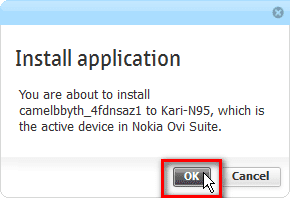
  • Install Ovi Suite, connect phone to Ovi using USB, Bluetooth or infrared
  • When phone is connected, launch the sis file from its download location on computer
  • Click OK on confirmation dialog on PC display
    .
    Install_sis_1.png
    .
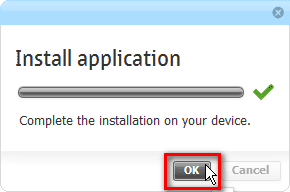
  • When Ovi has transferred the installation package to phone, click OK to close the dialog
    .
    Install_sis_2.png
    .
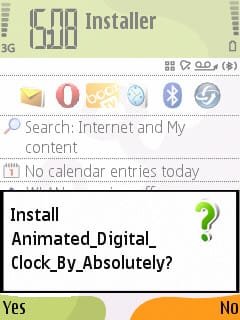
  • On phone, accept installation by selecting Yes
    .
    Install_sis_file0036.jpg
    .
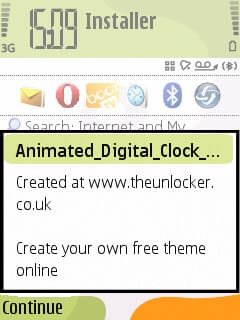
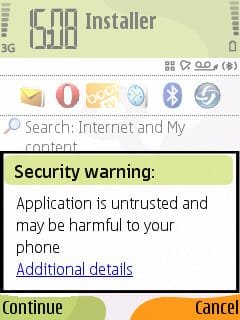
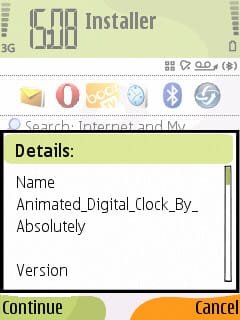
  • Accept security warning by selecting Continue. This warning comes almost always when installing third party software on Nokia. Be careful, continue only if you know the download source was a trusted site
    .
    Install_sis_file0037.jpg
    .
  • Once more you have to confirm by selecting Continue
    .
    Install_sis_file0038.jpg
    .
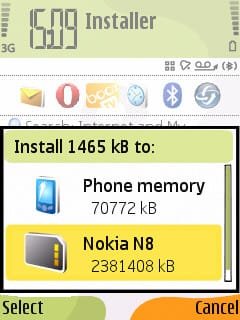
  • Select where you want to install, phone or memory card
    .
    Install_sis_file0039.jpg
    .
  • And again, confirm by selecting Continue
    .
    Install_sis_file0040.jpg
    .
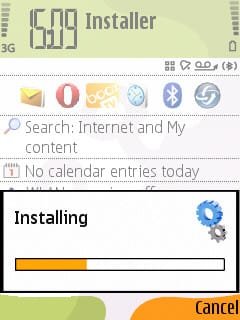
  • Application installs
    .
    Install_sis_file0041.jpg

That's it.

Kari
 

My Computer

Computer type
Laptop
Computer Manufacturer/Model Number
HP ENVY 17-1150eg
OS
Windows 10 Pro x64 EN-GB
CPU
1.6 GHz Intel Core i7-720QM Processor
Memory
6 GB
Graphics Card(s)
ATI Mobility Radeon HD 5850 Graphics
Sound Card
Beats sound system with integrated subwoofer
Monitor(s) Displays
17" laptop display, 22" LED and 32" Full HD TV through HDMI
Screen Resolution
1600*900 (1), 1920*1080 (2&3)
Hard Drives
Internal: 2 x 500 GB SATA Hard Disk Drive 7200 rpm
External: 2TB for backups, 3TB USB3 network drive for media
Cooling
As Envy runs a bit warm, I have it on a Cooler Master pad
Keyboard
Logitech diNovo Media Desktop Laser (bluetooth)
Mouse
Logitech Performance Mouse MX
Internet Speed
50/10 Mbps VDSL
Antivirus
Windows Defender 4.3.9431.0
Browser
Maxthon 3.5.2., IE11
Back
Top