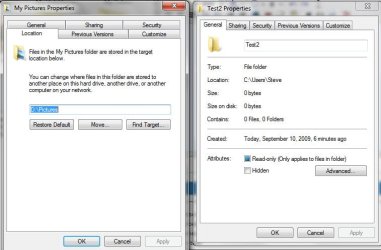
File Folder with Location tab?

sberry22

New member
Local time
9:58 PM
Messages
1
I noticed in the default folders like My Pictures, My Music in the Users directory all have 6 tabs including one called Location. When you create a new directory there are only 5 tabs with no location tab. Does anyone know how to enable or create a file folder with the location tab? I have redirected all of my c:\user\username folders to the D: drive but anything new I create does not allow me to change the location and I do not want to use a shortcut.

Thanks
 

Attachments

  • properties.jpg
    properties.jpg
    44.6 KB · Views: 279

My Computer

OS
Win 7
Since you are creating the folders, I think they assume you put them were you like. The ones with the location tabs are system created and they offer this feature so you can change the default location.

http://www.sevenforums.com/tutorials/18629-user-folders-change-default-location.html

If you created them already, just move them. It takes the same time to cut and paste as to have them moved the other way.

PS, is that you scary?
 
Last edited by a moderator:

My Computer

OS
Win 7 ultimate 64 7100
CPU
i7 920
Motherboard
MSI 58x Pro-E
Memory
6gigs OCZ trichannel
Graphics Card(s)
ATI 4890
Other Info
Running at 3.8 Ghz with EIST lowering voltages and multiplier as needed.
just for your info.. i did this before when i start using Vista.. i found a problem after i move all my user's folders to D: drive.

some application/games still use back the old path (C:\User\username)..
mayb it was hardcoded to the application.. i hate this.. sometimes it make me confused that my file is missing.. (especially those desktop shortcut created after install)

Now.. i plan to use Libraries in Windows 7..
First, I create my own new folder (Music, Picture, Video, etc.) in my D:
Then, i add those folder to my Libraries and set it as default..

Hope it works as i expected..
 

My Computer

Computer type
PC/Desktop
OS
Windows 10 x64
CPU
Intel Core i7 3770
Motherboard
Gigabyte GA-Z77X-D3H
Memory
Corsair Vengeance LP 16GB (4x4GB)
Graphics Card(s)
ASUS ROG Strix GeForce GTX 1070
Monitor(s) Displays
Samsung SyncMaster 2243
Screen Resolution
1920x1080
Hard Drives
Samsung 850 EVO 250GB
Western Digital 3TB WD30EZRX
Western Digital 2TB WD20EARX
Seagate 1TB Barracuda 7200.12
PSU
Corsair Enthusiast Series TX850M
Case
Cooler Master CM 690 II Advance USB 3.0
Cooling
Cooler Master Hyper 212 EVO
Internet Speed
8Mbps
Antivirus
Avast Free Antivirus
Browser
Chrome
Ranger is correct in that you can not move a folder that has programs installed since during installation there are files pointed to it (where it is now). Plain old "exe" files can be moved, but anthing that was installed can't.
 

My Computer

OS
Win 7 ultimate 64 7100
CPU
i7 920
Motherboard
MSI 58x Pro-E
Memory
6gigs OCZ trichannel
Graphics Card(s)
ATI 4890
Other Info
Running at 3.8 Ghz with EIST lowering voltages and multiplier as needed.
Back
Top