
You are using an out of date browser. It may not display this or other websites correctly.
You should upgrade or use an alternative browser.
You should upgrade or use an alternative browser.
File Infector Virus
- Thread starter cngerra
- Start date


cngerra,
Let's see if we can get to the root of the problem...
Please download RogueKiller:
Tlcharger RogueKiller (Site Officiel)
When you get to the website, go to where it says:
(Download link) Lien de téléchargement
Select the version that applies to your system: 32-bit or 64-bit. (See: Note (at the end))
Click the dark-blue button that applies.
Save to the Desktop.
Close all windows and browsers.
Right-click RogueKiller and select: Run as Administrator
Press: SCAN
When done, a report opens on the Desktop: RKreport.txt
Please provide the RKreport.txt (Mode: Scan) in your reply.
(Please do not delete anything!)
Note:
To find out if the system is 32 or 64 bit:
Click: Start
Type System in the Start Search box
Click System in the Programs list.
The operating system is displayed as follows:
For a 64-bit version operating system, under System > System type, it shows:
64-bit Operating System
For a 32-bit version operating system, it shows:
32-bit Operating System
Let's see if we can get to the root of the problem...
Please download RogueKiller:
Tlcharger RogueKiller (Site Officiel)
When you get to the website, go to where it says:
(Download link) Lien de téléchargement
Select the version that applies to your system: 32-bit or 64-bit. (See: Note (at the end))
Click the dark-blue button that applies.
Save to the Desktop.
Close all windows and browsers.
Right-click RogueKiller and select: Run as Administrator
Press: SCAN
When done, a report opens on the Desktop: RKreport.txt
Please provide the RKreport.txt (Mode: Scan) in your reply.
(Please do not delete anything!)
Note:
To find out if the system is 32 or 64 bit:
Click: Start
Type System in the Start Search box
Click System in the Programs list.
The operating system is displayed as follows:
For a 64-bit version operating system, under System > System type, it shows:
64-bit Operating System
For a 32-bit version operating system, it shows:
32-bit Operating System
My Computer
- Computer type
- PC/Desktop
- Computer Manufacturer/Model Number
- An ol' eMachines
- OS
- Windows 7 Home Premium
- Internet Speed
- Fine for me...I'm retired!

- Local time
- 5:49 PM
- Messages
- 8,608
Yes, do that before reformatting.
Cottonball just wants to see what the "file infector" is, so you'll be aware of it before infecting your newly reformatted disk again
Cottonball just wants to see what the "file infector" is, so you'll be aware of it before infecting your newly reformatted disk again
My Computer
- Computer type
- PC/Desktop
- Computer Manufacturer/Model Number
- Bruce ... somewhere in his 40's
- OS
- Windows 7 Ultimate 32bit SP1
- CPU
- Intel(R) Core(TM)2 Quad CPU @ 2.40GHz, 2400 MHz
- Motherboard
- INTEL/D975XBX2
- Memory
- 4 GB
- Graphics Card(s)
- ATI Radeon HD 2600 Pro
- Monitor(s) Displays
- Samsung SyncMaster 914v
- Screen Resolution
- 1280 x 1024
- Hard Drives
- 2/500GB each ... ST3500630AS ATA Device.
One is not connected
- PSU
- Rocketfish 700 W
- Case
- G.Skill Gigabyte Chassis
- Keyboard
- Standard PS/2 Keyboard
- Mouse
- Microsoft PS/2 Mouse
- Internet Speed
- DSL
- Antivirus
- Avira Internet Security
- Browser
- IE 11
- Other Info
- ATI HDMI Audio

Some file infectors can:
Formatting an existing partition doesn't rewrite the MBR...
- Infect the Master Boot Record (MBR)
- Run code in user mode
Formatting an existing partition doesn't rewrite the MBR...
Last edited:
My Computer
- Computer type
- PC/Desktop
- Computer Manufacturer/Model Number
- An ol' eMachines
- OS
- Windows 7 Home Premium
- Internet Speed
- Fine for me...I'm retired!
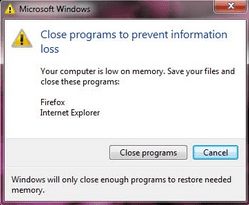
Hi everyone this is the result of the scan.
RogueKiller V8.5.4 [Mar 18 2013] by Tigzy
mail : tigzyRK<at>gmail<dot>com
Feedback : RogueKiller - Geeks to Go Forums
Website : Download RogueKiller (Official website)
Blog : tigzy-RK
Operating System : Windows 7 (6.1.7601 Service Pack 1) 32 bits version
Started in : Normal mode
User : Christopher [Admin rights]
Mode : Scan -- Date : 04/23/2013 19:56:53
| ARK || FAK || MBR |
¤¤¤ Bad processes : 0 ¤¤¤
¤¤¤ Registry Entries : 3 ¤¤¤
[HJ SMENU] HKCU\[...]\Advanced : Start_ShowMyGames (0) -> FOUND
[HJ DESK] HKLM\[...]\NewStartPanel : {59031a47-3f72-44a7-89c5-5595fe6b30ee} (1) -> FOUND
[HJ DESK] HKLM\[...]\NewStartPanel : {20D04FE0-3AEA-1069-A2D8-08002B30309D} (1) -> FOUND
¤¤¤ Particular Files / Folders: ¤¤¤
¤¤¤ Driver : [LOADED] ¤¤¤
¤¤¤ HOSTS File: ¤¤¤
--> C:\Windows\system32\drivers\etc\hosts
127.0.0.1 125.252.224.90
127.0.0.1 125.252.224.91
[...]
¤¤¤ MBR Check: ¤¤¤
+++++ PhysicalDrive0: Hitachi HTS547575A9E384 +++++
--- User ---
[MBR] 14ea7d3f16d242e19efba6e0a2248586
[BSP] c4fdb928998d49d79e915565f2da3e3d : Windows 7/8 MBR Code
Partition table:
0 - [ACTIVE] NTFS (0x07) [VISIBLE] Offset (sectors): 2048 | Size: 100 Mo
1 - [XXXXXX] NTFS (0x07) [VISIBLE] Offset (sectors): 206848 | Size: 249899 Mo
2 - [XXXXXX] NTFS (0x07) [VISIBLE] Offset (sectors): 512000000 | Size: 465403 Mo
User = LL1 ... OK!
User = LL2 ... OK!
Finished : << RKreport[1]_S_04232013_02d1956.txt >>
RKreport[1]_S_04232013_02d1956.txt
RogueKiller V8.5.4 [Mar 18 2013] by Tigzy
mail : tigzyRK<at>gmail<dot>com
Feedback : RogueKiller - Geeks to Go Forums
Website : Download RogueKiller (Official website)
Blog : tigzy-RK
Operating System : Windows 7 (6.1.7601 Service Pack 1) 32 bits version
Started in : Normal mode
User : Christopher [Admin rights]
Mode : Scan -- Date : 04/23/2013 19:56:53
| ARK || FAK || MBR |
¤¤¤ Bad processes : 0 ¤¤¤
¤¤¤ Registry Entries : 3 ¤¤¤
[HJ SMENU] HKCU\[...]\Advanced : Start_ShowMyGames (0) -> FOUND
[HJ DESK] HKLM\[...]\NewStartPanel : {59031a47-3f72-44a7-89c5-5595fe6b30ee} (1) -> FOUND
[HJ DESK] HKLM\[...]\NewStartPanel : {20D04FE0-3AEA-1069-A2D8-08002B30309D} (1) -> FOUND
¤¤¤ Particular Files / Folders: ¤¤¤
¤¤¤ Driver : [LOADED] ¤¤¤
¤¤¤ HOSTS File: ¤¤¤
--> C:\Windows\system32\drivers\etc\hosts
127.0.0.1 125.252.224.90
127.0.0.1 125.252.224.91
[...]
¤¤¤ MBR Check: ¤¤¤
+++++ PhysicalDrive0: Hitachi HTS547575A9E384 +++++
--- User ---
[MBR] 14ea7d3f16d242e19efba6e0a2248586
[BSP] c4fdb928998d49d79e915565f2da3e3d : Windows 7/8 MBR Code
Partition table:
0 - [ACTIVE] NTFS (0x07) [VISIBLE] Offset (sectors): 2048 | Size: 100 Mo
1 - [XXXXXX] NTFS (0x07) [VISIBLE] Offset (sectors): 206848 | Size: 249899 Mo
2 - [XXXXXX] NTFS (0x07) [VISIBLE] Offset (sectors): 512000000 | Size: 465403 Mo
User = LL1 ... OK!
User = LL2 ... OK!
Finished : << RKreport[1]_S_04232013_02d1956.txt >>
RKreport[1]_S_04232013_02d1956.txt
My Computer
- Computer type
- PC/Desktop
- OS
- Windows 7 Professional
cngerra,
The RogueKiller report is not showing malware files, or an infected MBR.
We would need more scans to confirm, though.
Can you provide some info:
Q 1. What led you believe the system has a file infector virus...did your AntiVirus program detect it? If so, can you post a screenshot of what is reported? Screenshots and Files - Upload and Post in Seven Forums
Q 2. Does the name Sality come up?
Q 3. Are you planning to reformat the partition where the Operating System is found, or, are you planning to attempt a disinfection?
Thanks!
The RogueKiller report is not showing malware files, or an infected MBR.
We would need more scans to confirm, though.
Can you provide some info:
Q 1. What led you believe the system has a file infector virus...did your AntiVirus program detect it? If so, can you post a screenshot of what is reported? Screenshots and Files - Upload and Post in Seven Forums
Q 2. Does the name Sality come up?
Q 3. Are you planning to reformat the partition where the Operating System is found, or, are you planning to attempt a disinfection?
Thanks!
My Computer
- Computer type
- PC/Desktop
- Computer Manufacturer/Model Number
- An ol' eMachines
- OS
- Windows 7 Home Premium
- Internet Speed
- Fine for me...I'm retired!
In any event, you can do the following, if you wish...
You need to use Internet Explorer for this scan.
Please right click the IE shortcut and select: Run as Administrator
Download: Free Online Virus Scanner | ESET
Click on: Run ESET Online Scanner
Click: Start
When asked, allow the add/on to be installed
Click: Start again
Click on: Advanced Settings
Make sure these options are checked:
When the scan is complete
If threats are found:
You need to use Internet Explorer for this scan.
Please right click the IE shortcut and select: Run as Administrator
Download: Free Online Virus Scanner | ESET
Click on: Run ESET Online Scanner
Click: Start
When asked, allow the add/on to be installed
Click: Start again
Click on: Advanced Settings
Make sure these options are checked:
- Scan for potentially unwanted applications
- Scan for potentially unsafe applications
- Enable Anti-Stealth Technology
When the scan is complete
If threats are found:
- Click on: List of threats found
- Click on: Export to text file
- Save to the Desktop and name it ESET Scan Results
- Click on: Back
- Place a check on: Uninstall application on close
- Click on: Finish, and close the program.
My Computer
- Computer type
- PC/Desktop
- Computer Manufacturer/Model Number
- An ol' eMachines
- OS
- Windows 7 Home Premium
- Internet Speed
- Fine for me...I'm retired!