
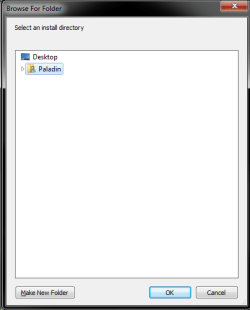
I have a recurring problem where some applications, including many installers, give me a file selection dialog which does not have any way to get to the root of my computer, or select a location outside my userprofile directory whatsoever.
I've managed to find a workaround, by putting symlinks (Not shortcuts) to the root directories of my 4 drives (C, D, E, and F) into my user profile directory, but the problem with that is that it means that the applications may consider themselves to be installed in C:\Users\Paladin\F\installdirectory instead of F:\installdirectory.
It's not a huge issue if the dialog at least has a location field I can just type in the directory I want it installed to (Though of course that means I have to create the directory through Explorer first), but in some cases (Such as the VMWare Workstation 11 installer which is what I took the screenshot of) they don't provide that so I'm stuck with either installing into my userprofile directory (Which is a problem as my C drive has limited space), or using my symlink hack.
Anyone else ever run into this?
I've managed to find a workaround, by putting symlinks (Not shortcuts) to the root directories of my 4 drives (C, D, E, and F) into my user profile directory, but the problem with that is that it means that the applications may consider themselves to be installed in C:\Users\Paladin\F\installdirectory instead of F:\installdirectory.
It's not a huge issue if the dialog at least has a location field I can just type in the directory I want it installed to (Though of course that means I have to create the directory through Explorer first), but in some cases (Such as the VMWare Workstation 11 installer which is what I took the screenshot of) they don't provide that so I'm stuck with either installing into my userprofile directory (Which is a problem as my C drive has limited space), or using my symlink hack.
Anyone else ever run into this?
Attachments
Last edited:
My Computer
At a glance
Windows 7 Home Premium x64
- Computer type
- PC/Desktop
- OS
- Windows 7 Home Premium x64