File magically disappeared, still visible in the Windows search index

blooglet

New member
Member
Local time
12:03 AM
Messages
26
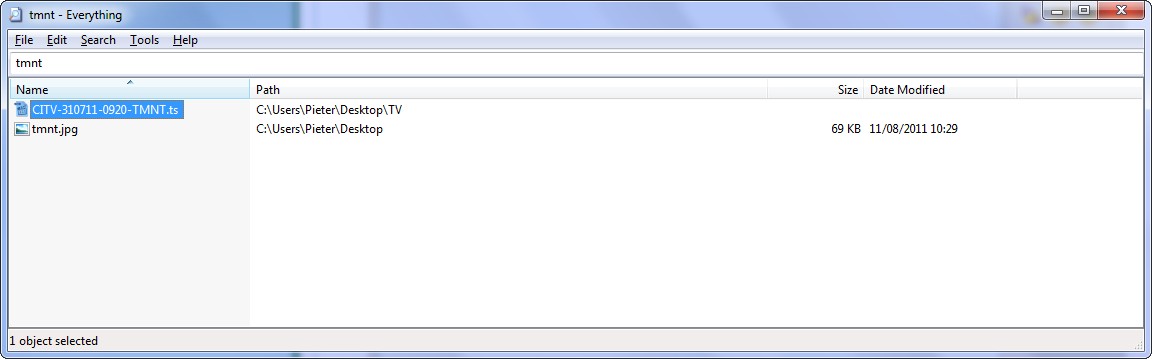
I was looking for a file when I noticed it was gone. I fired up the Windows search engine and Search Everything, both of which said the file was still there. When I try to open the search result in any media player, it says the file could not be found.

I already restarted my system, but both search engines still say the file exists. Is the file still there? I cannot find it with Undelete Plus, but it did find a lot of files that were recently deleted.
 

My Computer My Computer

At a glance

Windows 7 Ultimate 32-bit
OS
Windows 7 Ultimate 32-bit
Is the file located on a network drive or another volume?
 

My Computer My Computer

At a glance

Windows 7 Ultimate x64I76 x 1.5V DDR3 DIMM sockets supporting up to 2...GeForce GTX 580
Computer Manufacturer/Model Number
Alienware
OS
Windows 7 Ultimate x64
CPU
I7
Motherboard
GA-X58-USB3
Memory
6 x 1.5V DDR3 DIMM sockets supporting up to 24 GB of system
Graphics Card(s)
GeForce GTX 580
Sound Card
Realtek ALC892 codec 2/4/5.1/7.1-channel
Monitor(s) Displays
NEC Display Solutions E321 Black 32"
Screen Resolution
1366 x 768
Hard Drives
OCZ Colossus LT Series OCZSSD2-1CLSLT1T 3.5" 1TB SATA II MLC Internal Solid State Drive
PSU
XFX Black Edition XPS-850W-BES 850W ATX12V
Case
Antec
Cooling
Zalman
Keyboard
Microsoft
Mouse
Microsoft
On the partition I installed Windows on. Maybe it's worth noting that I also use openSUSE, which has read/write access to the partition. That said, I've never had any problems with it messing up Windows partitions so I don't think it is related to me accessing the partition on Linux.
 

My Computer My Computer

At a glance

Windows 7 Ultimate 32-bit
OS
Windows 7 Ultimate 32-bit
Aha that is probably the problem I had a similar issue with Ubuntu the file is there but only accessible through Suse most likely. Try opening up Suse and accessing the file I bet you'll be able to. Another point is that if you start windows you shouldn't be seeing a linux partition it's not possible or else something weird is going on.
 

My Computer My Computer

At a glance

Windows 7 Ultimate x64I76 x 1.5V DDR3 DIMM sockets supporting up to 2...GeForce GTX 580
Computer Manufacturer/Model Number
Alienware
OS
Windows 7 Ultimate x64
CPU
I7
Motherboard
GA-X58-USB3
Memory
6 x 1.5V DDR3 DIMM sockets supporting up to 24 GB of system
Graphics Card(s)
GeForce GTX 580
Sound Card
Realtek ALC892 codec 2/4/5.1/7.1-channel
Monitor(s) Displays
NEC Display Solutions E321 Black 32"
Screen Resolution
1366 x 768
Hard Drives
OCZ Colossus LT Series OCZSSD2-1CLSLT1T 3.5" 1TB SATA II MLC Internal Solid State Drive
PSU
XFX Black Edition XPS-850W-BES 850W ATX12V
Case
Antec
Cooling
Zalman
Keyboard
Microsoft
Mouse
Microsoft
I can't see the file in openSUSE. I see all other files in the directory, but not the file I'm looking for. I'm not sure if I was clear, but the file was on my Windows partition which is also accessible from Linux. I can read my Linux partitions from Windows using a special plugin, but I can't write to them.

But even assuming that it was accidentally deleted, why is the file still showing up in Windows Search and Search Everything?
 

My Computer My Computer

At a glance

Windows 7 Ultimate 32-bit
OS
Windows 7 Ultimate 32-bit
Then most likely that the database that the search indexer uses has become damaged or corrupted. In this case, you must rebuild that database. To do this, follow these steps.

Step A: Restart the Windows Search service
  1. Click Start
    VistaStartButton.jpg

    , type services in the Start Search box, and then press ENTER.
  2. In the Programs list, click Services.
    SecurityShield.jpg

    If you are prompted for an administrator password or for confirmation, type the password, or provide confirmation.
  3. Scroll down and locate the service that is labeled Windows Search.
  4. Right-click this service, and then click Properties.
  5. Set the Startup type: to Automatic (Delayed Start).
  6. Click Start to start the service, and then click OK.
Step B: Rebuild the database that is used by the search indexer
  1. Click Start
    VistaStartButton.jpg

    , type index in the Start Search box, and then press ENTER.
  2. In the Programs list, click Indexing Options.
    SecurityShield.jpg

    If you are prompted for an administrator password or for confirmation, type the password, or provide confirmation.
  3. Click Advanced.
  4. Click Rebuild, and then click OK to the warning that appears.
  5. Click OK to close the Indexing Options.

Can you manually navigate to the location instead of using the search function and if so is the file there?
 

My Computer My Computer

At a glance

Windows 7 Ultimate x64I76 x 1.5V DDR3 DIMM sockets supporting up to 2...GeForce GTX 580
Computer Manufacturer/Model Number
Alienware
OS
Windows 7 Ultimate x64
CPU
I7
Motherboard
GA-X58-USB3
Memory
6 x 1.5V DDR3 DIMM sockets supporting up to 24 GB of system
Graphics Card(s)
GeForce GTX 580
Sound Card
Realtek ALC892 codec 2/4/5.1/7.1-channel
Monitor(s) Displays
NEC Display Solutions E321 Black 32"
Screen Resolution
1366 x 768
Hard Drives
OCZ Colossus LT Series OCZSSD2-1CLSLT1T 3.5" 1TB SATA II MLC Internal Solid State Drive
PSU
XFX Black Edition XPS-850W-BES 850W ATX12V
Case
Antec
Cooling
Zalman
Keyboard
Microsoft
Mouse
Microsoft
Can you manually navigate to the location instead of using the search function and if so is the file there?
It is not there. After rebuilding the search index, Windows Search is no longer displaying the search result either. Search Everything is still showing the file.

d1QBf.jpg


I've looked at the Properties window of the associated folder to see if I can restore a previous version of the file, but none of the previous folder backups contain the file.

ibII7.jpg


Are there any other tricks I can try to recover the file? As I mentioned, I've already tried Undelete Plus but it didn't find the file.
 

My Computer My Computer

At a glance

Windows 7 Ultimate 32-bit
OS
Windows 7 Ultimate 32-bit

My Computer My Computer

At a glance

Windows 7 Ultimate x64I76 x 1.5V DDR3 DIMM sockets supporting up to 2...GeForce GTX 580
Computer Manufacturer/Model Number
Alienware
OS
Windows 7 Ultimate x64
CPU
I7
Motherboard
GA-X58-USB3
Memory
6 x 1.5V DDR3 DIMM sockets supporting up to 24 GB of system
Graphics Card(s)
GeForce GTX 580
Sound Card
Realtek ALC892 codec 2/4/5.1/7.1-channel
Monitor(s) Displays
NEC Display Solutions E321 Black 32"
Screen Resolution
1366 x 768
Hard Drives
OCZ Colossus LT Series OCZSSD2-1CLSLT1T 3.5" 1TB SATA II MLC Internal Solid State Drive
PSU
XFX Black Edition XPS-850W-BES 850W ATX12V
Case
Antec
Cooling
Zalman
Keyboard
Microsoft
Mouse
Microsoft
Sorry about the Dutch - I was hoping you'd recognize the dialog from the English version of Windows 7. I ran the data recovery tool, but like Undelete Plus it didn't detect a deleted file with that name. Fortunately the file wasn't of major importance to me, but I would have liked to know what happened to it. Ah well, stuff happens. :)
 

My Computer My Computer

At a glance

Windows 7 Ultimate 32-bit
OS
Windows 7 Ultimate 32-bit
No worries on the dutch I understood it.


My Computer My Computer

At a glance

Windows 7 Ultimate x64I76 x 1.5V DDR3 DIMM sockets supporting up to 2...GeForce GTX 580
Computer Manufacturer/Model Number
Alienware
OS
Windows 7 Ultimate x64
CPU
I7
Motherboard
GA-X58-USB3
Memory
6 x 1.5V DDR3 DIMM sockets supporting up to 24 GB of system
Graphics Card(s)
GeForce GTX 580
Sound Card
Realtek ALC892 codec 2/4/5.1/7.1-channel
Monitor(s) Displays
NEC Display Solutions E321 Black 32"
Screen Resolution
1366 x 768
Hard Drives
OCZ Colossus LT Series OCZSSD2-1CLSLT1T 3.5" 1TB SATA II MLC Internal Solid State Drive
PSU
XFX Black Edition XPS-850W-BES 850W ATX12V
Case
Antec
Cooling
Zalman
Keyboard
Microsoft
Mouse
Microsoft
Back
Top