File management/backup program recommendation

amoretam

New member
Power User
Local time
2:50 PM
Messages
362
Hello there,
I just come here because I am tired of doing things manually.
I just need a good and easy backup software which doesn't use proprietary format.
I.E. I just need to backup original folders with all of its sub-folders and different file types to be exact the same as the backup of this folder. I need two exact copies at all times. This is with the purpose of simply backing up and have my files secure.
I remember that Carbon Copy Cloner used to do this for me so easy and I had a profile that I just had to do one click. At the end CCC would validate (If I choose so) my two copies to be exactly the same too.

The program should be able to achieve this:

-If I change the name of a file or folder in the original it should update that in the backup copy
-If I delete Files in the original it should delete those files as well in the backup copy.
-If I modify a file in the original it should update it in the backup copy

I just need that anything I do to the original gets reflected in the backup copy. Anything.

I was testing Free File Sync program but this one is failing at updating the file name and I find it a little difficult to understand.
I have True Image but this is not good for this as this program uses proprietary format.

The other thing that I need a program to do (hopefully the same) is:

Let's say I have a folder with lots of subfolders, different file types everywhere and also files of the same type located in different folders.
I just need to be able to see and have access to files of the same type organized in one place.
I.E. all the jpg, all mp3, all pics. and then be able to organize them in one place.

Hopefully this is clear.

Thanks a lot lovely people of this forum.
 

My Computer

Computer type
PC/Desktop
Computer Manufacturer/Model Number
Custom Build
OS
Windows 7 x64bit Home Premium
CPU
Intel Core i5-2500K Quad-Core Processor 3.3 GHz 6 MB Cache
Motherboard
Intel Desktop Board Media Series LGA 1155 DDR 1333 Micro-ATX
Memory
8GB G.Skill DDR3 PC3-12800 1600MHz - F3-12800CL9D-8GBRL
Graphics Card(s)
Sandy Bridge
Sound Card
M-Audio Fast Track PRO - Avid digidesign 003 rack factory
Monitor(s) Displays
Acer X233H LCD monitor
Screen Resolution
1920x1080
Hard Drives
OS Drive: Silicon Power 256GB SSD 3D NAND A55 SLC Cache Performance Boost SATA III
PSU
Cooler Master eXtreme Power Plus 500w Power Supply
Other Info
This Computer was built from scratch
Free File Sync will do what you want. I can only guess that maybe you have a configuration setting wrong.

You're right; it isn't the easiest to understand if you are unfamiliar with it.

Second Copy is exceptional, but it's $30 with a 30 day free trial. If you don't mind paying, that's what I'd do.

Backup data with award winning automatic backup software Second Copy

Other freebies would include Syncback and Allway Sync, though I have no personal experience with them.

Aomei might also have a freebie that does what you want. Maybe their "Backupper" program?

I haven't kept up in the last couple of years. I used Second Copy for 10 years and have used Free File Sync for the last couple of years.

Don't quite follow what you mean by your last requirement. File management is a different issue than backup. Do your management manually in a way that suits your own sense of organization. Then use a backup program that will simply replicate the originals to the backup destination. If you make change X in the originals, change X will also be made in the backup the next time you run it.

Most backup programs have a setting where you can choose whether or not to delete a file from the backup if it is deleted from the original. Some people don't want to do that--they want to keep copies of old and deleted files. If you are like me and don't want to do that, you need to choose an option often called "mirroring". That's what it's called in Free File Sync. If you have a file named kitty44.jpg and then either delete it or rename it, that deletion/renaming will also be done on the backup when you next run it.
 

My Computer

Computer type
PC/Desktop
Computer Manufacturer/Model Number
Ignatz Special; 4 speed manual gearbox; factory air conditioning; one of one
OS
Windows 7 Home Premium SP1, 64-bit
CPU
Intel Skylake i5-6600K, not overclocked
Motherboard
AsRock Z170M Extreme 4, micro ATX
Memory
8 GB HyperX DDR4-2666 (2 x 4 GB)
Graphics Card(s)
none; graphics are integrated on CPU
Sound Card
onboard: Realtek ALC1150; external: USB Behringer UF0-202
Monitor(s) Displays
Dell S2340M 23 inch IPS
Screen Resolution
1600 x 900
Hard Drives
System: Crucial MX100 series SSD, 128 GB;
Data: Samsung Spinpoint 103SJ, 1 TB;
Backup: WD Caviar Green WD30EZRX-00D8PB0, 3 TB
PSU
Rosewill SilentNight 500 watt fanless, semi-modular
Case
Antec Solo II
Cooling
Noctua NH-U12S; Noctua F12 intake, Noctua S12A exhaust
Keyboard
Microsoft 200 6JH-00001 USB
Mouse
Dell or Microsoft optical wired; USB
Antivirus
Microsoft Security Essentials and Malwarebytes Premium
Browser
Pale Moon
Other Info
All fans PWM; speeds at idle: CPU circa 500 rpm; intake circa 600 rpm; exhaust circa 600 rpm; CPU temps 27 idle and 47 C load in a warm room (27 C/81 F) when running Intel Extreme Tuning Utility stress test.
Free File Sync will do what you want. I can only guess that maybe you have a configuration setting wrong.

You're right; it isn't the easiest to understand if you are unfamiliar with it.

Second Copy is exceptional, but it's $30 with a 30 day free trial. If you don't mind paying, that's what I'd do.

Backup data with award winning automatic backup software Second Copy

Other freebies would include Syncback and Allway Sync, though I have no personal experience with them.

Aomei might also have a freebie that does what you want. Maybe their "Backupper" program?

I haven't kept up in the last couple of years. I used Second Copy for 10 years and have used Free File Sync for the last couple of years.

Don't quite follow what you mean by your last requirement. File management is a different issue than backup. Do your management manually in a way that suits your own sense of organization. Then use a backup program that will simply replicate the originals to the backup destination. If you make change X in the originals, change X will also be made in the backup the next time you run it.

Most backup programs have a setting where you can choose whether or not to delete a file from the backup if it is deleted from the original. Some people don't want to do that--they want to keep copies of old and deleted files. If you are like me and don't want to do that, you need to choose an option often called "mirroring". That's what it's called in Free File Sync. If you have a file named kitty44.jpg and then either delete it or rename it, that deletion/renaming will also be done on the backup when you next run it.


Thanks for those recommendations. I will check that out.

My last requirement is very easy:
I just a software that can I.E. find all JPG files (which are in diferente folders) and show them to me in one place. From there on I can cut them and paste them in just one place.
That is just an example.

Thanks a lot
 

My Computer

Computer type
PC/Desktop
Computer Manufacturer/Model Number
Custom Build
OS
Windows 7 x64bit Home Premium
CPU
Intel Core i5-2500K Quad-Core Processor 3.3 GHz 6 MB Cache
Motherboard
Intel Desktop Board Media Series LGA 1155 DDR 1333 Micro-ATX
Memory
8GB G.Skill DDR3 PC3-12800 1600MHz - F3-12800CL9D-8GBRL
Graphics Card(s)
Sandy Bridge
Sound Card
M-Audio Fast Track PRO - Avid digidesign 003 rack factory
Monitor(s) Displays
Acer X233H LCD monitor
Screen Resolution
1920x1080
Hard Drives
OS Drive: Silicon Power 256GB SSD 3D NAND A55 SLC Cache Performance Boost SATA III
PSU
Cooler Master eXtreme Power Plus 500w Power Supply
Other Info
This Computer was built from scratch
My last requirement is very easy:
I just a software that can I.E. find all JPG files (which are in diferente folders) and show them to me in one place. From there on I can cut them and paste them in just one place.
That is just an example.

Thanks a lot

You want to be able to see all file names with a certain extension across many folders in one window and then be able to copy and paste them to some other location?

Easy.

Everything search engine from Voidtools.com.

See my comments in this thread:

http://www.sevenforums.com/general-discussion/391672-lazy-mans-question-about-file-copying.html
 

My Computer

Computer type
PC/Desktop
Computer Manufacturer/Model Number
Ignatz Special; 4 speed manual gearbox; factory air conditioning; one of one
OS
Windows 7 Home Premium SP1, 64-bit
CPU
Intel Skylake i5-6600K, not overclocked
Motherboard
AsRock Z170M Extreme 4, micro ATX
Memory
8 GB HyperX DDR4-2666 (2 x 4 GB)
Graphics Card(s)
none; graphics are integrated on CPU
Sound Card
onboard: Realtek ALC1150; external: USB Behringer UF0-202
Monitor(s) Displays
Dell S2340M 23 inch IPS
Screen Resolution
1600 x 900
Hard Drives
System: Crucial MX100 series SSD, 128 GB;
Data: Samsung Spinpoint 103SJ, 1 TB;
Backup: WD Caviar Green WD30EZRX-00D8PB0, 3 TB
PSU
Rosewill SilentNight 500 watt fanless, semi-modular
Case
Antec Solo II
Cooling
Noctua NH-U12S; Noctua F12 intake, Noctua S12A exhaust
Keyboard
Microsoft 200 6JH-00001 USB
Mouse
Dell or Microsoft optical wired; USB
Antivirus
Microsoft Security Essentials and Malwarebytes Premium
Browser
Pale Moon
Other Info
All fans PWM; speeds at idle: CPU circa 500 rpm; intake circa 600 rpm; exhaust circa 600 rpm; CPU temps 27 idle and 47 C load in a warm room (27 C/81 F) when running Intel Extreme Tuning Utility stress test.
My last requirement is very easy:
I just a software that can I.E. find all JPG files (which are in diferente folders) and show them to me in one place. From there on I can cut them and paste them in just one place.
That is just an example.

Thanks a lot

You want to be able to see all file names with a certain extension across many folders in one window and then be able to copy and paste them to some other location?

Easy.

Everything search engine from Voidtools.com.

See my comments in this thread:

http://www.sevenforums.com/general-discussion/391672-lazy-mans-question-about-file-copying.html

Thanks a lot for this, I will check that out.

I was testing Free File Sync but unfortunately the Mirror option will not update the copy backup if I erase something from the original. Enough testing that program..

Thanks
 

My Computer

Computer type
PC/Desktop
Computer Manufacturer/Model Number
Custom Build
OS
Windows 7 x64bit Home Premium
CPU
Intel Core i5-2500K Quad-Core Processor 3.3 GHz 6 MB Cache
Motherboard
Intel Desktop Board Media Series LGA 1155 DDR 1333 Micro-ATX
Memory
8GB G.Skill DDR3 PC3-12800 1600MHz - F3-12800CL9D-8GBRL
Graphics Card(s)
Sandy Bridge
Sound Card
M-Audio Fast Track PRO - Avid digidesign 003 rack factory
Monitor(s) Displays
Acer X233H LCD monitor
Screen Resolution
1920x1080
Hard Drives
OS Drive: Silicon Power 256GB SSD 3D NAND A55 SLC Cache Performance Boost SATA III
PSU
Cooler Master eXtreme Power Plus 500w Power Supply
Other Info
This Computer was built from scratch
Thanks a lot ignatzatsonic for your responses.

"Everything" search is great. That is exactly what I was looking for.

FreeFileSync however, is not working reliable.

I just my backup copy to stay the same as the original.

Sometimes I erase from the original, modify, change names,add files, etc etc.

I am using 2 folders in my desktop to test if this thing is reliable, because I just wan to set and forget.

I chose mirror mode and of course all the files from left were copied to right.
I erased some files from the left and ran the same mirror mode but it did not erased those files from the right. Why??

The same happens when I change names from the left folder.

Do I have to use different modes depending on what I do to the original?


CCC would be just one click away and used to do everything automatic.

Thanks so much, I saw lots of videos in Youtube but all of them just show the initial procedure but don't show when you start modifying files in the original.

I can also see that the process can be automatized by running batch jobs and such, but I still don't know If I will trust this automation without being a little paranoid thinking they are not exactly the same.

I just need to know how to set and forget.
 

My Computer

Computer type
PC/Desktop
Computer Manufacturer/Model Number
Custom Build
OS
Windows 7 x64bit Home Premium
CPU
Intel Core i5-2500K Quad-Core Processor 3.3 GHz 6 MB Cache
Motherboard
Intel Desktop Board Media Series LGA 1155 DDR 1333 Micro-ATX
Memory
8GB G.Skill DDR3 PC3-12800 1600MHz - F3-12800CL9D-8GBRL
Graphics Card(s)
Sandy Bridge
Sound Card
M-Audio Fast Track PRO - Avid digidesign 003 rack factory
Monitor(s) Displays
Acer X233H LCD monitor
Screen Resolution
1920x1080
Hard Drives
OS Drive: Silicon Power 256GB SSD 3D NAND A55 SLC Cache Performance Boost SATA III
PSU
Cooler Master eXtreme Power Plus 500w Power Supply
Other Info
This Computer was built from scratch
I'm not sure why FFS isn't working for you.

I do a mirror and it has worked perfectly.

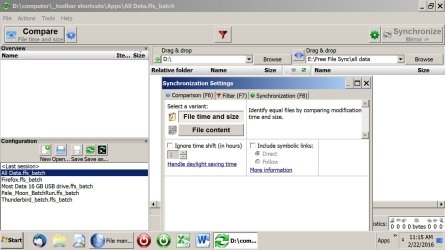
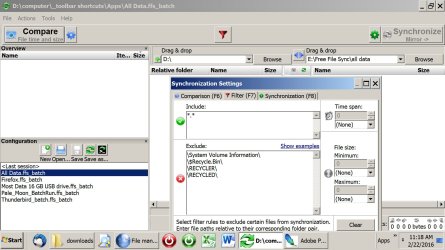
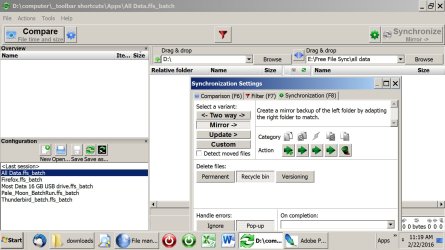
There are 3 settings you have to make from the "actions" menu: comparison, filter, and synchronization.

Below are pix of those 3 in that order as I see them on my installation.

Notice that "mirror" is chosen in the 3rd picture (which is the "synchronization" settings)

At the lower left, you can see the different batch files I have set up.

Notice that I have highlighted the "all data" batch.

Under the "drag and drop" windows near the top, you can see my source and destination for the "all data" batch.
 

Attachments

  • comparison settings.jpg
    comparison settings.jpg
    160.9 KB · Views: 2
  • filter settings.jpg
    filter settings.jpg
    174.9 KB · Views: 1
  • synchronization settings.jpg
    synchronization settings.jpg
    173.6 KB · Views: 4

My Computer

Computer type
PC/Desktop
Computer Manufacturer/Model Number
Ignatz Special; 4 speed manual gearbox; factory air conditioning; one of one
OS
Windows 7 Home Premium SP1, 64-bit
CPU
Intel Skylake i5-6600K, not overclocked
Motherboard
AsRock Z170M Extreme 4, micro ATX
Memory
8 GB HyperX DDR4-2666 (2 x 4 GB)
Graphics Card(s)
none; graphics are integrated on CPU
Sound Card
onboard: Realtek ALC1150; external: USB Behringer UF0-202
Monitor(s) Displays
Dell S2340M 23 inch IPS
Screen Resolution
1600 x 900
Hard Drives
System: Crucial MX100 series SSD, 128 GB;
Data: Samsung Spinpoint 103SJ, 1 TB;
Backup: WD Caviar Green WD30EZRX-00D8PB0, 3 TB
PSU
Rosewill SilentNight 500 watt fanless, semi-modular
Case
Antec Solo II
Cooling
Noctua NH-U12S; Noctua F12 intake, Noctua S12A exhaust
Keyboard
Microsoft 200 6JH-00001 USB
Mouse
Dell or Microsoft optical wired; USB
Antivirus
Microsoft Security Essentials and Malwarebytes Premium
Browser
Pale Moon
Other Info
All fans PWM; speeds at idle: CPU circa 500 rpm; intake circa 600 rpm; exhaust circa 600 rpm; CPU temps 27 idle and 47 C load in a warm room (27 C/81 F) when running Intel Extreme Tuning Utility stress test.
I'm not sure why FFS isn't working for you.

I do a mirror and it has worked perfectly.

There are 3 settings you have to make from the "actions" menu: comparison, filter, and synchronization.

Below are pix of those 3 in that order as I see them on my installation.

Notice that "mirror" is chosen in the 3rd picture (which is the "synchronization" settings)

At the lower left, you can see the different batch files I have set up.

Notice that I have highlighted the "all data" batch.

Under the "drag and drop" windows near the top, you can see my source and destination for the "all data" batch.

awesome, thanks for taking your time. I will check this tomorrow and come back with results.
 

My Computer

Computer type
PC/Desktop
Computer Manufacturer/Model Number
Custom Build
OS
Windows 7 x64bit Home Premium
CPU
Intel Core i5-2500K Quad-Core Processor 3.3 GHz 6 MB Cache
Motherboard
Intel Desktop Board Media Series LGA 1155 DDR 1333 Micro-ATX
Memory
8GB G.Skill DDR3 PC3-12800 1600MHz - F3-12800CL9D-8GBRL
Graphics Card(s)
Sandy Bridge
Sound Card
M-Audio Fast Track PRO - Avid digidesign 003 rack factory
Monitor(s) Displays
Acer X233H LCD monitor
Screen Resolution
1920x1080
Hard Drives
OS Drive: Silicon Power 256GB SSD 3D NAND A55 SLC Cache Performance Boost SATA III
PSU
Cooler Master eXtreme Power Plus 500w Power Supply
Other Info
This Computer was built from scratch
Hi there.
Still FFS is not working for me, .. I know everybody is loving it, but it is not working for me. I just need to make mirros backups, ...One folder, Partition or HD to be exact as the original one. Sometimes I erase files or compress files in the original and I want these changes to be reflected exactly in the backup.

Why on earth is this so difficult to achieve.
I followed your instructions with the pics and everything and it worked at the beginning, then I erased some files in the original and ran it again, did not work, it keeps saying nothing to copy or something.

One thing I don't understand from your instructions is the All Batch File. How did you get that there?
What is that for?

Isn't there another easier program, that I just set and click?

Thanks a lot, I really need this. I have been doing my backups manually and in order to keep them like mirrors, I have to delete the backup and copy the original to the backup every-time. A pain in the ass.

Sorry I have taken time to study this but it is quite complicated for me.
 

My Computer

Computer type
PC/Desktop
Computer Manufacturer/Model Number
Custom Build
OS
Windows 7 x64bit Home Premium
CPU
Intel Core i5-2500K Quad-Core Processor 3.3 GHz 6 MB Cache
Motherboard
Intel Desktop Board Media Series LGA 1155 DDR 1333 Micro-ATX
Memory
8GB G.Skill DDR3 PC3-12800 1600MHz - F3-12800CL9D-8GBRL
Graphics Card(s)
Sandy Bridge
Sound Card
M-Audio Fast Track PRO - Avid digidesign 003 rack factory
Monitor(s) Displays
Acer X233H LCD monitor
Screen Resolution
1920x1080
Hard Drives
OS Drive: Silicon Power 256GB SSD 3D NAND A55 SLC Cache Performance Boost SATA III
PSU
Cooler Master eXtreme Power Plus 500w Power Supply
Other Info
This Computer was built from scratch
The batch files are used to make backup a "one-click" operation. If you use batch files, you don't have to open FFS---you just poke the batch file shortcut with the mouse.

But they aren't necessary.

In your shoes, if you've fought FFS and can't figure it out, I'd give up.

And then spend $30 and use Second Copy as mentioned earlier in this thread. It has a 30 day free trial and is easier to configure and understand.
 

My Computer

Computer type
PC/Desktop
Computer Manufacturer/Model Number
Ignatz Special; 4 speed manual gearbox; factory air conditioning; one of one
OS
Windows 7 Home Premium SP1, 64-bit
CPU
Intel Skylake i5-6600K, not overclocked
Motherboard
AsRock Z170M Extreme 4, micro ATX
Memory
8 GB HyperX DDR4-2666 (2 x 4 GB)
Graphics Card(s)
none; graphics are integrated on CPU
Sound Card
onboard: Realtek ALC1150; external: USB Behringer UF0-202
Monitor(s) Displays
Dell S2340M 23 inch IPS
Screen Resolution
1600 x 900
Hard Drives
System: Crucial MX100 series SSD, 128 GB;
Data: Samsung Spinpoint 103SJ, 1 TB;
Backup: WD Caviar Green WD30EZRX-00D8PB0, 3 TB
PSU
Rosewill SilentNight 500 watt fanless, semi-modular
Case
Antec Solo II
Cooling
Noctua NH-U12S; Noctua F12 intake, Noctua S12A exhaust
Keyboard
Microsoft 200 6JH-00001 USB
Mouse
Dell or Microsoft optical wired; USB
Antivirus
Microsoft Security Essentials and Malwarebytes Premium
Browser
Pale Moon
Other Info
All fans PWM; speeds at idle: CPU circa 500 rpm; intake circa 600 rpm; exhaust circa 600 rpm; CPU temps 27 idle and 47 C load in a warm room (27 C/81 F) when running Intel Extreme Tuning Utility stress test.
The batch files are used to make backup a "one-click" operation. If you use batch files, you don't have to open FFS---you just poke the batch file shortcut with the mouse.

But they aren't necessary.

In your shoes, if you've fought FFS and can't figure it out, I'd give up.

And then spend $30 and use Second Copy as mentioned earlier in this thread. It has a 30 day free trial and is easier to configure and understand.

thanks a lot for your attention, I found this: https://www.microsoft.com/en-us/download/details.aspx?id=15155

Oh my god this is lovely, I can;t believe this is will do exactly what I want with only one click!!!
AWesome
 

My Computer

Computer type
PC/Desktop
Computer Manufacturer/Model Number
Custom Build
OS
Windows 7 x64bit Home Premium
CPU
Intel Core i5-2500K Quad-Core Processor 3.3 GHz 6 MB Cache
Motherboard
Intel Desktop Board Media Series LGA 1155 DDR 1333 Micro-ATX
Memory
8GB G.Skill DDR3 PC3-12800 1600MHz - F3-12800CL9D-8GBRL
Graphics Card(s)
Sandy Bridge
Sound Card
M-Audio Fast Track PRO - Avid digidesign 003 rack factory
Monitor(s) Displays
Acer X233H LCD monitor
Screen Resolution
1920x1080
Hard Drives
OS Drive: Silicon Power 256GB SSD 3D NAND A55 SLC Cache Performance Boost SATA III
PSU
Cooler Master eXtreme Power Plus 500w Power Supply
Other Info
This Computer was built from scratch
Back
Top