
- Local time
- 7:30 PM
- Messages
- 97
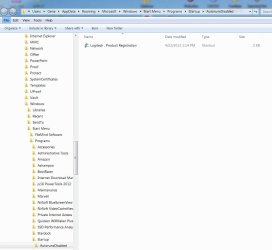
With every startup the past few days, my file manager has been opening when it's not supposed to. See the screenshot. The same thing happened briefly in early October, but I don't recall how I get rid of it. I thought it was related to Xyplorer, the file manager I mainly use, but after uninstalling it and rebooting, Windows Explorer is opening to the same folder (Xyplorer reinstalled doesn't do it now). Why Autoruns and Logitech? Not sure. I have a Logitech webcam, but it's not currently hooked up. Any idea what might be going on? Thanks,
Attachments
Last edited:
My Computer
At a glance
Win 7 Home Premium and Win XP/SP3 Home 32 bit...AMD Phenom II X3 720 Black Edition (unlocked)6 GBXFX Radeon HD 5670
- OS
- Win 7 Home Premium and Win XP/SP3 Home 32 bit (desktop); Win 7 x64 Home Premium (laptop)
- CPU
- AMD Phenom II X3 720 Black Edition (unlocked)
- Motherboard
- Gigabyte GA-MA790X-UD4P (rev. 1.0) - version F9 BIOS
- Memory
- 6 GB
- Graphics Card(s)
- XFX Radeon HD 5670
- Monitor(s) Displays
- Dell U2412M
- Hard Drives
- Corsair Force 3 SSD 60 GB
Seagate ST31000528AS - 1T
WD7500AAKS - 750GB
WD1600JBRTL - 160 GB
- PSU
- Corsair VX450
- Case
- Cooler Master
- Cooling
- front/back fans, CPU/PSU stock


