
I think I've screwed myself up into a corner. I really need help as Google is not bringing up anything that might help.
What happened is I tried to adjust the security setting for my whole external hard disk.
I have the admin rights to my computer and wanted to restrict a user to be able to read and execute only. I right clicked the drive (L:\) and adjusted the EVERYONE group.
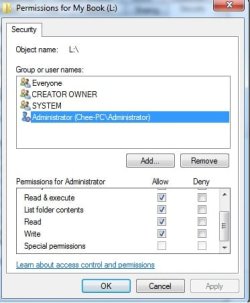
What I didn't know was EVERYONE included the admin too. So now I've blocked myself from editing the files and folders in the external. Now I see all accounts have the special permission part unticked.
And if I check the properties of a folder in the hard disk I see an account with the special permission allowed
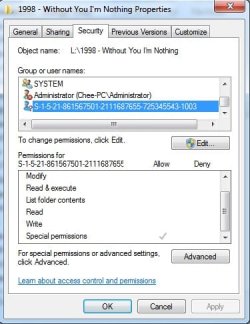
In a fit of panic I accidentally removed the account with special permission privilege from my hard disk properties so I don't see it when I check the properties of my hard disk but I can see the account when I check the properties for the individual folders.
For awhile I had access denied when I tried to enter the drive but now I can enter but still am restricted (can't delete folders, etc)
How do I rectify this mess I'm in?
What happened is I tried to adjust the security setting for my whole external hard disk.
I have the admin rights to my computer and wanted to restrict a user to be able to read and execute only. I right clicked the drive (L:\) and adjusted the EVERYONE group.
What I didn't know was EVERYONE included the admin too. So now I've blocked myself from editing the files and folders in the external. Now I see all accounts have the special permission part unticked.
And if I check the properties of a folder in the hard disk I see an account with the special permission allowed
In a fit of panic I accidentally removed the account with special permission privilege from my hard disk properties so I don't see it when I check the properties of my hard disk but I can see the account when I check the properties for the individual folders.
For awhile I had access denied when I tried to enter the drive but now I can enter but still am restricted (can't delete folders, etc)
How do I rectify this mess I'm in?
My Computer
- OS
- Windows 7 Ultimate x86
- CPU
- Intel Core 2 Duo 2.2Ghz
- Motherboard
- MSI
- Memory
- 2GB
- Graphics Card(s)
- ATI RADEON HD 5670
- Monitor(s) Displays
- 17" Samsung Syncmaster 753s
- Screen Resolution
- 1024x768
- Hard Drives
- 2Tb, 500Gb, 500Gb Internal
1Tb External
- PSU
- 650w Coolermaster

