File permissions for individual user folders, program install errors

linmix

New member
Member
Local time
10:04 PM
Messages
26
I recently suffered a hrd disk failure and I was forced to extract the data from the faulty disk using a Linux distro (which managed to access all the files just fine while windows complained the partitions were unformatted). I then incorporated the files into my new Windows 7 installation and soon found out I could not access the files because I didn't have the necessary permissions. Since changing permissions for 1000+ files one by one is rather tedious I browsed this forum for an alternate solution and found out I could change file permissions for a folder 1 or more levels higher, including all files and folders inside said top level folder.

While applying new permissions to my <username> folder I was prompted to confirm if I wanted the Appdata folder to be changed as well. I really didn't know, but decided against. Even so, since I made the change I am having problems installing programs (can only do so as admin) and several programs have started informing of problems like:

Failed to create temporary folder:
C:\Users\<username>\Appdata\Local\Temp\<foldername>

My questions therefore are as follows:

- what permissions do I need to set for the individual folders from <username> down? Are they all supposeed o be owned by the user?
- what can I do to correct the current behaviour of my installation and to regain control over installing programs as a user?
- ... or is something different causing the problems I am experiencing?

I am using Windows 7 Ultimate SP1 x64
 

My Computer

Computer Manufacturer/Model Number
Packard Bell EasyNote TS
OS
Windows 7 Ultimate x64
CPU
Intel Core i5-2430M
Memory
4GB DDR3
Graphics Card(s)
NVIDIA GeForce GT 540M (2GB VRAM)
Sound Card
on-board
Screen Resolution
1366 x 768
In command prompt
Code:
cd  %userprofile%
cacls  *.*>cacls.txt
Post cacls.txt. You may delete the file afterwards
 
Last edited:

My Computer

Computer type
Laptop
Computer Manufacturer/Model Number
ACER ASPIRE 5742G
OS
Microsoft Windows 7 Home Premium 64-bits 7601 Multiprocessor Free Service Pack 1
CPU
Intel(R) Core(TM) i3 CPU M 370 @ 2.40GHz
Motherboard
Acer Aspire 5742G
Memory
4,00 GB
Graphics Card(s)
ATI Mobility Radeon HD 5400 Series
Sound Card
(1) AMD High Definition Audio Device (2) Realtek High Defi
Screen Resolution
1366 x 768 x 32 bits (4294967296 colors) @ 60 Hz
Hard Drives
WDC WD5000BEVT-22ZAT0
C:\Users\Jetro\aeat NT AUTHORITY\SYSTEM:(OI)(CI)(ID)F
INGEBOUWD\Administrators:(OI)(CI)(ID)F
Jetro-LaptopBP\Jetro:(OI)(CI)(ID)F

C:\Users\Jetro\AppData Jetro-LaptopBP\HomeUsers:R
NT AUTHORITY\SYSTEM:(OI)(CI)(ID)F
INGEBOUWD\Administrators:(OI)(CI)(ID)F
Jetro-LaptopBP\Jetro:(OI)(CI)(ID)F

C:\Users\Jetro\Application Data Jetro-LaptopBP\Jetro:(OI)(CI)F

C:\Users\Jetro\cacls.txt NT AUTHORITY\SYSTEM:(ID)F
INGEBOUWD\Administrators:(ID)F
Jetro-LaptopBP\Jetro:(ID)F

C:\Users\Jetro\Contacts NT AUTHORITY\SYSTEM:(OI)(CI)(ID)F
INGEBOUWD\Administrators:(OI)(CI)(ID)F
Jetro-LaptopBP\Jetro:(OI)(CI)(ID)F

C:\Users\Jetro\Cookies Jetro-LaptopBP\Jetro:(OI)(CI)F

C:\Users\Jetro\Desktop NT AUTHORITY\SYSTEM:(OI)(CI)(ID)F
INGEBOUWD\Administrators:(OI)(CI)(ID)F
Jetro-LaptopBP\Jetro:(OI)(CI)(ID)F

C:\Users\Jetro\Documents Jetro-LaptopBP\HomeUsers:(OI)(CI)R
NT AUTHORITY\SYSTEM:(OI)(CI)(ID)F
INGEBOUWD\Administrators:(OI)(CI)(ID)F
Jetro-LaptopBP\Jetro:(OI)(CI)(ID)F

C:\Users\Jetro\Downloads NT AUTHORITY\SYSTEM:(OI)(CI)(ID)F
INGEBOUWD\Administrators:(OI)(CI)(ID)F
Jetro-LaptopBP\Jetro:(OI)(CI)(ID)F

C:\Users\Jetro\Dropbox NT AUTHORITY\SYSTEM:(OI)(CI)(ID)F
INGEBOUWD\Administrators:(OI)(CI)(ID)F
Jetro-LaptopBP\Jetro:(OI)(CI)(ID)F

C:\Users\Jetro\dwhelper NT AUTHORITY\SYSTEM:(OI)(CI)(ID)F
INGEBOUWD\Administrators:(OI)(CI)(ID)F
Jetro-LaptopBP\Jetro:(OI)(CI)(ID)F

C:\Users\Jetro\Favorites NT AUTHORITY\SYSTEM:(OI)(CI)(ID)F
INGEBOUWD\Administrators:(OI)(CI)(ID)F
Jetro-LaptopBP\Jetro:(OI)(CI)(ID)F

C:\Users\Jetro\Links NT AUTHORITY\SYSTEM:(OI)(CI)(ID)F
INGEBOUWD\Administrators:(OI)(CI)(ID)F
Jetro-LaptopBP\Jetro:(OI)(CI)(ID)F

C:\Users\Jetro\Local Settings Jetro-LaptopBP\Jetro:(OI)(CI)F

C:\Users\Jetro\Menu Start Jetro-LaptopBP\Jetro:(OI)(CI)F

C:\Users\Jetro\Mijn documenten Jetro-LaptopBP\Jetro:(OI)(CI)F

C:\Users\Jetro\Music NT SERVICE\WMPNetworkSvc:(special access:)

READ_CONTROL
SYNCHRONIZE
FILE_GENERIC_READ
FILE_READ_DATA
FILE_READ_EA
FILE_READ_ATTRIBUTES

NT SERVICE\WMPNetworkSvc:(OI)(CI)(IO)(special access:)

READ_CONTROL
SYNCHRONIZE
FILE_GENERIC_READ
FILE_READ_DATA
FILE_READ_EA
FILE_READ_ATTRIBUTES

Jetro-LaptopBP\HomeUsers:(OI)(CI)R
NT AUTHORITY\SYSTEM:(OI)(CI)(ID)F
INGEBOUWD\Administrators:(OI)(CI)(ID)F
Jetro-LaptopBP\Jetro:(OI)(CI)(ID)F

C:\Users\Jetro\NetHood Jetro-LaptopBP\Jetro:(OI)(CI)F

C:\Users\Jetro\Netwerkprinteromgeving Jetro-LaptopBP\Jetro:(OI)(CI)F

C:\Users\Jetro\NTUSER.DAT NT AUTHORITY\SYSTEM:(ID)F
INGEBOUWD\Administrators:(ID)F
Jetro-LaptopBP\Jetro:(ID)F

C:\Users\Jetro\ntuser.dat.LOG1 NT AUTHORITY\SYSTEM:(ID)F
INGEBOUWD\Administrators:(ID)F
Jetro-LaptopBP\Jetro:(ID)F

C:\Users\Jetro\ntuser.dat.LOG2 NT AUTHORITY\SYSTEM:(ID)F
INGEBOUWD\Administrators:(ID)F
Jetro-LaptopBP\Jetro:(ID)F

C:\Users\Jetro\NTUSER.DAT{016888bd-6c6f-11de-8d1d-001e0bcde3ec}.TM.blf NT AUTHORITY\SYSTEM:(ID)F
INGEBOUWD\Administrators:(ID)F
Jetro-LaptopBP\Jetro:(ID)F

C:\Users\Jetro\NTUSER.DAT{016888bd-6c6f-11de-8d1d-001e0bcde3ec}.TMContainer00000000000000000001.regtrans-ms NT AUTHORITY\SYSTEM:(ID)F
INGEBOUWD\Administrators:(ID)F
Jetro-LaptopBP\Jetro:(ID)F

C:\Users\Jetro\NTUSER.DAT{016888bd-6c6f-11de-8d1d-001e0bcde3ec}.TMContainer00000000000000000002.regtrans-ms NT AUTHORITY\SYSTEM:(ID)F
INGEBOUWD\Administrators:(ID)F
Jetro-LaptopBP\Jetro:(ID)F

C:\Users\Jetro\ntuser.ini NT AUTHORITY\SYSTEM:(ID)F
INGEBOUWD\Administrators:(ID)F
Jetro-LaptopBP\Jetro:(ID)F

C:\Users\Jetro\Pictures NT SERVICE\WMPNetworkSvc:(special access:)

READ_CONTROL
SYNCHRONIZE
FILE_GENERIC_READ
FILE_READ_DATA
FILE_READ_EA
FILE_READ_ATTRIBUTES

NT SERVICE\WMPNetworkSvc:(OI)(CI)(IO)(special access:)

READ_CONTROL
SYNCHRONIZE
FILE_GENERIC_READ
FILE_READ_DATA
FILE_READ_EA
FILE_READ_ATTRIBUTES

Jetro-LaptopBP\HomeUsers:(OI)(CI)R
NT AUTHORITY\SYSTEM:(OI)(CI)(ID)F
INGEBOUWD\Administrators:(OI)(CI)(ID)F
Jetro-LaptopBP\Jetro:(OI)(CI)(ID)F

C:\Users\Jetro\Recent Jetro-LaptopBP\Jetro:(OI)(CI)F

C:\Users\Jetro\Saved Games NT AUTHORITY\SYSTEM:(OI)(CI)(ID)F
INGEBOUWD\Administrators:(OI)(CI)(ID)F
Jetro-LaptopBP\Jetro:(OI)(CI)(ID)F

C:\Users\Jetro\Searches NT AUTHORITY\SYSTEM:(OI)(CI)(ID)F
INGEBOUWD\Administrators:(OI)(CI)(ID)F
Jetro-LaptopBP\Jetro:(OI)(CI)(ID)F

C:\Users\Jetro\SendTo Jetro-LaptopBP\Jetro:(OI)(CI)F

C:\Users\Jetro\Sjablonen Jetro-LaptopBP\Jetro:(OI)(CI)F

C:\Users\Jetro\SkyDrive NT AUTHORITY\SYSTEM:(OI)(CI)(ID)F
INGEBOUWD\Administrators:(OI)(CI)(ID)F
Jetro-LaptopBP\Jetro:(OI)(CI)(ID)F

C:\Users\Jetro\Tracing NT AUTHORITY\SYSTEM:(OI)(CI)(ID)F
INGEBOUWD\Administrators:(OI)(CI)(ID)F
Jetro-LaptopBP\Jetro:(OI)(CI)(ID)F

C:\Users\Jetro\Videos NT SERVICE\WMPNetworkSvc:(special access:)

READ_CONTROL
SYNCHRONIZE
FILE_GENERIC_READ
FILE_READ_DATA
FILE_READ_EA
FILE_READ_ATTRIBUTES

NT SERVICE\WMPNetworkSvc:(OI)(CI)(IO)(special access:)

READ_CONTROL
SYNCHRONIZE
FILE_GENERIC_READ
FILE_READ_DATA
FILE_READ_EA
FILE_READ_ATTRIBUTES

Jetro-LaptopBP\HomeUsers:(OI)(CI)R
NT AUTHORITY\SYSTEM:(OI)(CI)(ID)F
INGEBOUWD\Administrators:(OI)(CI)(ID)F
Jetro-LaptopBP\Jetro:(OI)(CI)(ID)
 

My Computer

Computer Manufacturer/Model Number
Packard Bell EasyNote TS
OS
Windows 7 Ultimate x64
CPU
Intel Core i5-2430M
Memory
4GB DDR3
Graphics Card(s)
NVIDIA GeForce GT 540M (2GB VRAM)
Sound Card
on-board
Screen Resolution
1366 x 768
Are you dutch just like me?

In command prompt:
Code:
cd %userprofile%
dir/q>dir.txt
dir/ah/q>>dir.txt
dir/as/q>>dir.txt
post dir.txt . Afterwards delete dir.txt
 

My Computer

Computer type
Laptop
Computer Manufacturer/Model Number
ACER ASPIRE 5742G
OS
Microsoft Windows 7 Home Premium 64-bits 7601 Multiprocessor Free Service Pack 1
CPU
Intel(R) Core(TM) i3 CPU M 370 @ 2.40GHz
Motherboard
Acer Aspire 5742G
Memory
4,00 GB
Graphics Card(s)
ATI Mobility Radeon HD 5400 Series
Sound Card
(1) AMD High Definition Audio Device (2) Realtek High Defi
Screen Resolution
1366 x 768 x 32 bits (4294967296 colors) @ 60 Hz
Hard Drives
WDC WD5000BEVT-22ZAT0
When did you create that account? It looks very new (?) Not a lot of NTUSER.DAT{016888bd-6c6f-11de-8d1d-001e0bcde3ec} files
 

My Computer

Computer type
Laptop
Computer Manufacturer/Model Number
ACER ASPIRE 5742G
OS
Microsoft Windows 7 Home Premium 64-bits 7601 Multiprocessor Free Service Pack 1
CPU
Intel(R) Core(TM) i3 CPU M 370 @ 2.40GHz
Motherboard
Acer Aspire 5742G
Memory
4,00 GB
Graphics Card(s)
ATI Mobility Radeon HD 5400 Series
Sound Card
(1) AMD High Definition Audio Device (2) Realtek High Defi
Screen Resolution
1366 x 768 x 32 bits (4294967296 colors) @ 60 Hz
Hard Drives
WDC WD5000BEVT-22ZAT0
I suffered a fatal system crash so I had to start from scratch about 2 weeks ago. And yes, I'm Dutch :D

Contents of dir.txt:

Volume in drive C has no label.
Volume Serial Number is C098-3C51

Directory of C:\Users\Jetro

15/01/2013 23:24 <DIR> Jetro-LaptopBP\Jetro .
15/01/2013 23:24 <DIR> INGEBOUWD\Administrator..
15/01/2013 10:01 <DIR> Jetro-LaptopBP\Jetro aeat
25/12/2012 11:11 <DIR> Jetro-LaptopBP\Jetro Contacts
15/01/2013 20:49 <DIR> Jetro-LaptopBP\Jetro Desktop
15/01/2013 23:24 0 Jetro-LaptopBP\Jetro dir.txt
15/01/2013 21:00 <DIR> Jetro-LaptopBP\Jetro Documents
15/01/2013 10:15 <DIR> Jetro-LaptopBP\Jetro Downloads
15/01/2013 08:57 <DIR> Jetro-LaptopBP\Jetro Dropbox
08/01/2013 09:49 <DIR> Jetro-LaptopBP\Jetro dwhelper
08/01/2013 16:36 <DIR> Jetro-LaptopBP\Jetro Favorites
08/01/2013 22:50 <DIR> Jetro-LaptopBP\Jetro Links
06/01/2013 23:49 <DIR> Jetro-LaptopBP\Jetro Music
13/01/2013 19:35 <DIR> Jetro-LaptopBP\Jetro Pictures
25/12/2012 15:38 <DIR> Jetro-LaptopBP\Jetro Saved Games
08/01/2013 16:27 <DIR> Jetro-LaptopBP\Jetro Searches
08/01/2013 22:50 <DIR> Jetro-LaptopBP\Jetro SkyDrive
15/01/2013 08:57 <DIR> Jetro-LaptopBP\Jetro Tracing
14/01/2013 23:43 <DIR> Jetro-LaptopBP\Jetro Videos
1 File(s) 0 bytes
18 Dir(s) 110.248.747.008 bytes free
Volume in drive C has no label.
Volume Serial Number is C098-3C51

Directory of C:\Users\Jetro

24/12/2012 15:10 <DIR> Jetro-LaptopBP\Jetro AppData
24/12/2012 15:10 <JUNCTION> Jetro-LaptopBP\Jetro Application Data [C:\Users\Jetro\AppData\Roaming]
24/12/2012 15:10 <JUNCTION> Jetro-LaptopBP\Jetro Cookies [C:\Users\Jetro\AppData\Roaming\Microsoft\Windows\Cookies]
24/12/2012 15:10 <JUNCTION> Jetro-LaptopBP\Jetro Local Settings [C:\Users\Jetro\AppData\Local]
24/12/2012 15:10 <JUNCTION> Jetro-LaptopBP\Jetro Menu Start [C:\Users\Jetro\AppData\Roaming\Microsoft\Windows\Start Menu]
24/12/2012 15:10 <JUNCTION> Jetro-LaptopBP\Jetro Mijn documenten [C:\Users\Jetro\Documents]
24/12/2012 15:10 <JUNCTION> Jetro-LaptopBP\Jetro NetHood [C:\Users\Jetro\AppData\Roaming\Microsoft\Windows\Network Shortcuts]
24/12/2012 15:10 <JUNCTION> Jetro-LaptopBP\Jetro Netwerkprinteromgeving [C:\Users\Jetro\AppData\Roaming\Microsoft\Windows\Printer Shortcuts]
15/01/2013 23:25 7.340.032 Jetro-LaptopBP\Jetro NTUSER.DAT
15/01/2013 23:25 262.144 Jetro-LaptopBP\Jetro ntuser.dat.LOG1
24/12/2012 15:10 0 Jetro-LaptopBP\Jetro ntuser.dat.LOG2
24/12/2012 16:16 65.536 Jetro-LaptopBP\Jetro NTUSER.DAT{016888bd-6c6f-11de-8d1d-001e0bcde3ec}.TM.blf
24/12/2012 16:16 524.288 Jetro-LaptopBP\Jetro NTUSER.DAT{016888bd-6c6f-11de-8d1d-001e0bcde3ec}.TMContainer00000000000000000001.regtrans-ms
24/12/2012 16:16 524.288 Jetro-LaptopBP\Jetro NTUSER.DAT{016888bd-6c6f-11de-8d1d-001e0bcde3ec}.TMContainer00000000000000000002.regtrans-ms
24/12/2012 15:10 20 Jetro-LaptopBP\Jetro ntuser.ini
24/12/2012 15:10 <JUNCTION> Jetro-LaptopBP\Jetro Recent [C:\Users\Jetro\AppData\Roaming\Microsoft\Windows\Recent]
24/12/2012 15:10 <JUNCTION> Jetro-LaptopBP\Jetro SendTo [C:\Users\Jetro\AppData\Roaming\Microsoft\Windows\SendTo]
24/12/2012 15:10 <JUNCTION> Jetro-LaptopBP\Jetro Sjablonen [C:\Users\Jetro\AppData\Roaming\Microsoft\Windows\Templates]
7 File(s) 8.716.308 bytes
11 Dir(s) 110.248.759.296 bytes free
Volume in drive C has no label.
Volume Serial Number is C098-3C51

Directory of C:\Users\Jetro

24/12/2012 15:10 <JUNCTION> Jetro-LaptopBP\Jetro Application Data [C:\Users\Jetro\AppData\Roaming]
24/12/2012 15:10 <JUNCTION> Jetro-LaptopBP\Jetro Cookies [C:\Users\Jetro\AppData\Roaming\Microsoft\Windows\Cookies]
24/12/2012 15:10 <JUNCTION> Jetro-LaptopBP\Jetro Local Settings [C:\Users\Jetro\AppData\Local]
24/12/2012 15:10 <JUNCTION> Jetro-LaptopBP\Jetro Menu Start [C:\Users\Jetro\AppData\Roaming\Microsoft\Windows\Start Menu]
24/12/2012 15:10 <JUNCTION> Jetro-LaptopBP\Jetro Mijn documenten [C:\Users\Jetro\Documents]
24/12/2012 15:10 <JUNCTION> Jetro-LaptopBP\Jetro NetHood [C:\Users\Jetro\AppData\Roaming\Microsoft\Windows\Network Shortcuts]
24/12/2012 15:10 <JUNCTION> Jetro-LaptopBP\Jetro Netwerkprinteromgeving [C:\Users\Jetro\AppData\Roaming\Microsoft\Windows\Printer Shortcuts]
15/01/2013 23:25 7.340.032 Jetro-LaptopBP\Jetro NTUSER.DAT
15/01/2013 23:25 262.144 Jetro-LaptopBP\Jetro ntuser.dat.LOG1
24/12/2012 15:10 0 Jetro-LaptopBP\Jetro ntuser.dat.LOG2
24/12/2012 16:16 65.536 Jetro-LaptopBP\Jetro NTUSER.DAT{016888bd-6c6f-11de-8d1d-001e0bcde3ec}.TM.blf
24/12/2012 16:16 524.288 Jetro-LaptopBP\Jetro NTUSER.DAT{016888bd-6c6f-11de-8d1d-001e0bcde3ec}.TMContainer00000000000000000001.regtrans-ms
24/12/2012 16:16 524.288 Jetro-LaptopBP\Jetro NTUSER.DAT{016888bd-6c6f-11de-8d1d-001e0bcde3ec}.TMContainer00000000000000000002.regtrans-ms
24/12/2012 15:10 20 Jetro-LaptopBP\Jetro ntuser.ini
24/12/2012 15:10 <JUNCTION> Jetro-LaptopBP\Jetro Recent [C:\Users\Jetro\AppData\Roaming\Microsoft\Windows\Recent]
24/12/2012 15:10 <JUNCTION> Jetro-LaptopBP\Jetro SendTo [C:\Users\Jetro\AppData\Roaming\Microsoft\Windows\SendTo]
24/12/2012 15:10 <JUNCTION> Jetro-LaptopBP\Jetro Sjablonen [C:\Users\Jetro\AppData\Roaming\Microsoft\Windows\Templates]
7 File(s) 8.716.308 bytes
10 Dir(s) 110.248.218.624 bytes free
 

My Computer

Computer Manufacturer/Model Number
Packard Bell EasyNote TS
OS
Windows 7 Ultimate x64
CPU
Intel Core i5-2430M
Memory
4GB DDR3
Graphics Card(s)
NVIDIA GeForce GT 540M (2GB VRAM)
Sound Card
on-board
Screen Resolution
1366 x 768
Did you change many settings under that account, and is it difficult to configure again? Best thing is to create a new user account and test if that's working fine.
 

My Computer

Computer type
Laptop
Computer Manufacturer/Model Number
ACER ASPIRE 5742G
OS
Microsoft Windows 7 Home Premium 64-bits 7601 Multiprocessor Free Service Pack 1
CPU
Intel(R) Core(TM) i3 CPU M 370 @ 2.40GHz
Motherboard
Acer Aspire 5742G
Memory
4,00 GB
Graphics Card(s)
ATI Mobility Radeon HD 5400 Series
Sound Card
(1) AMD High Definition Audio Device (2) Realtek High Defi
Screen Resolution
1366 x 768 x 32 bits (4294967296 colors) @ 60 Hz
Hard Drives
WDC WD5000BEVT-22ZAT0
It's quite a mess. You are owner of all "junction points". And junction points (hard links) are clickable.
What is aeat folder?15/01/2013 10:01 <DIR> Jetro-LaptopBP\Jetro aeat
dwhelper folder is most likely DownloadHelper - Media download Firefox extension
skydrive you know what it is
dropbox you know what it is
 

My Computer

Computer type
Laptop
Computer Manufacturer/Model Number
ACER ASPIRE 5742G
OS
Microsoft Windows 7 Home Premium 64-bits 7601 Multiprocessor Free Service Pack 1
CPU
Intel(R) Core(TM) i3 CPU M 370 @ 2.40GHz
Motherboard
Acer Aspire 5742G
Memory
4,00 GB
Graphics Card(s)
ATI Mobility Radeon HD 5400 Series
Sound Card
(1) AMD High Definition Audio Device (2) Realtek High Defi
Screen Resolution
1366 x 768 x 32 bits (4294967296 colors) @ 60 Hz
Hard Drives
WDC WD5000BEVT-22ZAT0
aeat is the Spanish tax office. They ask to install their program right under C:\ and then place another folder straight into the user account 8-$

Just to be sure, can I change the username of my current account? Then I can set up a second account, import all my files into the new account (how do I do that without getting permission problems again?) and reconfigure the handful of programs that have user specific settings. Doesn't sound like it would be too much work...
 

My Computer

Computer Manufacturer/Model Number
Packard Bell EasyNote TS
OS
Windows 7 Ultimate x64
CPU
Intel Core i5-2430M
Memory
4GB DDR3
Graphics Card(s)
NVIDIA GeForce GT 540M (2GB VRAM)
Sound Card
on-board
Screen Resolution
1366 x 768
  1. Create a new user with admin right
  2. Check if it's working as expected
Post if it is. Just check things that aren't working now. If working fine:
  1. logon as old username that has the problems
  2. uninstall skydrive. Do it only if all files have been syncronised to the cloud!
  3. uninstall dropbox. Do it only if all files have been syncronised to the cloud!
  4. uninstall dwhelper (firefox addon). Uninstall isn't neccesary I think(?)
Logon under new account. Then:
  1. Install the stuff you just uninstalled. For dwhelper you have to install firefox first
  2. Creat aeat folder in new account. copy/paste comtents of the folder from old to new folder. So don't copy paste folder itself! Do copy not move!
Is skydrive and dropbox working now? Are all files synchronises from web to pc? So everything is back again... can take a lot of time. Is aeat working?
 

My Computer

Computer type
Laptop
Computer Manufacturer/Model Number
ACER ASPIRE 5742G
OS
Microsoft Windows 7 Home Premium 64-bits 7601 Multiprocessor Free Service Pack 1
CPU
Intel(R) Core(TM) i3 CPU M 370 @ 2.40GHz
Motherboard
Acer Aspire 5742G
Memory
4,00 GB
Graphics Card(s)
ATI Mobility Radeon HD 5400 Series
Sound Card
(1) AMD High Definition Audio Device (2) Realtek High Defi
Screen Resolution
1366 x 768 x 32 bits (4294967296 colors) @ 60 Hz
Hard Drives
WDC WD5000BEVT-22ZAT0
Thanks for taking the time to help me get this right.

I've just renamed my existing user account and then created a new one with the old name. Windows appeared to complain the name was in use already, but then decided to make the account anyway. Should I be worried....
The new account appears to be working just fine.
backing up and preparing to uninstall as per your instructions
 

My Computer

Computer Manufacturer/Model Number
Packard Bell EasyNote TS
OS
Windows 7 Ultimate x64
CPU
Intel Core i5-2430M
Memory
4GB DDR3
Graphics Card(s)
NVIDIA GeForce GT 540M (2GB VRAM)
Sound Card
on-board
Screen Resolution
1366 x 768
Thanks for taking the time to help me get this right.

I've just renamed my existing user account and then created a new one with the old name. Windows appeared to complain the name was in use already, but then decided to make the account anyway. Should I be worried....
The new account appears to be working just fine.
backing up and preparing to uninstall as per your instructions
Did I say to backup stuff?
What usernames are listed in logon menu?
What folders are in c:\users? Old and new user account should be listed there.

You did make a adminstrator account not a standard user account??
 

My Computer

Computer type
Laptop
Computer Manufacturer/Model Number
ACER ASPIRE 5742G
OS
Microsoft Windows 7 Home Premium 64-bits 7601 Multiprocessor Free Service Pack 1
CPU
Intel(R) Core(TM) i3 CPU M 370 @ 2.40GHz
Motherboard
Acer Aspire 5742G
Memory
4,00 GB
Graphics Card(s)
ATI Mobility Radeon HD 5400 Series
Sound Card
(1) AMD High Definition Audio Device (2) Realtek High Defi
Screen Resolution
1366 x 768 x 32 bits (4294967296 colors) @ 60 Hz
Hard Drives
WDC WD5000BEVT-22ZAT0
Don't copy to new account:
  • Files in c:\users\<oldusername>
  • folder appdata
  • folder tracing
Did you change anyting in old account like this?
  • Internet explorer favorites
  • Open windows explorer. In left to control you see Favorites (desktop, downloads, recent locations). You changes that?
  • Check folder c:\users\oldname\downloads and c:\users\oldname\savedgames. Any relevant stuff there you wanna keep?
 

My Computer

Computer type
Laptop
Computer Manufacturer/Model Number
ACER ASPIRE 5742G
OS
Microsoft Windows 7 Home Premium 64-bits 7601 Multiprocessor Free Service Pack 1
CPU
Intel(R) Core(TM) i3 CPU M 370 @ 2.40GHz
Motherboard
Acer Aspire 5742G
Memory
4,00 GB
Graphics Card(s)
ATI Mobility Radeon HD 5400 Series
Sound Card
(1) AMD High Definition Audio Device (2) Realtek High Defi
Screen Resolution
1366 x 768 x 32 bits (4294967296 colors) @ 60 Hz
Hard Drives
WDC WD5000BEVT-22ZAT0
I haven't dared log out of my current account yet. Only the old account name is visible under Users, so I may just do a double take: create an admin account with a random name, copy everything into the new account, then delete the old "Jetro" account, double check it's completely gone, create a new account with the same name and copy everything again.

I never use IE so nothing needs to be rescued there. Firefox will allow me to add new machines and Sync will take care of the rest (bookmarks, add-ons, etc).

I've got loads in "Downloads" I need to keep.
Don't care about savedgames (should be empty)
Didn't make any changes in the Explorer Favourites.

About the backup. I can copy all relevant files to an external drive. How do I make sure the files on that drive will be mine after I create the new account? This whole mess started with just that problem: I made a copy of the files from the "unreadable" partition with Linux and had to reclaim the files for my new user.
 

My Computer

Computer Manufacturer/Model Number
Packard Bell EasyNote TS
OS
Windows 7 Ultimate x64
CPU
Intel Core i5-2430M
Memory
4GB DDR3
Graphics Card(s)
NVIDIA GeForce GT 540M (2GB VRAM)
Sound Card
on-board
Screen Resolution
1366 x 768
Copy only the stuff I told you! And of course My documents, My videos, desktop and so on.
Do all shortcuts/files on desktop work (chekc the ones you copied)
Only copy the contents from the folder not the folder itself!
Don't copy appdata!!

Initiate the copy when logged on as new user!! It can popup a message you need admininstrative rights... you acknowledge that.

Which folders/files are not copyable?

If you copy a file/folder it's just like you create it. You become the owner, permissions are set as it should. So DON'T move but copy
 

My Computer

Computer type
Laptop
Computer Manufacturer/Model Number
ACER ASPIRE 5742G
OS
Microsoft Windows 7 Home Premium 64-bits 7601 Multiprocessor Free Service Pack 1
CPU
Intel(R) Core(TM) i3 CPU M 370 @ 2.40GHz
Motherboard
Acer Aspire 5742G
Memory
4,00 GB
Graphics Card(s)
ATI Mobility Radeon HD 5400 Series
Sound Card
(1) AMD High Definition Audio Device (2) Realtek High Defi
Screen Resolution
1366 x 768 x 32 bits (4294967296 colors) @ 60 Hz
Hard Drives
WDC WD5000BEVT-22ZAT0
So it's the copy vs move thing that may have gone wrong in my case (earlier, not now) and the fact that I need to initiate it from the new account.

What about the external drive I use for backup? I'm on a laptop and don't have enough space to have duplicates so I will need to backup most of my audio and video files on an external USB drive. How do I take possession of those?

I'll get started and let you know how it works out.
 

My Computer

Computer Manufacturer/Model Number
Packard Bell EasyNote TS
OS
Windows 7 Ultimate x64
CPU
Intel Core i5-2430M
Memory
4GB DDR3
Graphics Card(s)
NVIDIA GeForce GT 540M (2GB VRAM)
Sound Card
on-board
Screen Resolution
1366 x 768
So it's the copy vs move thing that may have gone wrong in my case (earlier, not now) and the fact that I need to initiate it from the new account.

What about the external drive I use for backup? I'm on a laptop and don't have enough space to have duplicates so I will need to backup most of my audio and video files on an external USB drive. How do I take possession of those?

I'll get started and let you know how it works out.
A none system disk has read/write/excute permissions for "everyone" by default. If you don't set any permissions after creating file..... it inherits the permissions from folder above. For short.... you can read/write anyting on external drive.

File owner will be the person who actually does the copy command.

Move (only possible on same partition) is just a pointer by saying that file belongs to another folder. Owner and permissions stay the same. But most permissions are like "same as folder above". in that case it is of course inhereted as well... but from another folder.

Normally you set permissions on folders and not on files. files in that folder inherit the permissions from folder.
 

My Computer

Computer type
Laptop
Computer Manufacturer/Model Number
ACER ASPIRE 5742G
OS
Microsoft Windows 7 Home Premium 64-bits 7601 Multiprocessor Free Service Pack 1
CPU
Intel(R) Core(TM) i3 CPU M 370 @ 2.40GHz
Motherboard
Acer Aspire 5742G
Memory
4,00 GB
Graphics Card(s)
ATI Mobility Radeon HD 5400 Series
Sound Card
(1) AMD High Definition Audio Device (2) Realtek High Defi
Screen Resolution
1366 x 768 x 32 bits (4294967296 colors) @ 60 Hz
Hard Drives
WDC WD5000BEVT-22ZAT0
It's been a while, but I have finally completed the move and everything is working as expected.

Since I reused the old user name after changing it in the original profile, Windows has created a new folder under "Users" with the same name, but appending "_2"

I'm starting to get the hang of it...
Thank you for taking the time to walk me through this!
 

My Computer

Computer Manufacturer/Model Number
Packard Bell EasyNote TS
OS
Windows 7 Ultimate x64
CPU
Intel Core i5-2430M
Memory
4GB DDR3
Graphics Card(s)
NVIDIA GeForce GT 540M (2GB VRAM)
Sound Card
on-board
Screen Resolution
1366 x 768
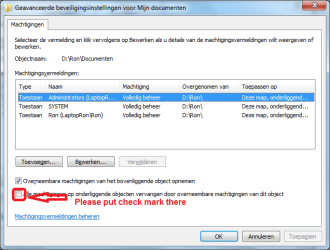
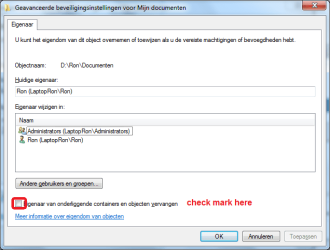
You also could have done move. For explame from old my documents folder to new one.
Then richt click new my documents folder->properties->security->advanced.

There you can click "change permissions". See screenhot
tab owner->change. See screenshot.

Of course you have to press OK. (Sorry... screenshots in Dutch)
 

Attachments

  • Naamloos.png
    Naamloos.png
    19.9 KB · Views: 1
  • Naamloos2.png
    Naamloos2.png
    17.7 KB · Views: 1

My Computer

Computer type
Laptop
Computer Manufacturer/Model Number
ACER ASPIRE 5742G
OS
Microsoft Windows 7 Home Premium 64-bits 7601 Multiprocessor Free Service Pack 1
CPU
Intel(R) Core(TM) i3 CPU M 370 @ 2.40GHz
Motherboard
Acer Aspire 5742G
Memory
4,00 GB
Graphics Card(s)
ATI Mobility Radeon HD 5400 Series
Sound Card
(1) AMD High Definition Audio Device (2) Realtek High Defi
Screen Resolution
1366 x 768 x 32 bits (4294967296 colors) @ 60 Hz
Hard Drives
WDC WD5000BEVT-22ZAT0
I'll keep that for reference. It might have saved me a couple of hours (copying to the same HDD is slow, moving almost instantaneous) but I'm happy everything is working again.
 

My Computer

Computer Manufacturer/Model Number
Packard Bell EasyNote TS
OS
Windows 7 Ultimate x64
CPU
Intel Core i5-2430M
Memory
4GB DDR3
Graphics Card(s)
NVIDIA GeForce GT 540M (2GB VRAM)
Sound Card
on-board
Screen Resolution
1366 x 768
Back
Top