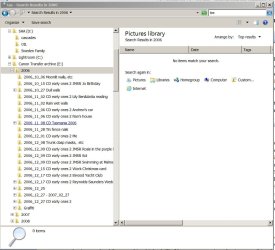
File Search in Windows 7 is Unreliable

What's the file count noted at the top of your index options? If you have folders that are highly active, you should exclude those folders from indexing. Indexing occurs in the background and can be slow to update. In the case of active programs, Superfetch may serve you better.

I don't understand your process of having to search for the same files all the time. If this is the normal course of your activities, perhaps a desktop shortcut to the file(s) would be better.

Indexing Options shows the file count at 12,295. It's not really important why I have to search for files all the time, only that I need to and it doesn't work (I've been a programmer for around 20 years, so I'm not a n00b :geek:).
 

My Computer My Computer

At a glance

Windows 7 Pro x64
OS
Windows 7 Pro x64
Hi there
I've never had any problems with it -- seems to work fine for me.

I must admit I haven't bothered to check the accuracy of the file count -- if I'm looking for file "XXXX" or files containing "YYYY" or "ZZZZ" then I just want those files -- telling me that I've got several billion files on the network isn't of ANY interest to me at all.

Note also that search can exclude hidden files, system files and directories (on a network) that you don't have read access for.

Can the OP post an image of the name of a file on his system from the Windows explorer list and the result of searching for this file where the search was unsuccessful. (Timestamps also needed to verify the search was performed when the file really existed on the system.

Don't forget that after a file update -- especially if the file goes into "a new extent or area" on the disk you will need to do a refresh in Windows explorer.

cheers
jimbo
 

My Computer My Computer

At a glance

Linux CENTOS 7 / various Windows OS'es and se...Intel i7 Intel i58GB, 16GBOn Motherboard
Computer type
PC/Desktop
Computer Manufacturer/Model Number
Custom built, several laptops HP/ASUS
OS
Linux CENTOS 7 / various Windows OS'es and servers
CPU
Intel i7 Intel i5
Memory
8GB, 16GB
Graphics Card(s)
On Motherboard
Sound Card
Realtek HD audio
Monitor(s) Displays
Apple Cinema display, Samsung LCD
Screen Resolution
1920 X 1080
Hard Drives
4 X 1TB SATA
Mouse
Toshiba wireless laser
Internet Speed
> 20MB up
Can the OP post an image of the name of a file on his system from the Windows explorer list and the result of searching for this file where the search was unsuccessful. (Timestamps also needed to verify the search was performed when the file really existed on the system.
Here are screenshots of my example in the original post. First image shows that there are multiple files starting with "glebe". The second image shows the results of a search for *glebe* which returns only one file that exists and one file that doesn't.


My Computer My Computer

At a glance

Windows 7 Pro x64
OS
Windows 7 Pro x64
I agree, Everything is nice and does the job, helps find old files that Windows Search doesn't, and doesn't leave Cluttered search history like Windows Search.
 

My Computer My Computer

At a glance

Windows 7 Ultimate SP1 - 64 BitIntel Core i5 2500k2x4GB DDR3 1333HzAti Radeon 6770
Computer type
PC/Desktop
Computer Manufacturer/Model Number
Novatech iRush Pro
OS
Windows 7 Ultimate SP1 - 64 Bit
CPU
Intel Core i5 2500k
Motherboard
Foxconn H67M-S/H67M-V/H67
Memory
2x4GB DDR3 1333Hz
Graphics Card(s)
Ati Radeon 6770
Sound Card
None
Monitor(s) Displays
Samsung S22B150
Screen Resolution
1920x1080
Hard Drives
2x500GB
PSU
500W
Cooling
Fan
Keyboard
HP KU0316
Mouse
Wireless Logitech M185
Internet Speed
20MB/s
Antivirus
Avast Free
Browser
Google Chrome
Other Info
Logitech M185 Mouse
KU-M316 Keyboard
Can the OP post an image of the name of a file on his system from the Windows explorer list and the result of searching for this file where the search was unsuccessful. (Timestamps also needed to verify the search was performed when the file really existed on the system.
Here are screenshots of my example in the original post. First image shows that there are multiple files starting with "glebe". The second image shows the results of a search for *glebe* which returns only one file that exists and one file that doesn't.

The Glebe entry has a modified date of 1/1/2012. Did you delete that one today or yesterday? What about a search for glebe with no asterisks?
 

My Computer My Computer

At a glance

Windows 7AMD Phenom II X2 (dual-core)4Gintegrated ATI HD 4200
Computer type
PC/Desktop
Computer Manufacturer/Model Number
Custom
OS
Windows 7
CPU
AMD Phenom II X2 (dual-core)
Motherboard
GA-MA785GM-US2H
Memory
4G
Graphics Card(s)
integrated ATI HD 4200
Sound Card
integrated
Monitor(s) Displays
Samsung 24"
Screen Resolution
1920x1080
Hard Drives
1 SSD - Samsung 840 - 500 GB - OS and DATA partitions
1 SSD - Intel 320 - 120 GB (used for backups) - Misc/BACKUP
1 SATA HD - WD, 500 GB - BACKUP
PSU
Ultra X4 500W
Case
Ultra X-blaster
Keyboard
Microsoft Digital Media Pro
Mouse
Logitech WIRED!
Internet Speed
15 Mbps FIOS
The Windows Search defenders, explainers, apologists, tweakers and tuners, teachers, and mavens, continue to discuss and analyze and attempt to understand. Just look at what's gone on in THIS thread, which is just one of many on the same subject all over the Interweb.

The plain and simple truth is that if all you want is a brilliantly simple and super-instantaneously fast file name search engine, you'd be hard pressed to find anything better than Everything.


There's no reason you can't use multiple different tools, for different purposes, depending on your likes and tastes, depending on the task at hand, and depending on whichever tool WORKS BEST (and works best for you). Why not have multiple arrows in your quiver?

In the case of the "file name search" I think it would just be hard to beat Everything and its instantaneous performance, and it just needs to be tried for that to become apparent. So why not just try it, and use it when it's appropriate (for which "file name search" is 99.999% of my own particular everyday "search" needs) , and reserve Windows Search for other more complex or sophisticated uses for which it is definitely more capable and sophisticated?

Everything... for every man, for "file name search". You WILL be a believer, once you try it.

I'm just sayin'.
 

My Computer My Computer

At a glance

Windows 7 Pro x64 (1), Win7 Pro X64 (2)i5-3350p 3.1Ghz/6MB-cache (1); E8400 3.0Ghz/6...8GB PC3-12800 DDR3 (1); 4GB PC3-10600 DDR3 (2)ATI HD7750 (1), (see TV cards); ATI R7 250 (2)
Computer type
PC/Desktop
Computer Manufacturer/Model Number
Home-built, two systems (1) and (2)
OS
Windows 7 Pro x64 (1), Win7 Pro X64 (2)
CPU
i5-3350p 3.1Ghz/6MB-cache (1); E8400 3.0Ghz/6MB-cache (2)
Motherboard
ASUS P8Z77-V Pro (1); ASUS P5Q3 (2)
Memory
8GB PC3-12800 DDR3 (1); 4GB PC3-10600 DDR3 (2)
Graphics Card(s)
ATI HD7750 (1), (see TV cards); ATI R7 250 (2)
Sound Card
Realtek ALC892 HD Audio (1); Realtek ALC1200 HD Audio (2)
Monitor(s) Displays
Eizo HD2441W LCD, Eizo S2433W (1); Eizo 24" S2433W (2)
Screen Resolution
1920x1200, 1920x1200 (1); 1920x1200 (2)
Hard Drives
(1) 1TB SATA-II (7200RPM), 2x2TB SATA-III (7200RPM), 250GB SATA-III (10000RPM) for OS; 2x2TB external USB 3.0

(2) 320GB SATA-II (7200RPM), 750GB SATA-II (7200RPM), 150GB SATA-II (10000RPM) for OS; 2TB external USB 3.0
PSU
Nesteq ECS-6001 600W (1); Nesteq ECS-5001 500W (2)
Case
Acousti-Case 360 (1) and (2)
Cooling
Noctua NH-U12P SE2 for CPU, 2x120mm case fans (1) and (2)
Keyboard
IBM PS/2 (1) and (2)
Mouse
Logitech MX Revolution wireless (1); Microsoft wired (2)
Internet Speed
100mbps down / 10mbps up
Antivirus
Microsoft Security Essentials; Malwarebyte Anti-Malware Pro
Browser
Firefox
Other Info
Ceton InfiniTV 4-tuner cablecard-enabled TV card as well as Hauppauge HVR-2250 OTA/ATSC 2-tuner TV card in (1), running under Win7 WMC
Can the OP post an image of the name of a file on his system from the Windows explorer list and the result of searching for this file where the search was unsuccessful. (Timestamps also needed to verify the search was performed when the file really existed on the system.
Here are screenshots of my example in the original post. First image shows that there are multiple files starting with "glebe". The second image shows the results of a search for *glebe* which returns only one file that exists and one file that doesn't.

The Glebe entry has a modified date of 1/1/2012. Did you delete that one today or yesterday? What about a search for glebe with no asterisks?

Actually two days ago - I'm in Australia so we're nearly a day ahead of the US.

A search for glebe with no asterisks returned exactly the same results.

Out of interest, I reindexed overnight and now the search returns no results at all (it has completed indexing).
 

My Computer My Computer

At a glance

Windows 7 Pro x64
OS
Windows 7 Pro x64
I have been playing with Windows Trace (ETW) and while there are Windows Search trace providers, none of them are something like: events will be logged to show each step through the Search "tree" of files/folders that are indexed based on the user search just passed to us so maybe we could debug this.

I have a post here from a while ago in which I indexed my libraries for the first time (D partition). Nothing showed up in a search and indexing was complete. So, I CREATED a simple .txt file in each location and searched on its naem (unique to the PC) and sure enough it showed up. THEN all future searched returned expected results. Very weird. This all comes down to C/C#/C++ coders vs. assembler programmers re: the reliability of the software (ducks and runs).

I'd be inclined to shut down all Windows Search services, delete the search index itself (if successful, implies you shut down the service that had it), and start from scratch choosing ONLY your single, Chris Docs folder tree or maybe even the House folder tree rather than JUST the brochures folder. Start simple. Index just the House folder and subfolders. Indexing should be fast as long as .pdf are not set to have contents searched.
 

My Computer My Computer

At a glance

Windows 7AMD Phenom II X2 (dual-core)4Gintegrated ATI HD 4200
Computer type
PC/Desktop
Computer Manufacturer/Model Number
Custom
OS
Windows 7
CPU
AMD Phenom II X2 (dual-core)
Motherboard
GA-MA785GM-US2H
Memory
4G
Graphics Card(s)
integrated ATI HD 4200
Sound Card
integrated
Monitor(s) Displays
Samsung 24"
Screen Resolution
1920x1080
Hard Drives
1 SSD - Samsung 840 - 500 GB - OS and DATA partitions
1 SSD - Intel 320 - 120 GB (used for backups) - Misc/BACKUP
1 SATA HD - WD, 500 GB - BACKUP
PSU
Ultra X4 500W
Case
Ultra X-blaster
Keyboard
Microsoft Digital Media Pro
Mouse
Logitech WIRED!
Internet Speed
15 Mbps FIOS
Wow.

I had a subfolder on my D drive nested a few levels under my Libraries folder (indexed).

D \ Libraries \ Documents \ Scripts

I was going to move this Scripts subfolder to the root of my D drive to prevent it from being indexed as I'm dropping these huge trace (.etl) files and their tracerpt output (.csv).

So, I moved the whole Scripts subfolder to D. Realizing that I wanted to move only the trace-related items to D, I moved the folder from D root back to nested under libraries. Here's what happened.

If I search via Start ORB, you can find the dumpfile and dumpfile2 .csv files even though both are gone (I deleted them). The jaltrace2.etl file is gone and does NOT show up in search. They are gone from the Scripts directory now. In fact, dumpfile.csv was deleted early today or yesterday.

Hmm. It gets more interesting. On the search panel, if I click on the actual "link" in the search window for either dumpfile or dumpfile2 a popup tells me the file this shortcut belongs to is gone and the shortcut will no longer work.

A nightmare occurred to me. Let's say I screwed up my Search index by this move. I certainly don't want to have to reindex the whole thing as it took 4 hours to index my emails (2 Gigs worth). I suppose I could UNindex this specific subfolder. Hopefully let indexer do his thing (I would assume that indexer would note the GUI folder index change and act accordingly) without me telling him to REBUILD the index. If that works, then add it back in once indexing is complete.
 

My Computer My Computer

At a glance

Windows 7AMD Phenom II X2 (dual-core)4Gintegrated ATI HD 4200
Computer type
PC/Desktop
Computer Manufacturer/Model Number
Custom
OS
Windows 7
CPU
AMD Phenom II X2 (dual-core)
Motherboard
GA-MA785GM-US2H
Memory
4G
Graphics Card(s)
integrated ATI HD 4200
Sound Card
integrated
Monitor(s) Displays
Samsung 24"
Screen Resolution
1920x1080
Hard Drives
1 SSD - Samsung 840 - 500 GB - OS and DATA partitions
1 SSD - Intel 320 - 120 GB (used for backups) - Misc/BACKUP
1 SATA HD - WD, 500 GB - BACKUP
PSU
Ultra X4 500W
Case
Ultra X-blaster
Keyboard
Microsoft Digital Media Pro
Mouse
Logitech WIRED!
Internet Speed
15 Mbps FIOS
I know you'd rather not use 3rd party tools but if/when you give up on win 7:

1. If you want really fast file name search over your whole hard drive and don't mind a small index or running with admin privileges try Everything:
Everything Search Engine

2. If you just want a plain search without any index jiggery pokery, which runs in basic user privileges mode, Agent Ransack is a good choice:
Agent Ransack - Free File Searching Utility

Good luck.
 

My Computer My Computer

At a glance

7 x64
OS
7 x64
Hi,

I'm here revisiting this old thread because I have a closely related problem.

BTW some of the suggested freeware workarounds sound promising.

My problem is as others have said that Win 7 explorer search is unreliable in 2015. Have any of you experienced it fail to find a folder on an internal drive then succeed to find the same name in a copy on an external drive?

Image 01 shows the failed search for "tas" when a folder does exist that contains "Tasmania".
Image 02 shows the search succeed on a more or less identical bunch of folders saved to a USB drive.

I checked just now that all were indexed though I am not sure about lag times involved in this process.

I will probably follow up on one or other of the freeware solutions mentioned here because apart from being unreliable the Win 7 search is a pain to use even when it works.
 

Attachments

  • Win 7 - search problem 01.JPG
    Win 7 - search problem 01.JPG
    99.4 KB · Views: 1
  • Win 7 - search problem 02.JPG
    Win 7 - search problem 02.JPG
    94.1 KB · Views: 0

My Computer My Computer

At a glance

Microsoft Windows 7 Professional 64-bit 7601 ...Intel(R) Core(TM) i7-4790K CPU @ 4.00GHz16GB Corsair (2x8GB) DDR3 2133MHz Dimm, Unbuf...Leadtek nVidia Quadro K620 PCI Express 3.0 x1...
Computer type
PC/Desktop
Computer Manufacturer/Model Number
AusPC build
OS
Microsoft Windows 7 Professional 64-bit 7601 Multiprocessor Free Service Pack 1
CPU
Intel(R) Core(TM) i7-4790K CPU @ 4.00GHz
Motherboard
ASUSTeK COMPUTER INC. Z97-PRO(Wi-Fi ac)
Memory
16GB Corsair (2x8GB) DDR3 2133MHz Dimm, Unbuffered, 11
Graphics Card(s)
Leadtek nVidia Quadro K620 PCI Express 3.0 x16, 2GB DDR3, 12
Sound Card
(1) Bluetooth Hands-free Audio (2) NVIDIA High Definition
Monitor(s) Displays
Eizo
Screen Resolution
1920 x nnnn
Hard Drives
(1) Samsung SSD 840 EVO 120G SCSI Disk Device
(2) Samsung SSD 840 EVO 120G SCSI Disk Device
(3) ST2000DM 001-1CH164 SCSI Disk Device
(4) LaCie Rugged FW/USB USB Device
(5) WD Elements 10B8 USB Device
(6) WD Elements 10B8 USB Devic
PSU
850W Seasonic S12D Power Supply PSUSEAS12-D850W
Case
Black PC-9F Mid Tower Chassis (USB3)
Keyboard
Dell
Mouse
Mionix Naos 7000 Optical Gaming Mouse, ADNS-3100 Optical Sen
Antivirus
MSE plus Malwarebytes
Browser
Firefox
Back
Top