I have a directory/folder with 30,000 pdf files--have moved and copied the folder around and now the search function no longer works--I can search for a file name and it says it can't find it but I can see it in the folder---Search used to work before I had to move and rename the folder--
How can I fix this issue??
As mentioned, you likely need to add the location to indexing. If you already have, it will take time to index. Here's a good link on configuring search:
http://www.sevenforums.com/tutorials/129437-windows-search-configure-use.html
The folder is almost 15 megabytes with many scanned pdf files
After making sure that the location is added to the index, it will take some time to index so many files (I assume, with 30,000 pdf files, you meant to say 15
Gigabytes).
You can check to see if indexing is complete via Control Panel\Indexing Options, as per screenshot:
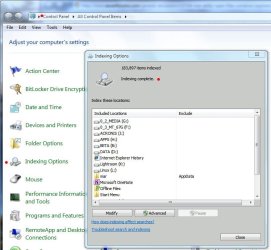
Also, with that many pdf files, it might be beneficial to use Adobe's (or Fox's) pdf filter, which will index the contents of your many pdfs to make your .pdf searches more comprehensive.
How do i index ALL of my files so I can find ALL of them. Thank you.
See the link above. Although MS recommends against adding
all of your partitions to the index, I found that it made my searches much more efficient. I added all of mine and turned off file types that I didn't want indexed (click the 'Advanced' button in Indexing Options). An example of file types I turned off is .tib files from Acronis TI, which don't require indexing. You may have other types you wish to turn off.


