File Sharing and Home Network Issues

hunt5000

New member
Local time
6:57 PM
Messages
10
Ok, I'll try to be as detailed as possible, as I know that it will help in determining the problem; I apologize if
this gets lengthy, though.

I have 4 computers on a home network, all running Windows 7 Ultimate. 3 computers are running the 64-bit version,
one is running the 32-bit version. The 2 desktop computers have Mcafee for the anti-virus and firewall program,
and the 2 laptops have Norton Internet Security 2010. The only PC that cannot connect to the other PCs on the
network is my laptop, which has Windows 7 64-bit and NIS 2010. My brother's laptop, which also have Win7 64-bit
and NIS 2010, was having problems with connecting to the other PCs and being seen on our home network, but I
tweaked some settings on NIS 2010, and now those problems have been resolved. I did the same tweaks on my laptop,
but it did not help. My laptop shows up in the list of PCs on the other computers, but they are unable to connect
to it; likewise, the other PCs show up on my list on my laptop, but I cannot connect to them. When I try to, I get
the message: "Windows cannot access (name of PC)"; when I click on See Details, it gives me "Error code: 0x80070035
The network path was not found." Clicking the Diagnose button does not help; the Windows troubleshooter is unable
to find the problem.

This also ties into a problem with streaming music on our Xbox 360. At first, my brother was unable to stream
music to it, either; after the NIS 2010 tweaks, he is now able to. My laptop does not even show up on the list on
the Xbox 360. I made sure to enable file and printer sharing on my laptop, and all the PCs have the network
they're connected to as being a home network. I feel like I've enabled all the proper settings and things; I even
completely disabled NIS 2010 on my laptop to see if that would help, but it did not. I've also tried leaving the
homegroup, then rejoining, to no avail. I'm not sure why messing with the same settings on my brother's laptop
worked, while it doesn't work for my laptop. Is there some sort of setting I've missed? Is there any other info
that you would need to troubleshoot this? The only other thing is that my laptop is an HP Pavilion, and the rest
of the PCs are Dell computers. That shouldn't affect anything, though, should it?
 

My Computer

OS
Windows 7 64-bit
did you look at the windows firewall settings?
 

My Computer

Computer Manufacturer/Model Number
Custom Build #2
OS
Windows 7 Ultimate 32-Bit
CPU
Intel Core 2 Duo E6300 O.C.'d to 2.80 GHz (For Now >:) )
Motherboard
Gigabyte P43-ES3G
Memory
4x1GB OCZ Dual Channel RAM
Graphics Card(s)
HIS ATI Radeon HD 5770 1GB
Sound Card
Onboard Sound
Monitor(s) Displays
Asus VH-236
Screen Resolution
1920x1080
Hard Drives
WD Caviar-Blue 250 GB SATA
WD Caviar-Green 1.5 TB SATA
PSU
Raidmax RX-630SS
Case
Apevia X-Dreamer
Cooling
Case: Arctic Cooling CPU:Rosewill RCX Z2
I cannot even change the settings in Windows Firewall; it appears to be disabled. When I open it from the Control Panel, it says that "These settings are being managed by vendor application Norton Firewall Provider...most of the links on the side of the window, such as Turn Windows Firewall On or Off, are disabled, so I assume that it's completely turned off.
 

My Computer

OS
Windows 7 64-bit
well, what are your options in Norton Firewall?
 

My Computer

Computer Manufacturer/Model Number
Custom Build #2
OS
Windows 7 Ultimate 32-Bit
CPU
Intel Core 2 Duo E6300 O.C.'d to 2.80 GHz (For Now >:) )
Motherboard
Gigabyte P43-ES3G
Memory
4x1GB OCZ Dual Channel RAM
Graphics Card(s)
HIS ATI Radeon HD 5770 1GB
Sound Card
Onboard Sound
Monitor(s) Displays
Asus VH-236
Screen Resolution
1920x1080
Hard Drives
WD Caviar-Blue 250 GB SATA
WD Caviar-Green 1.5 TB SATA
PSU
Raidmax RX-630SS
Case
Apevia X-Dreamer
Cooling
Case: Arctic Cooling CPU:Rosewill RCX Z2
Ok, here are the things I did on my brother's computer (and also my own): I enabled the Network Security Map, which operates somewhat like the Network Map that you see in Network and Sharing Center, except much more detailed regarding access to the PCs and other devices on the Network; you can set network access for each device, or you can apply it to the whole network and it will set the same level of access for all the devices. The levels of access are: Restricted, Protected, Shared, and Full Trust. On my brother's laptop, I simply needed to set the devices to Shared, and it worked. On my laptop, I have all the devices set to Full Trust, and it still does not work.
Another thing I did was to allow all port access (incoming and outgoing) to the file svchost.exe in the Windows/System32 folder. I did some research online about this problem, and found that on Microsoft's website, it says to do this in order to find a PC behind a firewall on the home network. As stated before, it worked on my brother's laptop, but not on mine.
 

My Computer

OS
Windows 7 64-bit
I cannot even change the settings in Windows Firewall; it appears to be disabled. When I open it from the Control Panel, it says that "These settings are being managed by vendor application Norton Firewall Provider...most of the links on the side of the window, such as Turn Windows Firewall On or Off, are disabled, so I assume that it's completely turned off.

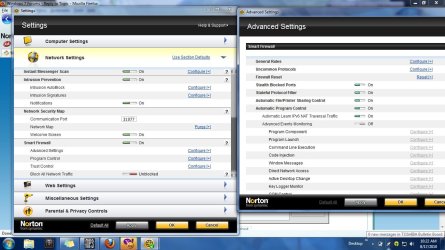
i have norton antivirus too, and yes that's norton disable the firewall,
Untitled.jpg
bt i'm not problems and can connect using LAN..maybe u're miss someting setting on it.
 

My Computer

Computer Manufacturer/Model Number
built up
OS
windows 7
CPU
Phenom II AMD Dragon 3.5Ghz
Memory
DDR3 4GB
Graphics Card(s)
ATI Radeon 512Mb
Monitor(s) Displays
HP L1506
Screen Resolution
1152 x 864
Hard Drives
WDC 1 TB SATA-II Green Power
Keyboard
HP wireless keyboard
Mouse
HP Optic
Internet Speed
1GB
I cannot even change the settings in Windows Firewall; it appears to be disabled. When I open it from the Control Panel, it says that "These settings are being managed by vendor application Norton Firewall Provider...most of the links on the side of the window, such as Turn Windows Firewall On or Off, are disabled, so I assume that it's completely turned off.

i have norton antivirus too, and yes that's norton disable the firewall,
View attachment 91662
bt i'm not problems and can connect using LAN..maybe u're miss someting setting on it.

Yeah, see, I did completely disable Norton, but my PC still is not able to connect to the other PCs on my home network...and what perplexes me is that I did the same things on my brother's laptop (same version of Norton and everything), and it worked...but on my laptop, no go. :(
 

My Computer

OS
Windows 7 64-bit
let me see ur setting on your laptop.
first type ipconfig /all. and post snapshot.
 

My Computer

Computer Manufacturer/Model Number
built up
OS
windows 7
CPU
Phenom II AMD Dragon 3.5Ghz
Memory
DDR3 4GB
Graphics Card(s)
ATI Radeon 512Mb
Monitor(s) Displays
HP L1506
Screen Resolution
1152 x 864
Hard Drives
WDC 1 TB SATA-II Green Power
Keyboard
HP wireless keyboard
Mouse
HP Optic
Internet Speed
1GB
I have the screen captures...but would that be safe to post, since it's a lot of IP and MAC address information? Should I send it to you by PM or something? On the other hand, if it would help anyone else with troubleshooting this, such as josef613, then perhaps I should post it...lol.
 

My Computer

OS
Windows 7 64-bit
if you feel didn't safe you can send private msg to me. or you can block the private information.and attach here. somebody will look and help you too.
 

My Computer

Computer Manufacturer/Model Number
built up
OS
windows 7
CPU
Phenom II AMD Dragon 3.5Ghz
Memory
DDR3 4GB
Graphics Card(s)
ATI Radeon 512Mb
Monitor(s) Displays
HP L1506
Screen Resolution
1152 x 864
Hard Drives
WDC 1 TB SATA-II Green Power
Keyboard
HP wireless keyboard
Mouse
HP Optic
Internet Speed
1GB
Ok, here's the info:
 
Last edited:

My Computer

OS
Windows 7 64-bit
ok..log to the safe mode, and did you available if try using ping from cmd prompt, that's reply or..??
 

My Computer

Computer Manufacturer/Model Number
built up
OS
windows 7
CPU
Phenom II AMD Dragon 3.5Ghz
Memory
DDR3 4GB
Graphics Card(s)
ATI Radeon 512Mb
Monitor(s) Displays
HP L1506
Screen Resolution
1152 x 864
Hard Drives
WDC 1 TB SATA-II Green Power
Keyboard
HP wireless keyboard
Mouse
HP Optic
Internet Speed
1GB
I was able to ping 2 of the 3 other computers in the network in the command prompt: the computer that is hardwired to the router, and my brother's laptop...the other desktop did not respond to the ping, but it was the only one that didn't respond. I couldn't do anything with the homegroup or file sharing in Safe Mode...I did the pinging again in Safe Mode, and still got the same results. So I did the pinging in the command prompt both in regular mode and Safe Mode, with the same results.
 

My Computer

OS
Windows 7 64-bit
ok do some trick on it. go to your protocols NIC and uncheck the Ipv6
 

My Computer

Computer Manufacturer/Model Number
built up
OS
windows 7
CPU
Phenom II AMD Dragon 3.5Ghz
Memory
DDR3 4GB
Graphics Card(s)
ATI Radeon 512Mb
Monitor(s) Displays
HP L1506
Screen Resolution
1152 x 864
Hard Drives
WDC 1 TB SATA-II Green Power
Keyboard
HP wireless keyboard
Mouse
HP Optic
Internet Speed
1GB
I just did it, but it didn't help. I even restarted my computer, but it still didn't help. :(
 

My Computer

OS
Windows 7 64-bit
you're using static ip, trying to disable the norton2010 network firewall after that restart your computer.
 

My Computer

Computer Manufacturer/Model Number
built up
OS
windows 7
CPU
Phenom II AMD Dragon 3.5Ghz
Memory
DDR3 4GB
Graphics Card(s)
ATI Radeon 512Mb
Monitor(s) Displays
HP L1506
Screen Resolution
1152 x 864
Hard Drives
WDC 1 TB SATA-II Green Power
Keyboard
HP wireless keyboard
Mouse
HP Optic
Internet Speed
1GB
I got it working! I set a static IP, and it works now! I didn't even have to disable Norton! Thanks to all who have helped me out on this situation, especially Ryo. :D
 

My Computer

OS
Windows 7 64-bit
I got it working! I set a static IP, and it works now! I didn't even have to disable Norton! Thanks to all who have helped me out on this situation, especially Ryo. :D

you're most welcome.. sorry for my late reply. because a bit busy of work mate.
glad hear it solved. :)
 

My Computer

Computer Manufacturer/Model Number
built up
OS
windows 7
CPU
Phenom II AMD Dragon 3.5Ghz
Memory
DDR3 4GB
Graphics Card(s)
ATI Radeon 512Mb
Monitor(s) Displays
HP L1506
Screen Resolution
1152 x 864
Hard Drives
WDC 1 TB SATA-II Green Power
Keyboard
HP wireless keyboard
Mouse
HP Optic
Internet Speed
1GB
Back
Top