
File Sharing between W7 & XP

Parry

New member
Local time
4:33 AM
Messages
67
Hi,

I am trying to use the network through wireless router between my Desktop (XP Pro SP3) & Laptop (Win 7 Pro). Able to view my shared folders & printers in each of the PC's but am not able to access them. Getting the following error messages respectively;

Desktop (XP Pro SP3) - Network Name 1234
\\ABCD\Documents is not accessible. You might not have the permission to use this network resource. Contact the administrator of this server to find out if you have access permissions.

Access is denied.

Laptop (Win 7 Pro) - Network Name ABCD
Network Error
Windows cannot access \\1234\Documents

You do not have permission to access \\1234\Documents. Contact your network administrator to request access.

Additional Info:
1) Windows Resource Tool Kit is installed on Desktop (XP Pro). And have entered the following commands:
net user guest /active:yes
ntrights +r SeNetworkLogonRight -u Guest
ntrights -r SeDenyNetworkLogonRight -u Guest

2) No 3rd Party Firewall software is being used. Have allowed File and Printer Sharing in Windows Firewall on both PC's.

Pls assist in resolving this issue.
 

My Computer

OS
XP Pro SP3 | Vista Home Premium x86 | Windows 7 Pro x86

My Computer

Computer type
PC/Desktop
Computer Manufacturer/Model Number
Home built
OS
Windows 7 Ult, Windows 8.1 Pro,
CPU
Q9650-4.275GHz, E8600 4.5GHz, E6750-3.8GHz
Motherboard
Evga 780i FTW
Memory
G.Skill PC2 9600 1200Mhz 5 5 5 15 2T
Graphics Card(s)
GTX480
Sound Card
Asus Xonar D2
Monitor(s) Displays
HannsG
Screen Resolution
1680X1050
Hard Drives
GSkill Phoenix Pro 120GB SSD
PSU
ThermalTake Toughpower 1000Watt modular
Case
ThermalTake XaserV
Cooling
Xigmatek S1283
Keyboard
Logitech G15
Mouse
Logitech G9
Internet Speed
T1
Thanks chev65 for your reply. I guess permissions was the key to the problem. :D

But am a bit surprised why the permissions issue came up now. As my laptop (W7 Pro) was previously networked with my desktop (XP SP2) & was in perfect sync with the network. Now I had changed my desktop & installed it with XP SP3.

Am facing the following issues;

1) I am able to rename any shared file/ folder of the XP Desktop on my Laptop. But I am getting an error message renaming any shared file/ folder of the Laptop on Desktop. Neither am able to copy any files to the shared folders to my Laptop on Desktop. :confused:

2) Earlier, I was sharing only the required folders & now I have shared the complete drives on both the systems. But still I get those error messages on some of the folders in the drive. :confused:

3) Security: There are other machines within my network, now is it possible that I give full access to the drives of my desktop & laptop to each other and restricted access to other machines???
 
Last edited:

My Computer

OS
XP Pro SP3 | Vista Home Premium x86 | Windows 7 Pro x86
I'm glad the original sharing problem was fixed by checking the permission settings.

If you need more leverage over those files you can try taking ownership of them. The link below will put a shortcut in your context menu to take ownership of which ever file you need full access permissions for.
http://www.sevenforums.com/tutorials/1911-take-ownership-shortcut.html

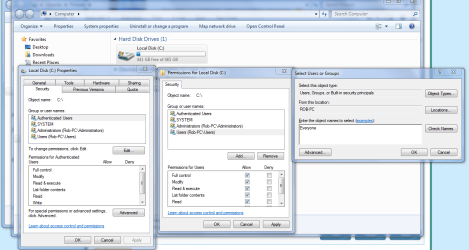
For full drive access, besides setting the usual permission settings you also need to go into the Security tab of the drive to allow for permissions there by adding "Everyone" to the access list. The picture below shows you how. Although it's safer from a security stand point to share the entire User folder rather than the entire drive.

As for giving individual User permissions for access to only certain files, that is a bit more complicated. In order to do that you need to set up a seperate User group on both machines then you can share only certain files with the special user through that User group.
 

Attachments

  • Sharing C drive EVERYONE.PNG
    Sharing C drive EVERYONE.PNG
    67.1 KB · Views: 110
Last edited:

My Computer

Computer type
PC/Desktop
Computer Manufacturer/Model Number
Home built
OS
Windows 7 Ult, Windows 8.1 Pro,
CPU
Q9650-4.275GHz, E8600 4.5GHz, E6750-3.8GHz
Motherboard
Evga 780i FTW
Memory
G.Skill PC2 9600 1200Mhz 5 5 5 15 2T
Graphics Card(s)
GTX480
Sound Card
Asus Xonar D2
Monitor(s) Displays
HannsG
Screen Resolution
1680X1050
Hard Drives
GSkill Phoenix Pro 120GB SSD
PSU
ThermalTake Toughpower 1000Watt modular
Case
ThermalTake XaserV
Cooling
Xigmatek S1283
Keyboard
Logitech G15
Mouse
Logitech G9
Internet Speed
T1
For full drive access, besides setting the usual permission settings you also need to go into the Security tab of the drive to allow for permissions there by adding "Everyone" to the access list.

Was able to access the complete drives by giving Full Control to 'Everyone'. Now is that secure, how can I make it secure?

In order to do that you need to set up a seperate User group on both machines then you can share only certain files with the special user through that User group.

Will we able to access/ add the user on the laptop of the desktop or vice-e-versa?

As was trying to add the same but could'nt. Have single users on both the machines. Guest account on XP is turned 'ON' & on W7 is turned 'OFF'. Changed the name of the user on the desktop to same as on the laptop. On desktop could add only the desktop user & similarly on laptop.

Now after doing so & removing full control from 'Everyone', am able to read/ write on the shared drives on my laptop W7. But when I try to do the same on XP desktop am getting error message of being write protected.
 

My Computer

OS
XP Pro SP3 | Vista Home Premium x86 | Windows 7 Pro x86
For full drive access, besides setting the usual permission settings you also need to go into the Security tab of the drive to allow for permissions there by adding "Everyone" to the access list.

Was able to access the complete drives by giving Full Control to 'Everyone'. Now is that secure, how can I make it secure?

In order to do that you need to set up a seperate User group on both machines then you can share only certain files with the special user through that User group.

Will we able to access/ add the user on the laptop of the desktop or vice-e-versa?

As was trying to add the same but could'nt. Have single users on both the machines. Guest account on XP is turned 'ON' & on W7 is turned 'OFF'. Changed the name of the user on the desktop to same as on the laptop. On desktop could add only the desktop user & similarly on laptop.

Now after doing so & removing full control from 'Everyone', am able to read/ write on the shared drives on my laptop W7. But when I try to do the same on XP desktop am getting error message of being write protected.

I don't have any XP machines to test anything with, so your best bet is to look up sharing permissions settings for XP and go from there. For sharing with just the single XP machine you would need to set up a seperate new User on your Win7 machine and set up shares from there with the XP machine.
 
Last edited:

My Computer

Computer type
PC/Desktop
Computer Manufacturer/Model Number
Home built
OS
Windows 7 Ult, Windows 8.1 Pro,
CPU
Q9650-4.275GHz, E8600 4.5GHz, E6750-3.8GHz
Motherboard
Evga 780i FTW
Memory
G.Skill PC2 9600 1200Mhz 5 5 5 15 2T
Graphics Card(s)
GTX480
Sound Card
Asus Xonar D2
Monitor(s) Displays
HannsG
Screen Resolution
1680X1050
Hard Drives
GSkill Phoenix Pro 120GB SSD
PSU
ThermalTake Toughpower 1000Watt modular
Case
ThermalTake XaserV
Cooling
Xigmatek S1283
Keyboard
Logitech G15
Mouse
Logitech G9
Internet Speed
T1
How can I enable Password Protected Sharing specially on XP?
 

My Computer

OS
XP Pro SP3 | Vista Home Premium x86 | Windows 7 Pro x86
My Computer

Computer type
PC/Desktop
Computer Manufacturer/Model Number
Bruce ... somewhere in his 40's
OS
Windows 7 Ultimate 32bit SP1
CPU
Intel(R) Core(TM)2 Quad CPU @ 2.40GHz, 2400 MHz
Motherboard
INTEL/D975XBX2
Memory
4 GB
Graphics Card(s)
ATI Radeon HD 2600 Pro
Monitor(s) Displays
Samsung SyncMaster 914v
Screen Resolution
1280 x 1024
Hard Drives
2/500GB each ... ST3500630AS ATA Device.
One is not connected
PSU
Rocketfish 700 W
Case
G.Skill Gigabyte Chassis
Keyboard
Standard PS/2 Keyboard
Mouse
Microsoft PS/2 Mouse
Internet Speed
DSL
Antivirus
Avira Internet Security
Browser
IE 11
Other Info
ATI HDMI Audio
there is another way you can share files between systems using dc++
all you need to do is download dc++ and ynhub
install dc++ to all the systems you want to share the data on - you can even share data between windows and linux - and then install ynhub on any one the the systems you want to use as a host. then run command prompt and type ipconfig and hit enter
there look for the ip address of the network adapter you want to use and in ynhub type that ip address in the host ip collum
then in dc under file go to quick connect and type the same ip
in preferences under sharing add the folders you want to share on each system and your sharing is set up.
 

My Computer

Computer Manufacturer/Model Number
`
OS
Windows 7 Professional 64-bit
CPU
AMD Phenom II X6 1050T
Motherboard
M4A87TD-m EVO\USB3
Memory
GSkill Trident 1600 MHz 4 GB Kit
Graphics Card(s)
MSi N580GTX Lightning Edition
Sound Card
On board
Monitor(s) Displays
dell ST2210 22" Full HD
Screen Resolution
1920x1080
Hard Drives
WD Caviar Green 1TB @ 3 GBps
WD Black Caviar 1TB @ 6 GBps
PSU
Cooler Master GX750
Case
CoolerMaster HAF922
Cooling
Stock
Keyboard
Logitech Classic Keyboard
Mouse
Logitech MX518
Internet Speed
BSNL unlimited @ 512 kbps
Thanks agent47er for the info. I guess this is sharing over the net, will have a look.

Is there any way I can add specific user on other machines to have access to my shared stuff rather than 'Everyone'?
 

My Computer

OS
XP Pro SP3 | Vista Home Premium x86 | Windows 7 Pro x86
Back
Top