File Sharing between Windows 7 and XP

trevordsmith

New member
Local time
12:50 PM
Messages
3
Hi,

I am trying to share files between and old home PC running XP, to a new PC running Windows 7. Both PC's are connected directly to a router via LAN cables. I am looking to transfer all the old files and documents to the new Windows 7 PC.

The Windows 7 PC currently shares files with other laptops (running Windows 7). I believe that I have setup up both PC for file sharing, but I am unable to see the other PC on either machine.

On the PC with XP, I can see under 'M Network Places', the folder and file structure that would like to share.

I have tested that the Internet connection via the router works on the XP (ensuring that all other connections are disconnected), and this works fine.

Can anyone provide some assistance as to how I can get these 2 machines talking?
 

My Computer My Computer

OS
Windows 7

My Computer My Computer

Computer Manufacturer/Model Number
HP Pavilion Elite 495UK
OS
Windows 7 Ultimate SP1 64-Bit
CPU
Intel Core i7 870 @ 2.93GHz
Motherboard
MSI 2A9C (CPU1)
Memory
8Gb Dual-Channel DDR3 @ 664MHz
Graphics Card(s)
nVidia GeForce GTX 460 1024MB dedicated RAM
Sound Card
Realtek HD Audio
Monitor(s) Displays
HP2310i
Screen Resolution
1920 x 1080
Hard Drives
1x1954GB Hitachi HDS22020ALA 330 (RAID), 1x1954GB Hitachi External for backup and storage
PSU
460W
Case
HP Elite
Cooling
Air cooled
Keyboard
Logitech K750 solar-powered keyboard
Mouse
Logitech Wireless M180 mouse
Internet Speed
2Mb
Other Info
Pure Avanti Flow Internet Radio with iPod Dock, 64Gb iPod, HP USB Speakers, Sony MDR-V500 Headphones, Sony Vaio F-Series Laptop

My Computer My Computer

OS
Windows 7

My Computer My Computer

Computer Manufacturer/Model Number
HP Pavilion Elite 495UK
OS
Windows 7 Ultimate SP1 64-Bit
CPU
Intel Core i7 870 @ 2.93GHz
Motherboard
MSI 2A9C (CPU1)
Memory
8Gb Dual-Channel DDR3 @ 664MHz
Graphics Card(s)
nVidia GeForce GTX 460 1024MB dedicated RAM
Sound Card
Realtek HD Audio
Monitor(s) Displays
HP2310i
Screen Resolution
1920 x 1080
Hard Drives
1x1954GB Hitachi HDS22020ALA 330 (RAID), 1x1954GB Hitachi External for backup and storage
PSU
460W
Case
HP Elite
Cooling
Air cooled
Keyboard
Logitech K750 solar-powered keyboard
Mouse
Logitech Wireless M180 mouse
Internet Speed
2Mb
Other Info
Pure Avanti Flow Internet Radio with iPod Dock, 64Gb iPod, HP USB Speakers, Sony MDR-V500 Headphones, Sony Vaio F-Series Laptop
What versions of XP and 7 are you running?
 

My Computer My Computer

Computer Manufacturer/Model Number
Toshiba Satellite L500
OS
Windows 7 Home Premium x64 OEM --> RTM clean install
CPU
Intel T4400
Motherboard
? - laptop inbuilt ?
Memory
4Gb
Graphics Card(s)
? - Mobile Intel(R) 4 Series Express Chipset Family ?
Sound Card
Realtek
Monitor(s) Displays
? + extended to a 42" LG55PC plasma tele!
Screen Resolution
1366 * 768
Hard Drives
320Gb 5500rpm
PSU
?
Case
?
Cooling
?
Internet Speed
3Meg, when it works.
Other Info
A LOWLY LAPTOP!
Last edited:

My Computer My Computer

Computer Manufacturer/Model Number
HP Pavilion Elite 495UK
OS
Windows 7 Ultimate SP1 64-Bit
CPU
Intel Core i7 870 @ 2.93GHz
Motherboard
MSI 2A9C (CPU1)
Memory
8Gb Dual-Channel DDR3 @ 664MHz
Graphics Card(s)
nVidia GeForce GTX 460 1024MB dedicated RAM
Sound Card
Realtek HD Audio
Monitor(s) Displays
HP2310i
Screen Resolution
1920 x 1080
Hard Drives
1x1954GB Hitachi HDS22020ALA 330 (RAID), 1x1954GB Hitachi External for backup and storage
PSU
460W
Case
HP Elite
Cooling
Air cooled
Keyboard
Logitech K750 solar-powered keyboard
Mouse
Logitech Wireless M180 mouse
Internet Speed
2Mb
Other Info
Pure Avanti Flow Internet Radio with iPod Dock, 64Gb iPod, HP USB Speakers, Sony MDR-V500 Headphones, Sony Vaio F-Series Laptop
Are you using a Homegroup or a Workgroup?

As you are trying to share files between Windows XP and Windows 7 you should be using a Workgroup.
This is really the key... that the all machines on the network should be in the same "workgroup" when you want to share drives, folders and files among all of them.

So, in WinXP and Win7 the workgroup definition is just a bit different cosmetically, but the result is the same. You will define the name of each computer uniquely but they will both be part of the same "workgroup".

For example, I have two machines on my home network, one called MDR and the other called DFW. The "workgroup" that they both live in is named "MDRLAN".

(1) The WinXP definition for the computer and workgroup is as follows (obtained by right-click on My Computer, select Properties, select "Computer Name" tab):

xpshare1.jpg


Push the "change" button to set both (a) the computer name, and (b) the workgroup name. You want the computer name to be unique from your other LAN machines, but the workgroup name should be identical for all LAN machines.

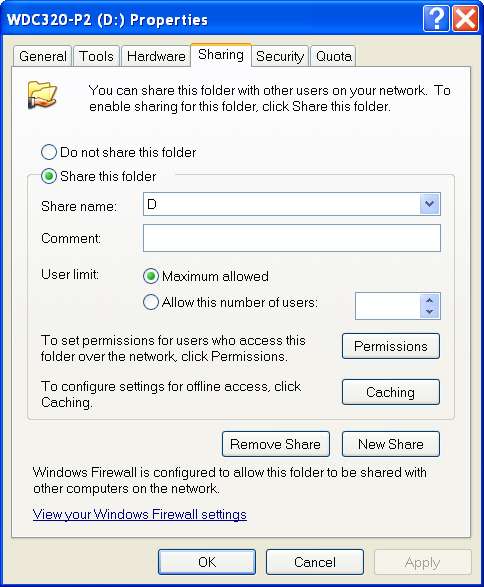
(2) Now go into Explorer on the XP machine and select the partition (i.e. drive letter) you want to make fully available to other machines on the network. Then right-click on the selected partition and then select "sharing and security" from the context menu (to get the "Properties" dialog):

xpshare2.jpg


(3) On the "Properties" dialog for the drive letter, check the "share this folder" radio button. Enter the drive letter as the "share name".

xpshare3.jpg


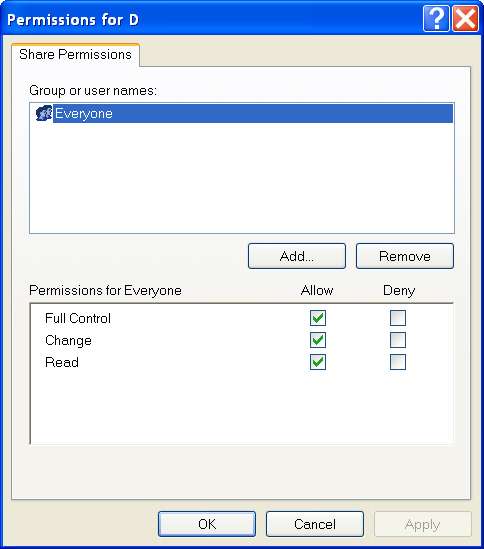
(4) On the "Properties" dialog for the drive letter, push the "Permissions" button (to get the "Share permissions for X" dialog):

xpshare4.jpg


To provide maximum access to ALL folders on this drive letter which you're now setting up the "share" for, you want to specify "FULL CONTROL" in the lower pane defining permissions.

In the upper pane, for maximum convenience and simplicity you should specify "EVERYONE"... assuming this works for you and you're really just trying to set up things so that you can get to any drive letter on any machine from any other machine, with no confusion or additional security requirements. In other words, it's your LAN, and your multiple machines, and you just want to be able to sit down at any machine under any Windows and get to any other machine's drives with no headache.

That's what "EVERYONE" is for, and that's exactly why you're putting all of your machines into the same workgroup and sharing all drives on all machines with "full control".

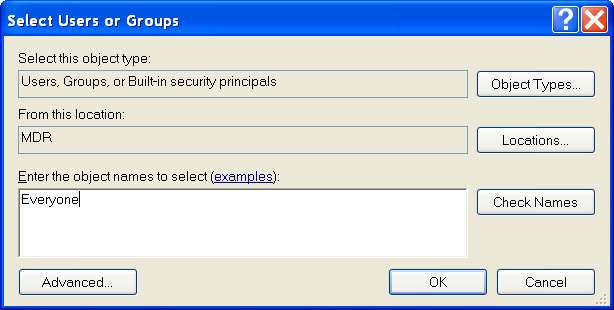
(5) If you don't see an "EVERYONE" you can add a definition for "EVERYONE" by pushing the ADD button. Type "EVERYONE" in the definition area and push the OK button.

xpshare5.jpg


Then when you come back to the permissions dialog, select EVERYONE and check the "FULL CONTROL" items.


OK your way back up the chain, and you've now just granted (a) full control to (b) EVERYONE on your workgroup, to have complete access of anything on this drive letter.

Rinse, repeat until done with all your drive letters.


Same story on the Win7 machine.
 

My Computer My Computer

Computer type
PC/Desktop
Computer Manufacturer/Model Number
Home-built, two systems (1) and (2)
OS
Windows 7 Pro x64 (1), Win7 Pro X64 (2)
CPU
i5-3350p 3.1Ghz/6MB-cache (1); E8400 3.0Ghz/6MB-cache (2)
Motherboard
ASUS P8Z77-V Pro (1); ASUS P5Q3 (2)
Memory
8GB PC3-12800 DDR3 (1); 4GB PC3-10600 DDR3 (2)
Graphics Card(s)
ATI HD7750 (1), (see TV cards); ATI R7 250 (2)
Sound Card
Realtek ALC892 HD Audio (1); Realtek ALC1200 HD Audio (2)
Monitor(s) Displays
Eizo HD2441W LCD, Eizo S2433W (1); Eizo 24" S2433W (2)
Screen Resolution
1920x1200, 1920x1200 (1); 1920x1200 (2)
Hard Drives
(1) 1TB SATA-II (7200RPM), 2x2TB SATA-III (7200RPM), 250GB SATA-III (10000RPM) for OS; 2x2TB external USB 3.0

(2) 320GB SATA-II (7200RPM), 750GB SATA-II (7200RPM), 150GB SATA-II (10000RPM) for OS; 2TB external USB 3.0
PSU
Nesteq ECS-6001 600W (1); Nesteq ECS-5001 500W (2)
Case
Acousti-Case 360 (1) and (2)
Cooling
Noctua NH-U12P SE2 for CPU, 2x120mm case fans (1) and (2)
Keyboard
IBM PS/2 (1) and (2)
Mouse
Logitech MX Revolution wireless (1); Microsoft wired (2)
Internet Speed
100mbps down / 10mbps up
Antivirus
Microsoft Security Essentials; Malwarebyte Anti-Malware Pro
Browser
Firefox
Other Info
Ceton InfiniTV 4-tuner cablecard-enabled TV card as well as Hauppauge HVR-2250 OTA/ATSC 2-tuner TV card in (1), running under Win7 WMC
Back
Top