File Sharing (Total Access)

djayloca

New member
Member
Local time
3:34 PM
Messages
33
Location
Sri Lanka
Guys,
I have a Desktop PC and a laptop. The Desktop PC is running windows ultimate and the laptop is running windows 7 professional. i use a router to connect both computers to the internet . I want to know how to create a connection to view files of that computer easily including drives if possible. since im new to networking i would very much appreciate if u could guide me through the process. THANKS IN ADVANCE... :geek:
 

My Computer

Computer Manufacturer/Model Number
Intel
OS
Windows 7 Ultimate 64 bit
CPU
core i5 2400 3.1Ghz
Memory
8.00 Gb
Graphics Card(s)
EVGA GTX 550 TI
Monitor(s) Displays
Samsung SyncMaster SA100 19" LED
Screen Resolution
1366*768
Hard Drives
1Tb Sata
Case
Normal Casing
Keyboard
HP
Mouse
HP
Internet Speed
3Mbps
Why not use Remote Desktop Connection instead?

I very much dislike the idea of sharing the whole PC, so I use remote connection for that. This solution might not be good for you but anyway, you could try this.

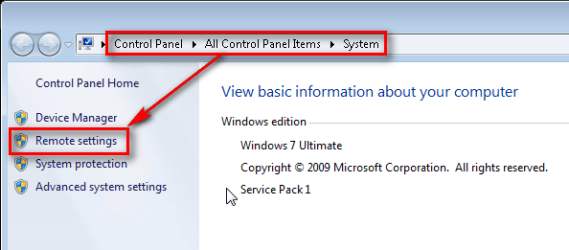
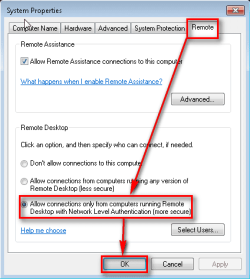
First allow remote connections to both computers. As Windows 7 uses Network Level Authentication select it, it is safer connection:

1.png

2.png

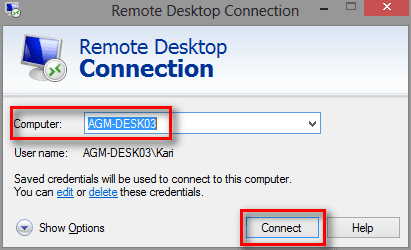
Type Remote to Start Menu > Search on the PC you will use to connect to another PC, select Remote Desktop Connection from the list.

Type the name of the computer you are connecting to, click Connect:

3.png

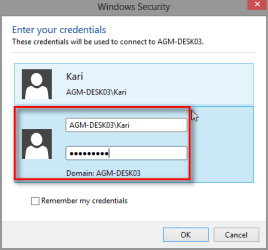
Enter your logon credentials. You must give the username as ComputerName\Username, for instance if the PC you are connecting to is PC2 and your username on that PC is Djayloca, you need to give your username here as PC2\Djayloca:

5.png

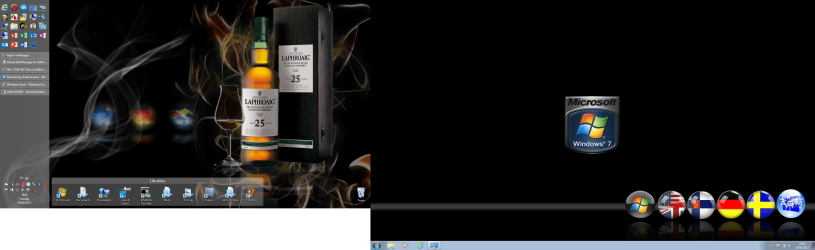
That's it. Remote connection is established and you can copy & paste or drag & drop from one PC to another, share as you wish. To get screenshots for this post I connected from my Windows 8 laptop (laptop's display on the left) to a Windows 7 desktop (remote connection full screen on my laptop's external display):

4.png

You do not need a dual display system but it makes remote computing much easier.

I am practically using two computers with one mouse and keyboard, dragging and dropping files as I see fit. Couldn't be easier!

Kari
 

My Computer

Computer type
Laptop
Computer Manufacturer/Model Number
HP ENVY 17-1150eg
OS
Windows 10 Pro x64 EN-GB
CPU
1.6 GHz Intel Core i7-720QM Processor
Memory
6 GB
Graphics Card(s)
ATI Mobility Radeon HD 5850 Graphics
Sound Card
Beats sound system with integrated subwoofer
Monitor(s) Displays
17" laptop display, 22" LED and 32" Full HD TV through HDMI
Screen Resolution
1600*900 (1), 1920*1080 (2&3)
Hard Drives
Internal: 2 x 500 GB SATA Hard Disk Drive 7200 rpm
External: 2TB for backups, 3TB USB3 network drive for media
Cooling
As Envy runs a bit warm, I have it on a Cooler Master pad
Keyboard
Logitech diNovo Media Desktop Laser (bluetooth)
Mouse
Logitech Performance Mouse MX
Internet Speed
50/10 Mbps VDSL
Antivirus
Windows Defender 4.3.9431.0
Browser
Maxthon 3.5.2., IE11
Guys,
I have a Desktop PC and a laptop. The Desktop PC is running windows ultimate and the laptop is running windows 7 professional. i use a router to connect both computers to the internet . I want to know how to create a connection to view files of that computer easily including drives if possible. since im new to networking i would very much appreciate if u could guide me through the process. THANKS IN ADVANCE... :geek:

In case you were referring to accessing the folders and drives on both machines, it's much safer to allow for access through the C:>Users folder rather than sharing the entire C: drive.

The link below shows you how to drive share. If you set up a Homegroup between these machines you can do most this type of sharing from inside the Homegroup, including allowing for drive access through a Library which is much safer than sharing it with Everyone.


http://www.sevenforums.com/network-sharing/92521-hdd-sharing.html#post798310
 

My Computer

Computer type
PC/Desktop
Computer Manufacturer/Model Number
Home built
OS
Windows 7 Ult, Windows 8.1 Pro,
CPU
Q9650-4.275GHz, E8600 4.5GHz, E6750-3.8GHz
Motherboard
Evga 780i FTW
Memory
G.Skill PC2 9600 1200Mhz 5 5 5 15 2T
Graphics Card(s)
GTX480
Sound Card
Asus Xonar D2
Monitor(s) Displays
HannsG
Screen Resolution
1680X1050
Hard Drives
GSkill Phoenix Pro 120GB SSD
PSU
ThermalTake Toughpower 1000Watt modular
Case
ThermalTake XaserV
Cooling
Xigmatek S1283
Keyboard
Logitech G15
Mouse
Logitech G9
Internet Speed
T1
Back
Top