File system annoyance

Firestrider

New member
Power User
VIP
Local time
9:22 PM
Messages
333
One annoyance I have is there is a desktop configuration settings file in every single folder in my OS, does anyone know why this is?

Also does anyone know how to view every folder in the OS to be "tiles"?
 

My Computer

Computer Manufacturer/Model Number
Intel WBIBX10J
OS
Linux (Debian, Android)
CPU
Intel Core i7 860
Motherboard
Intel DP55WB
Memory
2x 2GB Kingston DDR3-1333
Graphics Card(s)
AMD Radeon HD 5750
Sound Card
Realtek ALC888
Monitor(s) Displays
2x Dell Inc. E248WFP
Screen Resolution
3840x1200
Hard Drives
Intel X25-V
Samsung HD103SJ
PSU
Corsair CX400
Case
Silverstone GD05
Cooling
Stock
Keyboard
Dell Inc. Bluetooth Wireless
Internet Speed
30 Mbps
Hello Firestrider,

The desktop.ini file seems to be a bug in this build. You can just check the Hide box in that files properties page to hide them as you come across them.


After you set that folder to "Tiles" view, open Folder Options from within that folder and click on the View tab and Apply to Folders for all folders using that folder template (ex: Music, Pictures, General Items, etc...).

Hope this helps,
Shawn
 

My Computer

Computer type
PC/Desktop
Computer Manufacturer/Model Number
Self built custom
OS
64-bit Windows 11 Pro for Workstations
CPU
Intel i7-8700K OC'd to 5 GHz
Motherboard
ASUS ROG Maximus XI Formula Z390
Memory
64 GB (4x16GB) G.SKILL TridentZ RGB DDR4 3600 MHz
Graphics Card(s)
ASUS ROG-STRIX-GTX1080TI-O11G-GAMING
Sound Card
Integrated
Monitor(s) Displays
2 x Samsung Odyssey G7 27"
Screen Resolution
2560x1440
Hard Drives
1TB Samsung 990 PRO M.2,
4TB Samsung 990 PRO PRO M.2,
TerraMaster F8 SSD Plus NAS
PSU
Seasonic Prime Titanium 850W
Case
Thermaltake Core P3
Cooling
Corsair Hydro H115i
Keyboard
Logitech wireless K800
Mouse
Logitech MX Master 4
Internet Speed
2 Gb/s Download and 100 Mb/s Upload
Antivirus
Malwarebyte Anti-Malware Premium
Browser
Google Chrome
Other Info
Logitech Z625 speaker system,
Logitech BRIO 4K Pro webcam,
HP Color LaserJet Pro MFP M477fdn,
APC SMART-UPS RT 1000 XL - SURT1000XLI,
Galaxy S23 Plus phone

Attachments

  • partition.JPG
    partition.JPG
    21.3 KB · Views: 15

My Computer

Computer Manufacturer/Model Number
Intel WBIBX10J
OS
Linux (Debian, Android)
CPU
Intel Core i7 860
Motherboard
Intel DP55WB
Memory
2x 2GB Kingston DDR3-1333
Graphics Card(s)
AMD Radeon HD 5750
Sound Card
Realtek ALC888
Monitor(s) Displays
2x Dell Inc. E248WFP
Screen Resolution
3840x1200
Hard Drives
Intel X25-V
Samsung HD103SJ
PSU
Corsair CX400
Case
Silverstone GD05
Cooling
Stock
Keyboard
Dell Inc. Bluetooth Wireless
Internet Speed
30 Mbps
LOL, I'm happy to hear that you got the desktop.ini file sorted. :)

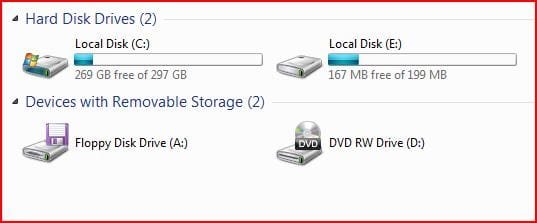
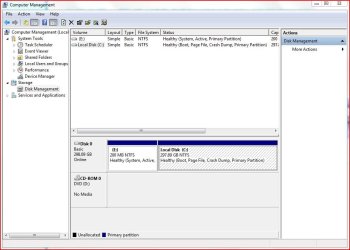
It should not be the same partition since the 7057 build now only creates a 100 MB hidden system partition instead. What do you have showing in Disk Management?
 

My Computer

Computer type
PC/Desktop
Computer Manufacturer/Model Number
Self built custom
OS
64-bit Windows 11 Pro for Workstations
CPU
Intel i7-8700K OC'd to 5 GHz
Motherboard
ASUS ROG Maximus XI Formula Z390
Memory
64 GB (4x16GB) G.SKILL TridentZ RGB DDR4 3600 MHz
Graphics Card(s)
ASUS ROG-STRIX-GTX1080TI-O11G-GAMING
Sound Card
Integrated
Monitor(s) Displays
2 x Samsung Odyssey G7 27"
Screen Resolution
2560x1440
Hard Drives
1TB Samsung 990 PRO M.2,
4TB Samsung 990 PRO PRO M.2,
TerraMaster F8 SSD Plus NAS
PSU
Seasonic Prime Titanium 850W
Case
Thermaltake Core P3
Cooling
Corsair Hydro H115i
Keyboard
Logitech wireless K800
Mouse
Logitech MX Master 4
Internet Speed
2 Gb/s Download and 100 Mb/s Upload
Antivirus
Malwarebyte Anti-Malware Premium
Browser
Google Chrome
Other Info
Logitech Z625 speaker system,
Logitech BRIO 4K Pro webcam,
HP Color LaserJet Pro MFP M477fdn,
APC SMART-UPS RT 1000 XL - SURT1000XLI,
Galaxy S23 Plus phone
This is what I have showing in disk management:

diskmanage.JPG
 

My Computer

Computer Manufacturer/Model Number
Intel WBIBX10J
OS
Linux (Debian, Android)
CPU
Intel Core i7 860
Motherboard
Intel DP55WB
Memory
2x 2GB Kingston DDR3-1333
Graphics Card(s)
AMD Radeon HD 5750
Sound Card
Realtek ALC888
Monitor(s) Displays
2x Dell Inc. E248WFP
Screen Resolution
3840x1200
Hard Drives
Intel X25-V
Samsung HD103SJ
PSU
Corsair CX400
Case
Silverstone GD05
Cooling
Stock
Keyboard
Dell Inc. Bluetooth Wireless
Internet Speed
30 Mbps
'Nope
this is OK
W7 reserves some system space.

You can actually get rid of it -- but if you do you *might* need to do the following or your system will become unbootable.

I prefer having the OS contained COMPLETELY in a single partition so I can make a decent "bare metal" bootable recovery system.

1) go into contol panel ==> administrative tools ==> computer management==disk management.

2) delete the partition

3) expand (either now or after a boot) your 'C' partition to reclaim the space.

If on boot your system fails with a message like bootmgr missing just boot your Windows 7 install DVD and repair system. It should install the boot manager on your "C" partition

job done.


To make 100% certainty that the system doesn't create another partition download the GPARTED cd and ensure your "C" partition starts at track 0.

GParted -- Download

Cheers
jimbo
 

My Computer

Computer type
PC/Desktop
Computer Manufacturer/Model Number
Custom built, several laptops HP/ASUS
OS
Linux CENTOS 7 / various Windows OS'es and servers
CPU
Intel i7 Intel i5
Memory
8GB, 16GB
Graphics Card(s)
On Motherboard
Sound Card
Realtek HD audio
Monitor(s) Displays
Apple Cinema display, Samsung LCD
Screen Resolution
1920 X 1080
Hard Drives
4 X 1TB SATA
Mouse
Toshiba wireless laser
Internet Speed
> 20MB up
This is what I have showing in disk management:

View attachment 5846

Firestrider,

In Disk Management, you can just right click on the E: drive and click on Change Drive Letter and Paths, Remove, Yes, and Yes to remove the drive letter and have the partition hidden again. :)
 

My Computer

Computer type
PC/Desktop
Computer Manufacturer/Model Number
Self built custom
OS
64-bit Windows 11 Pro for Workstations
CPU
Intel i7-8700K OC'd to 5 GHz
Motherboard
ASUS ROG Maximus XI Formula Z390
Memory
64 GB (4x16GB) G.SKILL TridentZ RGB DDR4 3600 MHz
Graphics Card(s)
ASUS ROG-STRIX-GTX1080TI-O11G-GAMING
Sound Card
Integrated
Monitor(s) Displays
2 x Samsung Odyssey G7 27"
Screen Resolution
2560x1440
Hard Drives
1TB Samsung 990 PRO M.2,
4TB Samsung 990 PRO PRO M.2,
TerraMaster F8 SSD Plus NAS
PSU
Seasonic Prime Titanium 850W
Case
Thermaltake Core P3
Cooling
Corsair Hydro H115i
Keyboard
Logitech wireless K800
Mouse
Logitech MX Master 4
Internet Speed
2 Gb/s Download and 100 Mb/s Upload
Antivirus
Malwarebyte Anti-Malware Premium
Browser
Google Chrome
Other Info
Logitech Z625 speaker system,
Logitech BRIO 4K Pro webcam,
HP Color LaserJet Pro MFP M477fdn,
APC SMART-UPS RT 1000 XL - SURT1000XLI,
Galaxy S23 Plus phone
Back
Top