JavaScript is disabled. For a better experience, please enable JavaScript in your browser before proceeding.
You are using an out of date browser. It may not display this or other websites correctly.
You should upgrade or use an
alternative browser .
File that has all programs background in it
Does anyone know what file has "all programs" in it?
I would like to add a photo in it!
Windows 7 Ultimate Turion 64 Bit 2 GIG Gateway Windows 7 Ultimate Turion 64 Bit 2 GIG
Administrator
Staff member
Hello RBCC,
What are you referring to? Do you mean changing the background in the Start Menu -> All Programs area?
Please let us know.
Last edited: Jan 10, 2011
64-bit Windows 11 Pro for Workstations Intel i7-8700K OC'd to 5 GHz 64 GB (4x16GB) G.SKILL TridentZ RGB DDR4 3600... ASUS ROG-STRIX-GTX1080TI-O11G-GAMING PC/Desktop Self built custom 64-bit Windows 11 Pro for Workstations Intel i7-8700K OC'd to 5 GHz ASUS ROG Maximus XI Formula Z390 64 GB (4x16GB) G.SKILL TridentZ RGB DDR4 3600 MHz ASUS ROG-STRIX-GTX1080TI-O11G-GAMING Integrated 2 x Samsung Odyssey G7 27" 2560x1440 1TB Samsung 990 PRO M.2, Seasonic Prime Titanium 850W Thermaltake Core P3 Corsair Hydro H115i Logitech wireless K800 Logitech MX Master 4 2 Gb/s Download and 100 Mb/s Upload Malwarebyte Anti-Malware Premium Google Chrome Logitech Z625 speaker system,
New member
Guru
Gold Member
Last edited by a moderator: Jan 9, 2011
Several, including Windows 7 x64 Ultimate
Several, including Windows 7 x64 Ultimate
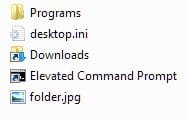
The easiest way is to use the old "Folder.jpg" trick. Copy a .jpg pic to the folder, rename it to "Folder.jpg" (it keeps it at the forefront) and you have the folder pic:
I don't know for sure if this is what the OP is seeking to do but I just thought I'd toss it out, in case.
Windows 7 Ultimate x64 SP1 Core2 Duo 4 GB GM965 on-board Toshiba L355D Windows 7 Ultimate x64 SP1 Core2 Duo Intel 4 GB GM965 on-board RealTek on-board 19"+17"(laptop) 1440x900 (x 2) 500GB Ext. 200GB Internal N/A N/A N/A
New member
Member
VIP
Thread Starter
What I was going for was...
What I was going for was how to add picture to the background of the all programs part of the start menu.
Windows 7 Ultimate Turion 64 Bit 2 GIG Gateway Windows 7 Ultimate Turion 64 Bit 2 GIG
My guess is you would have to use a third party skinning program to do that. You might check in the customization forum that resides right here in sevenforums for more information.
Windows 10 Home Intel Core i5 3550 Corsair Vengeance DDR3 16GB Nvidia GEForce GTX 970 SSC PC/Desktop Self build Windows 10 Home Intel Core i5 3550 ASUS P8Z77-V LX (LGA1155) Corsair Vengeance DDR3 16GB Nvidia GEForce GTX 970 SSC Hanns-G 23.6", Acer 17" 1920x1080, 1440x900 Sandisk SSD 256 GB Antec 650w Cooler Master Centurion 534 COOLER MASTER GeminII S524, 3 120 mm case fans. Logitech MK300 Logitech MK300 Cable MSSE, Malwarebytes IE 10, Chrome
Add a picture to the start menu? What is the goal you are trying to accomplish here, e.g. how does this help you?
XP / Win7 x64 Pro Intel Quad-Core Q9450 @ 3.2GHz 2x2GB GSkill DDR2 NVIDIA GeForce 8600 GTS (EVGA) XP / Win7 x64 Pro Intel Quad-Core Q9450 @ 3.2GHz Asus P5-E 2x2GB GSkill DDR2 NVIDIA GeForce 8600 GTS (EVGA) Dell 2408WFP 1920x1200
New member
Member
VIP
Thread Starter
Do you mean changing the background in the Start Menu -> All Programs area? yes thats what I meant. By Virtual Folder what do you mean? Where are the virtual folders? John
Windows 7 Ultimate Turion 64 Bit 2 GIG Gateway Windows 7 Ultimate Turion 64 Bit 2 GIG
R.I.P.
Guru
Gold Member
VIP
Instaed of plain white you want a background there, wouldn`t that make it a little hard to read ?
Windows 10 Pro x64 Intel Core i7 6700K GSkill TridentZ RGB 16GB 3600 16-16-16-36 EVGA GTX 980 Ti SC x2 PC/Desktop Skylake Special #666 Windows 10 Pro x64 Intel Core i7 6700K Asus Sabertooth Z170 Mark 1 GSkill TridentZ RGB 16GB 3600 16-16-16-36 EVGA GTX 980 Ti SC x2 Realtek High Definition AOC G2460PG 1920 x 1080 144Hz Samsung 860 Pro 256GB, Seagate Barracuda 4TB x2 EVGA 1000 P2, EVGA White Custom Braided Cables Corsair Vengeance C70 Gunmetal Black Corsair H100i v2, Corsair ML120 x2, Thermal Grizzly Kryonaut Logitech G910 Orion Spectrum Logitech G700s Verizon Fios Quantum Gateway 75/75 Windows Defender, Malwarebytes Free 3.8.3 Chrome Corsair SP120 x4, LG Blu-ray Drive, Durabrand HT-395 100 Watt Dolby Digital Amp, Corsair H2100 Wireless 7.1 Headset