file too long ????

Status
Not open for further replies.

pacinitaly

HappyGuru Lovin 2Help
Guru
VIP
Local time
10:41 AM
Messages
1,093
Location
the worst state in america
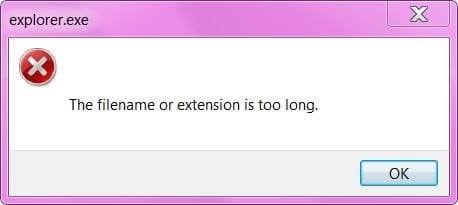
I'm getting this error for months now. It's due to the filename/location is too deep in the file structure. how can I extend the value to beyond 255 characters?
I can't copy/move/delete/play/take owenership of these freakin files.


thanks my friends as always:)
 

Attachments

  • Capture.JPG
    Capture.JPG
    16.3 KB · Views: 7

My Computer

Computer Manufacturer/Model Number
Gateway/NV7923u & NV79C52u Laptops
OS
windows 7 professional & ultimate 64bit laptops
CPU
2.27 boost to 2.53 & 2.53 boost to 2.80
Motherboard
Mobile Intel® HM55 Express Chipset ???
Memory
4GB
Graphics Card(s)
Intel® Graphics Media Accelerator HD
Sound Card
realtek High-definition audio support
Monitor(s) Displays
17.3 " HD 1600 x 900
Hard Drives
hatachi Travelstar 5400 500GB & west digital 500GB
Internet Speed
35MB fios
Hi pacinitaly, have you tried to go through the location at command prompt?
 

My Computer

Computer Manufacturer/Model Number
Custom Build
OS
Windows 7 Ultimate x64 SP1 clean install
CPU
AMD Athlon 64 X2 6400+
Motherboard
Asus M2N-E SLI
Memory
4 GB
Graphics Card(s)
2 x NVidia Geforce 8600 GTS
Sound Card
Trust 5.1 Surround USB
Monitor(s) Displays
Benq FP931 19"
Screen Resolution
1280x1024@32bit@75MHz
Hard Drives
1 x Western Digital 500GB SATA (OS installation), 2 x Seagate 320GB SATA, 1 x Seagate 250GB IDE (in external USB box), 1 x TrekStor 750GB USB
PSU
650W
Keyboard
Logitech Cordless Desktop EX 100
Mouse
Logitech Cordless Optical
Internet Speed
8192 kbps / 640 kbps
Hi pacinitaly, have you tried to go through the location at command prompt?

not really, there are about 230 files (mp3's) effected
 

My Computer

Computer Manufacturer/Model Number
Gateway/NV7923u & NV79C52u Laptops
OS
windows 7 professional & ultimate 64bit laptops
CPU
2.27 boost to 2.53 & 2.53 boost to 2.80
Motherboard
Mobile Intel® HM55 Express Chipset ???
Memory
4GB
Graphics Card(s)
Intel® Graphics Media Accelerator HD
Sound Card
realtek High-definition audio support
Monitor(s) Displays
17.3 " HD 1600 x 900
Hard Drives
hatachi Travelstar 5400 500GB & west digital 500GB
Internet Speed
35MB fios
Hi pacinitaly, have you tried to go through the location at command prompt?

not really, there are about 230 files (mp3's) effected
I mean, you use command prompt to navigate to that folder and then you can use the move command to move those files (move *.* <newlocation>)
 

My Computer

Computer Manufacturer/Model Number
Custom Build
OS
Windows 7 Ultimate x64 SP1 clean install
CPU
AMD Athlon 64 X2 6400+
Motherboard
Asus M2N-E SLI
Memory
4 GB
Graphics Card(s)
2 x NVidia Geforce 8600 GTS
Sound Card
Trust 5.1 Surround USB
Monitor(s) Displays
Benq FP931 19"
Screen Resolution
1280x1024@32bit@75MHz
Hard Drives
1 x Western Digital 500GB SATA (OS installation), 2 x Seagate 320GB SATA, 1 x Seagate 250GB IDE (in external USB box), 1 x TrekStor 750GB USB
PSU
650W
Keyboard
Logitech Cordless Desktop EX 100
Mouse
Logitech Cordless Optical
Internet Speed
8192 kbps / 640 kbps
Is there someplace I can change the 8.3 file system thing. I read about this a few months ago but I was sleepy.
 

My Computer

Computer Manufacturer/Model Number
Gateway/NV7923u & NV79C52u Laptops
OS
windows 7 professional & ultimate 64bit laptops
CPU
2.27 boost to 2.53 & 2.53 boost to 2.80
Motherboard
Mobile Intel® HM55 Express Chipset ???
Memory
4GB
Graphics Card(s)
Intel® Graphics Media Accelerator HD
Sound Card
realtek High-definition audio support
Monitor(s) Displays
17.3 " HD 1600 x 900
Hard Drives
hatachi Travelstar 5400 500GB & west digital 500GB
Internet Speed
35MB fios
Is there someplace I can change the 8.3 file system thing. I read about this a few months ago but I was sleepy.
You can always use the 8.3 format.
For instance, if you have a file named "my long file name.txt", you can access it by "mylong~1.txt".
 

My Computer

Computer Manufacturer/Model Number
Custom Build
OS
Windows 7 Ultimate x64 SP1 clean install
CPU
AMD Athlon 64 X2 6400+
Motherboard
Asus M2N-E SLI
Memory
4 GB
Graphics Card(s)
2 x NVidia Geforce 8600 GTS
Sound Card
Trust 5.1 Surround USB
Monitor(s) Displays
Benq FP931 19"
Screen Resolution
1280x1024@32bit@75MHz
Hard Drives
1 x Western Digital 500GB SATA (OS installation), 2 x Seagate 320GB SATA, 1 x Seagate 250GB IDE (in external USB box), 1 x TrekStor 750GB USB
PSU
650W
Keyboard
Logitech Cordless Desktop EX 100
Mouse
Logitech Cordless Optical
Internet Speed
8192 kbps / 640 kbps
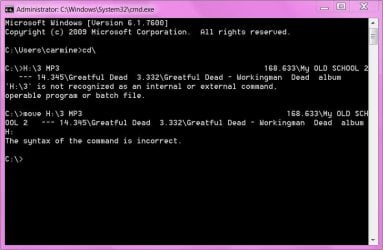
H:\3 MP3 168.633\My OLD SCHOOL 2 --- 14.345\Greatful Dead 3.332\Greatful Dead - Workingman Dead album


I tried but need to read about DOS


thanks for the advice.
 

Attachments

  • Capture.JPG
    Capture.JPG
    49.7 KB · Views: 34

My Computer

Computer Manufacturer/Model Number
Gateway/NV7923u & NV79C52u Laptops
OS
windows 7 professional & ultimate 64bit laptops
CPU
2.27 boost to 2.53 & 2.53 boost to 2.80
Motherboard
Mobile Intel® HM55 Express Chipset ???
Memory
4GB
Graphics Card(s)
Intel® Graphics Media Accelerator HD
Sound Card
realtek High-definition audio support
Monitor(s) Displays
17.3 " HD 1600 x 900
Hard Drives
hatachi Travelstar 5400 500GB & west digital 500GB
Internet Speed
35MB fios
I'm getting this error for months now. It's due to the filename/location is too deep in the file structure. how can I extend the value to beyond 255 characters?
I can't copy/move/delete/play/take owenership of these freakin files.


thanks my friends as always:)

I've been fighting that local limitation for decades. The limitation is in the Windows API (Explorer has a 260 character limitation).

To handle this situation, I do the following:

1) Download an burn a live Linux distribution to CD, such as Puppy Linux (very easy to use) or Knoppix (Linux has a higher PATH_MAX of 4069 characters).

2) In Windows, create a new top level directory (folder) in the root of a drive (such as C:\Moved).

3) Write down the path to the offending files.

4) Reboot to the Linux live CD.

5) Mount the local hard drive in Linux.

6) Navigate to the offending files.

7) Move the offending files to the directory you created above.

8) Reboot into Windows.

9) Navigate to the new directory and if needed change the file permissions.

Regards,
GEWB
 

My Computer

Computer type
PC/Desktop
Computer Manufacturer/Model Number
(7 different computers booting up to 10 systems)
OS
Linux Mint / XP / Win7 Home, Pro, Ultimate / Win8.1 / Win10
Other Info
Four desktops, two laptops, one notebook and one tablet
thank you guys.

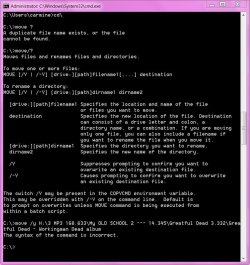
I don't have the patience to deal with this today. i thought there was a way to extend the 255 character limit via a .reg , .bat or .vbs file
 

Attachments

  • Capture.JPG
    Capture.JPG
    100.1 KB · Views: 22

My Computer

Computer Manufacturer/Model Number
Gateway/NV7923u & NV79C52u Laptops
OS
windows 7 professional & ultimate 64bit laptops
CPU
2.27 boost to 2.53 & 2.53 boost to 2.80
Motherboard
Mobile Intel® HM55 Express Chipset ???
Memory
4GB
Graphics Card(s)
Intel® Graphics Media Accelerator HD
Sound Card
realtek High-definition audio support
Monitor(s) Displays
17.3 " HD 1600 x 900
Hard Drives
hatachi Travelstar 5400 500GB & west digital 500GB
Internet Speed
35MB fios
Hi pacinitaly,

When you get a chance can you supply screenshots of exactly how you're going about it within explorer. I can help with the Command Prompt part but don't really think that's at all necessary ;)
 

My Computer

Computer Manufacturer/Model Number
Compaq Desktop
OS
Windows 7 Ultimate x64
CPU
AMD Sempron Dual Core
Memory
3GB
Graphics Card(s)
NVIDIA GeForce 6150SE nForce 430
Screen Resolution
1024x768
Hard Drives
150GB Sata
thanks Jeff !!!


I try later. have a good night
 

My Computer

Computer Manufacturer/Model Number
Gateway/NV7923u & NV79C52u Laptops
OS
windows 7 professional & ultimate 64bit laptops
CPU
2.27 boost to 2.53 & 2.53 boost to 2.80
Motherboard
Mobile Intel® HM55 Express Chipset ???
Memory
4GB
Graphics Card(s)
Intel® Graphics Media Accelerator HD
Sound Card
realtek High-definition audio support
Monitor(s) Displays
17.3 " HD 1600 x 900
Hard Drives
hatachi Travelstar 5400 500GB & west digital 500GB
Internet Speed
35MB fios
Hi, you have to input CD commands to change current directory to where mp3 resides. Then, use the 8.3 format to move files.
You input the move command with incorrect syntax.
That is: MOVE <source> <destination>
 

My Computer

Computer Manufacturer/Model Number
Custom Build
OS
Windows 7 Ultimate x64 SP1 clean install
CPU
AMD Athlon 64 X2 6400+
Motherboard
Asus M2N-E SLI
Memory
4 GB
Graphics Card(s)
2 x NVidia Geforce 8600 GTS
Sound Card
Trust 5.1 Surround USB
Monitor(s) Displays
Benq FP931 19"
Screen Resolution
1280x1024@32bit@75MHz
Hard Drives
1 x Western Digital 500GB SATA (OS installation), 2 x Seagate 320GB SATA, 1 x Seagate 250GB IDE (in external USB box), 1 x TrekStor 750GB USB
PSU
650W
Keyboard
Logitech Cordless Desktop EX 100
Mouse
Logitech Cordless Optical
Internet Speed
8192 kbps / 640 kbps
Cut Long Names
Download Cut Long Names 1.9 Free - Search and rename the file names that are longer than 150 characters. - Softpedia
Cut Long Names Screenshots, screen capture - Softpedia
Cut Long File Names!: Rename inaccessible files!
Because Windows had a limit of 255 characters, and if you didn't know it already, that include the full path so its much easier to exceed the 255 than most would think. Utility allows to rename the file so when it exceeds 255 characters included in the full path then shorten that file name so it does not exceed 255 in total.
 

My Computer

OS
Windows 7 32bit
Cut Long Names
Download Cut Long Names 1.9 Free - Search and rename the file names that are longer than 150 characters. - Softpedia
Cut Long Names Screenshots, screen capture - Softpedia
Cut Long File Names!: Rename inaccessible files!
Because Windows had a limit of 255 characters, and if you didn't know it already, that include the full path so its much easier to exceed the 255 than most would think. Utility allows to rename the file so when it exceeds 255 characters included in the full path then shorten that file name so it does not exceed 255 in total.


thank you very much
 

My Computer

Computer Manufacturer/Model Number
Gateway/NV7923u & NV79C52u Laptops
OS
windows 7 professional & ultimate 64bit laptops
CPU
2.27 boost to 2.53 & 2.53 boost to 2.80
Motherboard
Mobile Intel® HM55 Express Chipset ???
Memory
4GB
Graphics Card(s)
Intel® Graphics Media Accelerator HD
Sound Card
realtek High-definition audio support
Monitor(s) Displays
17.3 " HD 1600 x 900
Hard Drives
hatachi Travelstar 5400 500GB & west digital 500GB
Internet Speed
35MB fios
Hi, you have to input CD commands to change current directory to where mp3 resides. Then, use the 8.3 format to move files.
You input the move command with incorrect syntax.
That is: MOVE <source> <destination>


Grazia
 

My Computer

Computer Manufacturer/Model Number
Gateway/NV7923u & NV79C52u Laptops
OS
windows 7 professional & ultimate 64bit laptops
CPU
2.27 boost to 2.53 & 2.53 boost to 2.80
Motherboard
Mobile Intel® HM55 Express Chipset ???
Memory
4GB
Graphics Card(s)
Intel® Graphics Media Accelerator HD
Sound Card
realtek High-definition audio support
Monitor(s) Displays
17.3 " HD 1600 x 900
Hard Drives
hatachi Travelstar 5400 500GB & west digital 500GB
Internet Speed
35MB fios
ALternate way - reduce the folder names

If you have a long file name buried in folders and thus exceeds 256 characters and can not be copied...

Rename one or more of the folders to be shorter - until you get under the 256 limit.
As a reminder - it includes the entire path, file names, & extension.

You will then be able to copy the file\folder using standard Windows Explorer and no added applications or alternate OS Boot disks.

If the file is on a network share, you can also create a new drive letter mapped part way deeper down the folder path - so that your new drive and file are shorter than 256.

Best of luck.
JohnB
 

My Computer

Computer Manufacturer/Model Number
Dell
OS
Windows 7 Home Premium 64bit
Status
Not open for further replies.
Back
Top