File Type Problem

Craig747

New member
Local time
6:44 PM
Messages
4
Hello,

I am looking for a little bit of help. I have a new laptop with Windows 7 and I have installed Office 2007.

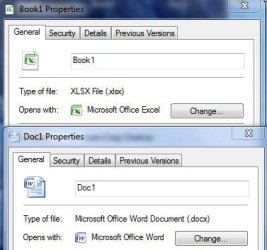
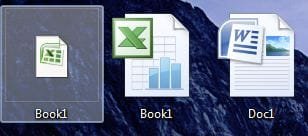
The problem I have is my computer doesn't recognise .xlsx files as Microsoft Excel files; instead it just treats them as a "XLSX File". This isn't causing any major problems but it does make the icon look a bit ugly and out of place. The attached images should help explain the problem.

I don't have this problem with Word documents or even Excel 2003 documents.

Does anyone know how I can rectify this?

Many thanks in advance for your help!
 

Attachments
  • Capture1.JPG
    Capture1.JPG
    16.1 KB · Views: 476
  • Capture2.JPG
    Capture2.JPG
    28.8 KB · Views: 7

My Computer

OS
Windows 7
You can set it, quite easily and simply, in file associations... ;)

kas1gw.png
 

My Computer

Computer Manufacturer/Model Number
Custom built machine
OS
W7 x64
CPU
Intel Q9300 2.5Ghz Quad LGA775 (Would like Q9650)
Motherboard
Gigabyte GA-EP45T-UD3R (F6 Bios)
Memory
4Gb OCZ Gold 1,333Mhz
Graphics Card(s)
Palit HD4850 O/C Sonic 512Mb DDR3, Dual DViD's
Sound Card
Azalia to twin Samson 50w Studio Monitors
Monitor(s) Displays
Twin Dell (E-IPS) U2311H 23.6" Screens
Screen Resolution
1920 x 1080 @ 60Hz
Hard Drives
Crucial M4 SSD, archives on twin Western Digital Caviar Black WD2002FAEX, 2TB, 7200rpm HDD's, Samsung Ritemaster CD/DVD Burner...
PSU
OCZ 600w
Case
Lian-Li PC8 acoustifoamed' aluminium tower
Cooling
Scythe 140mm Zipang
Keyboard
Cherry PS/2 custom model
Mouse
Lenovo USB laser "Thinkpad" Mouse
Internet Speed
ADSL2+ @14Mbps downstream & Cat6 Gigabit Ethernet
Antivirus
NOD32
Browser
Opera
Other Info
Silicon Dust HD Homerun Dual FTA (Ethernet) TV Tuners, Dray Tek Vigor 2850Vn router and 8x HP Gigabit Switch. Lian-Li CR26 Card Reader, Canon MF4430 iSensys laser printer/scanner.
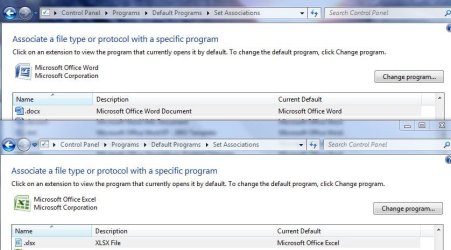
Thanks for your help; however the problem doesn't appear to be with what program is associated with .xlsx files as Excel is already set as the default for .xlsx files.

As you can see from the image, the description of .docx is "Mircrosoft Office Work Document" but the .xlsx is "XLSX File". I could be wrong but I think this is the problem and I don't know how to change that.

It's quite possible that I am being stupid!
 

Attachments

  • Capture3.JPG
    Capture3.JPG
    62.9 KB · Views: 22

My Computer

OS
Windows 7

My Computer

Computer Manufacturer/Model Number
Dell XPS420
OS
Vista Ult 64 bit Seven Ult RTM x64
CPU
Intel Core2 Quad Q6600 2.40 gigahertz
Memory
Crucial Ballistix 4x2GB PC2 6400
Graphics Card(s)
NVIDIA GeForce 8600 GTS 256 MB
Sound Card
Creative SB X-Fi audio
Monitor(s) Displays
HP w2207 + HPvs15
Screen Resolution
1680x1050 + 1024x768
Hard Drives
2-WD5000AAKS-500 GB
WD5000AAV-500 GB external
Keyboard
Microsoft Comfort Curve
Mouse
MX Revolution
Other Info
Wacom Intuos 2 Graphics Tablet
Experience Index=5.5
Thank you very much for your help Gary. I tried Method One as advised but unfortunately it didn't resolve the problem.
 

My Computer

OS
Windows 7
I should probably mention that it is 64 bit Windows 7 I am using.

The problem only seems to be with Excel 2007 files and no other Office applications. I noticed that when I right click on another file (i.e. Word or Excel 2003 etc) I get options for "Print" and "New". These options to do not appear when I right click on an Excel 2007 file.

I tried repairing the install of Office but it hasn't resolved the problem. If anyone can suggest anything else for me to try I would be very grateful. As I said before, the only problem it is causing is that the icons look odd.
 

My Computer

OS
Windows 7
Only other thing I can think to do is uninstall/reinstall Excel. If that doesn't work then uninstall/reinstall all of Office. I had a recurring prob. with outlook 2007 and tried repair and uninstall/reinstall of outlook with no luck. Did an uninstall/reinstall of Office and all was fine. Just had to repin the icons to the taskbar.
 

My Computer

Computer Manufacturer/Model Number
Dell XPS420
OS
Vista Ult 64 bit Seven Ult RTM x64
CPU
Intel Core2 Quad Q6600 2.40 gigahertz
Memory
Crucial Ballistix 4x2GB PC2 6400
Graphics Card(s)
NVIDIA GeForce 8600 GTS 256 MB
Sound Card
Creative SB X-Fi audio
Monitor(s) Displays
HP w2207 + HPvs15
Screen Resolution
1680x1050 + 1024x768
Hard Drives
2-WD5000AAKS-500 GB
WD5000AAV-500 GB external
Keyboard
Microsoft Comfort Curve
Mouse
MX Revolution
Other Info
Wacom Intuos 2 Graphics Tablet
Experience Index=5.5
OP, it's just occured to me, but you do have the up to date Office Service Packs onboard? These could well have an impact on the sort of issue you're describing, especially under a new OS environment......
 

My Computer

Computer Manufacturer/Model Number
Custom built machine
OS
W7 x64
CPU
Intel Q9300 2.5Ghz Quad LGA775 (Would like Q9650)
Motherboard
Gigabyte GA-EP45T-UD3R (F6 Bios)
Memory
4Gb OCZ Gold 1,333Mhz
Graphics Card(s)
Palit HD4850 O/C Sonic 512Mb DDR3, Dual DViD's
Sound Card
Azalia to twin Samson 50w Studio Monitors
Monitor(s) Displays
Twin Dell (E-IPS) U2311H 23.6" Screens
Screen Resolution
1920 x 1080 @ 60Hz
Hard Drives
Crucial M4 SSD, archives on twin Western Digital Caviar Black WD2002FAEX, 2TB, 7200rpm HDD's, Samsung Ritemaster CD/DVD Burner...
PSU
OCZ 600w
Case
Lian-Li PC8 acoustifoamed' aluminium tower
Cooling
Scythe 140mm Zipang
Keyboard
Cherry PS/2 custom model
Mouse
Lenovo USB laser "Thinkpad" Mouse
Internet Speed
ADSL2+ @14Mbps downstream & Cat6 Gigabit Ethernet
Antivirus
NOD32
Browser
Opera
Other Info
Silicon Dust HD Homerun Dual FTA (Ethernet) TV Tuners, Dray Tek Vigor 2850Vn router and 8x HP Gigabit Switch. Lian-Li CR26 Card Reader, Canon MF4430 iSensys laser printer/scanner.
Right click the file, choose open with and set Excel as the program to open them. Also, do you have SP2 for Office and SP1.
 

My Computer

Computer Manufacturer/Model Number
Sony Vaio Z46GDU
OS
Windows 7 Ultimate x86-64
CPU
[email protected] 1066MHz FSB
Motherboard
Sony branded
Memory
6GB DDR3 1066MHz
Graphics Card(s)
9300M GS 256MB Dedicated (Speed) + Intel4500MHD (Stamina)
Sound Card
Realtek HD Audio
Monitor(s) Displays
13.1' WXGA
Screen Resolution
1600x900
Hard Drives
320GB 7200RPM w/ 16MB cache
Internet Speed
1MB/s
Keep office up-to-date. I've gotten typical issues like that some times.
 

My Computer

Computer Manufacturer/Model Number
Gateway KAV60
OS
Windows 7 Home Premium 32-bit
Memory
2 GB
Screen Resolution
1024x600
Hard Drives
250 GB HDD
Internet Speed
Time Warner Cable/Road Runner
Other Info
Intel Atom processor N270
Multi-in-1 card reader
802.11b/g
NO optical drive
NO WWAN
NO Bluetooth
Back
Top