
Solved File View in Folder

bjproc

New member
Member
VIP
Local time
9:03 PM
Messages
198
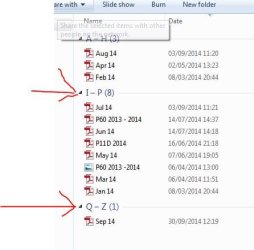
I was playing about with adding date modified to sort out some files, but now i can't get rid of this view, which i don't like, it's probably something very easy, only if you know how lol

here's the view, you'll see the red arrows for what is not going away
 

Attachments
  • Capture.JPG
    Capture.JPG
    28.9 KB · Views: 9

My Computer

Computer Manufacturer/Model Number
Mesh Q4
OS
Win 7 Pro 32bit
CPU
Intel Quad Core 6600
Motherboard
Asus P5N-E SLI
Memory
4 GB
Graphics Card(s)
nVidia 8800GT
Sound Card
Onboard
Hard Drives
1TB Samsung Spinpoint,
1TB WD Eco Green
Press the ALT key to bring up the menu bar. Then go to View - Group By. Change it to (None)
 

My Computer

Computer type
Laptop
Computer Manufacturer/Model Number
HP Elitebook 8540p
OS
Windows 7 Pro 32
CPU
Intel(R) Core(TM) i5 CPU M 540 @ 2.53GHz
Motherboard
Hewlett-Packard 1521
Memory
4,00 GB (Usable 2,98)
Graphics Card(s)
NVIDIA NVS 5100M
Sound Card
NVIDIA High Definition Audio
Screen Resolution
1600x900
Hard Drives
INTEL SSDSA2CW120G3
Antivirus
F-Secure Internet Security
Browser
IE, Firefox, Opera
Other Info
Sandboxie,
SRP (Software Restriction Policy),
EMET (Enhanced Mitigation Experience Toolkit),
WFC (Windows Firewall Control by BiniSoft),
Malwarebytes Premium
perfect, thank you

knew it would be something too easy!
 

My Computer

Computer Manufacturer/Model Number
Mesh Q4
OS
Win 7 Pro 32bit
CPU
Intel Quad Core 6600
Motherboard
Asus P5N-E SLI
Memory
4 GB
Graphics Card(s)
nVidia 8800GT
Sound Card
Onboard
Hard Drives
1TB Samsung Spinpoint,
1TB WD Eco Green
Back
Top