files always in use

questionesse

New member
Local time
3:25 AM
Messages
46
Hey there,

not sure if I'm on the right board...
My problem is the following. I am super often told I can't move/rename folders with pictures or audio files cause they are in use. They are not opened by any program, I just assume it somehow has to do with the visualization within the explorer - is that possible?
Are others experiencing this problem as well? How could I solve this?

thx
 

My Computer

Computer Manufacturer/Model Number
eee1000h
OS
win7 prof.
Memory
2GB

My Computer

Computer type
PC/Desktop
Computer Manufacturer/Model Number
Dell XPS 420
OS
Windows 10, Home Clean Install
CPU
Intel Core2 processsor Q8200(2.33Ghz 1333FSB) Quad Core Tech
Motherboard
Dell
Memory
6 gb
Graphics Card(s)
ATI Radeon 256MB HD3650
Sound Card
Intergrated 7.1 Channel Audio
Monitor(s) Displays
Dell SP2009W 20"
Hard Drives
640 GB Serial ATA Hard drive
Cooling
Fan
Keyboard
Dell USB Keyboard
Mouse
Dell Premium Optical USB
Internet Speed
DSL 2.85
hmm - not sure if you got me right - this happens from time to time, no difference if started new or not...
 

My Computer

Computer Manufacturer/Model Number
eee1000h
OS
win7 prof.
Memory
2GB
Hey there,

not sure if I'm on the right board...
My problem is the following. I am super often told I can't move/rename folders with pictures or audio files cause they are in use. They are not opened by any program, I just assume it somehow has to do with the visualization within the explorer - is that possible?
Are others experiencing this problem as well? How could I solve this?

thx

Do you have and file sharing applications running (such as Limewire) or Torrent applications (such as Vuze, Utorrent)?

The reason i ask is that these maybe sharing your files out and while that is happening they will be classed as 'In Use'

Obviously a reboot would kill off any processes that are using these files however you may have applications such as the above that are set to start on start up.

**EDIT**
When you can't move files open task manager and then take a snip of your processes tab so we can see what is running.

Regards,
JDobbsy1987
 

My Computer

Computer type
PC/Desktop
Computer Manufacturer/Model Number
Self Built
OS
Windows 8.1 Pro x64
CPU
Intel Core i5-2500K @ 3.30GHz - S1155
Motherboard
Asus P8P67 LE Rev3, Intel P67, S115
Memory
8GB Corsair DDR3 XMS3, PC3-12800
Graphics Card(s)
NVIDIA GeForce GTX 650
Sound Card
On-Board
Monitor(s) Displays
3 x 24" {Extended Display}
Screen Resolution
1920 x 1080
Hard Drives
300GB Seagate Barracuda 7200
PSU
550W Coolermaster GX550
Case
Silverstone Precision PS04B
Cooling
Stock
Keyboard
Logitech K120
Mouse
World of Warcraft Cataclysm MMO Gaming Mouse
Internet Speed
80 MB
Antivirus
MSE / Windows Defender
Browser
Chrome
I aint got something like that running...
the files are located on a home server though.
The weird thing is that some subfolders of the same folder can be moved, others not.
I'll make a screenshot when I can't move them - of both, server and client I assume.
 

My Computer

Computer Manufacturer/Model Number
eee1000h
OS
win7 prof.
Memory
2GB
Thumbnailing (visualization as you called it) potentially could. I know some files are particularly finicky about previews and being marked as "In Use". I don't use Preview so I don't generally run into this issue. As far as the thumbnailing in explorer, this is a common issue. Until the thumbnail is generated, it is technically "In Use" as far as Windows sees it for the most part because it's working on it. You could disable thumbnailing but then files will look plain. If a file gets stuck as being "In Use", then you generally want to log off and log back on and that will fix it.

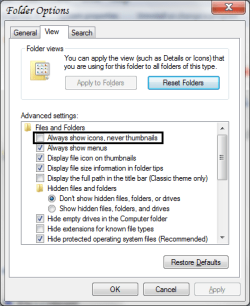
As far as completely solving it, the solution would be to disable thumbnailing; that should solve it completely. You can do this by going to Folder Options (Control Panel --> Folder Options) and then under the "View" tab, ensure "Always show icons, never thumbnails" is checked.
 

Attachments

  • Folder Views.png
    Folder Views.png
    17 KB · Views: 4

My Computer

OS
Windows 7 Ultimate x64 SP1
CPU
Intel Core i3 530 2.93 Ghz Clarkdale
Motherboard
ASRock P55 PRO/USB3 LGA 1156
Memory
4 GB OCZ DDR3 1600 (PC12800) Low Voltage Desktop Memory
Graphics Card(s)
Nvidia GeForce GTX 550 Ti with 1 GB of RAM
Sound Card
Realtek HD ALC892
Monitor(s) Displays
20'' eMachines E202HDbmd Glare Panel Widescreen
Screen Resolution
1600 x 900
Hard Drives
Western Digital 1 TB Caviar Black Edition (7200 RPM) SATA
Hitachi Deskstar 500 GB (7200 RPM) SATA
Samsung SpinPoint 400 GB (7200 RPM) SATA
PSU
Rosewill Xtreme Series RX750-D-B ATX12V v2.2 & EPS12V (750W)
Case
Cooler Master Centurion 534 RC-534-KKN2-GP Mid-Tower
Cooling
Standard Case Fans and Stock CPU Heatsink
Keyboard
Microsoft Wireless Optical Desktop Elite
Mouse
Microsoft Wireless Optical Desktop Elite
Internet Speed
7.1 Mbps Verizon DSL
is there a way to disable previews for specific folders?
because generally I like previews and I'm dealing a lot with pictures. so I could just disable it for files that cause trouble...

thx
 

My Computer

Computer Manufacturer/Model Number
eee1000h
OS
win7 prof.
Memory
2GB
I definitely can understand that and as far as I know, there is no such way to have selective thumbnailing. It's either you disable it completely or you leave it on all the time and grin and bear the "In Use" error.
 

My Computer

OS
Windows 7 Ultimate x64 SP1
CPU
Intel Core i3 530 2.93 Ghz Clarkdale
Motherboard
ASRock P55 PRO/USB3 LGA 1156
Memory
4 GB OCZ DDR3 1600 (PC12800) Low Voltage Desktop Memory
Graphics Card(s)
Nvidia GeForce GTX 550 Ti with 1 GB of RAM
Sound Card
Realtek HD ALC892
Monitor(s) Displays
20'' eMachines E202HDbmd Glare Panel Widescreen
Screen Resolution
1600 x 900
Hard Drives
Western Digital 1 TB Caviar Black Edition (7200 RPM) SATA
Hitachi Deskstar 500 GB (7200 RPM) SATA
Samsung SpinPoint 400 GB (7200 RPM) SATA
PSU
Rosewill Xtreme Series RX750-D-B ATX12V v2.2 & EPS12V (750W)
Case
Cooler Master Centurion 534 RC-534-KKN2-GP Mid-Tower
Cooling
Standard Case Fans and Stock CPU Heatsink
Keyboard
Microsoft Wireless Optical Desktop Elite
Mouse
Microsoft Wireless Optical Desktop Elite
Internet Speed
7.1 Mbps Verizon DSL
Back
Top