Files being changed when moving them

djeyewater

New member
Local time
11:41 PM
Messages
28
I had a folder called 'Walks' that was located as F:/Pictures/Walks
I then moved this folder to the drive root so it was F:/Walks

After moving it, it seems that many (not all) of the files in that folder have been changed. The file sizes are different, and last modified date is the date I moved the files.

Comparing one of the moved files with a file from a backup before I moved the folder, the only difference I could see was that the OWNER had been set as NETWORK SERVICE on the moved file. The filesizes are a few Kb different.

At a quick glance it appears to have affected many (but not all) .jpg files and probably all .mov files that were in the folder.

Any ideas what's going on here?
 

My Computer

Computer type
PC/Desktop
OS
Windows 7 Pro x64
Are the contents of the files unaltered?
 

My Computer

Computer type
PC/Desktop
Computer Manufacturer/Model Number
Alienware Aurora ALX R4
OS
Windows 10 Pro (x64)
CPU
Intel Core i7-3930K (3.2GHz - 4.5GHz)
Motherboard
Alienware Aurora-R4 x79
Memory
4x Samsung 4GB PC3-12800 DDR3 (16GB 1600MHz)
Graphics Card(s)
Nvidia Geforce GTX 690
Sound Card
SteelSeries Siberia Elite
Monitor(s) Displays
Dell UltraSharp U3011
Screen Resolution
2560x1600
Hard Drives
Samsung 850 Pro 256 GB, Seagate 1TB Desktop Hybrid HDD, 2x Western Digital 4TB Green HDD
PSU
875W Some Dell PSU <.<
Case
Alienware Aurora ALX
Cooling
Custom Liquid Cooling (EK CPU & GPU blocks) dual EK 480RAD
Keyboard
Logitech G710+ Mechanical
Mouse
Logitech G700s
Internet Speed
Verizon Fios (50 mbps average)
Other Info
Server: Intel NUC D54250WYK: i5-4250U, 16GB, 256 GB mSATA, Windows Server 2012 R2
I have only checked a few of the files, but the images and .mov files I did check looked the same visually. Some data must have changed though to account for the file size difference.

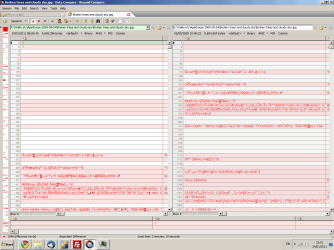
If I do a binary compare between one of the files in my backup software, you can see most data is the same, see attachment.
 

Attachments

  • Untitled-1.png
    Untitled-1.png
    48.1 KB · Views: 30

My Computer

Computer type
PC/Desktop
OS
Windows 7 Pro x64
If no-one knows, I think I'll be safest by restoring the files from a backup. With 19711 files that got modified when I moved the folder, it looks like it will take a long time to restore though!
 

My Computer

Computer type
PC/Desktop
OS
Windows 7 Pro x64
If you just left-clicked and dragged the folder into the root, it will change the creation time on all the files. However, if you do a right click and drag and select copy or move, it shouldn't change any of the date and time stamps on the files.
 

My Computer

OS
XP / Win7 x64 Pro
CPU
Intel Quad-Core Q9450 @ 3.2GHz
Motherboard
Asus P5-E
Memory
2x2GB GSkill DDR2
Graphics Card(s)
NVIDIA GeForce 8600 GTS (EVGA)
Monitor(s) Displays
Dell 2408WFP
Screen Resolution
1920x1200
If you just left-clicked and dragged the folder into the root, it will change the creation time on all the files. However, if you do a right click and drag and select copy or move, it shouldn't change any of the date and time stamps on the files.

I just cut the folder from its current location and then pasted it in the root.

As far as I'm aware, left click dragging to move a folder has exactly the same effect as right-click dragging or copy-pasting so long as the current location and destination are on the same partition. If they're not, then left-click dragging should copy the files instead.
 

My Computer

Computer type
PC/Desktop
OS
Windows 7 Pro x64
Unfortunately, in Windows 7, users have reported different file metadata changes depending on whether the files were dragged somewhere or right clicked and copied. Why, I have no idea, but there have been a couple threads on here about it.

Your screenshot shows the picture on two different partitions, although you said you just moved it to the root of the same partition. What's the discrepancy there? Doing that will change the modification date on the files.
 

My Computer

OS
XP / Win7 x64 Pro
CPU
Intel Quad-Core Q9450 @ 3.2GHz
Motherboard
Asus P5-E
Memory
2x2GB GSkill DDR2
Graphics Card(s)
NVIDIA GeForce 8600 GTS (EVGA)
Monitor(s) Displays
Dell 2408WFP
Screen Resolution
1920x1200
Another thing always be careful with important data when moving by cut and paste, because when you cut it and you make a mistake it's gone, i always copy and paste then make sure it's where i put it then delete from the original place. Also there is no problem copying and pasteing between partitions or drive's that i know of.
 

My Computer

Computer Manufacturer/Model Number
Dell XPS 730
OS
Windows 7 Home Premium 64 bit
CPU
Intel Core 2 quad Extreme Q9770 @ 3.2 GHz
Memory
4x2 GB Muskin 1600 MHz ram
Graphics Card(s)
NVidia GTX 250
Sound Card
Soundblaster X-Fi Fatality Champion
Monitor(s) Displays
2 Dell 2007WFP Ultrascans
Screen Resolution
3360 x 1050
Hard Drives
WD Black 1TB sata, 2-WD Black 500 sata, 2-Seagate 500 Go external
PSU
1000 Watt
Cooling
air
Keyboard
MS Natrual Keyboard Pro
Mouse
Logitech Wireless Trackball
Internet Speed
DSL Elite
Unfortunately, in Windows 7, users have reported different file metadata changes depending on whether the files were dragged somewhere or right clicked and copied. Why, I have no idea, but there have been a couple threads on here about it.

Your screenshot shows the picture on two different partitions, although you said you just moved it to the root of the same partition. What's the discrepancy there? Doing that will change the modification date on the files.

Thanks for the clarification. If other users are having problems with cut and paste (albeit different problems to me), it sounds like cut and paste in Windows 7 is just buggy.

The reason the screenshot shows one of the folders on a different partition is because I was comparing the moved folder with a backup of the folder, and the backup is on a different partition. It would be kind of difficult to compare the moved folder with itself before I moved it :D

Another thing always be careful with important data when moving by cut and paste, because when you cut it and you make a mistake it's gone, i always copy and paste then make sure it's where i put it then delete from the original place. Also there is no problem copying and pasteing between partitions or drive's that i know of.
If you cut a folder, then don't paste it anywhere, it will stay in the same location, not disappear. At least, that's how it works on my PC.
 

My Computer

Computer type
PC/Desktop
OS
Windows 7 Pro x64
I always do right-click, drag, and move if I want to move things so that they maintain as much original metadata as possible.

Gotcha on the file comparison. I was wondering what was going on there. Just keep in mind that metadata will certainly differ from backup to the originals for various reasons (due to the program accessing the files to move them and/or them being relocated to at least a different partition if not drive which will change the properties as well). I don't think you were confused about this, but wanted to put it out there in case.

Bottom line, I have no clue why anything should have been modified to the point of changing file size amidst the move, regardless of how it was done. This still remains a mystery to me. What A/V and backup programs are you using? It might be a case where another piece of software grabbed it mid-move to analyze it or modify it for whatever reason.
 

My Computer

OS
XP / Win7 x64 Pro
CPU
Intel Quad-Core Q9450 @ 3.2GHz
Motherboard
Asus P5-E
Memory
2x2GB GSkill DDR2
Graphics Card(s)
NVIDIA GeForce 8600 GTS (EVGA)
Monitor(s) Displays
Dell 2408WFP
Screen Resolution
1920x1200
You might want to try out xcopy from the command line. You can expressly copy all files and retain the ownership and audit permissions ( /x option ).

Microsoft Corporation

I would try copying a few files this way and see if that avoids this issue.
 

My Computer

OS
XP / Win7 x64 Pro
CPU
Intel Quad-Core Q9450 @ 3.2GHz
Motherboard
Asus P5-E
Memory
2x2GB GSkill DDR2
Graphics Card(s)
NVIDIA GeForce 8600 GTS (EVGA)
Monitor(s) Displays
Dell 2408WFP
Screen Resolution
1920x1200
I'd recommend a full scan with Malwarebyte's Anti-Malware. This sounds like a virus to me.
 

My Computer

Computer Manufacturer/Model Number
Custom
OS
Windows 7 Ultimate RTM (Technet)
CPU
3.00 gigahertz Intel Core2 Duo E8400
Motherboard
ASUSTeK Computer INC. P5K/EPU Rev 1.xx
Memory
4GB
Graphics Card(s)
ATI Radeon X1950 Pro
Sound Card
Built in HD Audio
Monitor(s) Displays
22" Gateway LCD
Screen Resolution
1920 x 1200
Hard Drives
ST3160023A [Hard drive] (160.04 GB) -- drive 0, rev 8.01, ST3500630AS [Hard drive] (500.11 GB) -- drive 2, rev 3.AAK
ST3500630AS [Hard drive] (500.11 GB) -- drive 1, rev 3.AAK
Keyboard
Logitech G11
Mouse
Microsoft Wireless Laser Mouse 5000
Internet Speed
13.44 Mbps
What A/V and backup programs are you using? It might be a case where another piece of software grabbed it mid-move to analyze it or modify it for whatever reason.
I did think this could be caused by my AV software, I'm using MS Security Essentials, and have the real time protection on. So it is possible that it decided to analyse the files as they were being moved and for some reason changed the metadata.
For backup I'm using Beyond Compare. I'm not quite sure what metadata it copies, but I think it copies permissions, date modified, etc. but not the date created.
You might want to try out xcopy from the command line. You can expressly copy all files and retain the ownership and audit permissions ( /x option ).
Thanks for the advice on xcopy, I'll keep it in mind, but I've never had any problem with copying before. Just this one time when I moved files on the same partition. Normally if I have to move a few GB of files from one partition to another, I'll copy them using Beyond Compare, then run a binary comparison using Beyond Compare to check they copied okay, then delete the original files.
I'd recommend a full scan with Malwarebyte's Anti-Malware. This sounds like a virus to me.
I guess it could be a virus, but it seems more likely to me that it would be a bug in Windows or my AV software as FliGi7 suggested. I will do a scan with MS Security Essentials just in case though.
 

My Computer

Computer type
PC/Desktop
OS
Windows 7 Pro x64
What A/V and backup programs are you using? It might be a case where another piece of software grabbed it mid-move to analyze it or modify it for whatever reason.
I did think this could be caused by my AV software, I'm using MS Security Essentials, and have the real time protection on. So it is possible that it decided to analyse the files as they were being moved and for some reason changed the metadata.
For backup I'm using Beyond Compare. I'm not quite sure what metadata it copies, but I think it copies permissions, date modified, etc. but not the date created.
You might want to try out xcopy from the command line. You can expressly copy all files and retain the ownership and audit permissions ( /x option ).
Thanks for the advice on xcopy, I'll keep it in mind, but I've never had any problem with copying before. Just this one time when I moved files on the same partition. Normally if I have to move a few GB of files from one partition to another, I'll copy them using Beyond Compare, then run a binary comparison using Beyond Compare to check they copied okay, then delete the original files.
I'd recommend a full scan with Malwarebyte's Anti-Malware. This sounds like a virus to me.
I guess it could be a virus, but it seems more likely to me that it would be a bug in Windows or my AV software as FliGi7 suggested. I will do a scan with MS Security Essentials just in case though.

I'll say it again....I recommend a full scan with Malwarebyte's Anti-Malware. It will find things that MSE will not.
 

My Computer

Computer Manufacturer/Model Number
Custom
OS
Windows 7 Ultimate RTM (Technet)
CPU
3.00 gigahertz Intel Core2 Duo E8400
Motherboard
ASUSTeK Computer INC. P5K/EPU Rev 1.xx
Memory
4GB
Graphics Card(s)
ATI Radeon X1950 Pro
Sound Card
Built in HD Audio
Monitor(s) Displays
22" Gateway LCD
Screen Resolution
1920 x 1200
Hard Drives
ST3160023A [Hard drive] (160.04 GB) -- drive 0, rev 8.01, ST3500630AS [Hard drive] (500.11 GB) -- drive 2, rev 3.AAK
ST3500630AS [Hard drive] (500.11 GB) -- drive 1, rev 3.AAK
Keyboard
Logitech G11
Mouse
Microsoft Wireless Laser Mouse 5000
Internet Speed
13.44 Mbps
I'll say it again....I recommend a full scan with Malwarebyte's Anti-Malware. It will find things that MSE will not.

Thanks for the advice, I didn't realise that. I scanned with MSE first, which found a (potential?) java exploit, and then after deleting the suspect file, scanned with MBAM, which didn't find anything.
 

My Computer

Computer type
PC/Desktop
OS
Windows 7 Pro x64
Back
Top