Files Disappearing

chakubanga

New member
Local time
4:43 PM
Messages
20
I have a very Unique situation. I click on a file and then print it with virtual pdf printer, give it a name and save it at a location of my choice. Done

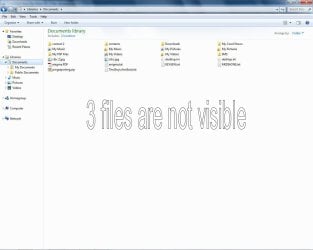
I go to the location example Documents, the file is nowhere to be seen. :confused:

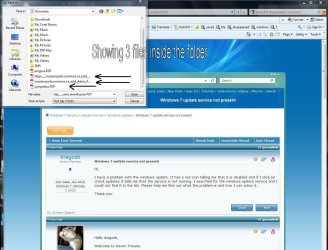
I REDO the samething and when Save as pop comes up, the previous file is INSIDE THE POP-UP SAVE AS , and I can right click to open it and save again after opening the file, but when I go back to the location, the file is gone.

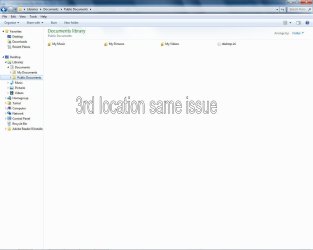
In the attachment I am showing all the folders possible to have these files, but inside FOLDER they are not visible despithe the save as path is clearly marked?

Any explanation will be appreciated.
1 files dissapearing.JPG

2 files dissapearing.JPG

3  files dissapearing.JPG

4  files dissapearing.JPG
 

My Computer

Computer Manufacturer/Model Number
Compal CL51-15
OS
WIN 7
CPU
Intel Centrino
Motherboard
Intel 82852/82855
Memory
2 GB
Graphics Card(s)
Intel Graphics
Sound Card
realtek AC'97
Hi chakubanga, Welcome to SF,

I guess it might be saving the File as Hidden File by some reason. Try to Enable Hidden Files Folder. and see whether your seeing them there.

Hope this helps,
Captain
 

My Computer

Computer Manufacturer/Model Number
Samsung NP550P5C-S02IN
OS
Windows 7 Ultimate - 64-bit | Windows 8 Pro - 64-bit
CPU
Intel® Core™ i7 Processor 3,610QM (2.30Hz, 6MB L3 Cach
Memory
8 GB
Graphics Card(s)
NVIDIA® GeForce® GT 650M 2GB Graphics, Optimus™ techno
Sound Card
SoundAlive™ JBL 3 Speakers (With sub-Woofer)
Monitor(s) Displays
39.62cm (15.6) SuperBright 300nit HD+ LED Display
Screen Resolution
1,600 x 900, Anti-Reflective
Hard Drives
1TB S-ATA II Hard Drive (5,400RPM)
Sounds like to me that your explorer isn't refreshing itself immediately...or it isn't detecting the change in folder contents...

Try hitting F5 in the windows where the PDF is saved or restarting the machine
 

My Computer

Computer Manufacturer/Model Number
Compal JFT02 (Custom Build Laptop)
OS
Windows 7 Home Premium x64 - Mac OS X 10.6.4 x64
CPU
Intel Core 2 Duo T9300 2.5 GHz
Motherboard
JFT02
Memory
4GB Kingston DDR2-800
Graphics Card(s)
NVIDIA Geforce 8600M GT (512MB Model)
Sound Card
Realtek HD Audio
Monitor(s) Displays
WUXGA Standard Laptop Display
Screen Resolution
1680*1050
Hard Drives
Toshiba 320GB 5400RPM Laptop HD
PSU
Standard Laptop Power Supply
Case
Standard Laptop Case
Cooling
Standard Laptop Cooling
Keyboard
Standard Laptop 105 Key-Keyboard
Mouse
Synaptics Touchpad
Internet Speed
Verizion Online DSL 3360/864 kbs (dl/up)
I'm thinking that since you're looking in Libraries, the files aren't showing because they haven't been indexed yet. Try going to the actual folder location and see if they show. Just a thought.
 

My Computer

Computer Manufacturer/Model Number
Dell XPS420
OS
Vista Ult 64 bit Seven Ult RTM x64
CPU
Intel Core2 Quad Q6600 2.40 gigahertz
Memory
Crucial Ballistix 4x2GB PC2 6400
Graphics Card(s)
NVIDIA GeForce 8600 GTS 256 MB
Sound Card
Creative SB X-Fi audio
Monitor(s) Displays
HP w2207 + HPvs15
Screen Resolution
1680x1050 + 1024x768
Hard Drives
2-WD5000AAKS-500 GB
WD5000AAV-500 GB external
Keyboard
Microsoft Comfort Curve
Mouse
MX Revolution
Other Info
Wacom Intuos 2 Graphics Tablet
Experience Index=5.5
Hi chakubanga, Welcome to SF,

I guess it might be saving the File as Hidden File by some reason. Try to Enable Hidden Files Folder. and see whether your seeing them there.

Hope this helps,
Captain

I did that but to no avail. I have all my system files visible no hidden folders, which you will able to see my desktop.ini

Sounds like to me that your explorer isn't refreshing itself immediately...or it isn't detecting the change in folder contents...

Try hitting F5 in the windows where the PDF is saved or restarting the machine

I have rebooted many times since but also NO CAN DO!? I have refreshed as well, same results :cry:

I'm thinking that since you're looking in Libraries, the files aren't showing because they haven't been indexed yet. Try going to the actual folder location and see if they show. Just a thought.

I have attached 3 locations and have verified from all 3 and there are no files. Unless there is somewhere else for an "ACTUAL FOLDER"? May I ask you to direct please?

Thank you all for prompt replies, it is driving me nuts.
 

My Computer

Computer Manufacturer/Model Number
Compal CL51-15
OS
WIN 7
CPU
Intel Centrino
Motherboard
Intel 82852/82855
Memory
2 GB
Graphics Card(s)
Intel Graphics
Sound Card
realtek AC'97
All three of your pics are pics of Libraries. Libraries do not store files or folders. They store an index of files and folders. The actual files are in your my documents folder under Computer.

Hope this helps to clarify.

Gary

PS. There is a load of info in the tutorials on Libraries.
 

My Computer

Computer Manufacturer/Model Number
Dell XPS420
OS
Vista Ult 64 bit Seven Ult RTM x64
CPU
Intel Core2 Quad Q6600 2.40 gigahertz
Memory
Crucial Ballistix 4x2GB PC2 6400
Graphics Card(s)
NVIDIA GeForce 8600 GTS 256 MB
Sound Card
Creative SB X-Fi audio
Monitor(s) Displays
HP w2207 + HPvs15
Screen Resolution
1680x1050 + 1024x768
Hard Drives
2-WD5000AAKS-500 GB
WD5000AAV-500 GB external
Keyboard
Microsoft Comfort Curve
Mouse
MX Revolution
Other Info
Wacom Intuos 2 Graphics Tablet
Experience Index=5.5
You could try Create a New Folder under your C drive then Save your PDF file there then see whether your able to see it.

Worth a try :),
Captain
 

My Computer

Computer Manufacturer/Model Number
Samsung NP550P5C-S02IN
OS
Windows 7 Ultimate - 64-bit | Windows 8 Pro - 64-bit
CPU
Intel® Core™ i7 Processor 3,610QM (2.30Hz, 6MB L3 Cach
Memory
8 GB
Graphics Card(s)
NVIDIA® GeForce® GT 650M 2GB Graphics, Optimus™ techno
Sound Card
SoundAlive™ JBL 3 Speakers (With sub-Woofer)
Monitor(s) Displays
39.62cm (15.6) SuperBright 300nit HD+ LED Display
Screen Resolution
1,600 x 900, Anti-Reflective
Hard Drives
1TB S-ATA II Hard Drive (5,400RPM)
Back
Top