
Files folders keep resetting to 'Read-Only' even when I'm admin, owner

zopfan

New member
Local time
9:44 PM
Messages
12
nUGpZeIHwELZ7BKC2
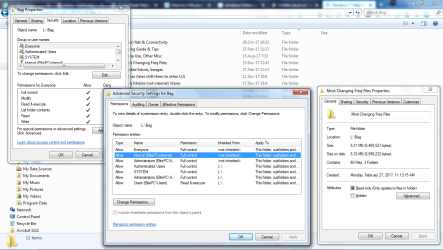
I reinstalled windows 7 64 bit and suddenly many of the (if not all) folders have become read-only. I used a batch file and took ownership of all the folders in that {d} drive and yet, the read-only flag doesn't go away.

Because of this, if I open a file into MS Office, it is opened as 'Read-Only' mode.

I've checked and rechecked and found that under 'Permissions', not only the current user, but even the 'everyone' user has been given all/full rights. And have also double checked that current user/me is the owner of those particular folders.

Earlier when this fault erupted on OS reinstallation, running 'Take Ownership' batch file would solve this issue, but not today.

Help pls. (SS attached)
 

Attachments
  • 1.png
    1.png
    81.5 KB · Views: 5
Last edited by a moderator:

My Computer My Computer

At a glance

Windows Seven
OS
Windows Seven
Did the L: drive came from another computer?
Are the folders on a L: drive?
Are those folders under L:\Users\...?
 

My Computers My Computers

  • At a glance

    Windows 7 HP 64i5 6600K - 800MHz to 4200MHz4+4G GSkill DDR4 3000IG - Intel 530
    Computer type
    PC/Desktop
    Computer Manufacturer/Model Number
    custom build
    OS
    Windows 7 HP 64
    CPU
    i5 6600K - 800MHz to 4200MHz
    Motherboard
    GA-Z170-HD3P
    Memory
    4+4G GSkill DDR4 3000
    Graphics Card(s)
    IG - Intel 530
    Monitor(s) Displays
    Samsung 226BW
    Screen Resolution
    1680x1050
    Hard Drives
    (1) -1 SM951 – 128GB M.2 AHCI PCIe SSD drive for Windows 7 and Lubuntu
    (2) -1 WD SATA 3 - 1T for Data
    (3) -1 WD SATA 3 - 1T for backup
    PSU
    Thermaltake 450W TR2 gold
    Keyboard
    Old and good Chicony mechanical keyboard
    Mouse
    Logitech mX performance - 9 buttons (had to disable some)
    Internet Speed
    500Mb/s
    Browser
    Firefox 64
    Other Info
    TinyWall firewall
  • At a glance

    Windows 7 Proi7-4500U 800MHz to 3.0GHz(4+4)G DDR3 1600IG intel 4400 + NVIDIA GeForce GT 745M
    Computer type
    Laptop
    System Manufacturer/Model Number
    Asus Q550LF
    OS
    Windows 7 Pro
    CPU
    i7-4500U 800MHz to 3.0GHz
    Motherboard
    Asus Q550LF
    Memory
    (4+4)G DDR3 1600
    Graphics Card(s)
    IG intel 4400 + NVIDIA GeForce GT 745M
    Sound Card
    Realtek
    Monitor(s) Displays
    LG Display LP156WF4-SPH1
    Screen Resolution
    1920 x 1080
    Hard Drives
    BX500 120G SSD for Windows and programs +
    1T HDD for data
    Internet Speed
    500 Mb/s
    Browser
    Firefox
    Other Info
    TinyWall firewall
Did the L: drive came from another computer?
Are the folders on a L: drive?
Are those folders under L:\Users\...?

1. I have two hdds in my laptop. Both disks have win7 on partition1. Earlier I was booting/using windows from hdd1 and now (without fresh installation), started booting/using hdd2.

2. Yes, I've changed the one drive's letter to 'L'. So that howsoever external drives I may attach/detach, there is lesser chance of this data drive, which I often need.

3. No, L has no windows/OS files/folders on it. It is a purely data partition.

4. Both disks have 2 partitions on each of them. 1st has Win7 on them, 2nd is for data.

Thanks for replying.
 
Last edited by a moderator:

My Computer My Computer

At a glance

Windows Seven
OS
Windows Seven
So the data on L: was once owned by a windows user on that drive?
 

My Computers My Computers

  • At a glance

    Windows 7 HP 64i5 6600K - 800MHz to 4200MHz4+4G GSkill DDR4 3000IG - Intel 530
    Computer type
    PC/Desktop
    Computer Manufacturer/Model Number
    custom build
    OS
    Windows 7 HP 64
    CPU
    i5 6600K - 800MHz to 4200MHz
    Motherboard
    GA-Z170-HD3P
    Memory
    4+4G GSkill DDR4 3000
    Graphics Card(s)
    IG - Intel 530
    Monitor(s) Displays
    Samsung 226BW
    Screen Resolution
    1680x1050
    Hard Drives
    (1) -1 SM951 – 128GB M.2 AHCI PCIe SSD drive for Windows 7 and Lubuntu
    (2) -1 WD SATA 3 - 1T for Data
    (3) -1 WD SATA 3 - 1T for backup
    PSU
    Thermaltake 450W TR2 gold
    Keyboard
    Old and good Chicony mechanical keyboard
    Mouse
    Logitech mX performance - 9 buttons (had to disable some)
    Internet Speed
    500Mb/s
    Browser
    Firefox 64
    Other Info
    TinyWall firewall
  • At a glance

    Windows 7 Proi7-4500U 800MHz to 3.0GHz(4+4)G DDR3 1600IG intel 4400 + NVIDIA GeForce GT 745M
    Computer type
    Laptop
    System Manufacturer/Model Number
    Asus Q550LF
    OS
    Windows 7 Pro
    CPU
    i7-4500U 800MHz to 3.0GHz
    Motherboard
    Asus Q550LF
    Memory
    (4+4)G DDR3 1600
    Graphics Card(s)
    IG intel 4400 + NVIDIA GeForce GT 745M
    Sound Card
    Realtek
    Monitor(s) Displays
    LG Display LP156WF4-SPH1
    Screen Resolution
    1920 x 1080
    Hard Drives
    BX500 120G SSD for Windows and programs +
    1T HDD for data
    Internet Speed
    500 Mb/s
    Browser
    Firefox
    Other Info
    TinyWall firewall
So the data on L: was once owned by a windows user on that drive?

Of course. It was owned by another user on the other OS.

But I've 'Taken Ownership' (as shown by the SS attached with my first msg) of all the objects/drive since then.
 
Last edited by a moderator:

My Computer My Computer

At a glance

Windows Seven
OS
Windows Seven
If you only take ownership of files rights will be inherted from folders above
 

My Computer My Computer

At a glance

win 8 32 bit
Computer type
PC/Desktop
OS
win 8 32 bit
Did you try the CMD attrib Attrib
-r remove read only attribute
/s Applies attrib and any command-line options to matching files in the current directory and all of its subdirectories.

attrib -r /s L:\Bag\*
 

My Computers My Computers

  • At a glance

    Windows 7 HP 64i5 6600K - 800MHz to 4200MHz4+4G GSkill DDR4 3000IG - Intel 530
    Computer type
    PC/Desktop
    Computer Manufacturer/Model Number
    custom build
    OS
    Windows 7 HP 64
    CPU
    i5 6600K - 800MHz to 4200MHz
    Motherboard
    GA-Z170-HD3P
    Memory
    4+4G GSkill DDR4 3000
    Graphics Card(s)
    IG - Intel 530
    Monitor(s) Displays
    Samsung 226BW
    Screen Resolution
    1680x1050
    Hard Drives
    (1) -1 SM951 – 128GB M.2 AHCI PCIe SSD drive for Windows 7 and Lubuntu
    (2) -1 WD SATA 3 - 1T for Data
    (3) -1 WD SATA 3 - 1T for backup
    PSU
    Thermaltake 450W TR2 gold
    Keyboard
    Old and good Chicony mechanical keyboard
    Mouse
    Logitech mX performance - 9 buttons (had to disable some)
    Internet Speed
    500Mb/s
    Browser
    Firefox 64
    Other Info
    TinyWall firewall
  • At a glance

    Windows 7 Proi7-4500U 800MHz to 3.0GHz(4+4)G DDR3 1600IG intel 4400 + NVIDIA GeForce GT 745M
    Computer type
    Laptop
    System Manufacturer/Model Number
    Asus Q550LF
    OS
    Windows 7 Pro
    CPU
    i7-4500U 800MHz to 3.0GHz
    Motherboard
    Asus Q550LF
    Memory
    (4+4)G DDR3 1600
    Graphics Card(s)
    IG intel 4400 + NVIDIA GeForce GT 745M
    Sound Card
    Realtek
    Monitor(s) Displays
    LG Display LP156WF4-SPH1
    Screen Resolution
    1920 x 1080
    Hard Drives
    BX500 120G SSD for Windows and programs +
    1T HDD for data
    Internet Speed
    500 Mb/s
    Browser
    Firefox
    Other Info
    TinyWall firewall
Sorry for late reply (the notification mail from Sevenforums was ignored somehow).

But I'd tried all the solutions given above, thru Dos and thru 'Attribut Changer' ware. But none succeeded.

Then suddenly the problem disappeared (I didn't check the 'Read Only attribute' of diff folders, but the programes in which I was opening files, behaved ok).

But today, I'm facing problem with one particular program again (Tally, accounting software). The data folder it requires, is again and again showing 'Read Only' attribute.
 

My Computer My Computer

At a glance

Windows Seven
OS
Windows Seven
Back
Top